
cloudron dashboard error: "This app is currently not responding. Please try refreshing the page in a few minutes."
-
Hello @tshirt-chihuahu
Can you please write a mail to support@cloudron.io ?
It seems that there is an issue with the database that will be hard to resolve. -
Note: I made a light edit, changing app name to "[this_cloudron.app]"
@tshirt-chihuahu not 100% sure since I don't have a way to match ids but it's probably you from support@ some time back.
2025-11-24T03:35:09.353Z BoxError: Unknown column 'pending' in 'field list'
The database migrations did not complete for some reason. Can you run
/home/yellowtent/box/setup/start.shon the server? This will re-run the migrations. -
@tshirt-chihuahu not 100% sure since I don't have a way to match ids but it's probably you from support@ some time back.
2025-11-24T03:35:09.353Z BoxError: Unknown column 'pending' in 'field list'
The database migrations did not complete for some reason. Can you run
/home/yellowtent/box/setup/start.shon the server? This will re-run the migrations.@joseph I ran the script. The migration failed. Here's the output I got back:
1 updates could not be installed automatically. For more details,
see /var/log/unattended-upgrades/unattended-upgrades.log
Last login: Mon Nov 24 03:29:56 2025 from 73.245.168.195 root@wisdom:~# bash /home/yellowtent/box/setup/start.sh 2025-11-24T12:59:37 ==> start: Cloudron Start media:x:500: 2025-11-24T12:59:38 ==> start: Configuring docker Synchronizing state of apparmor.service with SysV service script with /lib/systemd/systemd-sysv-install. Executing: /lib/systemd/systemd-sysv-install enable apparmor 2025-11-24T12:59:40 ==> start: Ensuring directories 2025-11-24T12:59:40 ==> start: Configuring journald 2025-11-24T12:59:41 ==> start: Setting up unbound 2025-11-24T12:59:41 ==> start: Adding systemd services Synchronizing state of unbound.service with SysV service script with /lib/systemd/systemd-sysv-install. Executing: /lib/systemd/systemd-sysv-install enable unbound Synchronizing state of cron.service with SysV service script with /lib/systemd/systemd-sysv-install. Executing: /lib/systemd/systemd-sysv-install enable cron Synchronizing state of rpcbind.service with SysV service script with /lib/systemd/systemd-sysv-install. Executing: /lib/systemd/systemd-sysv-install disable rpcbind 2025-11-24T12:59:52 ==> start: Configuring sudoers 2025-11-24T12:59:52 ==> start: Unconfiguring collectd Synchronizing state of collectd.service with SysV service script with /lib/systemd/systemd-sysv-install. Executing: /lib/systemd/systemd-sysv-install disable collectd 2025-11-24T12:59:55 ==> start: Configuring logrotate 2025-11-24T12:59:55 ==> start: Adding motd message for admins 2025-11-24T12:59:55 ==> start: Configuring nginx 2025-11-24T12:59:55 ==> start: Starting mysql mysqladmin: [Warning] Using a password on the command line interface can be insecure. Warning: Since password will be sent to server in plain text, use ssl connection to ensure password safety. mysql: [Warning] Using a password on the command line interface can be insecure. mysql: [Warning] Using a password on the command line interface can be insecure. 2025-11-24T12:59:56 ==> start: Migrating data [ERROR] AssertionError [ERR_ASSERTION]: ifError got unwanted exception: Data too long for column 'password' at row 1 at /home/yellowtent/box/node_modules/db-migrate/lib/commands/on-complete.js:15:14 at tryCatcher (/home/yellowtent/box/node_modules/bluebird/js/release/util.js:16:23) at Promise.successAdapter (/home/yellowtent/box/node_modules/bluebird/js/release/nodeify.js:22:30) at Promise._settlePromise (/home/yellowtent/box/node_modules/bluebird/js/release/promise.js:601:21) at Promise._settlePromiseCtx (/home/yellowtent/box/node_modules/bluebird/js/release/promise.js:641:10) at _drainQueueStep (/home/yellowtent/box/node_modules/bluebird/js/release/async.js:97:12) at _drainQueue (/home/yellowtent/box/node_modules/bluebird/js/release/async.js:86:9) at Async._drainQueues (/home/yellowtent/box/node_modules/bluebird/js/release/async.js:102:5) at Async.drainQueues [as _onImmediate] (/home/yellowtent/box/node_modules/bluebird/js/release/async.js:15:14) at process.processImmediate (node:internal/timers:485:21) at Packet.asError (/home/yellowtent/box/node_modules/mysql2/lib/packets/packet.js:740:17) at Query.execute (/home/yellowtent/box/node_modules/mysql2/lib/commands/command.js:29:26) at Connection.handlePacket (/home/yellowtent/box/node_modules/mysql2/lib/base/connection.js:477:34) at PacketParser.onPacket (/home/yellowtent/box/node_modules/mysql2/lib/base/connection.js:93:12) at PacketParser.executeStart (/home/yellowtent/box/node_modules/mysql2/lib/packet_parser.js:75:16) at Socket.<anonymous> (/home/yellowtent/box/node_modules/mysql2/lib/base/connection.js:100:25) at Socket.emit (node:events:519:28) at addChunk (node:internal/streams/readable:561:12) at readableAddChunkPushByteMode (node:internal/streams/readable:512:3) at Readable.push (node:internal/streams/readable:392:5) at TCP.onStreamRead (node:internal/stream_base_commons:189:23) 2025-11-24T12:59:57 ==> start: DB migration failed -
@joseph I ran the script. The migration failed. Here's the output I got back:
1 updates could not be installed automatically. For more details,
see /var/log/unattended-upgrades/unattended-upgrades.log
Last login: Mon Nov 24 03:29:56 2025 from 73.245.168.195 root@wisdom:~# bash /home/yellowtent/box/setup/start.sh 2025-11-24T12:59:37 ==> start: Cloudron Start media:x:500: 2025-11-24T12:59:38 ==> start: Configuring docker Synchronizing state of apparmor.service with SysV service script with /lib/systemd/systemd-sysv-install. Executing: /lib/systemd/systemd-sysv-install enable apparmor 2025-11-24T12:59:40 ==> start: Ensuring directories 2025-11-24T12:59:40 ==> start: Configuring journald 2025-11-24T12:59:41 ==> start: Setting up unbound 2025-11-24T12:59:41 ==> start: Adding systemd services Synchronizing state of unbound.service with SysV service script with /lib/systemd/systemd-sysv-install. Executing: /lib/systemd/systemd-sysv-install enable unbound Synchronizing state of cron.service with SysV service script with /lib/systemd/systemd-sysv-install. Executing: /lib/systemd/systemd-sysv-install enable cron Synchronizing state of rpcbind.service with SysV service script with /lib/systemd/systemd-sysv-install. Executing: /lib/systemd/systemd-sysv-install disable rpcbind 2025-11-24T12:59:52 ==> start: Configuring sudoers 2025-11-24T12:59:52 ==> start: Unconfiguring collectd Synchronizing state of collectd.service with SysV service script with /lib/systemd/systemd-sysv-install. Executing: /lib/systemd/systemd-sysv-install disable collectd 2025-11-24T12:59:55 ==> start: Configuring logrotate 2025-11-24T12:59:55 ==> start: Adding motd message for admins 2025-11-24T12:59:55 ==> start: Configuring nginx 2025-11-24T12:59:55 ==> start: Starting mysql mysqladmin: [Warning] Using a password on the command line interface can be insecure. Warning: Since password will be sent to server in plain text, use ssl connection to ensure password safety. mysql: [Warning] Using a password on the command line interface can be insecure. mysql: [Warning] Using a password on the command line interface can be insecure. 2025-11-24T12:59:56 ==> start: Migrating data [ERROR] AssertionError [ERR_ASSERTION]: ifError got unwanted exception: Data too long for column 'password' at row 1 at /home/yellowtent/box/node_modules/db-migrate/lib/commands/on-complete.js:15:14 at tryCatcher (/home/yellowtent/box/node_modules/bluebird/js/release/util.js:16:23) at Promise.successAdapter (/home/yellowtent/box/node_modules/bluebird/js/release/nodeify.js:22:30) at Promise._settlePromise (/home/yellowtent/box/node_modules/bluebird/js/release/promise.js:601:21) at Promise._settlePromiseCtx (/home/yellowtent/box/node_modules/bluebird/js/release/promise.js:641:10) at _drainQueueStep (/home/yellowtent/box/node_modules/bluebird/js/release/async.js:97:12) at _drainQueue (/home/yellowtent/box/node_modules/bluebird/js/release/async.js:86:9) at Async._drainQueues (/home/yellowtent/box/node_modules/bluebird/js/release/async.js:102:5) at Async.drainQueues [as _onImmediate] (/home/yellowtent/box/node_modules/bluebird/js/release/async.js:15:14) at process.processImmediate (node:internal/timers:485:21) at Packet.asError (/home/yellowtent/box/node_modules/mysql2/lib/packets/packet.js:740:17) at Query.execute (/home/yellowtent/box/node_modules/mysql2/lib/commands/command.js:29:26) at Connection.handlePacket (/home/yellowtent/box/node_modules/mysql2/lib/base/connection.js:477:34) at PacketParser.onPacket (/home/yellowtent/box/node_modules/mysql2/lib/base/connection.js:93:12) at PacketParser.executeStart (/home/yellowtent/box/node_modules/mysql2/lib/packet_parser.js:75:16) at Socket.<anonymous> (/home/yellowtent/box/node_modules/mysql2/lib/base/connection.js:100:25) at Socket.emit (node:events:519:28) at addChunk (node:internal/streams/readable:561:12) at readableAddChunkPushByteMode (node:internal/streams/readable:512:3) at Readable.push (node:internal/streams/readable:392:5) at TCP.onStreamRead (node:internal/stream_base_commons:189:23) 2025-11-24T12:59:57 ==> start: DB migration failed@tshirt-chihuahu said in [critical] cloudron dashboard error: "This app is currently not responding. Please try refreshing the page in a few minutes.":
Data too long
I have to guess here since it's not printing which migration is running. Can you please run
mysql -uroot -ppassword -e "SELECT name FROM box.migrations ORDER BY run_on DESC LIMIT 1"? This will give the last successful migration.If I were to guess: Is it possible you use the docker registry feature and password for the registry is > 128 characters?
-
@tshirt-chihuahu said in [critical] cloudron dashboard error: "This app is currently not responding. Please try refreshing the page in a few minutes.":
Data too long
I have to guess here since it's not printing which migration is running. Can you please run
mysql -uroot -ppassword -e "SELECT name FROM box.migrations ORDER BY run_on DESC LIMIT 1"? This will give the last successful migration.If I were to guess: Is it possible you use the docker registry feature and password for the registry is > 128 characters?
Here's what I got back from the mysql command:
+------------------------------------------------+ | name | +------------------------------------------------+ | /20250307100449-tokens-add-allowedIpRangesJson | +------------------------------------------------+ -
Hello @tshirt-chihuahu
Please use code blocks for posting logs or outputs from commands by either typing 3x backticks before and after your code/output, like this:```
THIS IS THE CODE TO PUT IN A CODE BLOCK
MORE LINES
```Or use the editor by highlighting the code and pressing the button:
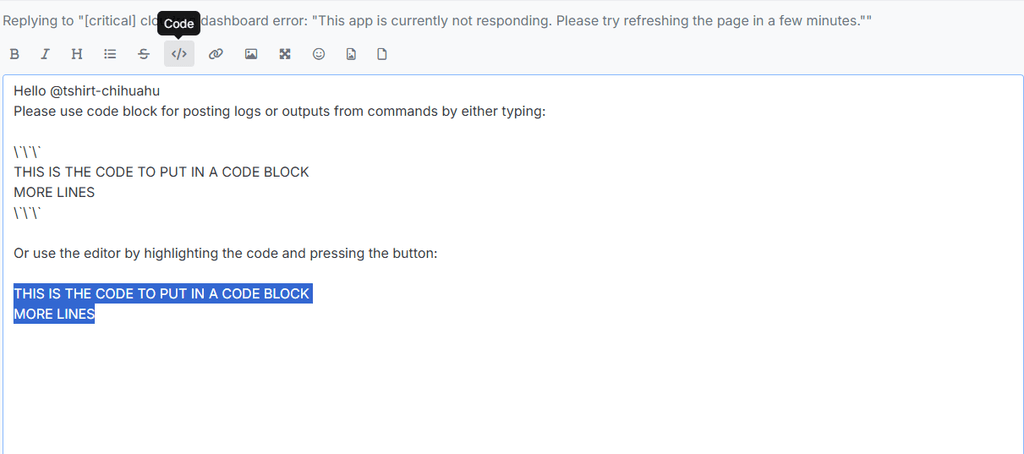
THIS IS THE CODE TO PUT IN A CODE BLOCK MORE LINES -
@tshirt-chihuahu said in [critical] cloudron dashboard error: "This app is currently not responding. Please try refreshing the page in a few minutes.":
Data too long
I have to guess here since it's not printing which migration is running. Can you please run
mysql -uroot -ppassword -e "SELECT name FROM box.migrations ORDER BY run_on DESC LIMIT 1"? This will give the last successful migration.If I were to guess: Is it possible you use the docker registry feature and password for the registry is > 128 characters?
This post is deleted! -
J joseph has marked this topic as solved
-
I am seeing the same issue. How did you fix it?
-
I am seeing the same issue. How did you fix it?
@saikarthik I deleted the registry config.
mysql -uroot -ppassword -e "DELETE FROM box.settings WHERE name='registry_config'"Then, re-run the migrations:
/home/yellowtent/box/setup/start.shAfter the upgrade, you can re-setup the registry . But you have to shorten the password length to < 128 chars.