
hi, any update here ? thanks for your help
C
Crush33
@Crush33
Posts
-
tcpdf error permission denied cuz invoice job create folder with root permission instead of www-data -
tcpdf error permission denied cuz invoice job create folder with root permission instead of www-datayep, on multiple instances.
Note that I do NOT use cron, I manually click on the button to generate my invoices each month. -
tcpdf error permission denied cuz invoice job create folder with root permission instead of www-datafolder dolibarr / facture / (PROVXXXX) for example
this folder is created when invoice is created and contain the generated PDF -
tcpdf error permission denied cuz invoice job create folder with root permission instead of www-datahi
similar to this : https://forum.cloudron.io/topic/14965/which-user-for-cron-task/8
when I click 'launch now' the job runs and create invoices...
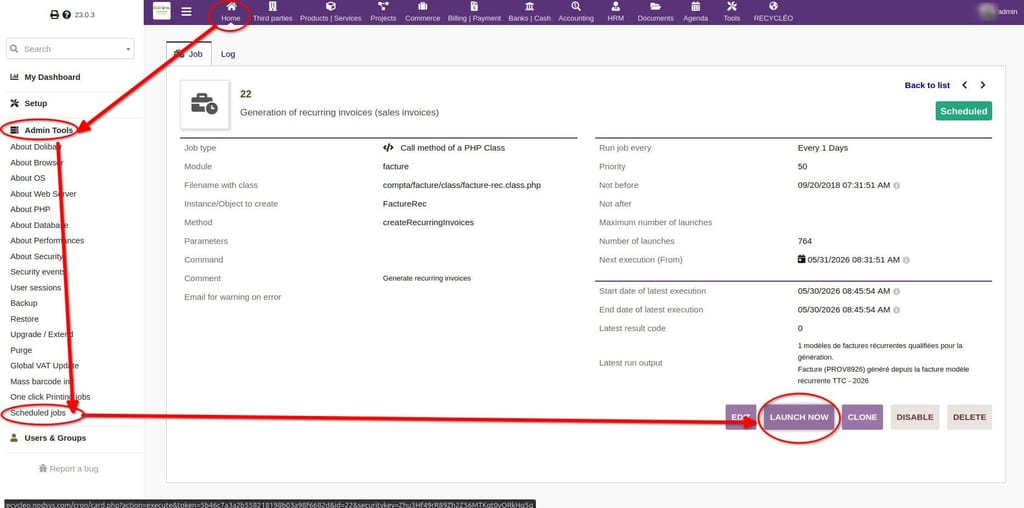
... but the folder generated are root-owned.
Then I got an error when I go to the invoice page and try to generate the PDF.
To fix I need to change the owner of the folder from root to www-data. -
install.lock removed after cloudron rebootOP here
it's good for me too !!! thanks a lot
-
implement fix propalhi folk's
https://github.com/Dolibarr/dolibarr/pull/36525
could you please push this quick fix for dolibarr v22.0.3 ? It's a pain in the @ss for users.
Thanks a lot !

-
install.lock removed after cloudron reboothello,
got same behavior tonight, after ubuntu reboot for security updates (clicked from notification panel, red button "Reboot", all my 26x Dolibarr instances restarted without putting the install.lock file back in place.
I recreate all of them at one using this in shell on cloudron :
#!/bin/bash

BASE_DIR="/home/yellowtent/appsdata"

for appdir in "$BASE_DIR"/*; do
    if [ -d "$appdir/data/dolibarr" ]; then
        LOCKFILE="$appdir/data/dolibarr/install.lock"
        if [ ! -f "$LOCKFILE" ]; then
            echo "Create $LOCKFILE"
            touch "$LOCKFILE"
        else
            echo "$LOCKFILE already exist"
        fi
    else
        echo "no dolibarr in $appdir"
    fi
done
dunno what I should do to see why it doesn't work appropriately

thanks for any help !
-
install.lock removed after cloudron reboothello joseph
cloudron ask me to reboot whole OS for ubuntu security update
when I do, file /app/data/dolibarr/install.lock is missing after that reboot (which is critical for security reason).I recreate them by hand (touch install.lock from ssh in OS, maybe I shouldn't to that...?).
On a later update ubuntu, they vanish again.
If I manually reboot (i.e command "reboot" in shell), they're gone too after the reboot.I dunno where to look at to see exactly what's happening. Is it container side ? or OS side ?
Provided above logs are from container side and there is nothing about the lock file... -
override email automatic configurationthanks a lot for the update, it works and was able to put this option on my apps.
-
install.lock removed after cloudron reboothello james
I have a reboot pending on server with multiple dolibarr inside.
I don't use any volumes.
What should I look at before and after reboot to be sure to catch the right information for debugging ?
Thanks ! -
override email automatic configurationokay thanks for your reply James ! how to do so ?
-
override email automatic configurationdolibarr hasn't that option unfortunately...

-
override email automatic configurationhello
I want to change SMTP informations on email sender in /admin/const.php or in /admin/mails.php but changes does not survive after a update / reboot of container (and I guess that it's const.php that override mails.php options...?).
Is there any way to change this behavior ?
Thanks !
-
how to implement fix on core files ?another question :
- does the database of dolibarr will be lost after quitting the recovery mode ? (I guess no cuz it's another container)
- does the files in /app/data/dolibarr will be lost too ? (I guess no cuz it's mounted in volume inside the host...)
-
how to implement fix on core files ?I used recovery mode as it suits my needs better for a super short fix, thx a lot james !
-
how to implement fix on core files ?thanks for your reply James !
does option 1 still backup normally ?
EDIT : in recovery mode, app is not accessible anymore saying "app is curretly inaccessible" -
how to implement fix on core files ?hi
need to put this fix in place before 22.0.2 is released : https://github.com/Dolibarr/dolibarr/pull/35228
but as I understand, core files of Dolibarr are readonly.
Is it possible to do so (from cloudron server directly maybe ?)
thanks ! -
install.lock removed after cloudron rebootbefore reboot : https://paste.cloudron.io/cigojugite.yaml
after reboot : https://paste.cloudron.io/ilulajihon.yaml -
install.lock removed after cloudron rebootforum says i can't upload file here
Error
You do not have enough privileges for this action. -
install.lock removed after cloudron rebootwhere should I check exactly to see what happend ?