
Hi there,
I also had 404 page on all booking page.
Rolled back to v1.14.10 and disabled auto updates.
Is this bug coming from Cal.com or from Cloudron integration ?
Thanks,
Hi there,
I also had 404 page on all booking page.
Rolled back to v1.14.10 and disabled auto updates.
Is this bug coming from Cal.com or from Cloudron integration ?
Thanks,
Hi there,
Sorry to dig this up but. Is it really disabled on the selfhosted app ?
I managed to activate "workflows" in the settings page (/settings/admin/flags)
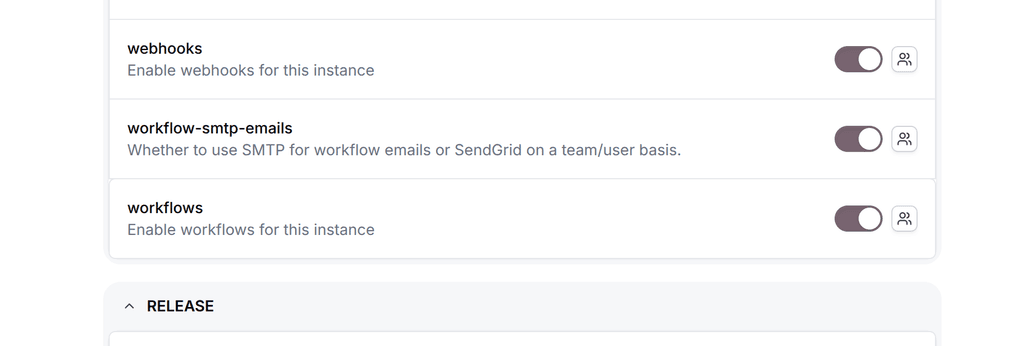
I discover workflows don't run on themself and needed to be triggered by external cronjob, which I did via Cloudron :
* * * * * curl -fsS -X POST -H "authorization: $CRON_API_KEY" http://localhost:3000/api/cron/workflows/scheduleEmailReminders > /dev/null 2>&1
I also discover it needed some env variables to work :
ENABLE_TASK_SYSTEM=true
CRON_ENABLE_APP_SYNC=true
CRON_API_KEY=***
When calling this URL from the instance itself, I even got a status:200 code with a JSON response {"message":"No Emails to schedule"}
And this is my problem now : it says no emails to schedule while there is actual emails scheduled (from workflow). It is visible in the postgres tables "WorkflowReminder" and "Task". I even see in the log that the task is set up for scheduling.
But at the end, the workflow is never executed and I'm out of solutions.
What a complicated journey just to get this feature working, even though it’s advertised as available in the free version (so I assumed it would work in self-hosted as well).
Or am I missing something?
Could you clarify this for me?
Thanks.
Hi there,
My Cloudron subscription is seen as "cancelled" in the dashboard while I actually paid for the yearly subscription.
Services are still running but I'm worried.
What can i do?
Thanks