
TEI (Text Embeddings Inference) on Cloudron - Community Package
-
Text Embeddings Inference (Hugging Face TEI), packaged for Cloudron
A community package for Text Embeddings Inference (TEI) — Hugging Face's fast Rust server for text
embeddings and reranking. It is the embedding tier of a self-hostable, OpenAI-compatible retrieval
stack: TEI turns text into vectors, a vector database such as Qdrant stores and searches them, and an
LLM answers over what is retrieved.- Package: https://github.com/OrcVole/TEI-Cloudron
- Upstream: https://github.com/huggingface/text-embeddings-inference
TL;DR
TEI gives you a private, self-hosted embeddings API (OpenAI-compatible
/v1/embeddings, plus a
native/embed). Install it from the versions URL, the API key is generated for you on first run, point any app that
speaks the OpenAI embeddings API at it, and you have on-box embeddings for retrieval-augmented
generation (RAG) and semantic search — no documents leaving your server. It pairs directly with the
Qdrant Cloudron package to make a complete pure-Rust retrieval pipeline. It is API-only (no web
UI), amd64-only (the CPU build bundles Intel MKL), and verified working on Cloudron 9.x,
including a live TEI-to-Qdrant round trip.Installation
Click on the Add custom app drop down top right in the App Store and choose Community app:
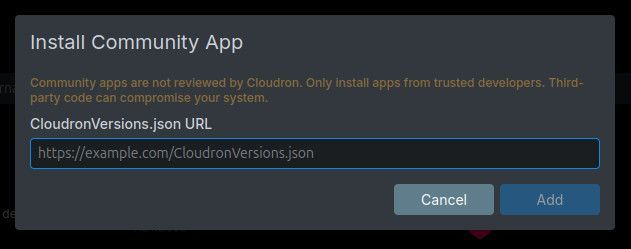
Then paste in the CloudronVersions.json URL into the box that pops up: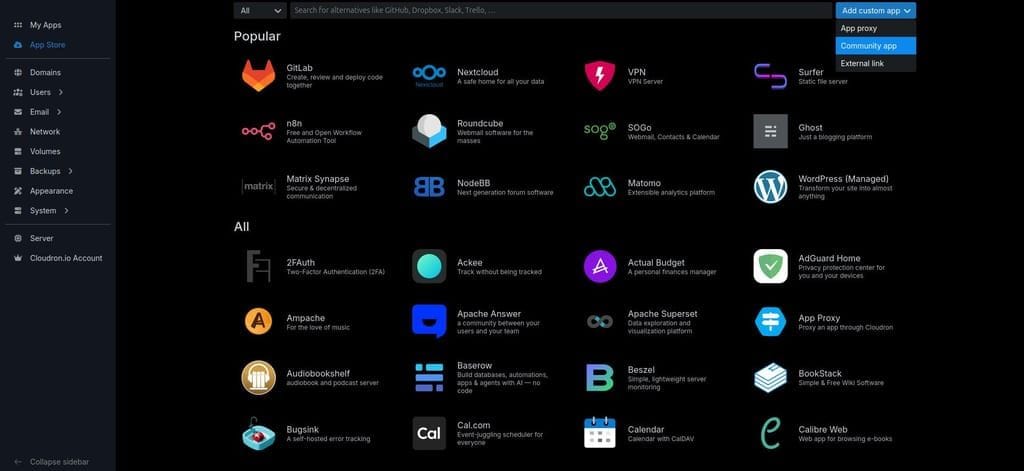
From CLI:
Install:cloudron install \ --versions-url https://raw.githubusercontent.com/OrcVole/TEI-Cloudron/main/CloudronVersions.json \ --location tei.example.com
For potential users
What it is. You send TEI text, it returns an embedding (a vector of ~384 numbers for the default
model). That vector is the "meaning" of your text as coordinates, which a vector database can compare
and search. TEI speaks the OpenAI embeddings API, so anything that already calls OpenAI for
embeddings can call your own box instead.There is no web page. TEI is a service, not a website — opening its domain shows a blank page, and
that is normal. The only browsable page is the interactive Swagger API docs at/docs(behind your
Cloudron login; the app's "Open" button goes there). You check it works by calling it:GET /health
returnsOK, and a real embedding request returns a JSON list of ~384 decimal numbers. That wall of
numbers is the correct output — it is for machines, not people.What you can do with it.
- Give OpenWebUI, AnythingLLM, n8n, or
riga private embeddings backend for document chat and
semantic search, instead of sending your files to a third-party API. - Build a RAG pipeline: embed your documents with TEI, store and search them in Qdrant, and let an
LLM (e.g. Ollama) answer questions grounded in your own data. - Switch the model with one environment variable (
TEI_MODEL_ID) — multilingual, larger/higher
recall, or a cross-encoder reranker (for the/rerankendpoint) to sharpen search results.
Synergy with other Cloudron apps. TEI is one tier of a stack you can run entirely on Cloudron:
App Role TEI (this) Text -> embeddings (and reranking) Qdrant Stores the vectors, does similarity search Ollama The LLM that answers OpenWebUI The chat UI; point its embedding engine at TEI for document RAG agentgateway One gated front door: routes chat to the LLM and exposes Qdrant as an agent (MCP) tool n8n Automates ingestion: pull documents, embed via TEI, upsert to Qdrant The default model is
BAAI/bge-small-en-v1.5(384-dim), which matches the Qdrant package's examples,
so the pieces line up dimensionally out of the box.Good defaults. TEI has no auth of its own, so the package generates a strong API key on first run
and injects it through the environment; the embedding endpoints require it,/healthstays open for
monitoring, and the Swagger docs sit behind Cloudron single sign-on. The model cache and the key live
under/app/data, so Cloudron's backup covers them and a restore brings the same key back.Caveats: no web UI; amd64 only; a large model needs more than the 2 GB default and a slower first
boot (it downloads once, then is cached); the default model does embeddings only (/rerankneeds a
reranker model).
For other packagers
What helped.
- A multi-stage Dockerfile onto
cloudron/base:5.0.0: pull the runtime out of the official
upstream image in stage one, assemble onto the base in stage two. On-server build (cloudron installfrom source) meant no local Docker was needed for iterating; rootless podman built it
locally. - Putting all state under
/app/data(the model cache and the generated key) made the
localstoragebackup just work — a real backup thenclonebrought the key back byte-for-byte. - A build-time linkage gate (
ldd+--versionin the Dockerfile) catches a missing library or
glibc symbol at build time instead of at runtime. - The reference packages (agentgateway, and the sibling Qdrant package) set the patterns: the
two-surface auth model, the/runvs/app/datadiscipline, the release gates.
What was difficult.
- The CPU build is not a lone binary — it carries a ~320 MB Intel MKL math runtime. The real trap:
libiomp5.soin the upstream image is a symlink whose internal soname islibomp.so.5, so
ldconfigindexes it under the wrong name and the binary fails to resolve it. Fix:cp -Lit to a
concretelibiomp5.soand resolve the MKL libs viaLD_LIBRARY_PATH(filename match), not
ldconfig. And the linkage gate does not load the MKL libs (they are dlopened at inference time),
so the only honest test is a runtime/embedsmoke on the assembled image. - The router defaults
--hostnameto theHOSTNAMEenv var, which Docker sets to the container
id, so it binds the wrong interface unless you pass--hostname 0.0.0.0explicitly. The upstream
default port is 80, which the unprivilegedcloudronuser cannot bind — move it to 8080. proxyAuthwithsupportsBearerAuth: truelet any bearer header skip the SSO wall on/docs;
for a docs-only wall, drop the flag ("proxyAuth": { "path": "/docs" }).- Users expect a GUI and there is none, so set
configurePath: /docsand say so plainly in the
post-install notes, including that a successful embedding is a wall of numbers. - Publishing on a podman-only host:
cloudron versions addcould not see the image through the
podman socket, so I hand-builtCloudronVersions.json(inlining thefile://description, changelog,
and post-install message; keepingiconasfile://; pinning the digest). It validated on the real
versions-url install.
How we made it compatible with other Cloudron apps.
- OpenAI-compatible endpoint is the key: it lets OpenWebUI, n8n, AnythingLLM, and
riguse TEI by
changing one base URL, with no app-specific glue. - API-key auth on the data plane, SSO only on
/docs, so a sibling app authenticates with a key
and gets TEI's own 401 (not a login redirect) when the key is wrong — that is what makes
app-to-app calls work. - Dimensional alignment with Qdrant (both default to bge-small-en-v1.5, 384-dim) so vectors are
comparable across the stack. - We wired it live: OpenWebUI's embedding engine pointed at TEI via the package's
env.sh, and a
verified TEI-to-Qdrant retrieval round trip. agentgateway already fronts Qdrant (as an MCP tool) and
Ollama, so TEI slots in as the embeddings tier.
For the Cloudron maintainers
Friendly asks from packaging this:
iconUrlcouples to theminBoxVersionfloor. A--versions-urlmanifest must include
iconUrl, andiconUrlforcesminBoxVersion >= 9.1.0; omitting it fails validation. So every
community-channel app is pinned to box 9.1.0+ purely by the icon requirement, even when it runs on
8.3. Only the real versions-url path surfaces this (on-servercloudron installaccepts a lower
floor). Please document or decouple. (This affects the Qdrant package too.)cloudron versions addneeds the image via the Docker API, with no working podman bridge. On a
podman-only host it reported "No docker image found, run cloudron build first" even with
DOCKER_HOSTpointed at the podman socket and the image present. A documented podman path, or a
cloudron versions add --image <ref>that takes a registry reference directly, would remove the need
to hand-build the versions file.- The
manifestVersionis still 2 and these primitives look stable, which is reassuring for the
Cloudron 10 upgrade — the one thing a packager will need to re-verify on 10 is thecloudron/base
pin (re-run the linkage gate).
For the developers of the program (Hugging Face / TEI)
Friendly asks that would make TEI easier to run in any container:
--hostnamedefaulting to theHOSTNAMEenv var is container-hostile (Docker setsHOSTNAMEto
the container id, so the server binds the wrong interface). Consider defaulting to0.0.0.0.- A CPU image that does not bundle Intel MKL (or a clearly separate slim tag) would make a small,
reproducible base copy much simpler. The MKL +libfakeintel+libiomp5set, and the
libiomp5.sosoname mismatch, were the bulk of the packaging effort. - Publish a minimum glibc per release — the binary is dynamically linked, and a slim base needs to
know the floor (a toolchain bump that raises it fails at runtime, not build time). - An arm64 CPU image would let TEI run on arm Cloudron hosts; today the CPU/MKL image is amd64-only.
It tracks upstream TEI releases and keeps the binary unmodified. Hugging Face and the model names are
trademarks of their owners; this is a community package, not affiliated with or endorsed by Hugging
Face. Feedback, issues, and suggestions are very welcome.#text-embeddings-inference #huggingface #embeddings #rag #cloudron-9.1
Hello! It looks like you're interested in this conversation, but you don't have an account yet.
Getting fed up of having to scroll through the same posts each visit? When you register for an account, you'll always come back to exactly where you were before, and choose to be notified of new replies (either via email, or push notification). You'll also be able to save bookmarks and upvote posts to show your appreciation to other community members.
With your input, this post could be even better 💗
Register Login