
🚀 Laminar on Cloudron: Community Package now available
-
 Laminar: community package now available
TL;DR: Laminar (
lmnr) is open-source observability for LLM apps and AI agents: OpenTelemetry-native tracing of every prompt, completion, model, token count, latency and cost, plus full-text span search, a SQL editor over your trace data, and evals / datasets / labelling queues on top. It's how you see what your agents are actually doing, on your own box. Now packaged for Cloudron and ready to install. Built and tested on Cloudron 9.x; unofficial and community-maintained.Links
 Project homepage: https://www.lmnr.sh
 Docs: https://docs.lmnr.sh
 Upstream repo: https://github.com/lmnr-ai/lmnr
- 🧱 Cloudron package repo: https://github.com/OrcVole/laminar-cloudron
No public demo to click:Laminar is something you self-host. Once installed, the full web UI (trace explorer, SQL editor, dashboards, evals) is at your app's domain, behind your Cloudron login.
 How to install
Community packages aren't in the App Store, so install via the CLI or easily as explained here:
Installation
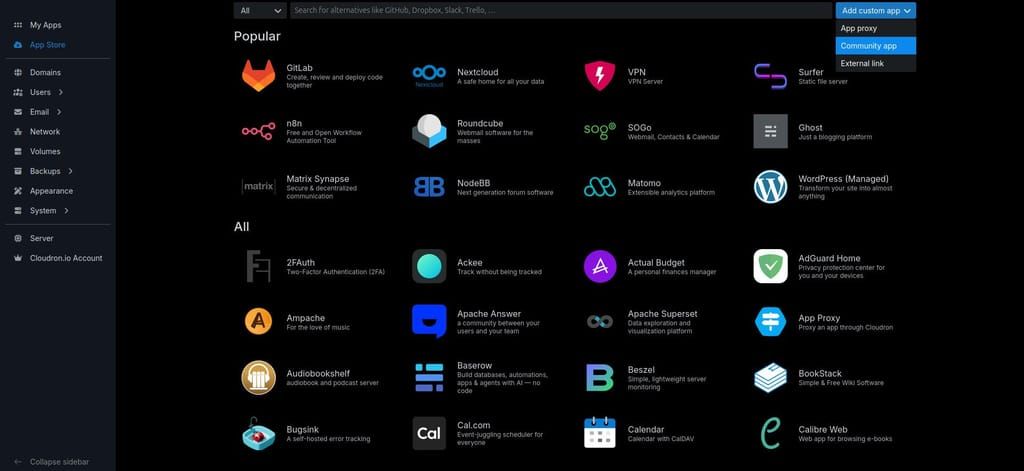
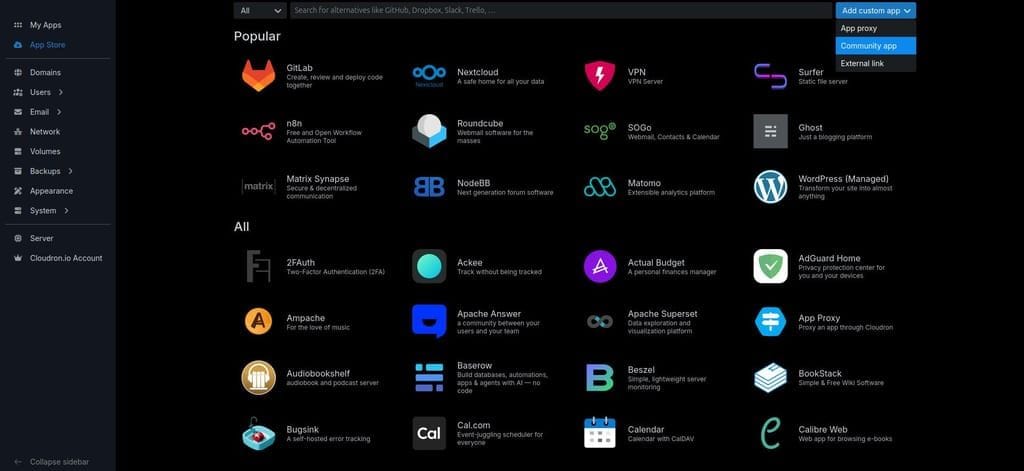
- Click on the Add custom app drop down top right in the App Store and choose Community app:
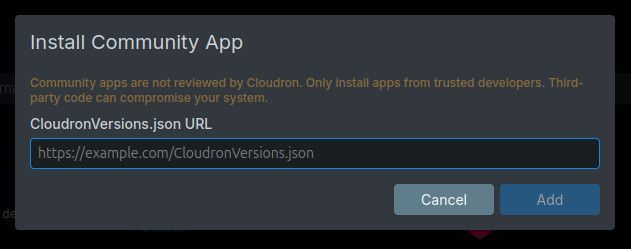
- Then paste in the CloudronVersions.json URL into the box that pops up:
Installation
Click on the Add custom app drop down top right in the App Store and choose Community app:
Then paste in the CloudronVersions.json URL into the box that pops up:Community packages aren't in the App Store, so install via the CLI (or the dashboard's Add custom app → Community app with the CloudronVersions.json URL). The published image is on GHCR and the package ships a community versions file:
# recommended: install the published community build from the versions URL
cloudron install \
  --versions-url https://raw.githubusercontent.com/OrcVole/laminar-cloudron/main/CloudronVersions.json \
  --location laminar.example.com

# or pin the prebuilt image directly (the digest is in CloudronVersions.json)
cloudron install \
  --image ghcr.io/orcvole/laminar-cloudron@sha256:729fae449afc99ddd6d37657797695754c7372509ff4ba844f017ef3ba7a8e8f \
  --location laminar.example.com

# or build it yourself from the repo
git clone https://github.com/OrcVole/laminar-cloudron
cd laminar-cloudron
cloudron build
cloudron install --image [your-registry]/laminar-cloudron:latest --location laminar.example.com
Minimums: 4 GB RAM (raise it in Resources if you ingest heavily; the bundled ClickHouse is the main consumer), addons
localstorage,postgresql, andoidc. It also claims one extra subdomain for the trace-ingestion endpoint, which Cloudron prompts for during install.First run: sign in with your Cloudron account (OIDC SSO); with SSO off, sign-in is passwordless local-email, so keep SSO on for a private instance. Create a project, then copy your project API key and give it to your Laminar SDK or any OTLP/HTTP exporter. The data-encryption key is generated on first boot and preserved across updates and restores, so you never manage it. The ingestion endpoint stays open for keyed SDK/OTLP traffic; the dashboard sits behind your Cloudron login.
 For users
Why try it: you can't debug an agent you can't see. Laminar records every span, prompt, completion, model, token count and latency across your LLM and agent features — with nothing leaving your server — and lets you search and query it.
What you get out of the box:
- An OpenTelemetry-native trace store fed by the Laminar Python/TS SDKs or any OTLP/HTTP exporter, capturing full agent/LLM spans.
- A trace & span explorer with full-text search (bundled Quickwit) and a SQL editor over all your trace data (bundled ClickHouse).
- Evals, datasets, and labelling queues for building and grading eval pipelines.
- Cloudron-specific wins: sign-in through Cloudron SSO, the encryption key generated on first run and preserved across updates/restores, automatic backups that cover the bundled ClickHouse and Quickwit stores plus PostgreSQL and the secrets, all state under
/app/data, and one-click updates.
Good fit if you run self-hosted AI apps and want private observability instead of shipping traces to a SaaS. Probably not for you if you only need basic request logging, or if you specifically need the enterprise features (this build ships the open-source Apache-2.0 LITE core only — no Signals, clustering, or enterprise PII).
🧰 For packagers: what we learned
What helped — the
postgresqlandoidcaddons covered the database and single sign-on cleanly; a sibling bundled-ClickHouse package (Langfuse) was cribbed for the store/backup shape; and Laminar's LITE profile falls back to in-process cache/queue/storage, so there's no Redis, RabbitMQ, or object store to bundle.What was tricky (problem → fix):
- ClickHouse backup races Cloudron's file backup. Raw CH parts vanish mid-walk and can abort the whole-server backup; you also can't
clickhouse localthe live store (the server holds a lock). Fix: move CH and Quickwit ontopersistentDirs(out of the file-walk) and add abackupCommand/restoreCommandthat snapshots + logical-dumps into/app/data, so backups are consistent and can't race live writes. - The frontend rejects the addon
DATABASE_URL. Its parser is stricter than the Cloudron Postgres URL; pass the discreteDATABASE_USERNAME/PASSWORD/HOST/PORT/DATABASEvars instead (both services support that path). - Memory is a single shared budget across four bundled processes. Measure the warmup peak (migrations are the heaviest moment) and set
memoryLimitwith a coupled, absolute ClickHouse cap — never a ratio against possibly-misread host RAM. - HTTP-only OTLP. Ingestion works over OTLP/HTTP (protobuf or JSON); gRPC would need a raw-TCP
tcpPortsblock + grey-cloud DNS for zero real benefit, so it's dropped.
Still rough — a cold versions-url install on a fresh subdomain is the least-exercised path; and see the integration note below on OTLP exporters that don't negotiate TLS.
 ️ For the Cloudron team
Maintenance burden: thin. One
LAMINAR_VERSIONARG is the only bump point, and point releases auto-migrate their Postgres + ClickHouse schemas on boot. Why it suits the App Store: clean Apache-2.0 upstream, a self-contained single-container LITE profile, and it completes an existing self-hosted-AI stack by giving the other AI apps an OTLP trace sink. Friction worth knowing: thepackagerNameversions-url gate (a--versions-urlinstall is rejected if it's empty, stricter than the documented schema); and thehttpPortssecond-subdomain contract used for the public ingest endpoint.
 For Laminar's developers
A few low-effort things that make self-host packaging easier, most of which Laminar already does well:
- Keep the discrete DB env vars (
DATABASE_HOST/PORT/...) working alongsideDATABASE_URL— it saved a Prisma-style parser fight. - State a glibc floor for the Rust app-server so packagers can pick a matching base.
- Keep tagged releases + a changelog and the LITE single-container profile — it's genuinely nice to package.
Package source and PRs welcome: https://github.com/OrcVole/laminar-cloudron — happy to co-maintain.
 Unlocks /
  Synergies
Now you can point your self-hosted AI apps at a private Laminar and actually see your agent traffic. It pairs with the other community AI packages:
- Dify + Laminar: Dify's native OpenTelemetry export sends rich
gen_ai.*spans (prompts, models, tokens, tools, retrieval) straight to Laminar's endpoint with a project API key. - An LLM/MCP gateway + Laminar: route your model + tool traffic through a gateway and have it emit OTLP to Laminar for one-place coverage.
- Ollama / OpenWebUI + Laminar: instrument the clients (or the app's OTEL export) to get request-level visibility.
Integration gotcha worth stating plainly: the ingest endpoint is HTTPS-only — the exporter must actually negotiate TLS. Some OTLP exporters (and some gateways' "plaintext HTTP" export modes) send cleartext even to an
https://URL; the platform proxy then answers400 "plain HTTP request was sent to HTTPS port"and nothing lands. Use a TLS-capable exporter, or put a local OTLP collector in front as a TLS relay.Feedback, bug reports, and "works on my install" confirmations all welcome below.

Hello! It looks like you're interested in this conversation, but you don't have an account yet.
Getting fed up of having to scroll through the same posts each visit? When you register for an account, you'll always come back to exactly where you were before, and choose to be notified of new replies (either via email, or push notification). You'll also be able to save bookmarks and upvote posts to show your appreciation to other community members.
With your input, this post could be even better 💗
Register Login