Cloudron makes it easy to run web apps like WordPress, Nextcloud, GitLab on your server. Find out more or install now.


Skip to content
  • Categories
  • Recent
  • Tags
  • Popular
  • Bookmarks
  • Search
Skins
  • Light
  • Brite
  • Cerulean
  • Cosmo
  • Flatly
  • Journal
  • Litera
  • Lumen
  • Lux
  • Materia
  • Minty
  • Morph
  • Pulse
  • Sandstone
  • Simplex
  • Sketchy
  • Spacelab
  • United
  • Yeti
  • Zephyr
  • Dark
  • Cyborg
  • Darkly
  • Quartz
  • Slate
  • Solar
  • Superhero
  • Vapor

  • Default (No Skin)
  • No Skin
Collapse
Brand Logo

Cloudron Forum

Apps | Demo | Docs | Install
J

jorrg

@jorrg
About
Posts
5
Topics
3
Shares
0
Groups
0
Followers
0
Following
0

Posts

Recent Best Controversial

  • Account Settings not accessible in Stirling PDF
    J jorrg

    I think I found the issue - to be validated!

    My cloudron admin account had only two characters. By creating a second account, with more characters, I was able to access the admin settings. 🚀

    Stirling-PDF

  • Account Settings not accessible in Stirling PDF
    J jorrg

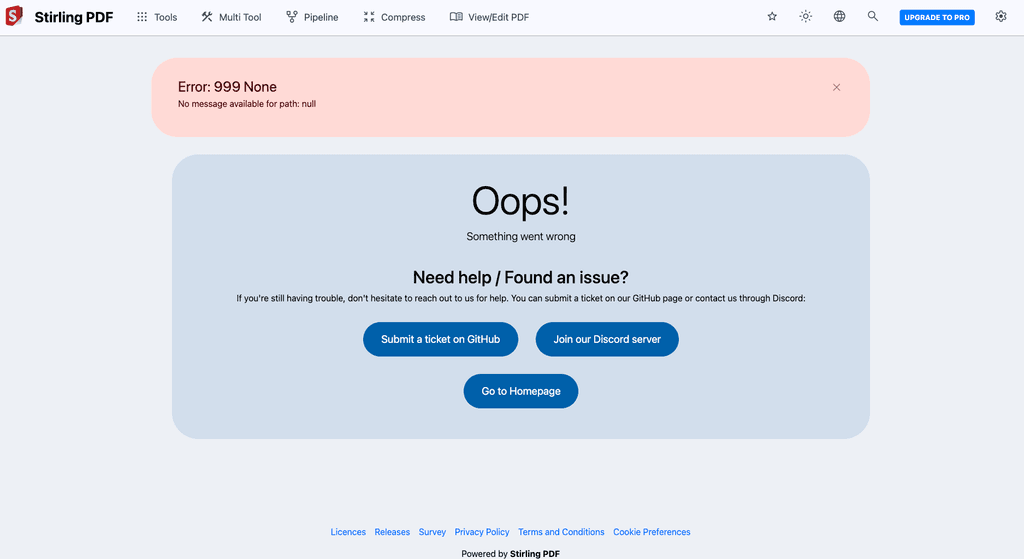
    752283ab-b191-4bb0-837e-481d54562843-image.png

    I have an interesting case:
    If I install Stirling-PDF on Cloudron - then go onto:

    Settings > Account Settings

    I get the issue shown in the screenshot above: "Error: 999 None".

    The logs say:

    INFO s.s.p.s.f.UserAuthenticationFilter - Invalidating session for disabled or non-existent user: (myusername)
    

    Interstingly, seems to be related to the Cloudron I run this on. I tried on a fresh install, and didn't have any issues. I have another Cloudron that is about 6 months old, there the issue appears.


    Any ideas what could be the root cause? For now, I will try updating the cloudrons.

    Stirling-PDF

  • Cloudron OIDC with SPA Frontend - PKCE Configuration Missing?
    J jorrg

    Hi everyone,

    I'm trying to set up authentication for a simple web application and I'm running into some confusion around OAuth/OIDC best practices with Cloudron.

    My Setup:

    • Frontend: Static website served by Surfer (Cloudron app)
    • Backend: n8n workflows for API endpoints
    • Authentication: Want to use Cloudron's built-in OIDC

    My Intended Flow:

    • User clicks login on frontend (JavaScript SPA)
    • Redirect to Cloudron OIDC authorization endpoint
    • User authenticates with Cloudron
    • Frontend receives authorization code/token
    • Frontend passes token to n8n backend for verification
    • n8n validates token with Cloudron and proceeds with authorized operations

    The Problem:
    I understand that exposing a client_secret in JavaScript is a security anti-pattern. For single-page applications, the recommended approach is to use a "public client" with PKCE (Proof Key for Code Exchange) instead of client secrets.

    However, when I look at Cloudron's OIDC app configuration, I don't see any option to:

    • Configure a client as "public" (no secret required)
    • Enable PKCE support
    • Set the client type appropriately for SPAs

    My Questions:

    • Does Cloudron's OIDC implementation support public clients with PKCE?
    • If not, what's the recommended pattern for SPA authentication with Cloudron?
    • Should I be using a different flow entirely (like having n8n handle the OAuth dance server-side)?
    • Is installing a separate Keycloak instance the only way to get proper SPA OIDC support?

    I'm hoping there's a standard way to handle this that I'm missing. The alternative of putting authentication logic entirely in n8n (server-side) seems to complicate the frontend significantly.

    Any guidance on the proper architecture pattern here would be greatly appreciated!

    Additional Context:

    • All components are running on the same Cloudron instance
    • I'd prefer to stick with Cloudron's built-in capabilities if possible

    Thanks in advance!

    Discuss

  • Expose reverse-SSH tunnel to Cloudron app?
    J jorrg

    Hi all,

    Need a quick hint:

    # MacBook → Cloudron box (works)
    ssh -R 172.18.0.1:11434:localhost:11434 <user>@<server>
    
    # On the Cloudron host (works)
    curl localhost:11434          # → “Ollama is running”
    
    # Inside my Cloudron app (times out)
    cloudron exec --app <app> -- curl 172.18.0.1:11434
    

    Goal: let the app reach Ollama on my Mac via that tunnel.
    Host sees it, container doesn’t. What’s the right bind/IP/firewall tweak so the container can hit the tunnel?

    Thanks!

    Support
  • Login

  • Don't have an account? Register

  • Login or register to search.
  • First post
    Last post
0
  • Categories
  • Recent
  • Tags
  • Popular
  • Bookmarks
  • Search