
Hi, our Cloudron instance automatically upgraded from v.9.1.5 to v9.1.6 last night. Today many of our apps are in the Error state, showing the following error message:
BoxError: Storage volume "NetCup RS voln639290a1" is not active. Could not determine mount failure reason.
All these apps have their data storage located on that volume. I have remounted the volume and restarted the server and individual apps multiple times, with no effect.
On logging onto the server I found that nfs-server service was not running (did not exist), and the nfs-kernel-server apt package was not installed. This is strange as the NFS mount has been fine for many months/years, and how would it be running without that service? Had Cloudron uninstalled it? I might be wrong about that, I'm not great with Linux but I installed the nfs-kernel-server:
root@-REDACTED-:~# sudo apt list nfs-*
Listing... Done
nfs-common/jammy-updates,now 1:2.6.1-1ubuntu1.2 amd64 [installed]
nfs-ganesha-ceph/jammy-updates 3.5-1ubuntu1 amd64
nfs-ganesha-doc/jammy-updates 3.5-1ubuntu1 all
nfs-ganesha-gluster/jammy-updates 3.5-1ubuntu1 amd64
nfs-ganesha-gpfs/jammy-updates 3.5-1ubuntu1 amd64
nfs-ganesha-mem/jammy-updates 3.5-1ubuntu1 amd64
nfs-ganesha-mount-9p/jammy-updates 3.5-1ubuntu1 all
nfs-ganesha-nullfs/jammy-updates 3.5-1ubuntu1 amd64
nfs-ganesha-proxy/jammy-updates 3.5-1ubuntu1 amd64
nfs-ganesha-rados-grace/jammy-updates 3.5-1ubuntu1 amd64
nfs-ganesha-rgw/jammy-updates 3.5-1ubuntu1 amd64
nfs-ganesha-vfs/jammy-updates 3.5-1ubuntu1 amd64
nfs-ganesha/jammy-updates 3.5-1ubuntu1 amd64
nfs-kernel-server/jammy-updates,now 1:2.6.1-1ubuntu1.2 amd64 [installed]
The nfs-server service is now running:
root@-REDACTED-:~# sudo systemctl status nfs-server
● nfs-server.service - NFS server and services
     Loaded: loaded (/lib/systemd/system/nfs-server.service; enabled; vendor preset: enabled)
     Active: active (exited) since Fri 2026-04-24 12:57:35 UTC; 3h 53min ago
    Process: 887 ExecStartPre=/usr/sbin/exportfs -r (code=exited, status=0/SUCCESS)
    Process: 888 ExecStart=/usr/sbin/rpc.nfsd (code=exited, status=0/SUCCESS)
   Main PID: 888 (code=exited, status=0/SUCCESS)
        CPU: 11ms

Apr 24 12:57:35 -REDACTED- systemd[1]: Starting NFS server and services...
Apr 24 12:57:35 -REDACTED-systemd[1]: Finished NFS server and services.
But the above issue still remains after rebooting the server.
Here is the output of cloudron-support --troubleshoot:
root@-REDACTED-:~# cloudron-support --troubleshoot
Vendor: netcup Product: KVM Server
Linux: 5.15.0-176-generic
Ubuntu: jammy 22.04
Execution environment: kvm
Processor: AMD EPYC 9634 84-Core Processor x 8
RAM: 16371020KB
Disk: /dev/vda3       130G
[OK]    node version is correct
[OK]    IPv6 is enabled and public IPv6 address is working
[OK]    docker is running
[OK]    docker version is correct
[OK]    MySQL is running
[OK]    netplan is good
[OK]    DNS is resolving via systemd-resolved
[OK]    unbound is running
[OK]    nginx is running
[OK]    dashboard cert is valid
[OK]    dashboard is reachable via loopback
[OK]    No pending database migrations
[OK]    Service 'mysql' is running and healthy
[OK]    Service 'postgresql' is running and healthy
[OK]    Service 'mongodb' is running and healthy
[FAIL]  Service 'mail' container is not running (state: created)!
[OK]    Service 'graphite' is running and healthy
[OK]    Service 'sftp' is running and healthy
[OK]    box v9.1.6 is running
[OK]    Dashboard is reachable via domain name
        Domain stirchley.coop expiry check skipped because whois is not installed. Run 'apt install whois' to check
I'm seeing these errors in /home/yellowtent/platformdata/logs/box.log:
2026-04-23T21:03:00.049Z shell: mounts: mountpoint -q -- /mnt/volumes/00fd99454f384c91a83326ad3097bb1e errored BoxError: mountpoint exited with code 32 signal null
    at ChildProcess.<anonymous> (file:///home/yellowtent/box/src/shell.js:70:23)
    at ChildProcess.emit (node:events:508:28)
    at maybeClose (node:internal/child_process:1101:16)
    at Socket.<anonymous> (node:internal/child_process:457:11)
    at Socket.emit (node:events:508:28)
    at Pipe.<anonymous> (node:net:346:12) {
  reason: 'Shell Error',
  details: {},
  stdout: '',
  stdoutString: '',
  stdoutLineCount: 0,
  stderr: '',
  stderrString: '',
  stderrLineCount: 0,
  code: 32,
  signal: null,
  timedOut: false,
  terminated: false
}
2026-04-23T21:03:00.050Z shell: mounts: systemd-escape -p --suffix=mount /mnt/volumes/00fd99454f384c91a83326ad3097bb1e
2026-04-23T21:03:00.062Z shell: mounts: journalctl -u mnt-volumes-00fd99454f384c91a83326ad3097bb1e.mount\n -n 10 --no-pager -o json
2026-04-23T21:03:00.074Z apphealthmonitor: app health: 6 running / 5 stopped / 7 unresponsive
2026-04-23T21:03:00.084Z scheduler: BoxError: Storage volume "NetCup RS voln639290a1" is not active. Could not determine mount failure reason.
    at getAddonMounts (file:///home/yellowtent/box/src/docker.js:247:54)
    at process.processTicksAndRejections (node:internal/process/task_queues:103:5)
    at async getMounts (file:///home/yellowtent/box/src/docker.js:297:25)
    at async Object.createSubcontainer (file:///home/yellowtent/box/src/docker.js:649:20) {
  reason: 'Bad State',
  details: {}
}
...
2026-04-24T12:31:28.345Z shell: mounts: /usr/bin/sudo --non-interactive /home/yellowtent/box/src/scripts/remountmount.sh /mnt/volumes/00fd99454f384c91a83326ad3097bb1e
2026-04-24T12:31:28.397Z shell: mounts: /usr/bin/sudo --non-interactive /home/yellowtent/box/src/scripts/remountmount.sh /mnt/volumes/00fd99454f384c91a83326ad3097bb1e errored BoxError: /usr/bin/sudo exited with code 1 signal null
    at ChildProcess.<anonymous> (file:///home/yellowtent/box/src/shell.js:70:23)
    at ChildProcess.emit (node:events:508:28)
    at maybeClose (node:internal/child_process:1101:16)
    at ChildProcess._handle.onexit (node:internal/child_process:305:5) {
  reason: 'Shell Error',
  details: {},
  stdout: '',
  stdoutString: '',
  stdoutLineCount: 0,
  stderr: 'Job failed. See "journalctl -xe" for details.\n',
  stderrString: 'Job failed. See "journalctl -xe" for details.\n',
  stderrLineCount: 1,
  code: 1,
  signal: null,
  timedOut: false,
  terminated: false
}
2026-04-24T12:31:28.454Z shell: mounts: mountpoint -q -- /mnt/volumes/00fd99454f384c91a83326ad3097bb1e
...
2026-04-24T12:58:00.215Z scheduler: BoxError: (HTTP code 400) bad parameter - No such container: null
    at Object.createSubcontainer (file:///home/yellowtent/box/src/docker.js:770:28)
    at process.processTicksAndRejections (node:internal/process/task_queues:103:5) {
  reason: 'Docker Error',
  details: {},
  nestedError: Error: (HTTP code 400) bad parameter - No such container: null
      at /home/yellowtent/box/node_modules/docker-modem/lib/modem.js:383:17
      at getCause (/home/yellowtent/box/node_modules/docker-modem/lib/modem.js:418:7)
      at Modem.buildPayload (/home/yellowtent/box/node_modules/docker-modem/lib/modem.js:379:5)
      at IncomingMessage.<anonymous> (/home/yellowtent/box/node_modules/docker-modem/lib/modem.js:347:16)
      at IncomingMessage.emit (node:events:520:35)
      at endReadableNT (node:internal/streams/readable:1701:12)
      at process.processTicksAndRejections (node:internal/process/task_queues:89:21) {
    reason: 'bad parameter',
    statusCode: 400,
    json: { message: 'No such container: null' }
  }
}
This was the output for journalctl -xe when remounting the volume:
Apr 24 16:35:55 -REDACTED-systemd[1]: var-lib-docker-overlay2-2e77e0df312b7a38d974f58ce03709aeb8f5b83a3a95b6560a74c107d7e68417-merged.mount: Deactivated success>
░░ Subject: Unit succeeded
░░ Defined-By: systemd
░░ Support: http://www.ubuntu.com/support
░░
░░ The unit var-lib-docker-overlay2-2e77e0df312b7a38d974f58ce03709aeb8f5b83a3a95b6560a74c107d7e68417-merged.mount has successfully entered the 'dead' state.
Apr 24 16:36:01 -REDACTED-kernel: Packet dropped: IN=eth0 OUT= MAC=6a:80:31:09:cf:8d:84:03:28:62:58:1a:08:00 SRC=185.242.226.71 DST=152.53.33.202 LEN=40 TOS=0x0>
Apr 24 16:36:22 -REDACTED-sshd[29055]: Connection closed by authenticating user -REDACTED- 77.90.185.40 port 46604 [preauth]
Apr 24 16:36:25 -REDACTED-kernel: Packet dropped: IN=eth0 OUT= MAC=6a:80:31:09:cf:8d:84:03:28:62:58:1a:08:00 SRC=51.148.95.245 DST=152.53.33.202 LEN=60 TOS=0x00>
Apr 24 16:36:57 -REDACTED-kernel: Packet dropped: IN=eth0 OUT= MAC=6a:80:31:09:cf:8d:84:03:28:62:58:1a:08:00 SRC=51.148.95.245 DST=152.53.33.202 LEN=60 TOS=0x00>
Apr 24 16:37:04 -REDACTED-sudo[29078]: pam_unix(sudo:session): session opened for user root(uid=0) by (uid=998)
Apr 24 16:37:04 -REDACTED-systemd[1]: Unmounting NetCup RS voln639290a1...
░░ Subject: A stop job for unit mnt-volumes-00fd99454f384c91a83326ad3097bb1e.mount has begun execution
░░ Defined-By: systemd
░░ Support: http://www.ubuntu.com/support
░░
░░ A stop job for unit mnt-volumes-00fd99454f384c91a83326ad3097bb1e.mount has begun execution.
░░
░░ The job identifier is 1013.
Apr 24 16:37:04 -REDACTED-systemd[1]: mnt-volumes-00fd99454f384c91a83326ad3097bb1e.mount: Deactivated successfully.
░░ Subject: Unit succeeded
░░ Defined-By: systemd
░░ Support: http://www.ubuntu.com/support
░░
░░ The unit mnt-volumes-00fd99454f384c91a83326ad3097bb1e.mount has successfully entered the 'dead' state.
Apr 24 16:37:04 -REDACTED-systemd[1]: Unmounted NetCup RS voln639290a1.
░░ Subject: A stop job for unit mnt-volumes-00fd99454f384c91a83326ad3097bb1e.mount has finished
░░ Defined-By: systemd
░░ Support: http://www.ubuntu.com/support
░░
░░ A stop job for unit mnt-volumes-00fd99454f384c91a83326ad3097bb1e.mount has finished.
░░
░░ The job identifier is 1013 and the job result is done.
Apr 24 16:37:04 -REDACTED-systemd[1]: mnt-volumes-00fd99454f384c91a83326ad3097bb1e.mount: Directory /mnt/volumes/00fd99454f384c91a83326ad3097bb1e to mount over >
░░ Subject: Mount point is not empty
░░ Defined-By: systemd
░░ Support: http://www.ubuntu.com/support
░░
░░ The directory /mnt/volumes/00fd99454f384c91a83326ad3097bb1e is specified as the mount point (second field in
░░ /etc/fstab or Where= field in systemd unit file) and is not empty.
░░ This does not interfere with mounting, but the pre-exisiting files in
░░ this directory become inaccessible. To see those over-mounted files,
░░ please manually mount the underlying file system to a secondary
░░ location.
Apr 24 16:37:04 -REDACTED-systemd[1]: Mounting NetCup RS voln639290a1...
░░ Subject: A start job for unit mnt-volumes-00fd99454f384c91a83326ad3097bb1e.mount has begun execution
░░ Defined-By: systemd
░░ Support: http://www.ubuntu.com/support
░░
░░ A start job for unit mnt-volumes-00fd99454f384c91a83326ad3097bb1e.mount has begun execution.
░░
░░ The job identifier is 1014.
Apr 24 16:37:04 -REDACTED-systemd[1]: Mounted NetCup RS voln639290a1.
░░ Subject: A start job for unit mnt-volumes-00fd99454f384c91a83326ad3097bb1e.mount has finished successfully
░░ Defined-By: systemd
░░ Support: http://www.ubuntu.com/support
░░
░░ A start job for unit mnt-volumes-00fd99454f384c91a83326ad3097bb1e.mount has finished successfully.
░░
░░ The job identifier is 1014.
Apr 24 16:37:04 -REDACTED-sudo[29078]: pam_unix(sudo:session): session closed for user root
Apr 24 16:37:23 -REDACTED-kernel: Packet dropped: IN=eth0 OUT= MAC=6a:80:31:09:cf:8d:84:03:28:62:58:1a:08:00 SRC=88.210.63.192 DST=152.53.33.202 LEN=40 TOS=0x00>
Here are the logs from one of the erroring apps:
Apr 24 13:57:12 13:M 24 Apr 2026 12:57:12.786 # Redis is now ready to exit, bye bye...
Apr 24 13:57:12 13:M 24 Apr 2026 12:57:12.786 * DB saved on disk
Apr 24 13:57:12 13:M 24 Apr 2026 12:57:12.786 * Removing the pid file.
Apr 24 13:57:12 13:signal-handler (1777035432) Received SIGTERM scheduling shutdown...
Apr 24 13:57:12 2026-04-24 12:57:12,759 INFO waiting for redis, redis-service to die
Apr 24 13:57:12 2026-04-24 12:57:12,759 WARN received SIGTERM indicating exit request
Apr 24 13:57:12 2026-04-24 12:57:12,762 WARN stopped: redis-service (terminated by SIGTERM)
Apr 24 13:57:12 2026-04-24 12:57:12,788 INFO stopped: redis (exit status 0)
Apr 24 13:57:37 2026-04-24 12:57:37,995 INFO Included extra file "/etc/supervisor/conf.d/redis-service.conf" during parsing
Apr 24 13:57:37 2026-04-24 12:57:37,996 INFO Included extra file "/etc/supervisor/conf.d/redis.conf" during parsing
Apr 24 13:57:37 2026-04-24 12:57:37,996 INFO Set uid to user 0 succeeded
Apr 24 13:57:37 ==> Starting supervisor
Apr 24 13:57:38 2026-04-24 12:57:38,002 CRIT Server 'inet_http_server' running without any HTTP authentication checking
Apr 24 13:57:38 2026-04-24 12:57:38,002 INFO RPC interface 'supervisor' initialized
Apr 24 13:57:38 2026-04-24 12:57:38,002 INFO supervisord started with pid 1
Apr 24 13:57:39 13:C 24 Apr 2026 12:57:39.029 # WARNING Memory overcommit must be enabled! Without it, a background save or replication may fail under low memory condition. Being disabled, it can also cause failures without low memory condition, see https://github.com/jemalloc/jemalloc/issues/1328. To fix this issue add 'vm.overcommit_memory = 1' to /etc/sysctl.conf and then reboot or run the command 'sysctl vm.overcommit_memory=1' for this to take effect.
Apr 24 13:57:39 13:C 24 Apr 2026 12:57:39.029 * Configuration loaded
Apr 24 13:57:39 13:C 24 Apr 2026 12:57:39.029 * Redis version=8.4.0, bits=64, commit=00000000, modified=1, pid=13, just started
Apr 24 13:57:39 13:C 24 Apr 2026 12:57:39.029 * oO0OoO0OoO0Oo Redis is starting oO0OoO0OoO0Oo
Apr 24 13:57:39 13:M 24 Apr 2026 12:57:39.030 * Increased maximum number of open files to 10032 (it was originally set to 1024).
Apr 24 13:57:39 13:M 24 Apr 2026 12:57:39.030 * monotonic clock: POSIX clock_gettime
Apr 24 13:57:39 13:M 24 Apr 2026 12:57:39.032 # Failed to write PID file: Permission denied
Apr 24 13:57:39 13:M 24 Apr 2026 12:57:39.032 * Running mode=standalone, port=6379.
Apr 24 13:57:39 13:M 24 Apr 2026 12:57:39.033 * Server initialized
Apr 24 13:57:39 13:M 24 Apr 2026 12:57:39.036 * Loading RDB produced by version 8.4.0
Apr 24 13:57:39 13:M 24 Apr 2026 12:57:39.036 * RDB age 27 seconds
Apr 24 13:57:39 13:M 24 Apr 2026 12:57:39.036 * RDB memory usage when created 4.76 Mb
Apr 24 13:57:39 13:M 24 Apr 2026 12:57:39.086 * Done loading RDB, keys loaded: 175, keys expired: 0.
Apr 24 13:57:39 13:M 24 Apr 2026 12:57:39.087 * DB loaded from disk: 0.053 seconds
Apr 24 13:57:39 13:M 24 Apr 2026 12:57:39.087 * Ready to accept connections tcp
Apr 24 13:57:39 2026-04-24 12:57:39,004 INFO spawned: 'redis' with pid 13
Apr 24 13:57:39 2026-04-24 12:57:39,006 INFO spawned: 'redis-service' with pid 14
Apr 24 13:57:39 Redis service endpoint listening on http://:::3000
Apr 24 13:57:40 2026-04-24 12:57:40,639 INFO success: redis entered RUNNING state, process has stayed up for > than 1 seconds (startsecs)
Apr 24 13:57:40 2026-04-24 12:57:40,639 INFO success: redis-service entered RUNNING state, process has stayed up for > than 1 seconds (startsecs)
Apr 24 14:01:38 [GET] /healthcheck
Apr 24 14:01:38 BoxError: Storage volume "NetCup RS voln639290a1" is not active. Could not determine mount failure reason.
Apr 24 14:01:38 }
Apr 24 14:01:38 }
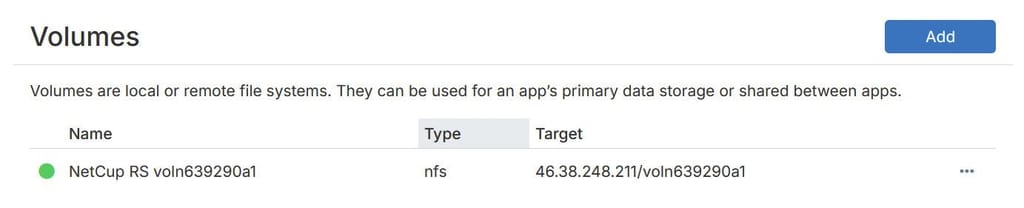
The volume in the Cloudron /volumes view looks like it has mounted successfully. It has a green circle next to it.
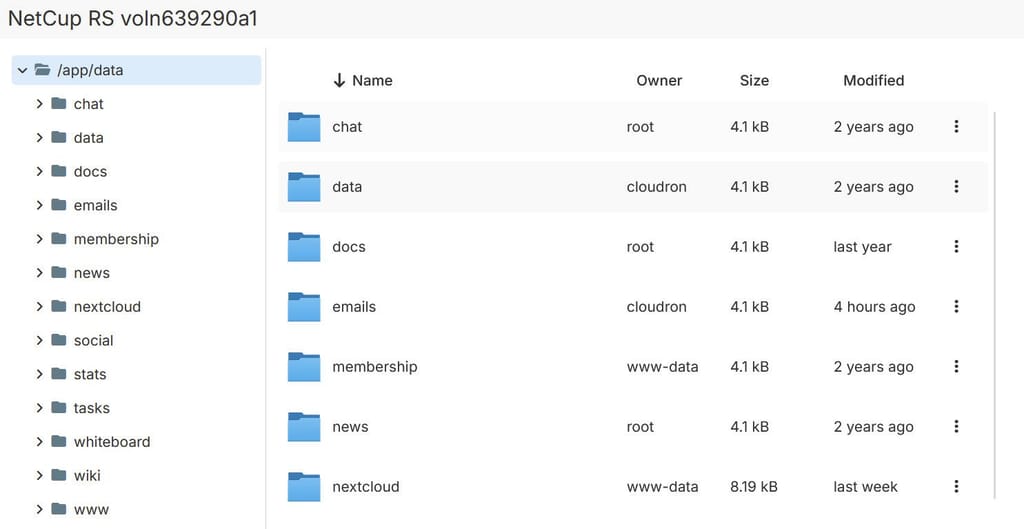
Clicking on File manager allows me to browse the files within it:
I'm out of ideas, and searching online isn't turning up anything helpful I can see. Is it possible the update has done something to our NFS settings or has there been a bug introduced where apps with their data hosted on an NFS volume don't work? This issue has come at a critical time for our organisation so would really appreciate any help you can give!
Thanks,
Stu
