Cloudron makes it easy to run web apps like WordPress, Nextcloud, GitLab on your server. Find out more or install now.


Skip to content
  • Categories
  • Recent
  • Tags
  • Popular
  • Bookmarks
  • Search
Skins
  • Light
  • Brite
  • Cerulean
  • Cosmo
  • Flatly
  • Journal
  • Litera
  • Lumen
  • Lux
  • Materia
  • Minty
  • Morph
  • Pulse
  • Sandstone
  • Simplex
  • Sketchy
  • Spacelab
  • United
  • Yeti
  • Zephyr
  • Dark
  • Cyborg
  • Darkly
  • Quartz
  • Slate
  • Solar
  • Superhero
  • Vapor

  • Default (No Skin)
  • No Skin
Collapse
Brand Logo

Cloudron Forum

Apps - Status | Demo | Docs | Install
  1. Cloudron Forum
  2. WordPress (Managed)
  3. HTTPS

HTTPS

Scheduled Pinned Locked Moved WordPress (Managed)
8 Posts 3 Posters 1.3k Views 3 Watching
  • Oldest to Newest
  • Newest to Oldest
  • Most Votes
Reply
  • Reply as topic
Log in to reply
This topic has been deleted. Only users with topic management privileges can see it.
  • L Offline
    L Offline
    leemuljadi
    wrote on last edited by leemuljadi
    #1

    Hi,

    Why I am getting this not secure indication while pointing the root domain to the wordpress?

    Screenshot 2025-06-02 at 3.11.16 pm.png

    Is it related to SSL cert config? and how to fix this?

    Thanks in advance

    J 1 Reply Last reply
    1
    • jamesJ Offline
      jamesJ Offline
      james
      Staff
      wrote on last edited by
      #2

      Hello @leemuljadi

      You can always try to manually run the certificate update process => https://docs.cloudron.io/certificates/#renewal
      Using the main domain for a WordPress managed should be no issue.
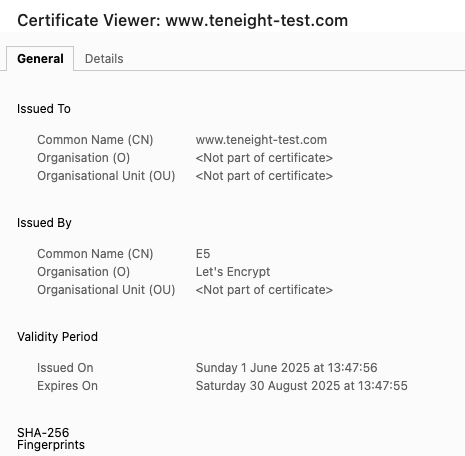
      Could you inspect the certificate in the browser where it says Not Secure and share the inspect view of that certificate?

      1 Reply Last reply
      1
      • L leemuljadi

        Hi,

        Why I am getting this not secure indication while pointing the root domain to the wordpress?

        Screenshot 2025-06-02 at 3.11.16 pm.png

        Is it related to SSL cert config? and how to fix this?

        Thanks in advance

        J Offline
        J Offline
        joseph
        Staff
        wrote on last edited by
        #3

        @leemuljadi said in HTTPS:

        pointing the root domain to the wordpress

        Just a guess but note that www.example.com and example.com are different domains i.e in theory it is possible to have two separate websites . If this is your situation, you have to add a redirection - https://docs.cloudron.io/apps/#redirections

        L 1 Reply Last reply
        2
        • L Offline
          L Offline
          leemuljadi
          wrote on last edited by
          #4

          @james
          Screenshot 2025-06-03 at 11.03.04 am.png

          1 Reply Last reply
          0
          • J joseph

            @leemuljadi said in HTTPS:

            pointing the root domain to the wordpress

            Just a guess but note that www.example.com and example.com are different domains i.e in theory it is possible to have two separate websites . If this is your situation, you have to add a redirection - https://docs.cloudron.io/apps/#redirections

            L Offline
            L Offline
            leemuljadi
            wrote on last edited by
            #5

            @joseph
            I put the main location at www.example.com
            and alias at example.com
            any difference of alias from redirection?

            1 Reply Last reply
            0
            • J Offline
              J Offline
              joseph
              Staff
              wrote on last edited by
              #6

              @leemuljadi seems to work here now. alias is for multi-tenant apps - apps that can server different pages for different subdomains. This requires support in the app itself. say some cms app can be assigned 5 domains (aliases) and it servers some different page for each domain . https://docs.cloudron.io/apps/#aliases

              1 Reply Last reply
              0
              • jamesJ Offline
                jamesJ Offline
                james
                Staff
                wrote on last edited by
                #7

                @leemuljadi
                Could it be that your local computer time is incorrect? This can also cause such issues.

                1 Reply Last reply
                0
                • L Offline
                  L Offline
                  leemuljadi
                  wrote on last edited by leemuljadi
                  #8

                  @joseph thanks!

                  @james local comp time is fine. how do I know it is not correct though?

                  Btw this issue still persist somehow, but when I tried to open it from incognito mode it's fine, so probably it's the browser cache.

                  Thanks for the help.

                  1 Reply Last reply
                  1

                  Hello! It looks like you're interested in this conversation, but you don't have an account yet.

                  Getting fed up of having to scroll through the same posts each visit? When you register for an account, you'll always come back to exactly where you were before, and choose to be notified of new replies (either via email, or push notification). You'll also be able to save bookmarks and upvote posts to show your appreciation to other community members.

                  With your input, this post could be even better 💗

                  Register Login
                  Reply
                  • Reply as topic
                  Log in to reply
                  • Oldest to Newest
                  • Newest to Oldest
                  • Most Votes


                  • Login

                  • Don't have an account? Register

                  • Login or register to search.
                  • First post
                    Last post
                  0
                  • Categories
                  • Recent
                  • Tags
                  • Popular
                  • Bookmarks
                  • Search