

Hello @günter
In the future you can use https://paste.cloudron.io/
Thanks for reporting this issue, we will have to look into it.
Staff
Private
Cloudron.io Staff
Posts
-
env variables missing in cron job -
Request: Feature Parity between Surfer and Cloudron File Manager.Hello @luckow and @andreasdueren
I have merged the topics. -
solr email search crashing during indecingHello @aartjansen
To analyse this issue we need more details.
What Cloudron version are you currently running? -
solr email search crashing during indecingHello @aartjansen
I have redacted the real mail inbox address and server address from your post to prevent it from being spammed. -
Large app backup (~70GB) fails at rotate-copy step with `NoSuchKey` — IONOS S3 read-after-write consistency, but Cloudron has no retryI have now reproduced this without any Cloudron code: only the AWS CLI v2 (
aws-cli/2.36.44, Python/botocore), a dedicated IONOS bucket, and a hand-issued multipart upload —create-multipart-upload, N ×upload-part, then a singlecomplete-multipart-upload. Same failure, so nothing about it is specific to Cloudron or to the JS SDK.- Creating a new key: completion answers in under 1 s, at every size up to 40 GiB.
- Overwriting an existing key: 19.7 s per GiB of the old object, independent of part size.
DeleteObjectcosts 24 s per GiB. So the 600 s timeout is reached at about 30 GiB. - 40 GiB overwrite, one attempt, no retry: 504 after 600 s — but the object was complete and readable. The work had succeeded; only the response was lost.
- 40 GiB overwrite, with retries: 504, 504, then a 200 with an empty ETag — and the object is destroyed. HeadObject reports the full 40 GiB, while GET and
UploadPartCopyanswerNoSuchKey. That is the failure from the first post.
And the same wall hits other operations: deleting the intact 40 GiB object answered 504 after 600 s — and deleted it anyway, and aborting a 35 GiB multipart upload ran through two 600 s timeouts until the client gave up, with the upload gone from the bucket afterwards. In all three cases the work succeeded and only the answer was lost.
The decisive part: this only happens because the proxy answers 504.
The S3 API specifies how this operation answers. From the CompleteMultipartUpload API reference:
The processing of a CompleteMultipartUpload request could take several minutes to finalize. After Amazon S3 begins processing the request, it sends an HTTP response header that specifies a 200 OK response. While processing is in progress, Amazon S3 periodically sends white space characters to keep the connection from timing out. A request could fail after the initial 200 OK response has been sent. This means that a 200 OK response can contain either a success or an error. The error response might be embedded in the 200 OK response. […] If you use AWS SDKs, SDKs handle this condition.
I checked this in the SDK we use, JavaScript v3, and in Python / botocore, which is what the AWS CLI runs on — and then, just to be sure it is not a quirk of those two, in Go v2 and Java v2 as well. Every one of them expects the 200 and reads a failure out of it, and every one of them treats a 504 as a transient error to retry. And so does IONOS's own S3 SDK.
SDK Reads an error out of a 200 On a 504 AWS JavaScript v3 throw200ExceptionsMiddleware: forCompleteMultipartUploadCommand,CopyObjectCommandandUploadPartCopyCommand, an empty 200 body becomes a synthetic503 InternalError, and a 200 body ending in</Error>is rewritten to 503retries — TRANSIENT_ERROR_STATUS_CODES = [500, 502, 503, 504]AWS Python / botocore (AWS CLI) _handle_200_erroronbefore-parse.s3.*: a 200 whose body parses to an XML root<Error>becomes a 500retries — _TRANSIENT_STATUS_CODES = [500, 502, 503, 504]AWS Go v2 HandleResponseErrorWith200Status: "If an s3 200 error is found, status code for the response is modified temporarily to 5xx" — wired into exactlyCompleteMultipartUpload,CopyObjectandUploadPartCopyretries — DefaultRetryableHTTPStatusCodes= 500, 502, 503, 504AWS Java v2 DecorateErrorFromResponseBodyUnmarshaller, used for S3: "a serialized error is found in the XML body of a 'successful' response. This is a non-standard error handling behavior that is used by some non-streaming S3 operations"retries — SdkDefaultRetrySetting.RETRYABLE_STATUS_CODESincludesGATEWAY_TIMEOUTIONOS sdk-java-s3(see the caveat below)the same expectation: completeMultipartUploadAsyncreads the body of the successful response and throwsErrorResponseExceptionif it is an<Error>document, falling back to parsingCompleteMultipartUploadOutputotherwisehas no status-code retry at all, so the 504 is handed to the application — which cannot tell "the operation failed" from "the answer was lost" That last row is the one I would put in front of IONOS: their own SDK is written for a
CompleteMultipartUploadthat answers 200 and reports failures inside that 200. Their proxy answers something their own client library does not expect.One caveat on that row, so nobody has to discover it in the middle of a support case:
ionos-cloud/sdk-java-s3is a fork of the MinIO Java client and it has not moved in a long time — the last commit on its default branch is from March 2024, and the file quoted above was last touched in August 2023. It may no longer be what IONOS ships or recommends, and I do not know what their current tooling looks like. What does hold regardless: the maintained upstream it was forked from does exactly the same in its code today (that file was last changed in June 2026, the project a few days ago) — it parses the body of the successful response and raises an error if it finds an<Error>document. So this is not an artefact of an old snapshot; it is what S3 clients do, including the one IONOS forked.So the proxy's 504 makes every S3 client do the one thing that destroys the object: send the completion again while the first one is still running. If the proxy answered 200 with whitespace keepalive as the API specifies, there would be no retry and this failure could not occur, no matter how long the operation takes.
So the request to IONOS is not "please be faster". It is: answer this operation the way the S3 API specifies, because the entire client ecosystem depends on it. Raising the proxy timeout would only move the threshold.
@dsp76 the section below is for forwarding to IONOS support — it has the request IDs and the affected keys. Every request and response of these runs is logged; if IONOS wants them, I can provide them.
For IONOS support — bucket
repro-15914-cli, endpointhttps://s3.eu-central-3.ionoscloud.com, regionde, all times UTC 2026-09-12, clientaws-cli/2.36.44with single hand-issued requestsWe can now separate the timeout from the data loss. Three cases, same 40 GiB object size, 8 parts:
Case CompleteMultipartUpload Object afterwards 1. one attempt, no retry ( max_attempts = 1)504 after 600.88 s, HTML body, no x-amz-request-idintact: HeadObject 200, new ETag "38bca5c5a14c5de4bb4680748c95ec23-8",Last-Modified 19:27:56(when the request was sent), all ranges readable for 20 minutes2. the identical request re-sent 20 min later 200 in 892 ms, body <ETag>""</ETag>,tx00000a2d304e68c841255-006aa5aed9-810018177-eu-central-3still intact, UploadPartCopyworks3. retries allowed ( max_attempts = 3), so attempt 2 is sent while attempt 1 is still being processed504 after 600.06 s, 504 after 600.80 s, then 200 in 104 ms with <ETag>""</ETag>,tx00000e7d6aca15e68097a-006aa5bb04-810018177-eu-central-3destroyed Two more operations ran past the same 600 s wall, both of them completing their work regardless:
DeleteObject
on the intact 40 GiB object answered 504 after 600.90 s and the object was gone afterwards, and
AbortMultipartUploadon ~35 GiB of parts ran 1,202 s — two timeouts — before the client gave up, with the
upload no longer listed.DeleteObjectcosts about 24 s per GiB (3.2 GiB in 69–88 s).Case 3, key
cli/s40960-a3.bin, upload2~6_NqBYDjgdujSBQSSAh3Y5JkKfm6qFz, 42,949,672,960 bytes:Time Request Response 20:50:15 HeadObject 200, 42949672960 bytes, ETag "d3547ace9ebab5c85fb09048b6f10d5c-8",Last-Modified 20:40:13— the moment attempt 2 was sent20:50:16 GET bytes=0-1048575404 NoSuchKey 20:50:17 GET bytes=21474836480-21475885055404 NoSuchKey 20:50:18 GET bytes=42948624384-42949672959206 20:50:21 UploadPartCopy bytes=0-1073741823404 NoSuchKey 21:09:22 the same three ranges 404, 404, 404 — tx000006e1e6e746753445f-…,tx0000078569c5a1b0d03b1-…,tx00000a7dec52305489e7f-…The object is kept in the bucket for you, and we have the full request-level logs of every run if you need them.
Questions
- A second
CompleteMultipartUploadfor the sameuploadId, arriving while the first is still being processed, leaves the object listed and reported by HeadObject but unreadable. Is this a known race, and can it be made safe? Every S3 client retries a 504, so from the outside it is unavoidable. CompleteMultipartUploadof an overwrite takes about 19.7 s per GiB of the object being replaced,DeleteObjectabout 24 s per GiB andAbortMultipartUploadis expensive too, while creating a new key answers in under a second. Why is this work synchronous, and can it be moved out of the request?- The 504 arrives after exactly 600 s with an HTML body and no S3 headers, so we assume a proxy. The S3 API specifies that this operation sends a 200 header immediately and whitespace characters while processing, and that a failure is then reported as an error embedded in that 200. All four official AWS SDKs implement precisely that —
throw200ExceptionsMiddleware(JavaScript),_handle_200_error(Python/botocore),HandleResponseErrorWith200Status(Go),DecorateErrorFromResponseBodyUnmarshaller(Java) — and all four classify a 504 as a transient error to retry. Your ownsdk-java-s3is written for the same contract: it parses the body of a successful CompleteMultipartUpload response and raises an error if it finds an<Error>document there. That repository is a fork of the MinIO Java client and has not been updated since March 2024, so it may not reflect your current tooling — but the maintained upstream still does the same today, as do all four AWS SDKs above. Ifsdk-java-s3is no longer the client you recommend, we would be glad to know which one is. Can the proxy be changed to that specified behaviour? It would remove this failure mode for every client, independently of how long the operation takes. - What does the empty
<ETag></ETag>in a 200 mean on your side? In our tests it appears when the upload is already complete — is it a reliable marker for "this response does not belong to your request"? - Is the data of
cli/s40960-a3.binrecoverable, or is it lost? Both the bucket index and HeadObject still report the object. - An aside: overwriting a key with byte-identical content completes in about 0.1 s and returns the same ETag, instead of paying the per-byte cost. Is there a shortcut for identical content?
- The
UploadPartCopyrequests referring to anUploadIdthat no longer exists, which you asked about earlier, come from our own client aborting the destination upload while its parallel part copies are still in flight. We will fix that; they are a symptom, not a cause.
-
Large app backup (~70GB) fails at rotate-copy step with `NoSuchKey` — IONOS S3 read-after-write consistency, but Cloudron has no retryI have visualized the data from the tests with @grafana to assist explaining the findings.
https://graph.cloudron.dev/public-dashboards/509097ca6d364e7a8d4a096f894e32b7
Preview:
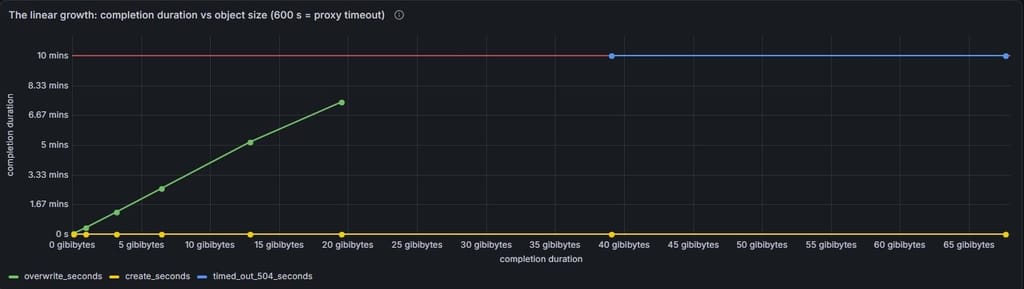
-
Large app backup (~70GB) fails at rotate-copy step with `NoSuchKey` — IONOS S3 read-after-write consistency, but Cloudron has no retryI have now measured the whole thing on IONOS with Cloudron 10.0.4, and the cause is clear.
It is on the IONOS side, but Cloudron hides the part that shows it.Short version: on IONOS, overwriting (and deleting) an object costs about 24 seconds per GiB, handled synchronously before the response. Above roughly 25 GiB that exceeds the 600 s timeout of the proxy in front of their S3 service. The AWS SDK then silently repeats the CompleteMultipartUpload, one attempt answers 200 with an empty ETag, and afterwards the object is listed but its data can not be read. The rotate copy then fails with exactly the
NoSuchKeyfrom the first post.@dsp76, three things would help:
- In the log of a failed backup task: is there a long gap (around 10, 20 or 30 minutes) between the last "Uploading backup …" line and "upload completed"?
- How large are the other apps' snapshots? By these measurements, the problem should only affect apps above roughly 25 GiB, which would explain why only your largest app fails.
- Can the first MiB of the current snapshot still be downloaded, or does that return
NoSuchKey? For example:aws s3api get-object --bucket <bucket> --key <prefix>/snapshot/app_c08ad55d-….tar.gz.enc --range bytes=0-1048575 --endpoint-url <your IONOS endpoint> /tmp/snapshot-test.bin
Below is a separate summary for IONOS support with all request IDs.
For IONOS support (all times UTC, 2026-09-11)
Hello IONOS team,
we have measured this with Cloudron's own S3 code and logged every request with
x-amz-request-id. There are two separate issues: the runtime of an overwrite, and an object that is confirmed but unreadable afterwards.Client and test setup
- Endpoint
https://s3.eu-central-3.ionoscloud.com, regionde, virtual-hosted-style requests, AWS SDK for JavaScript v3 (@aws-sdk/client-s33.1116.0), Cloudron 10.0.4, one client host - Buckets
repro-15914,repro-15914-b,repro-15914-c,repro-15914-d; objects of random data uploaded as multipart, 3 parts in parallel
1. CompleteMultipartUpload of an overwrite scales with the size of the object being replaced
Case CompleteMultipartUpload Key does not exist yet (create), 0.1 GiB to 39 GiB under 1 s in every case Key already exists (overwrite) about 23.5 s per GiB of the old object DeleteObject on such an object about 25 s per GiB Independent of the part size (50, 100 and 250 MiB parts at the same size give the same time) and of the bucket. Reproducible cheaply: create a 3.2 GiB object and overwrite it, which takes about 75 s instead of about 0.2 s. Occasionally, in 3 of about 34 operations, an overwrite or delete was fast (0.2–0.5 s).
Question: why is this work done synchronously before the response, and what happens with it after 600 s? A proxy in front of the service answers with
504 Gateway Time-out(HTML, no S3 headers, no request ID) after exactly 600.0 s. For comparison, AWS S3 sends the 200 header early for long-running completions and keeps the connection alive with whitespace. source: https://docs.aws.amazon.com/AmazonS3/latest/API/API_CompleteMultipartUpload.html2. Above 600 s the object ends up unreadable
Bucket
repro-15914-d, keyrepro-15914/snapshot/app_p2-s40000-r1.tar.gz.enc, 41,943,040,000 bytes in 800 parts, upload2~C7vvA9XH1m0gX5ETzPptO6piVDoqJKw:Sent Request Response x-amz-request-id 22:16:20.100 CompleteMultipartUpload, attempt 1 504 after 600.07 s none 22:26:40.176 CompleteMultipartUpload, attempt 2 504 after 600.06 s none 22:37:00.241 CompleteMultipartUpload, attempt 3 200 in 78 ms, body contains <ETag></ETag>tx00000898b3e6a0332a144-006aa4828c-810022444-eu-central-322:37:00.328 HeadObject 200, 41943040000 bytes, ETag "d6198b07dbf3a8ecd1f840d8b24c7c35-800", Last-Modified 22:26:40tx0000019e93fb95908b459-006aa4828c-809736856-eu-central-322:37:00.478 UploadPartCopy part 1, bytes=0-1073741823404 NoSuchKey, empty <Message>tx000009e4ad2fa8b99db77-006aa4828c-809736856-eu-central-322:37:00.483 UploadPartCopy part 2 404 NoSuchKey tx00000fe72582a902f5490-006aa4828c-807519665-eu-central-322:37:00.530 UploadPartCopy part 3 404 NoSuchUpload (our client had already aborted the destination upload) tx00000d35fc6d29c7099a6-006aa4828c-809730471-eu-central-322:37:01.068 GET bytes=0-1048575404 NoSuchKey tx00000849e27e44423877a-006aa4828d-797521041-eu-central-322:37:01.110 GET bytes=20971520000-20972568575404 NoSuchKey tx000002052bd3daec1d0ba-006aa4828d-809730471-eu-central-322:37:01.197 GET bytes=41941991424-41943039999206, 1048576 bytes tx00000ad11ad4192c75825-006aa4828d-803482478-eu-central-322:40:31 the same three ranges again 404 / 404 / 206, unchanged tx0000095e483f0c394dbf5-…,tx0000017020a5bb1e46bd8-…,tx0000018734af690b0297b-…Control in the same bucket:
repro-15914/repro/2026-09-11T21-50-54-233Z/app_repro-15914_v1.tar.gz.enc(39 GiB, created by a server-side copy) returns 206 for all three ranges at 22:40:31.The same happened earlier in bucket
repro-15914with a 72.6 GB object: three 504s, then 200 with an empty ETag, and after that all three ranges returnedNoSuchKey, still 33 minutes later. That object is still in the bucket for you to look at, keyrepro-15914/snapshot/app_repro-15914.tar.gz.enc, ETag"252d72dfd55e5f6b8799cb56a64339b3-1385", along with an intact control object.Just to make sure this is not a timing issue and the large object might now readable:
All three ranges of the first manual object return NoSuchKey:Range Result x-amz-request-id bytes=0-1048575 404 NoSuchKey tx00000760487e9eeddc8f0-006aa4a32b-809730471-eu-central-3 bytes=36304322560-36305371135 404 NoSuchKey tx000008f860d7695a5e683-006aa4a32b-803482478-eu-central-3 bytes=72607596544-72608645119 404 NoSuchKey tx0000037d2d2c104ca6b58-006aa4a32b-803482478-eu-central-3 HeadObjectstill claims the object is fine: HTTP 200, 72,608,645,120 bytes, ETag"252d72dfd55e5f6b8799cb56a64339b3-1385", Last-Modified 14:49:28, identical to 10 hours ago (tx0000095cf0eba4266169e-006aa4a32b-799478461-eu-central-3).Questions
- Why does
CompleteMultipartUploadof an overwrite take about 24 s per GiB, and is the 504 produced by a proxy with a 600 s timeout? - Attempt 3 answered 200 with an empty ETag. Which request actually completed the upload? The object's Last-Modified matches attempt 2, which received a 504.
- Why is the object listed and returned by HeadObject, while GET and UploadPartCopy answer
NoSuchKeyon several gateway hosts, unchanged minutes later? Is the data lost, and can it be recovered? - Is the empty ETag in the CompleteMultipartUpload response a reliable marker on your side that the object was not stored correctly?
- You mentioned requests referring to an upload ID that no longer exists. In our logs the only upload IDs sent more than once belong to the repeated CompleteMultipartUpload attempts; the part 3
NoSuchUploadabove comes from our own abort. Could those be the requests you found?
The affected objects are kept in
repro-15914andrepro-15914-d.
If needed, I can provide the full log files of each attempt of reproducing this. -
Feature Request: Add "Download All" button to shares -
Large app backup (~70GB) fails at rotate-copy step with `NoSuchKey` — IONOS S3 read-after-write consistency, but Cloudron has no retry -
Stuck on old version, unable to update via GUIHello @stirchley.coop
Apologies that you are experiencing this issue.
This happened because we did release a @wordpress-managed with version4.0.0which was the wrong version number.To resolve this issue you need to run a command with the cloudron cli
cloudron update -app $YOUR_LOCATION_OR_APPID --appstore-id org.wordpress.cloudronapp@3.17.0 --forceAfter that is finished, your app will get updated again.

