
MiroTalk SFU: Recording not possible?
-
Created on the fly, I can confirm that the previous configuration works as expected.
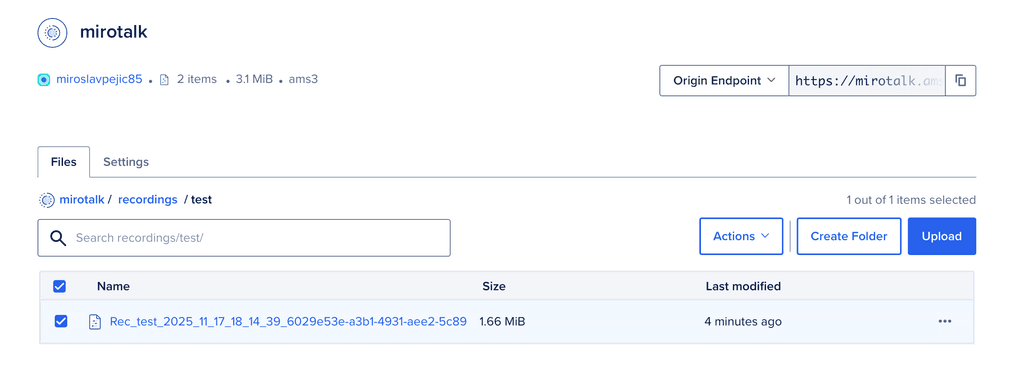
-
@MiroTalk Thanks for sharing the details and the screenshot.
In my case, i'm getting this error:
Nov 18 08:28:31 "app": "Server", Nov 18 08:28:31 "level": "error", Nov 18 08:28:31 "message": "Rec Finalization error" Nov 18 08:28:31 "timestamp": "2025-11-18T02:58:31.414Z",env-># Recording RECORDING_ENABLED=true # Enable recording functionality (true|false) RECORDING_UPLOAD_TO_S3=true # Upload recording to AWS S3 bucket [true/false] # AWS S3 Configuration AWS_S3_ENABLED=true # Enable AWS S3 storage (true|false) AWS_S3_BUCKET_NAME=<bucket> # Name of your S3 bucket (must exist) AWS_ACCESS_KEY_ID=<key_id> # AWS Access Key ID (leave empty for IAM roles) AWS_SECRET_ACCESS_KEY=<key_secret> # AWS Secret Access Key (leave empty for IAM roles) AWS_REGION=<region> # AWS region (e.g., us-east-2, eu-west-2) AWS_S3_ENDPOINT=https://<region>.digitaloceanspaces.com AWS_S3_FORCE_PATH_STYLE=true -
@MiroTalk Thanks for sharing the details and the screenshot.
In my case, i'm getting this error:
Nov 18 08:28:31 "app": "Server", Nov 18 08:28:31 "level": "error", Nov 18 08:28:31 "message": "Rec Finalization error" Nov 18 08:28:31 "timestamp": "2025-11-18T02:58:31.414Z",env-># Recording RECORDING_ENABLED=true # Enable recording functionality (true|false) RECORDING_UPLOAD_TO_S3=true # Upload recording to AWS S3 bucket [true/false] # AWS S3 Configuration AWS_S3_ENABLED=true # Enable AWS S3 storage (true|false) AWS_S3_BUCKET_NAME=<bucket> # Name of your S3 bucket (must exist) AWS_ACCESS_KEY_ID=<key_id> # AWS Access Key ID (leave empty for IAM roles) AWS_SECRET_ACCESS_KEY=<key_secret> # AWS Secret Access Key (leave empty for IAM roles) AWS_REGION=<region> # AWS region (e.g., us-east-2, eu-west-2) AWS_S3_ENDPOINT=https://<region>.digitaloceanspaces.com AWS_S3_FORCE_PATH_STYLE=true -
Hello @shrey
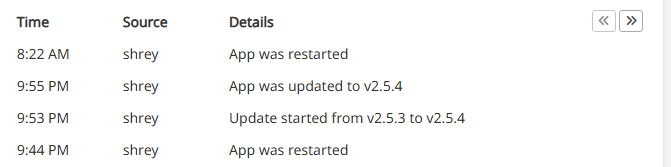
Just to make doubly so sure, please share your installed app version and confirm that you have restarted the app after the/app/data/envchanges. -
Ah, I see your issue. You are still using
AWS_S3_BUCKET_NAMEand notAWS_S3_BUCKETwhich was posted to be the wrong variable and fixed upstream.
Small detail, leading to fail.
ChangeAWS_S3_BUCKET_NAMEtoAWS_S3_BUCKETrestart and it should be working. -
Ah, I see your issue. You are still using
AWS_S3_BUCKET_NAMEand notAWS_S3_BUCKETwhich was posted to be the wrong variable and fixed upstream.
Small detail, leading to fail.
ChangeAWS_S3_BUCKET_NAMEtoAWS_S3_BUCKETrestart and it should be working.@james said in MiroTalk SFU: Recording not possible?:
Change AWS_S3_BUCKET_NAME to AWS_S3_BUCKET restart and it should be working.
Thanks!
That did get it working.
@mirotalk-57bab571 Just one more kink remaining:
When i 'disconnect' the call without stopping the recording, the Recording seems to get saved only in the local directory, and not S3. The S3 upload seems to be triggered only when an ongoing recording is stopped explicitly.
-
@james said in MiroTalk SFU: Recording not possible?:
Change AWS_S3_BUCKET_NAME to AWS_S3_BUCKET restart and it should be working.
Thanks!
That did get it working.
@mirotalk-57bab571 Just one more kink remaining:
When i 'disconnect' the call without stopping the recording, the Recording seems to get saved only in the local directory, and not S3. The S3 upload seems to be triggered only when an ongoing recording is stopped explicitly.
Hello @shrey
@shrey said in MiroTalk SFU: Recording not possible?:
The S3 upload seems to be triggered only when an ongoing recording is stopped explicitly.
Oh, so you mean if the meeting is exited by a recording member, his recording is not stopped and thus never saved/uploaded?
Could you give more details about what you'd expect and what the current behavior is that you have observed? -
Hello @shrey
@shrey said in MiroTalk SFU: Recording not possible?:
The S3 upload seems to be triggered only when an ongoing recording is stopped explicitly.
Oh, so you mean if the meeting is exited by a recording member, his recording is not stopped and thus never saved/uploaded?
Could you give more details about what you'd expect and what the current behavior is that you have observed?@james
Current behaviour:- I start a meeting as Host
- Start the Recording (only Host is allowed to record)
- Once meeting is over, i stop the meeting by clicking on "Leave Room"
- The recording is available in
/app/data/recbut not in S3.
If, in Step 3:
i stop the Recording and then stop the meeting, only then the Recording gets uploaded to S3.Expectation:
Recording should get uploaded to S3 regardless of the path taken to 'stop' the meeting and without explicitly stopping the recording. -
-
 IMPORTANT Update in MiroTalk SFU v.2.0.19
To avoid confusion, I’ve updated the environment variables and configuration keys to use a global
S3_prefix. This makes the configuration compatible with any S3-compatible storage, not just AWS.Example: DigitalOcean Spaces Configuration
# Recording
RECORDING_UPLOAD_TO_S3=true           # Upload recordings to S3-compatible storage (MinIO, Wasabi, DigitalOcean Spaces, etc.) (true|false)

# S3-Compatible Storage Configuration
S3_ENABLED=true                       # Enable S3-compatible storage (true/false)
S3_ACCESS_KEY_ID=<key_id>             # Access Key ID (optional if using instance credentials or IAM roles)
S3_SECRET_ACCESS_KEY=<key_secret>     # Secret Access Key (optional if using instance credentials or IAM roles)
S3_BUCKET=<bucket>                    # Name of your bucket (must already exist)
S3_REGION=<region>                    # Region or location (e.g., us-east-2, eu-west-2, or custom for non-AWS providers)
S3_ENDPOINT=https://<region>.digitaloceanspaces.com  # Custom endpoint for S3-compatible services (MinIO, Wasabi, DigitalOcean Spaces, etc.)
S3_FORCE_PATH_STYLE=true              # Use path-style URLs (true/false). Typically true for non-AWS providers
Notes:
S3_ENDPOINTis optional if your provider supports automatic resolution from the region.S3_FORCE_PATH_STYLE=trueis usually required for providers like MinIO, Wasabi, or DigitalOcean Spaces.
-
@james
Current behaviour:- I start a meeting as Host
- Start the Recording (only Host is allowed to record)
- Once meeting is over, i stop the meeting by clicking on "Leave Room"
- The recording is available in
/app/data/recbut not in S3.
If, in Step 3:
i stop the Recording and then stop the meeting, only then the Recording gets uploaded to S3.Expectation:
Recording should get uploaded to S3 regardless of the path taken to 'stop' the meeting and without explicitly stopping the recording.@shrey said in MiroTalk SFU: Recording not possible?:
If, in Step 3:
i stop the Recording and then stop the meeting, then the Recording gets uploaded to S3.Thanks for pointing that out! I’ll take a look.
-
@james
Current behaviour:- I start a meeting as Host
- Start the Recording (only Host is allowed to record)
- Once meeting is over, i stop the meeting by clicking on "Leave Room"
- The recording is available in
/app/data/recbut not in S3.
If, in Step 3:
i stop the Recording and then stop the meeting, only then the Recording gets uploaded to S3.Expectation:
Recording should get uploaded to S3 regardless of the path taken to 'stop' the meeting and without explicitly stopping the recording.@shrey said in MiroTalk SFU: Recording not possible?:
Expectation:
Recording should get uploaded to S3 regardless of the path taken to 'stop' the meeting and without explicitly stopping the recording. Done in
 MiroTalk SFU v.2.0.20 -
-
Ops:
[Server] Rec Finalization error 'Invalid room ID'Edit: Done in
MiroTalk SFU v2.0.24



Hello! It looks like you're interested in this conversation, but you don't have an account yet.
Getting fed up of having to scroll through the same posts each visit? When you register for an account, you'll always come back to exactly where you were before, and choose to be notified of new replies (either via email, or push notification). You'll also be able to save bookmarks and upvote posts to show your appreciation to other community members.
With your input, this post could be even better 💗
Register Login