
Cloudron makes it easy to run web apps like WordPress, Nextcloud, GitLab on your server. Find out more or install now.


Skip to content
  • Categories
  • Recent
  • Tags
  • Popular
  • Bookmarks
  • Search
Skins
  • Light
  • Brite
  • Cerulean
  • Cosmo
  • Flatly
  • Journal
  • Litera
  • Lumen
  • Lux
  • Materia
  • Minty
  • Morph
  • Pulse
  • Sandstone
  • Simplex
  • Sketchy
  • Spacelab
  • United
  • Yeti
  • Zephyr
  • Dark
  • Cyborg
  • Darkly
  • Quartz
  • Slate
  • Solar
  • Superhero
  • Vapor

  • Default (No Skin)
  • No Skin
Collapse
Brand Logo

Cloudron Forum

Apps - Status | Demo | Docs | Install
  1. Cloudron Forum
  2. N8N
  3. How to Read/Write local disk?

How to Read/Write local disk?

Scheduled Pinned Locked Moved Solved N8N
7 Posts 4 Posters 4.2k Views 4 Watching
  • Oldest to Newest
  • Newest to Oldest
  • Most Votes
Reply
  • Reply as topic
Log in to reply
This topic has been deleted. Only users with topic management privileges can see it.
  • S Offline
    S Offline
    shrey
    wrote on last edited by shrey
    #1

    Hi.

    In n8n, often one needs to access (read/write) host filesystem (from inside n8n).

    The way it's usually implemented, via Docker, is to map a volume on the host system to a directory in the n8n container fs.

    Example:

      - /app/data/files:/home/cloudron/files
    

    But i can't seem to find a way to implement this mapping.

    murgeroM S 2 Replies Last reply
    0
    • S shrey

      Hi.

      In n8n, often one needs to access (read/write) host filesystem (from inside n8n).

      The way it's usually implemented, via Docker, is to map a volume on the host system to a directory in the n8n container fs.

      Example:

        - /app/data/files:/home/cloudron/files
      

      But i can't seem to find a way to implement this mapping.

      S Offline
      S Offline
      shrey
      wrote on last edited by
      #3

      @shrey said in How to Read/Write local disk?:

      Hi.

      In n8n, often one needs to access (read/write) host filesystem (from inside n8n).

      The way it's usually implemented, via Docker, is to map a volume on the host system to a directory in the n8n container fs.

      Example:

        - /app/data/files:/home/cloudron/files
      

      But i can't seem to find a way to implement this mapping.

      It seems that the entire host fs is available via direct path:
      /app/...

      1 Reply Last reply
      0
      • S shrey

        Hi.

        In n8n, often one needs to access (read/write) host filesystem (from inside n8n).

        The way it's usually implemented, via Docker, is to map a volume on the host system to a directory in the n8n container fs.

        Example:

          - /app/data/files:/home/cloudron/files
        

        But i can't seem to find a way to implement this mapping.

        murgeroM Offline
        murgeroM Offline
        murgero
        App Dev
        wrote on last edited by
        #2

        @shrey You can access that filesystem in my.domain.com (your cloudron instance) and select the settings for the app in there and select the file manager or terminal.

        --
        https://urgero.org
        ~ Professional Nerd. Freelance Programmer. ~

        S 1 Reply Last reply
        0
        • S shrey

          Hi.

          In n8n, often one needs to access (read/write) host filesystem (from inside n8n).

          The way it's usually implemented, via Docker, is to map a volume on the host system to a directory in the n8n container fs.

          Example:

            - /app/data/files:/home/cloudron/files
          

          But i can't seem to find a way to implement this mapping.

          S Offline
          S Offline
          shrey
          wrote on last edited by
          #3

          @shrey said in How to Read/Write local disk?:

          Hi.

          In n8n, often one needs to access (read/write) host filesystem (from inside n8n).

          The way it's usually implemented, via Docker, is to map a volume on the host system to a directory in the n8n container fs.

          Example:

            - /app/data/files:/home/cloudron/files
          

          But i can't seem to find a way to implement this mapping.

          It seems that the entire host fs is available via direct path:
          /app/...

          1 Reply Last reply
          0
          • murgeroM murgero

            @shrey You can access that filesystem in my.domain.com (your cloudron instance) and select the settings for the app in there and select the file manager or terminal.

            S Offline
            S Offline
            shrey
            wrote on last edited by
            #4

            Hi @murgero .

            Sorry, the query is specifically for accessing files from within n8n (Have updated my OP).

            Nevertheless, found out how to go about it.

            A 1 Reply Last reply
            0
            • S shrey has marked this topic as solved on
            • S shrey

              Hi @murgero .

              Sorry, the query is specifically for accessing files from within n8n (Have updated my OP).

              Nevertheless, found out how to go about it.

              A Offline
              A Offline
              AmbroiseUnly
              wrote on last edited by
              #5

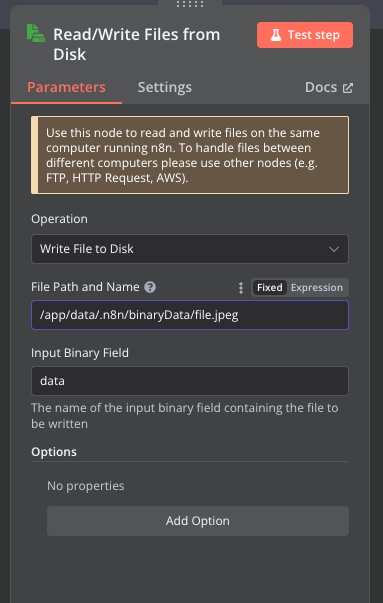
              @shrey Could you post the solution? I'm also stuck with it

              Tried various things but none worked, and error messages are completely useless, logs, too.
              5cc8b3bb-042d-4c96-81c9-7ea6c754e365-image.png

              1 Reply Last reply
              0
              • A Offline
                A Offline
                AmbroiseUnly
                wrote on last edited by
                #6

                Figured it out.

                Note: I manually created a n8n-uploads folder in my case.

                In n8n, using the "Read/Write Files from Disk" action:

                • File Path and Name: /app/data/n8n-uploads/file.jpeg

                /app/data/file.jpeg works out of the box, but I wanted to store all my files in the same folder.
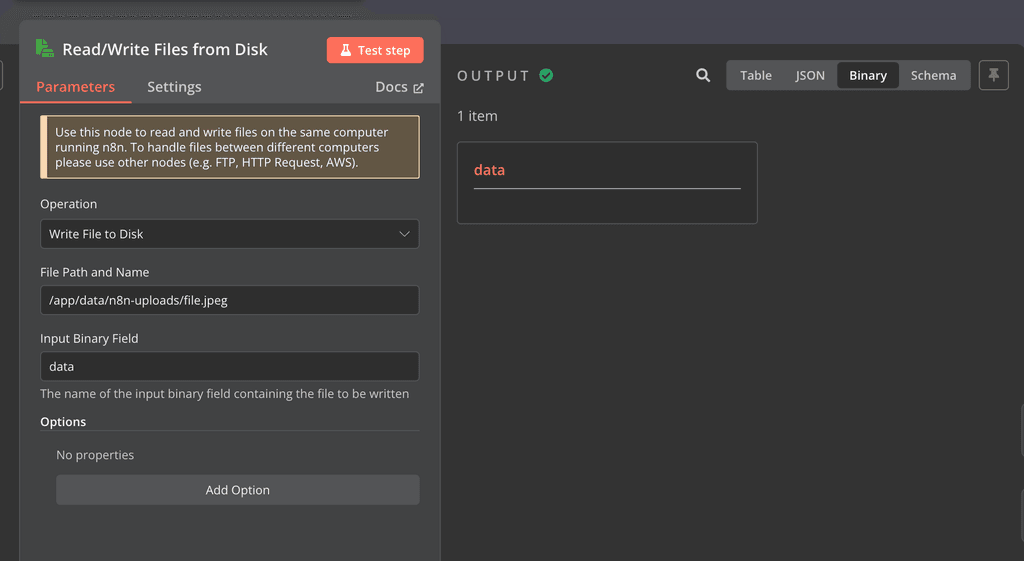
                image.png

                Here is a video:
                https://www.loom.com/share/5e6bccdbd19842a489cc10f90ea871d4

                R 1 Reply Last reply
                4
                • A AmbroiseUnly

                  Figured it out.

                  Note: I manually created a n8n-uploads folder in my case.

                  In n8n, using the "Read/Write Files from Disk" action:

                  • File Path and Name: /app/data/n8n-uploads/file.jpeg

                  /app/data/file.jpeg works out of the box, but I wanted to store all my files in the same folder.

                  image.png

                  Here is a video:
                  https://www.loom.com/share/5e6bccdbd19842a489cc10f90ea871d4

                  R Offline
                  R Offline
                  ROLD55
                  wrote on last edited by
                  #7

                  @AmbroiseUnly
                  Great, this helps me finally 😉

                  1 Reply Last reply
                  3

                  Hello! It looks like you're interested in this conversation, but you don't have an account yet.

                  Getting fed up of having to scroll through the same posts each visit? When you register for an account, you'll always come back to exactly where you were before, and choose to be notified of new replies (either via email, or push notification). You'll also be able to save bookmarks and upvote posts to show your appreciation to other community members.

                  With your input, this post could be even better 💗

                  Register Login
                  Reply
                  • Reply as topic
                  Log in to reply
                  • Oldest to Newest
                  • Newest to Oldest
                  • Most Votes


                  • Login

                  • Don't have an account? Register

                  • Login or register to search.
                  • First post
                    Last post
                  0
                  • Categories
                  • Recent
                  • Tags
                  • Popular
                  • Bookmarks
                  • Search