
How can FFmpeg work with N8N?
-
Hi
According to this Forum post/comment:
https://forum.cloudron.io/post/17531FFmpeg is installed on Ubuntu 24.04 LTS OS
...
We researched and in order to make it work with N8N, some additional changes are required.It would be very helpful if anybody can share that info

-
Hello @creative567145
You have been misguided by this video.
ExecuteCommandandLocalFileTriggerhave been disabled by default for N8N 2.0 and above, documented here: https://docs.n8n.io/2-0-breaking-changes/#disable-executecommand-and-localfiletrigger-nodes-by-default
You can edit your/app/data/env.shfile and addexport NODES_EXCLUDE="[]"save the file and restart your N8N app, to re-enable all disabled nodes.
But be advised,ExecuteCommandandLocalFileTriggernodes have been disabled by default because they pose security risks- since N8N on Cloudron is running inside docker and not on the system itself you will not find ffmpeg on the system but inside the docker container of N8N.
After you have followed step 1. above, following up referring to the video, you can skip to the last part and test it with
ExecuteCommandandffmpeg -versionsinceffpmegis installed in docker.I have confirmed this is working with the Cloudron N8N package version
4.1.1(screenshot below number (1)) packaging N8N version2.1.4(screenshot below number (2)).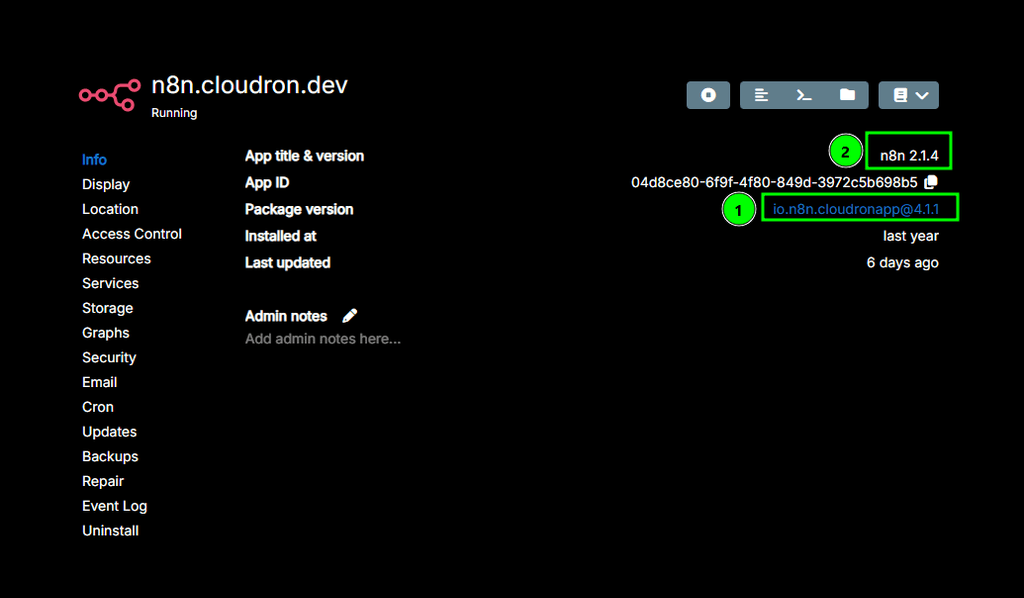
Running
ffpemg -versionin the Cloudron app after addingexport NODES_EXCLUDE="[]"to/app/data/env.shand restarting the app.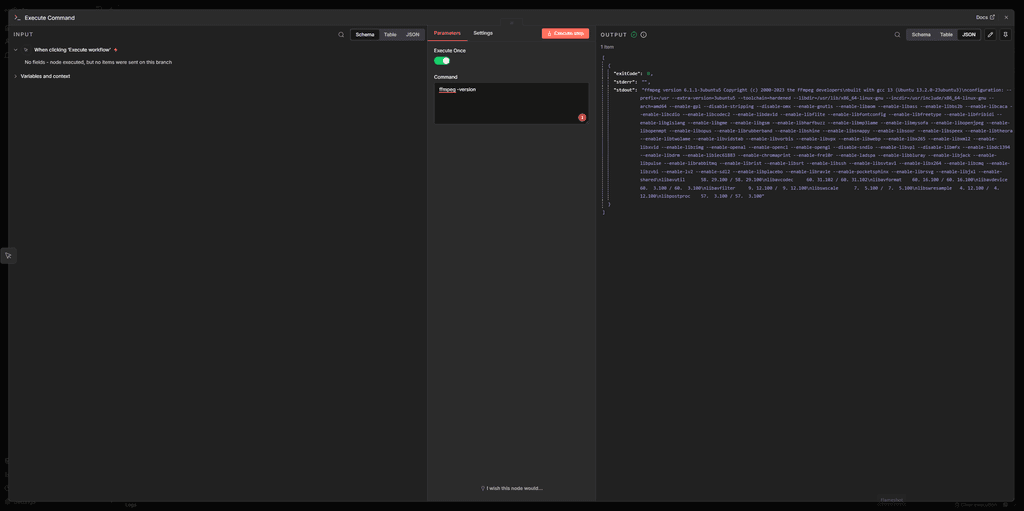
-
Thank you @james for the fast response.
-
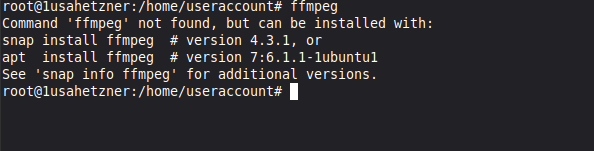
For starters, we checked if FFmpeg is installed on the OS and we get the result that it isn't.
Screenshot attached -
Then, according to this:
We should perform modifications to the docker compose file of N8N,
but since we are doing that with env.sh (export put in front), we don't know what to add there.
That is why we asked if somebody has already done this successfully so that he can send the summarized steps, if possible
-
-
Hello @creative567145
You have been misguided by this video.
ExecuteCommandandLocalFileTriggerhave been disabled by default for N8N 2.0 and above, documented here: https://docs.n8n.io/2-0-breaking-changes/#disable-executecommand-and-localfiletrigger-nodes-by-default
You can edit your/app/data/env.shfile and addexport NODES_EXCLUDE="[]"save the file and restart your N8N app, to re-enable all disabled nodes.
But be advised,ExecuteCommandandLocalFileTriggernodes have been disabled by default because they pose security risks- since N8N on Cloudron is running inside docker and not on the system itself you will not find ffmpeg on the system but inside the docker container of N8N.
After you have followed step 1. above, following up referring to the video, you can skip to the last part and test it with
ExecuteCommandandffmpeg -versionsinceffpmegis installed in docker.I have confirmed this is working with the Cloudron N8N package version
4.1.1(screenshot below number (1)) packaging N8N version2.1.4(screenshot below number (2)).Running
ffpemg -versionin the Cloudron app after addingexport NODES_EXCLUDE="[]"to/app/data/env.shand restarting the app. -
Thank you @james
We performed these steps and it was successful:
-
Add these lines in env.sh
export NODES_EXCLUDE="["ExecuteCommand", "LocalFileTrigger"]" -
Restarted N8N
-
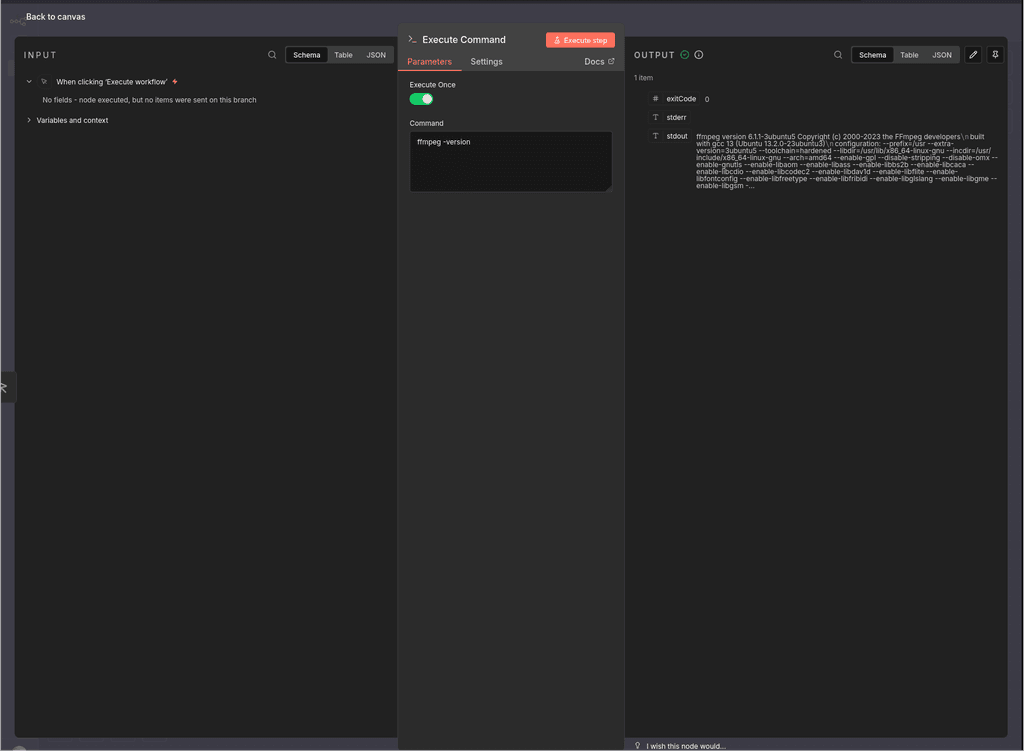
Performed the test using these steps:
- (+) - Execute command
- Execute Once: ON
- Command: ffmpeg -version
- Test step
- Check the OUTPUT - ok (screenshot attached)
-
-
 J james has marked this topic as solved on
Hello! It looks like you're interested in this conversation, but you don't have an account yet.
Getting fed up of having to scroll through the same posts each visit? When you register for an account, you'll always come back to exactly where you were before, and choose to be notified of new replies (either via email, or push notification). You'll also be able to save bookmarks and upvote posts to show your appreciation to other community members.
With your input, this post could be even better 💗
Register Login