
Docling on Cloudron - Community Package
-
 Docling: community package now available
TL;DR: Docling converts documents (PDF, DOCX, PPTX, XLSX, HTML, images) into clean, structured Markdown and JSON, with layout analysis, table reconstruction, and OCR. It is the document-ingestion front end for a private, self-hosted RAG stack, so you can turn your own files into something an LLM can actually search and answer over. Now packaged for Cloudron and ready to install. Built and tested on Cloudron 9.1; unofficial and community-maintained.
Links
 Project homepage: https://docling-project.github.io/docling/
 Upstream repo: https://github.com/docling-project/docling-serve
- 🧱 Cloudron package repo: https://github.com/OrcVole/docling-cloudron
No public demo to click, Docling is something you self-host. Once you install it, it includes a browser demo at
/ui, behind your Cloudron login, for converting a document by hand.
 How to install
Community packages aren't in the App Store, so install via the CLI. The published image is on GHCR and the package ships a community versions file:
# recommended: install the published community build from the versions URL
cloudron install \
  --versions-url https://raw.githubusercontent.com/OrcVole/docling-cloudron/main/CloudronVersions.json \
  --location docling.example.com

# or pin the prebuilt image directly
cloudron install --image ghcr.io/orcvole/docling-cloudron:1.0.1 --location docling.example.com

# or build it yourself from the repo
git clone https://github.com/OrcVole/docling-cloudron
cd docling-cloudron
cloudron build
cloudron install --image [your-registry]/docling-cloudron:latest --location docling.example.com
Minimums: 4 GB RAM (raise it in Resources for large or heavily scanned documents), addons
localstorageandproxyAuth.First run: the API key is generated for you. Read it from the app's Terminal with
cat /app/data/.secrets/keys.envand send it as theX-Api-Keyheader onPOST /v1/convert/*. The/uidemo and/docssit behind your Cloudron login;/healthis open. The pipeline models are baked into the image, so first boot is ready in seconds, offline, with no download.
 For users
Why try it: garbage in, garbage out starts at the parser. Docling gives you a private service that turns a PDF, a scan, or an Office file into clean Markdown (or JSON) with the layout understood, tables rebuilt, and OCR over images, the exact input a retrieval pipeline needs, with nothing leaving your server.
What you get out of the box:
- A document-conversion API (PDF, DOCX, PPTX, XLSX, HTML, images to Markdown or JSON) with layout analysis, table reconstruction, and OCR, CPU-only, models baked in.
- A browser demo UI at
/ui(behind your Cloudron login) to drop in a file and see the Markdown, plus interactive OpenAPI docs at/docs. - Async conversion (
/v1/convert/source/async) so a 150-page scan does not hold a request open. - Cloudron-specific wins: the API key is generated on first run,
/healthis open for monitoring,/uiand/docssit behind Cloudron SSO, all state lives under/app/dataso backups cover the key and caches, and updates are one click.
Good fit if you want a self-hosted ingestion tier for RAG and semantic search (pairs directly with the TEI and Qdrant community packages), or simply a private "PDF and scan to clean Markdown" service. Probably not for you if you need GPU acceleration (this build is CPU-only) or you only convert the occasional file (the image is about 6 GB, heavy for light use).
🧰 For packagers: what we learned
What helped
- A two-stage Dockerfile onto
cloudron/base:5.0.0: the builder installs the pinned release and bakes the models, the runtime stage copies only the installed venv and the models across. That dropped the image from 8.74 GB to 6.05 GB, because the single-stage build had been bakinguv's multi-gigabyte download cache into its layers (profiling withpodman historyandduinside the container made this obvious). - Baking the pipeline models into the image (read-only under
/app/code) so the app is ready in seconds, offline, and sidesteps the first-boot-download-versus-health-grace race. - Installing CPU-only torch from the PyTorch CPU index first, so the main install finds torch satisfied and never pulls the multi-gigabyte CUDA build.
- Putting all state under
/app/dataso thelocalstoragebackup just works; a real backup then restore brought the key back byte-for-byte. - Cribbing the two-surface auth model and the release gates from the sibling TEI and Qdrant community packages.
What was tricky and how we solved it
- A build that imports cleanly can still fail at runtime: the import gate does not exercise the dlopen-heavy stack (torch, OpenCV, the models), so the real gate is a convert-a-PDF smoke on the assembled image, not the build.
- A Cloudron restore returns the key file as
0644: re-assertchownandchmod 0600on every boot, not only at first run (the0700parent dir still protects it meanwhile). - The app phones home on boot (huggingface_hub telemetry) even with models baked: set
HF_HUB_DISABLE_TELEMETRY=1andDO_NOT_TRACK=1. - A 6 GB push to GHCR dropped mid-layer with repeated EOF: the blobs landed on retry, and re-pushing the tag only had to write the manifest and finished in seconds.
Still rough and open questions
- A cold install from the versions URL on a fresh subdomain is the gate we'd most welcome other eyes on.
- Trimming the image further (a build-time single-OCR-engine option) without losing capability.
 ️ For the Cloudron team
Maintenance burden: upstream
docling-serveis active with a steady release cadence; expect periodic rebumps that track upstream. The package is a thin layer (a pinned version build-arg plus the manifest), so a rebump is a version bump and a re-run of the convert smoke.Why it would suit the App Store: clean MIT upstream, real demand (document ingestion is the missing tier for self-hosted RAG), and it completes the existing TEI and Qdrant community stack.
Friction worth knowing about: the
iconUrlfield couples to theminBoxVersion 9.1.0floor on the versions-url channel (shared with TEI and Qdrant); theproxyAuthaddon key is camelCase while the packaging skill reference shows it lowercase (which fails manifest validation); and acloudron update --imagereuses the stored manifest, so the dashboard version label lags the image actually running.
 For Docling's developers and contributors
A few low-effort things that help packagers a lot:
- Telemetry off by default, or a first-class offline switch. The models can be baked and the app run fully offline, yet huggingface_hub still fetches a telemetry manifest on boot unless
HF_HUB_DISABLE_TELEMETRYis set. - A slimmer CPU image, or a build-time OCR-engine selector. The full stack with both EasyOCR and RapidOCR plus the baked models is large; selecting one engine would trim it.
- Publish a minimum Python and glibc floor per release, so a slim base copy knows the target.
Package source and PRs welcome here: https://github.com/OrcVole/docling-cloudron. Happy to co-maintain.
 Unlocks
Once it's running, you can:
- Drop a folder of PDFs and scans and get clean, chunked Markdown your LLM stack can actually retrieve over.
- Build "ask questions about my own documents" entirely on your box: Docling, then TEI, then Qdrant, then Ollama or OpenWebUI.
- Turn scanned, image-only PDFs into searchable text with OCR, with no third-party OCR service.
 Synergies
Pairs nicely with other Cloudron apps:
- Docling + TEI: convert documents, then embed the clean text via TEI's OpenAI-compatible
/v1/embeddings(defaultbge-small-en-v1.5, 384-dim). - Docling + Qdrant: store and similarity-search the embedded chunks (the
knowledgecollection). - Docling + n8n: automate ingestion: watch a folder or Nextcloud, convert, embed, upsert.
- Docling + OpenWebUI or agentgateway: ask an LLM questions grounded in your own documents.
Feedback, bug reports, and "works on my install" confirmations all welcome below.

-
Docling: community package now available
TL;DR: Docling converts documents (PDF, DOCX, PPTX, XLSX, HTML, images) into clean, structured Markdown and JSON, with layout analysis, table reconstruction, and OCR. It is the document-ingestion front end for a private, self-hosted RAG stack, so you can turn your own files into something an LLM can actually search and answer over. Now packaged for Cloudron and ready to install. Built and tested on Cloudron 9.1; unofficial and community-maintained.
Links
- Project homepage: https://docling-project.github.io/docling/
- Upstream repo: https://github.com/docling-project/docling-serve
- 🧱 Cloudron package repo: https://github.com/OrcVole/docling-cloudron
No public demo to click, Docling is something you self-host. Once you install it, it includes a browser demo at
/ui, behind your Cloudron login, for converting a document by hand.
How to installCommunity packages aren't in the App Store, so install via the CLI. The published image is on GHCR and the package ships a community versions file:
# recommended: install the published community build from the versions URL
cloudron install \
  --versions-url https://raw.githubusercontent.com/OrcVole/docling-cloudron/main/CloudronVersions.json \
  --location docling.example.com

# or pin the prebuilt image directly
cloudron install --image ghcr.io/orcvole/docling-cloudron:1.0.1 --location docling.example.com

# or build it yourself from the repo
git clone https://github.com/OrcVole/docling-cloudron
cd docling-cloudron
cloudron build
cloudron install --image [your-registry]/docling-cloudron:latest --location docling.example.com
Minimums: 4 GB RAM (raise it in Resources for large or heavily scanned documents), addons
localstorageandproxyAuth.First run: the API key is generated for you. Read it from the app's Terminal with
cat /app/data/.secrets/keys.envand send it as theX-Api-Keyheader onPOST /v1/convert/*. The/uidemo and/docssit behind your Cloudron login;/healthis open. The pipeline models are baked into the image, so first boot is ready in seconds, offline, with no download.
For usersWhy try it: garbage in, garbage out starts at the parser. Docling gives you a private service that turns a PDF, a scan, or an Office file into clean Markdown (or JSON) with the layout understood, tables rebuilt, and OCR over images, the exact input a retrieval pipeline needs, with nothing leaving your server.
What you get out of the box:
- A document-conversion API (PDF, DOCX, PPTX, XLSX, HTML, images to Markdown or JSON) with layout analysis, table reconstruction, and OCR, CPU-only, models baked in.
- A browser demo UI at
/ui(behind your Cloudron login) to drop in a file and see the Markdown, plus interactive OpenAPI docs at/docs. - Async conversion (
/v1/convert/source/async) so a 150-page scan does not hold a request open. - Cloudron-specific wins: the API key is generated on first run,
/healthis open for monitoring,/uiand/docssit behind Cloudron SSO, all state lives under/app/dataso backups cover the key and caches, and updates are one click.
Good fit if you want a self-hosted ingestion tier for RAG and semantic search (pairs directly with the TEI and Qdrant community packages), or simply a private "PDF and scan to clean Markdown" service. Probably not for you if you need GPU acceleration (this build is CPU-only) or you only convert the occasional file (the image is about 6 GB, heavy for light use).
🧰 For packagers: what we learned
What helped
- A two-stage Dockerfile onto
cloudron/base:5.0.0: the builder installs the pinned release and bakes the models, the runtime stage copies only the installed venv and the models across. That dropped the image from 8.74 GB to 6.05 GB, because the single-stage build had been bakinguv's multi-gigabyte download cache into its layers (profiling withpodman historyandduinside the container made this obvious). - Baking the pipeline models into the image (read-only under
/app/code) so the app is ready in seconds, offline, and sidesteps the first-boot-download-versus-health-grace race. - Installing CPU-only torch from the PyTorch CPU index first, so the main install finds torch satisfied and never pulls the multi-gigabyte CUDA build.
- Putting all state under
/app/dataso thelocalstoragebackup just works; a real backup then restore brought the key back byte-for-byte. - Cribbing the two-surface auth model and the release gates from the sibling TEI and Qdrant community packages.
What was tricky and how we solved it
- A build that imports cleanly can still fail at runtime: the import gate does not exercise the dlopen-heavy stack (torch, OpenCV, the models), so the real gate is a convert-a-PDF smoke on the assembled image, not the build.
- A Cloudron restore returns the key file as
0644: re-assertchownandchmod 0600on every boot, not only at first run (the0700parent dir still protects it meanwhile). - The app phones home on boot (huggingface_hub telemetry) even with models baked: set
HF_HUB_DISABLE_TELEMETRY=1andDO_NOT_TRACK=1. - A 6 GB push to GHCR dropped mid-layer with repeated EOF: the blobs landed on retry, and re-pushing the tag only had to write the manifest and finished in seconds.
Still rough and open questions
- A cold install from the versions URL on a fresh subdomain is the gate we'd most welcome other eyes on.
- Trimming the image further (a build-time single-OCR-engine option) without losing capability.
️ For the Cloudron teamMaintenance burden: upstream
docling-serveis active with a steady release cadence; expect periodic rebumps that track upstream. The package is a thin layer (a pinned version build-arg plus the manifest), so a rebump is a version bump and a re-run of the convert smoke.Why it would suit the App Store: clean MIT upstream, real demand (document ingestion is the missing tier for self-hosted RAG), and it completes the existing TEI and Qdrant community stack.
Friction worth knowing about: the
iconUrlfield couples to theminBoxVersion 9.1.0floor on the versions-url channel (shared with TEI and Qdrant); theproxyAuthaddon key is camelCase while the packaging skill reference shows it lowercase (which fails manifest validation); and acloudron update --imagereuses the stored manifest, so the dashboard version label lags the image actually running.
For Docling's developers and contributorsA few low-effort things that help packagers a lot:
- Telemetry off by default, or a first-class offline switch. The models can be baked and the app run fully offline, yet huggingface_hub still fetches a telemetry manifest on boot unless
HF_HUB_DISABLE_TELEMETRYis set. - A slimmer CPU image, or a build-time OCR-engine selector. The full stack with both EasyOCR and RapidOCR plus the baked models is large; selecting one engine would trim it.
- Publish a minimum Python and glibc floor per release, so a slim base copy knows the target.
Package source and PRs welcome here: https://github.com/OrcVole/docling-cloudron. Happy to co-maintain.
UnlocksOnce it's running, you can:
- Drop a folder of PDFs and scans and get clean, chunked Markdown your LLM stack can actually retrieve over.
- Build "ask questions about my own documents" entirely on your box: Docling, then TEI, then Qdrant, then Ollama or OpenWebUI.
- Turn scanned, image-only PDFs into searchable text with OCR, with no third-party OCR service.
SynergiesPairs nicely with other Cloudron apps:
- Docling + TEI: convert documents, then embed the clean text via TEI's OpenAI-compatible
/v1/embeddings(defaultbge-small-en-v1.5, 384-dim). - Docling + Qdrant: store and similarity-search the embedded chunks (the
knowledgecollection). - Docling + n8n: automate ingestion: watch a folder or Nextcloud, convert, embed, upsert.
- Docling + OpenWebUI or agentgateway: ask an LLM questions grounded in your own documents.
Feedback, bug reports, and "works on my install" confirmations all welcome below.
Community packages aren't in the App Store, so install via the CLI.
I've not actually tried any community apps yet, but you don't need to use the CLI.
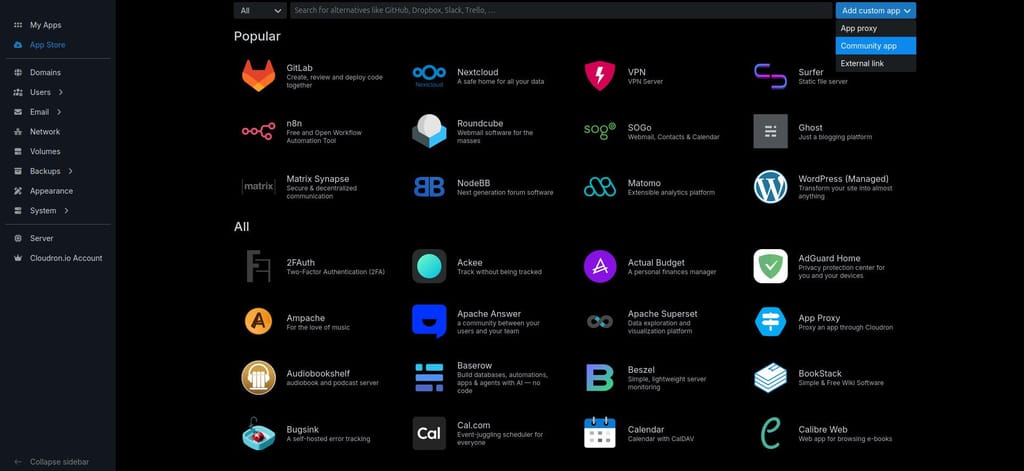
The standard way is to click on the Add custom app drop down top right in the App Store and choose Community app:
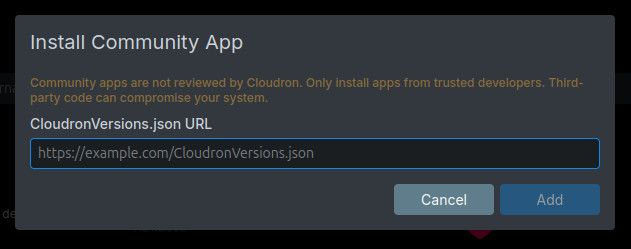
And then paste in the CloudronVersions.json URL into the box that pops up:
-
Well said @jdaviescoates
@loudlemur The entire point of a Community App (characterised by having a CloudronVersions.json) is that it can be installed VIA the App Store, even if it is not IN the ap store.
Your AI buddy may need to be corrected on this.
Can you ask him to be bit more concise. I struggle to get through the detail.Nice work on packaging.


-
Community packages aren't in the App Store, so install via the CLI.
I've not actually tried any community apps yet, but you don't need to use the CLI.
The standard way is to click on the Add custom app drop down top right in the App Store and choose Community app:
And then paste in the CloudronVersions.json URL into the box that pops up:
@jdaviescoates Thank you again. I didn't see the wood for the trees!


Hello! It looks like you're interested in this conversation, but you don't have an account yet.
Getting fed up of having to scroll through the same posts each visit? When you register for an account, you'll always come back to exactly where you were before, and choose to be notified of new replies (either via email, or push notification). You'll also be able to save bookmarks and upvote posts to show your appreciation to other community members.
With your input, this post could be even better 💗
Register Login