
Run Additional Sidekiqs
-
I think I may have gotten to a threshold of sorts. The sidekiq running in my Mastodon instance isn't able to keep up. Top shows it running in the container no problem, but apparently I need more than one instance to get some parallelism rocking. Top also showed the container wasn't pegged at 100% CPU, so it had room to grow. I also bumped up the Resources from default 50% to 75%.
So, I ended up with about a 6 hr backlog (around 40,000 messages) in my queues. In order to get them to clear, I opened up two terminal instances and manually ran
bundle exec sidekiqin each and that chewed through them pretty quickly. Once the queues were drained, I closed them out but it started building back up again - the default sidekiq is definitely running, just a lot slower than needed.So, wondering if we could have a config option to ramp additional sidekiqs up?
-
I think I may have gotten to a threshold of sorts. The sidekiq running in my Mastodon instance isn't able to keep up. Top shows it running in the container no problem, but apparently I need more than one instance to get some parallelism rocking. Top also showed the container wasn't pegged at 100% CPU, so it had room to grow. I also bumped up the Resources from default 50% to 75%.
So, I ended up with about a 6 hr backlog (around 40,000 messages) in my queues. In order to get them to clear, I opened up two terminal instances and manually ran
bundle exec sidekiqin each and that chewed through them pretty quickly. Once the queues were drained, I closed them out but it started building back up again - the default sidekiq is definitely running, just a lot slower than needed.So, wondering if we could have a config option to ramp additional sidekiqs up?
@doodlemania2 have you seen:
https://docs.cloudron.io/apps/mastodon/#scaling
https://docs.joinmastodon.org/admin/scaling/?

I've not hit the need yet, but I think all you need to do is adjust the figures in
/app/data/config.sh#!/bin/bash # Setup scaling related environment variables here - https://docs.joinmastodon.org/admin/scaling/ # Puma export WEB_CONCURRENCY=2 # number of worker processes export MAX_THREADS=5 # the number of threads per process # Streaming API export STREAMING_CLUSTER_NUM=1 # number of worker processes # Sidekiq export SIDEKIQ_THREADS=2 export DB_POOL=25 # must be at least the same as the number of threads -
@doodlemania2 have you seen:
https://docs.cloudron.io/apps/mastodon/#scaling
https://docs.joinmastodon.org/admin/scaling/?
I've not hit the need yet, but I think all you need to do is adjust the figures in
/app/data/config.sh#!/bin/bash # Setup scaling related environment variables here - https://docs.joinmastodon.org/admin/scaling/ # Puma export WEB_CONCURRENCY=2 # number of worker processes export MAX_THREADS=5 # the number of threads per process # Streaming API export STREAMING_CLUSTER_NUM=1 # number of worker processes # Sidekiq export SIDEKIQ_THREADS=2 export DB_POOL=25 # must be at least the same as the number of threads -
@jdaviescoates ohhhh! doinks - thanks sir
that did the trick nicely!
-
that did the trick nicely!
@doodlemania2 what’s your setup now?
here's mine:#!/bin/bash # Setup scaling related environment variables here - https://docs.joinmastodon.org/admin/scaling/ # Puma export WEB_CONCURRENCY=3 # number of worker processes export MAX_THREADS=10 # the number of threads per process # Streaming API export STREAMING_CLUSTER_NUM=3 # number of worker processes export DB_POOL=15 # Sidekiq export SIDEKIQ_THREADS=75 export DB_POOL=75 # must be at least the same as the number of threads export MALLOC_ARENA_MAX=2 -
@doodlemania2 what’s your setup now?
here's mine:#!/bin/bash # Setup scaling related environment variables here - https://docs.joinmastodon.org/admin/scaling/ # Puma export WEB_CONCURRENCY=3 # number of worker processes export MAX_THREADS=10 # the number of threads per process # Streaming API export STREAMING_CLUSTER_NUM=3 # number of worker processes export DB_POOL=15 # Sidekiq export SIDEKIQ_THREADS=75 export DB_POOL=75 # must be at least the same as the number of threads export MALLOC_ARENA_MAX=2@alwynispat you've got DB_POOL specified twice
I'm doing:
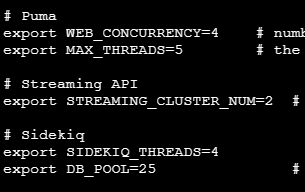
-
 N nebulon marked this topic as a question on
-
N nebulon has marked this topic as solved on


Hello! It looks like you're interested in this conversation, but you don't have an account yet.
Getting fed up of having to scroll through the same posts each visit? When you register for an account, you'll always come back to exactly where you were before, and choose to be notified of new replies (either via email, or push notification). You'll also be able to save bookmarks and upvote posts to show your appreciation to other community members.
With your input, this post could be even better 💗
Register Login