Cloudron makes it easy to run web apps like WordPress, Nextcloud, GitLab on your server. Find out more or install now.


Skip to content
  • Categories
  • Recent
  • Tags
  • Popular
  • Bookmarks
  • Search
Skins
  • Light
  • Brite
  • Cerulean
  • Cosmo
  • Flatly
  • Journal
  • Litera
  • Lumen
  • Lux
  • Materia
  • Minty
  • Morph
  • Pulse
  • Sandstone
  • Simplex
  • Sketchy
  • Spacelab
  • United
  • Yeti
  • Zephyr
  • Dark
  • Cyborg
  • Darkly
  • Quartz
  • Slate
  • Solar
  • Superhero
  • Vapor

  • Default (No Skin)
  • No Skin
Collapse
Brand Logo

Cloudron Forum

Apps - Status | Demo | Docs | Install
C

chrisbol

@chrisbol
About
Posts
13
Topics
5
Shares
0
Groups
0
Followers
0
Following
0

Posts

Recent Best Controversial

  • Forgejo built-in SSH server not authenticating public keys
    C chrisbol

    OK, thanks to your answer I now know that I had to change "ssh -T git@git.albiobola.nl -p 29418" to "ssh -T cloudron@git.albiobola.nl -p 29418"

    Forgejo

  • Forgejo built-in SSH server not authenticating public keys
    C chrisbol

    Hi all,

    I have Forgejo 14.0.3 running on Cloudron and I'm unable to authenticate via SSH using public key authentication. HTTPS with a personal access token works fine, so the issue is specific to SSH.

    Setup:

    • Forgejo 14.0.3+gitea-1.22.0
    • SSH domain: git.albiobola.nl
    • SSH port: 29418 (built-in SSH server, not system SSH)
    • Running on Cloudron

    What I have verified:

    • Port 29418 is open and reachable (confirmed with netcat)
    • The SSH key is correctly stored in the PostgreSQL database (verified directly in the public_key table)
    • The key fingerprint in the database matches the local key exactly
    • The Forgejo user account is active
    • DISABLE_SSH = false and START_SSH_SERVER = true in app.ini
    • SSH_ROOT_PATH = /app/data/ssh
    • The /app/data/ssh/ directory exists and is owned by the cloudron user
    • Forgejo process runs as the cloudron user

    The error:

    ssh -T git@git.albiobola.nl -p 29418
    git@git.albiobola.nl: Permission denied (publickey).
    

    What's strange:

    • No log files are being written anywhere under /app or /run/forgejo
    • The [log] section in app.ini is present but empty
    • The /app/data/ssh/ folder remains empty — Forgejo never writes an authorized_keys file there
    • Verbose SSH output shows the key is being offered correctly and the connection reaches Forgejo's built-in SSH server (remote software version: Go)

    Relevant app.ini:

    [server]
    DISABLE_SSH = false
    START_SSH_SERVER = true
    SSH_DOMAIN = git.albiobola.nl
    SSH_PORT = 29418
    SSH_LISTEN_HOST = 0.0.0.0
    SSH_LISTEN_PORT = 29418
    SSH_ROOT_PATH = /app/data/ssh
    
    [database]
    DB_TYPE = postgres
    
    [log]
    ROOT_PATH = /run/forgejo
    

    Has anyone experienced this with the Cloudron Forgejo package? Is there any additional configuration needed to make the built-in SSH server work properly? Any help appreciated!

    Forgejo

  • Enabling Grist Enterprise does not work
    C chrisbol

    @jdaviescoates yes I am on version 0.4.0

    Grist

  • Enabling Grist Enterprise does not work
    C chrisbol

    Hi,

    I have a problem with enabling Grist Enterprise.
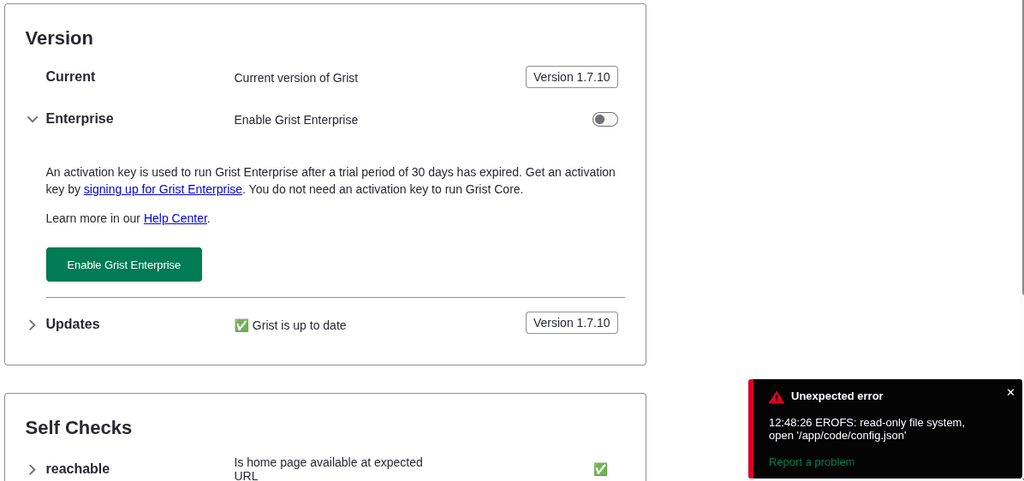
    When I toggle on this feature at [domain]/o/docs/admin I get the following error:

    Unexpected error
    12:48:00 EROFS: read-only file system, open '/app/code/config.json'

    see screenshot
    Screenshot from 2026-01-29 12-48-41.png

    Grist

  • Windmill: Open-source alternative to Airplane, Superblocks, Retool
    C chrisbol

    would be great if Windmill is available on Cloudron

    App Wishlist

  • My dashboard and apps unreachable
    C chrisbol

    Problem is fixed by upgrading Ubuntu from 20 to 22.

    Support

  • My dashboard and apps unreachable
    C chrisbol

    I have Cloudron running on Netcup.
    At the moment my dashboard and apps become unreachable after 15 minutes or so after rebooting. I have checked /home/yellowtent/platformdata/logs/box.log but don't see anything like an error.
    I have renew the certs using Domains -> Renew Certs.
    Also I have runned /home/yellowtent/box/setup/start.sh on the server.
    But the problem still exists.

    Does someone has a clue what can cause the server be up and running for 15 minutes but then becoming unreachable.

    Or which steps I should take next?

    Support

  • Cloudron offline after reboot
    C chrisbol

    Many thanks, after deleting config file for freshrss the restart of nginx went OK.

    Support nginx troubleshoot

  • Cloudron offline after reboot
    C chrisbol

    Hi.
    I have just rebooted my Cloudron instance after necessary Ubuntu updates.
    Now my server is not coming up, it says Cloudron is offline, Reconnecting.

    I have checked the server. It looks like there is a problem with nginx.
    After running the command journalctl -u nginx -fa the error below is displayed:
    So it looks like a problem with freshrss certificate.
    I have disabled FreshRSS a long time ago.
    How can I solve this problem?

    • Logs begin at Mon 2024-06-17 00:19:00 UTC. --
      Jun 18 08:18:35 v2202108153678159622 systemd[1]: Starting nginx - high performance web server...
      Jun 18 08:18:35 v2202108153678159622 nginx[11952]: nginx: [emerg] cannot load certificate "/home/yellowtent/platformdata/nginx/cert/freshrss.albiobola.nl.cert": BIO_new_file() failed (SSL: error:02001002:system library:fopen:No such file or directory:fopen('/home/yellowtent/platformdata/nginx/cert/freshrss.albiobola.nl.cert','r') error:2006D080:BIO routines:BIO_new_file:no such file)
      Jun 18 08:18:35 v2202108153678159622 systemd[1]: nginx.service: Control process exited, code=exited, status=1/FAILURE
      Jun 18 08:18:35 v2202108153678159622 systemd[1]: nginx.service: Failed with result 'exit-code'.
      Jun 18 08:18:35 v2202108153678159622 systemd[1]: Failed to start nginx - high performance web server.
      Jun 18 08:18:36 v2202108153678159622 systemd[1]: nginx.service: Scheduled restart job, restart counter is at 5.
      Jun 18 08:18:36 v2202108153678159622 systemd[1]: Stopped nginx - high performance web server.
      Jun 18 08:18:36 v2202108153678159622 systemd[1]: nginx.service: Start request repeated too quickly.
      Jun 18 08:18:36 v2202108153678159622 systemd[1]: nginx.service: Failed with result 'exit-code'.
      Jun 18 08:18:36 v2202108153678159622 systemd[1]: Failed to start nginx - high performance web server.
    Support nginx troubleshoot

  • Airbyte
    C chrisbol

    Airbyte would be a great addition, it is a great open source replacement for Fivetran and Stitch

    App Wishlist

  • Windmill: Open-source alternative to Airplane, Superblocks, Retool
    C chrisbol

    This would be great if available at Cloudron

    Open-source developer infrastructure for internal tools. Self-hostable alternative to Airplane, Pipedream, Superblocks and a simplified Temporal with autogenerated UIs to trigger workflows and scripts as internal apps. Scripts are turned into UIs and no-code modules, no-code modules can be composed into very rich flows, and script and flows can be triggered from internal UIs made with a low-code builder. The script languages supported are: Python, Typescript, Go, Bash.
    from: https://github.com/windmill-labs/windmill

    more info on self-host
    https://docs.windmill.dev/docs/how-tos/self_host/

    App Wishlist

  • Shiny Server
    C chrisbol

    Currently I run a Shiny server on Digital Ocean but would be great to run this via my Cloudron.

    App Wishlist

  • How to mobile app / Browser Extension
    C chrisbol

    I have tried the Brave and Firefox extensions but I don't see an option to link it to my self-hosted Vaultwarden app or option to change an endpoint.

    Vaultwarden
  • Login

  • Don't have an account? Register

  • Login or register to search.
  • First post
    Last post
0
  • Categories
  • Recent
  • Tags
  • Popular
  • Bookmarks
  • Search