Cloudron makes it easy to run web apps like WordPress, Nextcloud, GitLab on your server. Find out more or install now.


Skip to content
  • Categories
  • Recent
  • Tags
  • Popular
  • Bookmarks
  • Search
Skins
  • Light
  • Brite
  • Cerulean
  • Cosmo
  • Flatly
  • Journal
  • Litera
  • Lumen
  • Lux
  • Materia
  • Minty
  • Morph
  • Pulse
  • Sandstone
  • Simplex
  • Sketchy
  • Spacelab
  • United
  • Yeti
  • Zephyr
  • Dark
  • Cyborg
  • Darkly
  • Quartz
  • Slate
  • Solar
  • Superhero
  • Vapor

  • Default (No Skin)
  • No Skin
Collapse
Brand Logo

Cloudron Forum

Apps - Status | Demo | Docs | Install
D

DNA PC

@DNA PC
About
Posts
14
Topics
3
Shares
0
Groups
0
Followers
0
Following
0

Posts

Recent Best Controversial

  • Integrate Waha for Whatsapp and n8n automations
    D DNA PC

    Waha helps setting up triggers for WhatsApp

    It's open source and runs using a Docker container, it should be compatible with Cloudron 🎉

    https://waha.devlike.pro/docs/overview/quick-start/

    Here is one well made tutorial, jumping to showing what you can achieve with that:

    Would be quite useful to have this Waha installable via Cloudron 😉

    N8N

  • Sync In : Your data belongs to you
    D DNA PC

    @timconsidine That's my wife's request, I'm merely a servant 😅

    "We need at least that much" she said.
    It gets very expensive with such volumes IMHO, with costs around 50$/month, so I'm also considering having a NAS home, such as https://nas-fr.ugreen.com/products/ugreen-nasync-dxp2800-serveur-nas

    But sync-in interests me for work and for my (small) companies and non-profit, too. Can't have everything sitting at home.

    I've never configured backups for Volumes, I understand you can use Hetzner Storage Box as storage and rsync as utility to perform the actual sync, interesting.

    I don't currently have anything (just a server sitting there to run some tests and get familiar with all of this), my ~1TB files are currently living in OneDrive. No hurry to change.

    Just to share a bit of my situation 😉
    Thanks!

    App Wishlist

  • Sync In : Your data belongs to you
    D DNA PC

    @timconsidine said in Sync In : Your data belongs to you:

    Whoop, whoop, whoop 🍾
    Breakthrough !

    After spending X hours on packaging the release, Y hours on building from source and Z hours on alternative implementations of building from source,

    • where X is too long,
    • where Y is X * 2, and
    • where Z is Y * 3,

    ... I gave up and changed approach again, and now have Sync-in packaged and installing and running on my Cloudron !

    TBH, there is still a bunch of work to do, but having cracked baseline minimal function deployment, I'm hopeful (well, praying) that I can get the rest of it done.

    WORKING :

    • builds, installs and runs
    • login and basic file storage operations working

    TO-DO / TO-TEST :

    • desktop client downloading and synchronisation (now✔)
    • OnlyOffice integration
    • file storage "in app" and by volume mount
    • backups
    • WebDAV (now ✔ )
    • automated install by CCAI (Custom App Installer)

    I will of course make a repo on git.cloudron.io, but want to do so when I have ironed out some things (had to be a bit naughty to get to here) and completed more of the o/s work.

    I don't use Windows so will need some help testing desktop sync on that platform; when the time comes, volunteers appreciated.

    🐱 (grinning like a Cheshire one)

    Awesome! I just discovered Sync-in this morning and my first thought was "does it exist on Cloudron?". Gonna give it a try real soon, I'm really unhappy with all other drive-like softwares (google, microsoft, and the likes).
    But, without Cloudron to cover backups and help me handle all the things I don't know, I'm not confident moving my company's files anywhere else, too much risk involved.
    I'll start small and personal, hopefully it's a great fit!

    App Wishlist

  • Sync In : Your data belongs to you
    D DNA PC

    None of those, it was from a French website https://korben.info/sync-in-alternative-francaise-nextcloud-dechire.html 😄

    App Wishlist

  • Sync In : Your data belongs to you
    D DNA PC

    My next challenges are definitely backups.

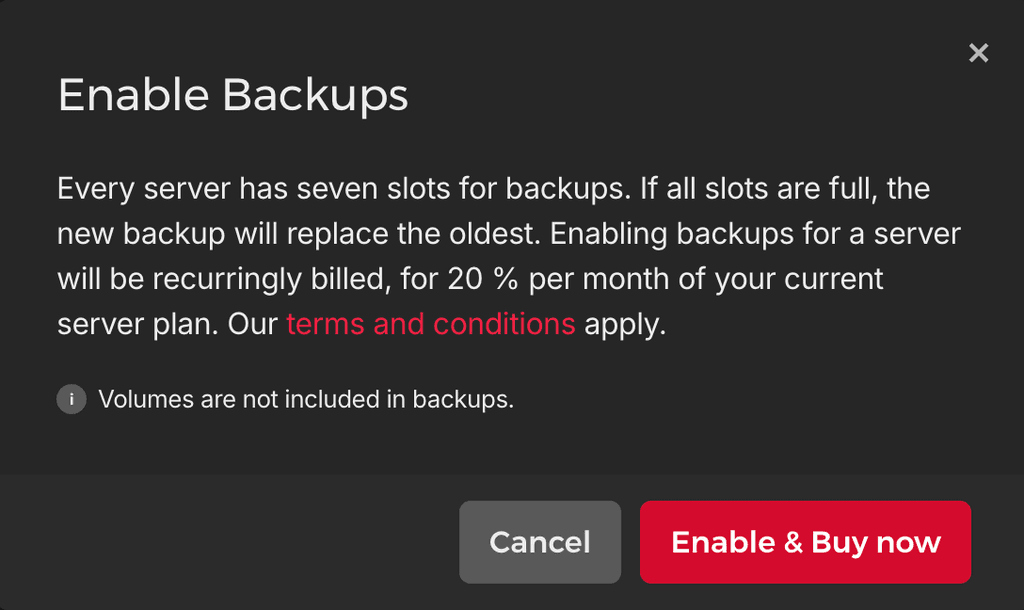
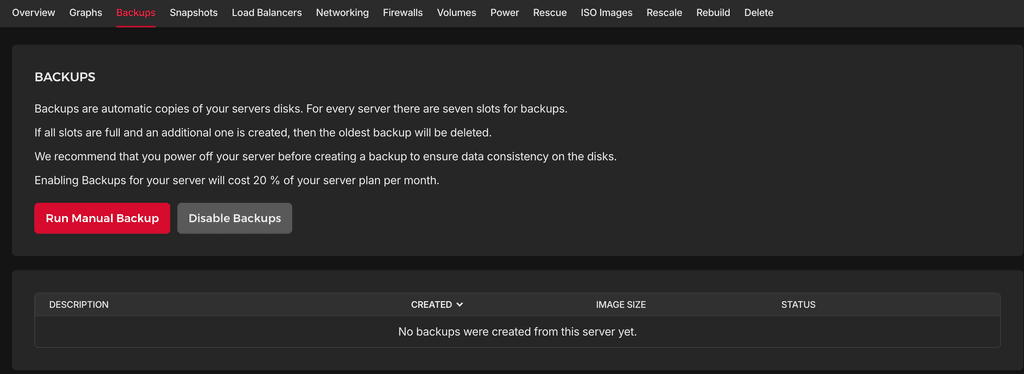
    • Server backups (Hetzner): Hetzner has built-in backups, this is great if something really wrong happens to the hosting server, but cannot be used outside Hetzner. I'm not entirely sure how useful it is but feels like a must-have for critical servers such as this. I haven't found a way to customise how often the backups run and it only keep the last 7. Feels useful to have around, but definitely not sufficient.

      ⚠️ And this won't backup the Hetzner Volumes, only the main disk.
      ❓ I'm not sure if it's useful in combination of Cloudron backups and Volume backups, may be overkill.

      1c7f3c50-3f90-4785-941f-55030d38de98-image.png
      d6e67d3c-02ee-4e55-b7f3-c06928b936eb-image.png

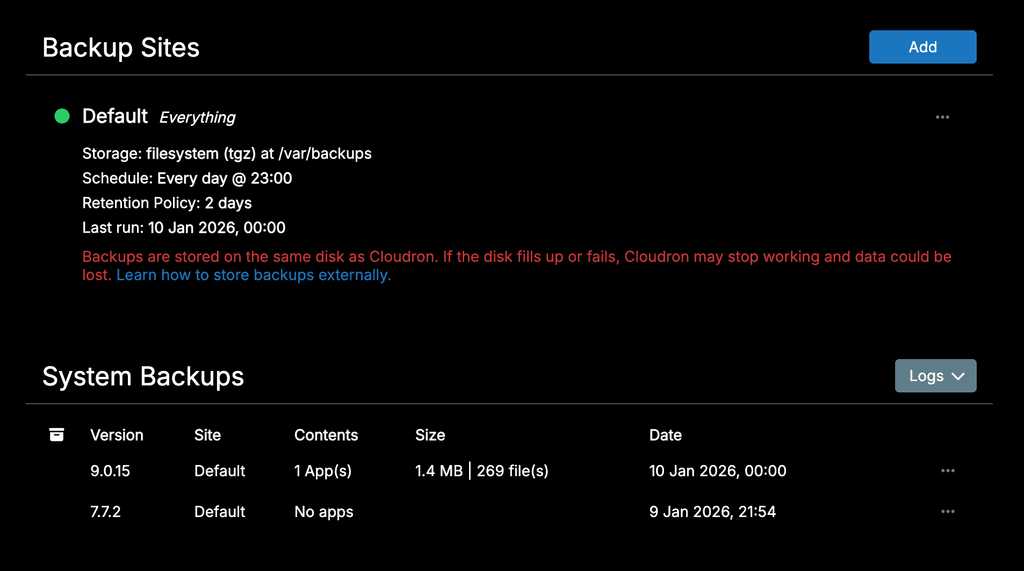
    • Backups of Cloudron apps: Setting up Cloudron backups to an AWS S3 is rather simple. I wonder if Sync-in has it's own backup system to setup.
      By default, they are stored in the same server (locally) and it's a weakness (weak resilience) that must be addressed, to avoid issues such as Hetzner's datacenters taking fire and losing apps and backups at once.
      image.png

      What I usually do is to configure a remote backup destination, usually using a different provider, to mitigate risks, such as AWS in another EU region. Done it plenty of times, not particularly difficult.
      ⚠️ But this won't backup the Hetzner Volumes, only the main disk.

    • Backups of Volumes: Need to learn how to do that, @timconsidine mentioned using a Hetzner Storage Box as a backup destination, using rsync to perform the actual sync.
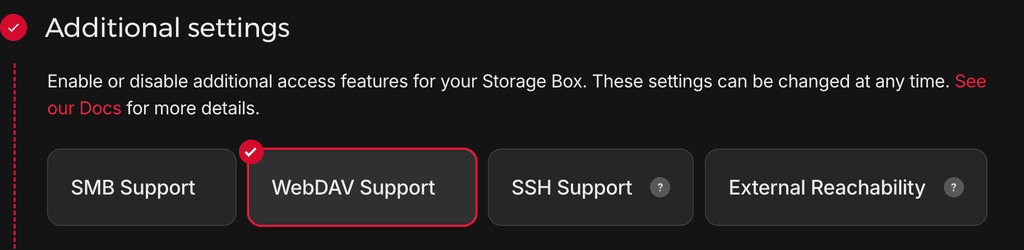
      I've never used Hetzner Storage Box, but it looks great at first glance. It supports WebDav natively. Great if ever needed to quickly access the backup on any computer, as a remote disk. (typically to copy some files/folders directly from the backup)

      This will likely be the most challenging (at least for me).

      Price for 1TB is 3.2€/month, AWS S3 Glacier Flexible Retrieval is priced at 4.05$/TB/month, while S3 Glacier Deep Archive is 1,8$/month.
      96e14f27-769a-4c57-9a8d-866b2c32e678-image.png

    Backups (and a proper/clear) restoration protocol are very important. Especially so as I haven't seen any concept of "file history" in Sync-in. It doesn't seem possible to revert a file to a previous version at this time. 😨
    It's only possible to restore a deleted file.

    App Wishlist

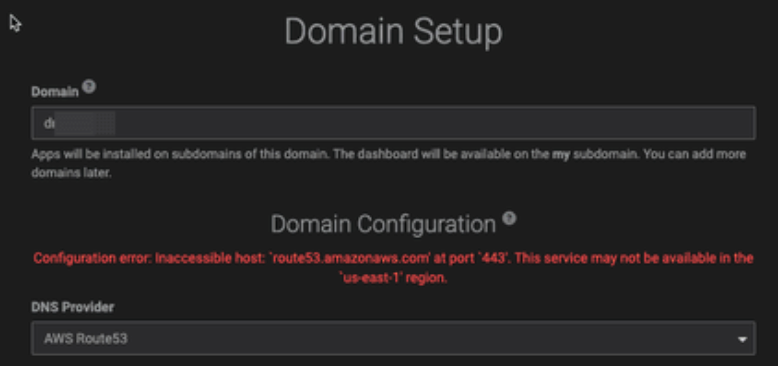
  • Installing Cloudron fails - AWS Route53 - Configuration error: Inaccessible host: `route53.amazonaws.com' at port `443'. This service may not be available in the `us-east-1' region.
    D DNA PC

    7c2add5f-9b57-462a-b66f-a01eba1ad435-image.png

    Configuration error: Inaccessible host: route53.amazonaws.com' at port 443'. This service may not be available in the `us-east-1' region.

    I tried to initialize my domain, created the IAM user, assigned the right policies, but I always get this error.

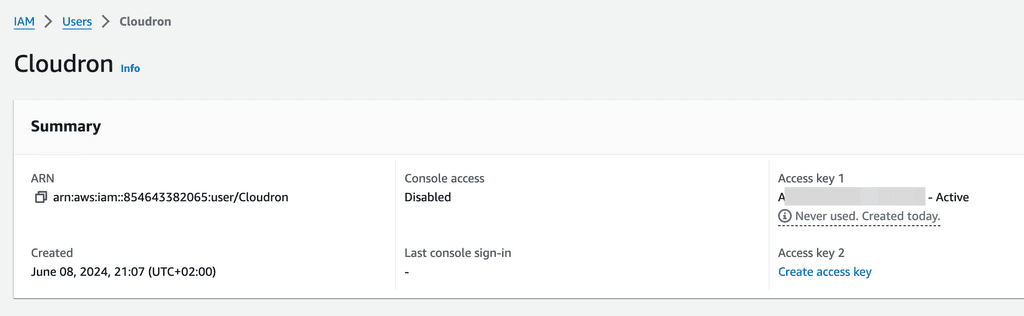
    Also, what's super weird is that the Access Key doesn't seem to be used at all.

    Never used. Created today.

    1cba3532-3998-4f9d-94a5-3120f51ca311-image.png

    I'm using Hetzner. It's a brand-new server.
    I also noticed if I use a different Access Key (like a wrong one), the same behavior and error happens, as if the query wasn't even reached AWS.

    Do you know what could be wrong?

    Support domains route53

  • Sync In : Your data belongs to you
    D DNA PC

    @timconsidine If you have any pointers regarding how to configure Volumes with Hetzner hosting, to store the Sync-in "drive files" in a dedicated volume instead of the main drive.

    I've never used volumes, only tried it once and couldn't achieve what I wanted, I didn't understand how to backup them (you mentioned rsync, so I guess there isn't a native Cloudron-powered way to achieve that simply)

    I'm really careful about backups and restoration, I must have confidence in how it's done to revert/reinstall if ever necessary.

    Here is a bit of a feedback

    So far so good, your install worked neatly once I upgraded Cloudron to 9.0.15, wasn't working on 7.7.2.
    Hosted on Hetzner, costs me 2.99$/month for 40GB hard drive (cx23)

    image.png

    I also configured webdav, it was super simple on MacOS. This is what it looks like now:
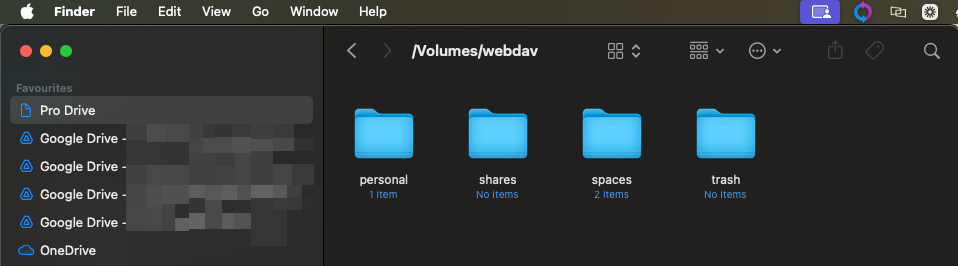
    image.png

    Already reached my 40GB of disk size.

    Some of my file uploads failed, it not always obvious why, there is no retry mechanism, and it's hard to identify the file/culprit.

    • I've reached max disk size for one file (5GB left, 6GB file size)
    • Google slides and other google documents failed to upload (.gslides)
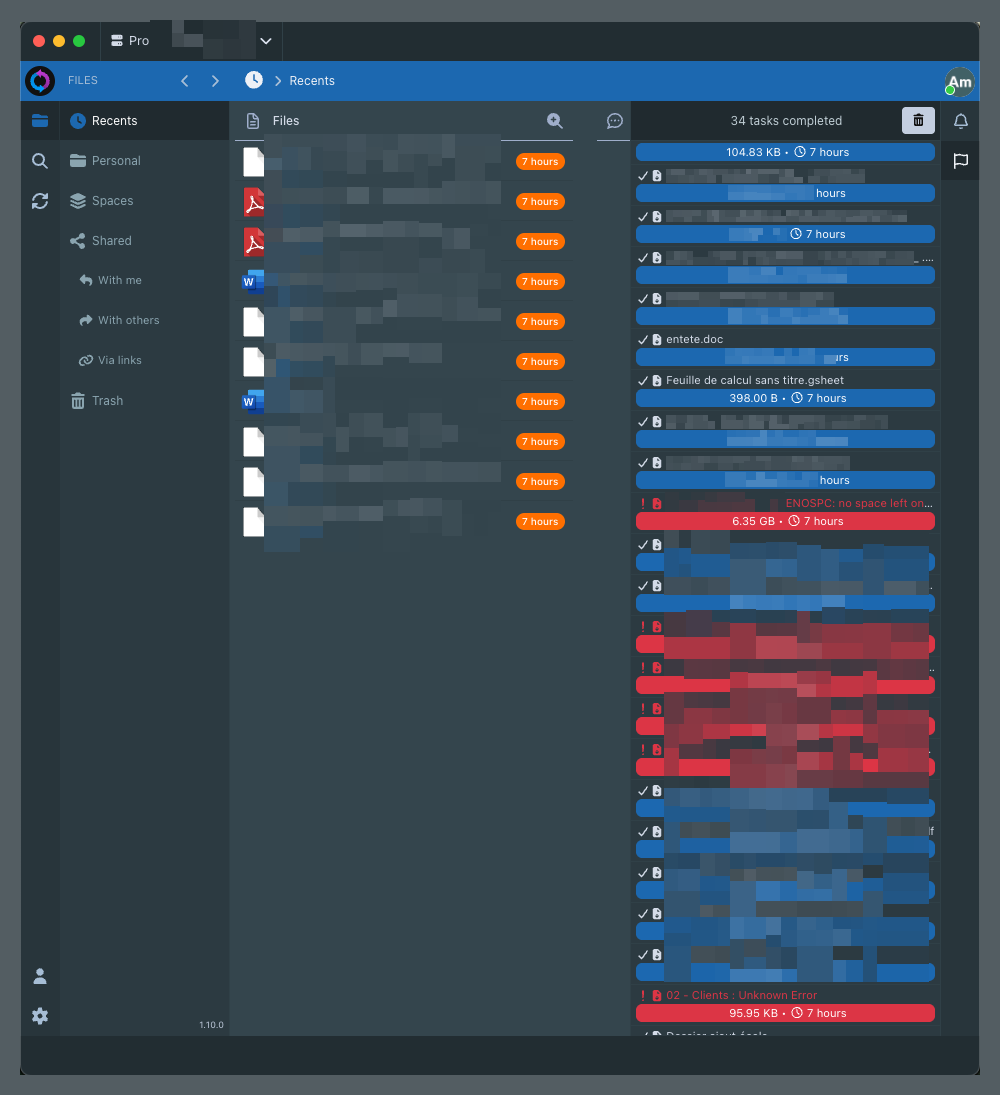
    image.png

    The ability to sync folder-to-folder is just incredible, I've been using Sugarsync for the past 10 year just for that feature, costs me 100$/y. Having it on the mobile app was the only way I had to sync some internal apps folders to avoid content loss. The fact Sync-in doesn't have a native mobile app yet probably means I won't be able to achieve that with Sync-in yet (unless it's possible with the few apps mentioned in https://sync-in.com/docs/user-guide/mobile_apps), might be possible, though.

    The ability to configure filters, per sync, is just so welcome, it's something I could never achieve with Sugarsync, typically. Made it utterly impossible to backup "dev" folders because I couldn't ignore huge subfolders like node_modules, .git, and the likes.
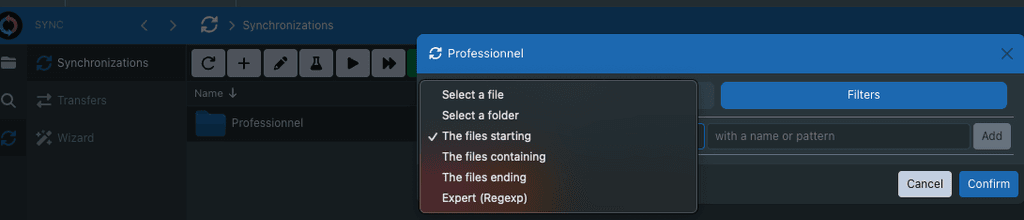
    4ccd89ad-55bf-485e-b387-11f49dd2a010-image.png

    I was first surprised by how Sync-in uses a scheduler to run syncs, the default is 15mn. I find it way too long so I guess I'll just use 1mn on most folders, but the ability to customise it is really great. I'm used to have the files being synced as they are added, I wonder why they haven't made it that way and rely on a scheduler instead. But a 1mn delay isn't an issue at all I believe.
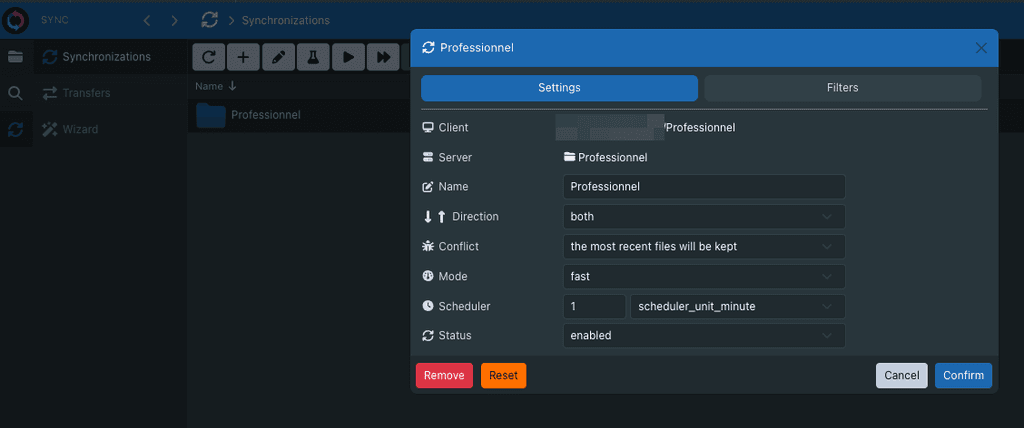
    7b2c1ac5-7d57-45ab-a1fb-e70662824a0b-image.png

    I was unsure how to use "Spaces" at first. Also, it's not obvious what should be inside the "Personal" folder.

    As I plan on using this for my various companies (solopreneur), I first thought of using a different Space for each company, but I'm not sure to go about that way after all, as it doesn't seem possible to sync a whole folder directly as a Space. And Spaces are meant for collaboration and that's not something I need at this time. Also, the Personal folder allows to move some files into Spaces using Anchors so that offers very flexible options on the long run anyway.

    App Wishlist

  • Sync In : Your data belongs to you
    D DNA PC

    @robi I suggest reporting it to https://github.com/Sync-in/desktop/issues?q=sort%3Aupdated-desc+is%3Aissue+is%3Aopen

    Maybe it's a binding that's currently hardcoded without ability to change it

    App Wishlist

  • Sync In : Your data belongs to you
    D DNA PC

    @timconsidine How would you recommend using Sync-in, considering the need of 1TB of data storage, I'm not sure what hosting provider to use, I usually use Hetzner, but with that much data I'm not sure how to handle "Volumes" (extra disk space on top of the main drive) and related-volume stuff (backups, etc.)

    If you have some recommandation, that'd be interesting.

    App Wishlist

  • Valheim - ERROR! Failed to install app '896660' (Disk write failure) during install
    D DNA PC

    I deleted the app and recreated it and it worked.


    But then, I changed the .env file and enabling mods broke the server.

    SERVERNAME="Vadorequest-Valheim-Server"
    WORLDNAME="VadorequestValheimWorld"
    PASSWORD="xxx"
    PUBLIC=1
    MODSUPPORT="1" <-- HERE
    BepInExVersion="5.4.2202"
    SAVEINTERVAL="300"
    BACKUPS="10"
    BACKUPSHORT="7200"
    BACKUPLONG="43200"
    CROSSPLAY=0
    

    See full logs


    Moving back to no mods, and restarting, it worked again

    MODSUPPORT="0"
    

    Not sure why.

    Valheim

  • Valheim - ERROR! Failed to install app '896660' (Disk write failure) during install
    D DNA PC

    Hi,

    I'm running into issues while installing the Valheim App.

    ERROR! Failed to install app '896660' (Disk write failure)

    Seems to be the root issue.

    Here are my server specs (it's a Hetzner CCX13 instance):
    c23f63b3-f368-4340-9ea1-9188176f8d5d-image.png

    Here are the full logs, it's stuck in an infinite loop and stopping the app didn't work, I had to shutdown the whole server.

    I didn't do anything particular, I used a fresh Cloudron instance with a single app, nothing else is installed on the server, and there is no disk space issue.

     ✔  df -h
    Filesystem       Size   Used  Avail Capacity iused      ifree %iused  Mounted on
    /dev/disk3s1s1  926Gi   11Gi  264Gi     5%  356093 2765231000    0%   /
    devfs           201Ki  201Ki    0Bi   100%     696          0  100%   /dev
    /dev/disk3s6    926Gi  6.0Gi  264Gi     3%       6 2765231000    0%   /System/Volumes/VM
    /dev/disk3s2    926Gi  9.2Gi  264Gi     4%    1185 2765231000    0%   /System/Volumes/Preboot
    /dev/disk3s4    926Gi  662Mi  264Gi     1%     276 2765231000    0%   /System/Volumes/Update
    /dev/disk1s2    500Mi  6.0Mi  480Mi     2%       1    4919720    0%   /System/Volumes/xarts
    /dev/disk1s1    500Mi  6.2Mi  480Mi     2%      32    4919720    0%   /System/Volumes/iSCPreboot
    /dev/disk1s3    500Mi  2.6Mi  480Mi     1%      52    4919720    0%   /System/Volumes/Hardware
    /dev/disk3s5    926Gi  634Gi  264Gi    71% 7134539 2765231000    0%   /System/Volumes/Data
    map auto_home     0Bi    0Bi    0Bi   100%       0          0  100%   /System/Volumes/Data/home
    /dev/disk2s1    5.0Gi  1.7Gi  3.3Gi    34%      58   34806120    0%   /System/Volumes/Update/SFR/mnt1
    /dev/disk3s1    926Gi   11Gi  264Gi     5%  356841 2765231000    0%   /System/Volumes/Update/mnt1
    /dev/disk4s1    250Mi   97Mi  153Mi    39%     159 4294967120    0%   /Volumes/Sync
    

    See Full logs (too big to be added in this post)

    Valheim
  • Login

  • Don't have an account? Register

  • Login or register to search.
  • First post
    Last post
0
  • Categories
  • Recent
  • Tags
  • Popular
  • Bookmarks
  • Search