
Cloudron makes it easy to run web apps like WordPress, Nextcloud, GitLab on your server. Find out more or install now.


Skip to content
  • Categories
  • Recent
  • Tags
  • Popular
  • Bookmarks
  • Search
Skins
  • Light
  • Brite
  • Cerulean
  • Cosmo
  • Flatly
  • Journal
  • Litera
  • Lumen
  • Lux
  • Materia
  • Minty
  • Morph
  • Pulse
  • Sandstone
  • Simplex
  • Sketchy
  • Spacelab
  • United
  • Yeti
  • Zephyr
  • Dark
  • Cyborg
  • Darkly
  • Quartz
  • Slate
  • Solar
  • Superhero
  • Vapor

  • Default (No Skin)
  • No Skin
Collapse
Brand Logo

Cloudron Forum

Apps - Status | Demo | Docs | Install
G

garza

@garza
About
Posts
9
Topics
4
Shares
0
Groups
0
Followers
0
Following
0

Posts

Recent Best Controversial

  • External Devices - ZBT-2
    G garza

    I was reviewing the documentation to add a ZBT-2 device to my Home Assistant, but the app has this field disabled, and I'm unsure why. Could this be a Cloudron issue?
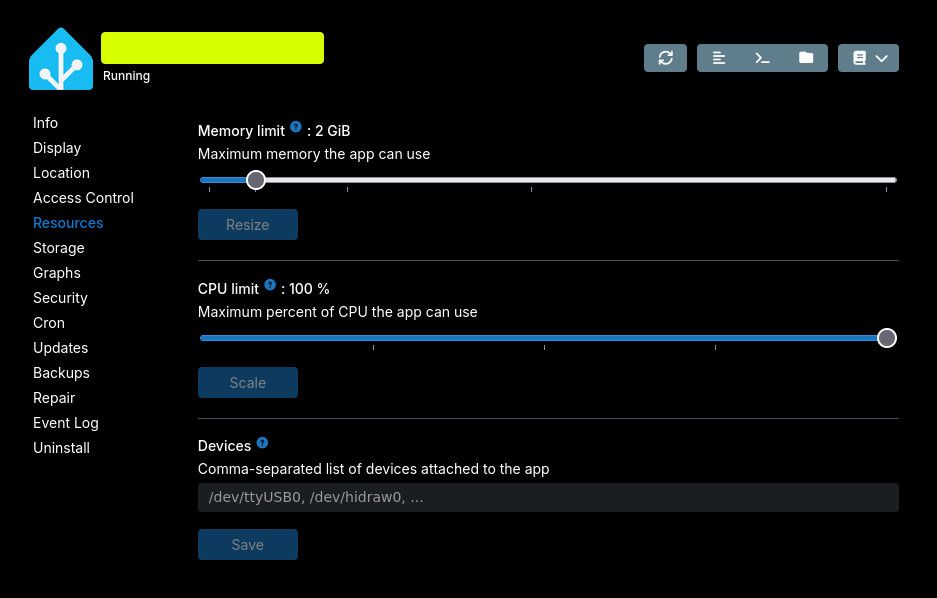
    1ac6d2f0-ebfd-4fb5-bdd9-0c46d8d30773-image.jpeg

    The host does recognize the new device:

    $ ls -l /dev/ttyACM0 
    crw-rw---- 1 root dialout 166, 0 Mar 19 22:01 /dev/ttyACM0
    
    Home Assistant

  • Built-in DNS Server - Not resolving connected clients
    G garza

    Hello, I have installed and connected my devices to OpenVPN, but the DNS server doesn't seem to work.
    I'm able to ping each device with their VPN IP but not able to do it with the devicename.username format as it doesn't get resolved.
    The DNS server has the default value: 10.8.0.1.

    How can this issue get resolved?
    I already followed the documentation and read this forum, but didn't find a solution.
    Thank you in advance.

    VPN

  • Built-in DNS Server - Not resolving connected clients
    G garza

    I continued debugging the issue and fortunately, I finally found the root cause and solution. Turns out the Ubuntu client wasn't updating the DHCP settings automatically, so I added the following lines to the ovpn file:

    up /etc/openvpn/update-systemd-resolved
    down /etc/openvpn/update-systemd-resolved
    

    And also installed the following dependencies:

    sudo apt install resolvconf openvpn-systemd-resolved
    

    With that, I was able to solve the issue and now all the clients are resolving automatically.

    VPN
  • Login

  • Don't have an account? Register

  • Login or register to search.
  • First post
    Last post
0
  • Categories
  • Recent
  • Tags
  • Popular
  • Bookmarks
  • Search