
@joseph omg! thank you so much for pointing in the right direction. i did upgrade our servers on Netcup a while ago, i kept the old ones in case i needed any data, turns out, the VMs had an autostart set and were running again.... Thank you! Case solved (i hope)
P
pdrupp
@pdrupp
Posts
-
Mails that do not make sense -
box:user verify@nebulon Hi! Thank you for your quick reply. I believe I've pinpointed the source of those "user verify" logs, which leads to a specific question.
These users all belong to groups using shared mailboxes. For example, MAILBOX1 is owned by GROUP1, which includes USER1, USER2, and USER3. These users access MAILBOX1 in Outlook but authenticate using their personal Cloudron user passwords.
I monitored the logs as departments shut down their PCs to go home, and those users immediately disappeared from the logs. I also tested by temporarily removing a few users from their groups (while they were still working), and the logs confirmed the pattern. Notably, one user from each group was consistently missing from the logs each time (a different one).
This raises my question: When USER1's Outlook initiates a connection, is the password verified successfully—but due to the group/shared mailbox feature, does Cloudron then check against multiple passwords for that mailbox, logging the "incorrect" ones for the other group members?
-
Backup ErrorsI'm thinking about the possibility that the length of the encrypted filenames might be too much for Wasabi... I'll dig deeper...
-
box:user verifyHi. My server logs are full of these messages
"Mar 12 16:02:09 box:user verify: USERNAME provided incorrect password"
Multiple times per second.
Where do i even start to look for the source? there is no further info in the logs.This instance is used as our mail server and the installed apps are: Surfer, Kutt, Rocket Chat, Minio, Jirafeau, SoGo and Wordpress.
There are 65 users on the server but the names i see in the error log are only roughly 10 of these.
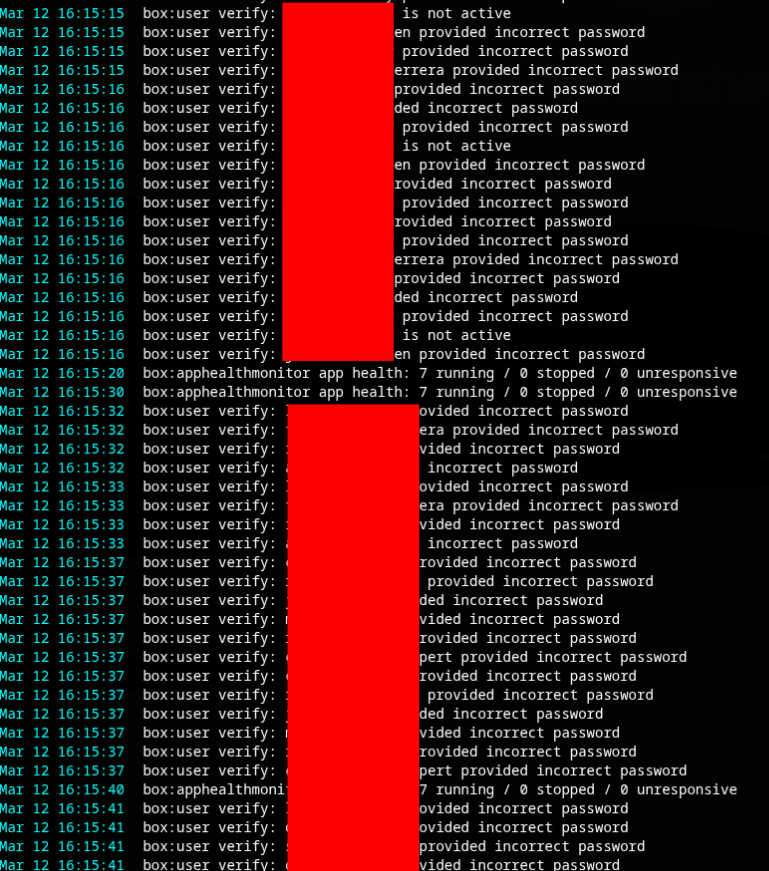
-
Struggling to connect OktaHello there, i am currently struggling with setting up Okta external directory.
After some trial and error, i got Cloudron to accept my settings, then when i hit sync, i see under the progress bar the one user i currently have in okta and the task finishes without error. but the user is not created. I guess i have an issue with uid, username or something the like. kinda lost. could anybody help me out here? thx -
Backup ErrorsHi, i have recently setup a 2nd Cloudron instance on Netcup that i only use as a mail server. Currently around 50 Mailboxes with a total of 180GB of data. I do hourly Backups to our on-prem Synology via Tailscale that work fine and fast. Usually between 1 and 5 minutes. Once per night i still want to make a direct backup from Cloudron to Wasabi S3. I already found out that rsync takes a lot of time, so i switched to tar for a few days, and that worked great, but still i would prefer rsync. There's pros and cons for both settings. So i switched back to rsync and the backups work, but during the upload i see a lot of 500 errors.
Here's an example:
Retrying (1) copy of 6sRz+6WKso8LhqISaUkfxZZhA02YwUGbjJPLNwP5YGg/viNdvgKqX2Z0h2Q8PWusD+r432QXN4DIGBmVbmWqqCQ/9EOUhxrSmnxrOk0C1mGNy73UPTrETurLwHZIMWcTaW4/WLjr6ukIaB+olQVkGmjQamtztBwQ0qCzvHqrSTsGUEJWr5EBiWSvHYqYxTOw-O7i/aBD30AGnxxwdei3sZYSXWzbyX2wX7ZCpUkgkj5czFDc/OL8uir0yWaEDftripDEB6aTiwnfGsOK+DCpt3UstR3LUPK4Lq3Vi6Y5W-I4dG6PXKSZaCtohB-DL-mGfDablPYtq-JDXCc3ke9wPI0otcFI. Error: InternalError: We encountered an internal error. Please retry the operation again later. 500What is this error, how can i fix it and how come the backup still finishes in a positive state?
-
Backup ErrorsHey joseph, thx for your reply. No this error is when backing up using Cloudrons Backup Module to Wasabi S3. The Synology makes a complete VM Backup in the background, no errors there. I hadn't activated logging in S3, i will change that and run a new backup.
-
Backup Errors@james Hi james, in the end i attached a second storage to the vm and configured to backups using ext4 and rsync. This works better. I still get regular cp exited with code 1 signal null errors but currently i can live with that. I set my backup schedule to every 2 hours, if every 2nd backup fails with this error, i still have 6 backups per day.
-
Backup Errors
