
App crashing frequently throws "500" error - PHP Fatal error: Allowed memory size of 134217728 bytes exhausted
-
my Shaarli app on Cloudron frequently throws 500 while loading the frontend.
everytime this occurs I see this in Shaarli log:Mar 04 14:40:58 [Tue Mar 04 13:40:58.352043 2025] [php:error] [pid 46] [client 172.18.0.1:36306] PHP Fatal error: Allowed memory size of 134217728 bytes exhausted (tried to allocate 9235624 bytes) in /app/code/application/bookmark/BookmarkIO.php on line 93I tried to increase the memory limit via Cloudron allocated resources and php.ini without improvement.
I've also opened an issue in Shaarli repo: https://github.com/shaarli/Shaarli/issues/2130 because this I/O intensive operation for loading such a small DB (9K links) is unbelievable.
I know CLoudron hardcodes this memory limit : https://git.cloudron.io/packages/shaarli-app/-/blob/master/Dockerfile?ref_type=heads#L31 so I first thought that my changes made to php.ini were not taken into account. I wonder also how to double check if those are really taken into account?Yet I also notice that Shaarli codebase contains a init.php file that hardcodes the memory limit to 128M : https://github.com/shaarli/Shaarli/blob/master/init.php#L18 so I also wonder if Cloudron php.ini makes sense.
Thanks for your help!
-
@SansGuidon I can update PHP to 8.3 and see if that helps.
One angle is: shaarli runs with a memory limit at container level. apache spins out processes and each of this has a php limit. It is possible that if apache spins say 5 processes, then 5*128MB > container limit . So, can you try adjusting the app memory limit to say 800MB and checking if that helps ? If that's the case, we can also adjust the package to use a better default memory limit.
-
Thank you @girish
I've already pushed the memory limit up to 1G yesterday without help
What I did try is to edit php.ini with something likedisable_functions = ini_set auto_prepend_file = /app/data/init.phpand the
init.phpwas a custom hack looking like<?php $original_ini_set = 'ini_set'; function ini_set($option, $value) { if ($option === 'memory_limit') { return false; } return call_user_func_array($GLOBALS['original_ini_set'], func_get_args()); } call_user_func($original_ini_set, 'memory_limit', '512M'); error_log("Prepend file loaded and memory_limit set to " . ini_get('memory_limit'));I don't recall all the different versions of the setting I've tried as it was passed midnight but at some point I could work around the hardcoded memory limit of 128M as defined in Shaarli init.php. Yet that didn't solve the root cause

but even if I could see an effective increase of memory limit used by Shaarli at runtime, so completely ignoring what was hardcoded in init.php , that didn't improve the situation
-
@girish thanks for the package update, it might have improved the stability as despite sress testing the shaarli app after updating I didn't face the same error as before. I consider that if this resolves the problem it is a big victory, yet I prefer to not jump to conclusions for now, a good night is needed it the problem is not solved, I should soon get new alerts. Otherwise then I'll mark the issue as solved (hopefully)

-
So far, no crash during the night
 . I'm now testing if lowering the memory allocated to this app by Cloudron will make things worse. Like going back to something like 256M instead of 1G.
 -
@girish As mentioned before, Shaarli hardcodes the memory limit in their init.php. I did not realize that Shaarli maintainer wasn't aware of that. Yet they suggest adjusting the way Cloudron packages Shaarli. https://github.com/shaarli/Shaarli/issues/2130#issuecomment-2726974132
Quoting the GitHub discussion:
@nodisc said in App frequently returns 500 error - PHP Fatal error: Allowed memory size of 134217728 bytes exhausted (cloudron) #2130@SansGuidon wow, I had no idea this was actually in the code (and always has been), and on my setup (apache+php-fpm) it doesn't have any effect (memory_limit stays at 256M), but I suspect it does with Cloudron's setup which still uses the deprecated apache2+mod_php setup.
Before moving forward, I suggest that cloudron's packaging should be modernized to use php-fpm + apache mpm-event which has many advantagesThey suggest that we verify this by hacking the init.php of Shaarli and remove the ini_set but I can't do that as init.php is part of
/app/codeand I do not want to break Shaarli on my Cloudron
Any idea to move this forward?
-
-
Hey, I've an update to report on this:
I had recently lot of crashes of my Shaarli instance that I couldn't explain nor troubleshoot. I was also convinced I should migrate away from Shaarli to fix my suffering. But with patience and being stubborn, come great success! A Shaarli plugin was it seems causing lot of troubles: https://github.com/ilesinge/shaarli-related, this plugin was causing memory exhausted issues on many pages of Shaarli.
Disabling it solved all my php memory exhausted issues.Hope it helps!
Related GH issues:
-
@girish This can be flagged as solved.
-
 J james has marked this topic as solved on
-
For the sake of completion,
The UptimeKuma chart for past week show a huge gain in responsiveness and stability since after disabling completely the plugin.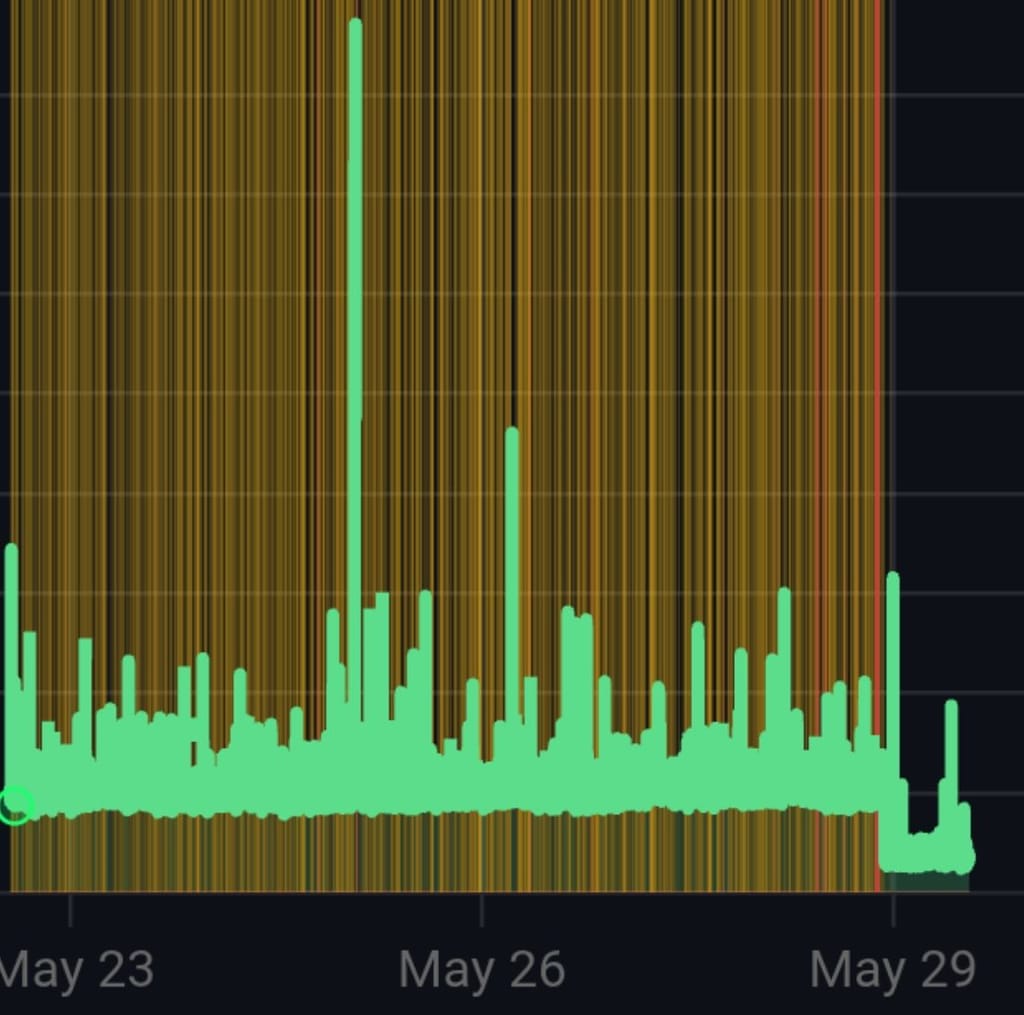


Hello! It looks like you're interested in this conversation, but you don't have an account yet.
Getting fed up of having to scroll through the same posts each visit? When you register for an account, you'll always come back to exactly where you were before, and choose to be notified of new replies (either via email, or push notification). You'll also be able to save bookmarks and upvote posts to show your appreciation to other community members.
With your input, this post could be even better 💗
Register Login