Cloudron makes it easy to run web apps like WordPress, Nextcloud, GitLab on your server. Find out more or install now.


Skip to content
  • Categories
  • Recent
  • Tags
  • Popular
  • Bookmarks
  • Search
Skins
  • Light
  • Brite
  • Cerulean
  • Cosmo
  • Flatly
  • Journal
  • Litera
  • Lumen
  • Lux
  • Materia
  • Minty
  • Morph
  • Pulse
  • Sandstone
  • Simplex
  • Sketchy
  • Spacelab
  • United
  • Yeti
  • Zephyr
  • Dark
  • Cyborg
  • Darkly
  • Quartz
  • Slate
  • Solar
  • Superhero
  • Vapor

  • Default (No Skin)
  • No Skin
Collapse
Brand Logo

Cloudron Forum

Apps | Demo | Docs | Install
  1. Cloudron Forum
  2. Vaultwarden
  3. Cloudron documentation outdated? Bitwarden now supports SSO

Cloudron documentation outdated? Bitwarden now supports SSO

Scheduled Pinned Locked Moved Vaultwarden
18 Posts 8 Posters 2.1k Views 9 Watching
  • Oldest to Newest
  • Newest to Oldest
  • Most Votes
Reply
  • Reply as topic
Log in to reply
This topic has been deleted. Only users with topic management privileges can see it.
  • M Offline
    M Offline
    marylou
    wrote on last edited by
    #1

    Hello!

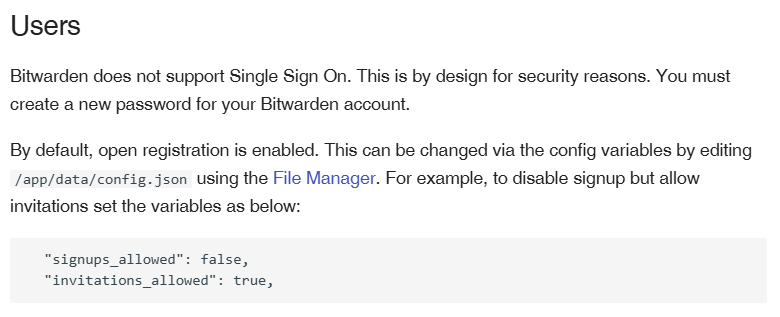
    I believe the Cloudron documentation may be outdated:
    674ec1d9-066b-4d0c-9ad9-edc32dcaefd6-image.png

    Bitwarden now supports SSO: https://bitwarden.com/help/about-sso/

    Can we expect SSO to be added to Vaultwarden?

    jdaviescoatesJ 1 Reply Last reply
    0
    • M marylou

      Hello!

      I believe the Cloudron documentation may be outdated:
      674ec1d9-066b-4d0c-9ad9-edc32dcaefd6-image.png

      Bitwarden now supports SSO: https://bitwarden.com/help/about-sso/

      Can we expect SSO to be added to Vaultwarden?

      jdaviescoatesJ Offline
      jdaviescoatesJ Offline
      jdaviescoates
      wrote on last edited by
      #2

      @marylou said in Cloudron documentation outdated? Bitwarden now supports SSO:

      Can we expect SSO to be added to Vaultwarden?

      I wonder if it could too. But I'm guessing perhaps not given SSO on Bitwarden is an enterprise-only feature.

      I use Cloudron with Gandi & Hetzner

      1 Reply Last reply
      0
      • andreasduerenA Offline
        andreasduerenA Offline
        andreasdueren
        wrote on last edited by
        #3

        I've been watching this for a while. This has been a longstanding feature request #3899 is the merged one from the seemingly hundreds of requests lol. But it does seem to be close to being finalized and merged.

        1 Reply Last reply
        2
        • girishG Offline
          girishG Offline
          girish
          Staff
          wrote on last edited by
          #4

          right, as others said, what applies to bitwarden doesn't necessarily apply to Vaultwarden...

          1 Reply Last reply
          1
          • andreasduerenA Offline
            andreasduerenA Offline
            andreasdueren
            wrote on last edited by
            #5

            https://github.com/dani-garcia/vaultwarden/commit/28b932befce51a5aa0274d08c371b1c13a8ba94d 🎉

            jdaviescoatesJ 1 Reply Last reply
            1
            • andreasduerenA andreasdueren

              https://github.com/dani-garcia/vaultwarden/commit/28b932befce51a5aa0274d08c371b1c13a8ba94d 🎉

              jdaviescoatesJ Offline
              jdaviescoatesJ Offline
              jdaviescoates
              wrote on last edited by
              #6

              @andreasdueren cool! I'm intrigued as to how exactly this will work in practice... will have to have a play around once we've got it in the Cloudron package...

              I use Cloudron with Gandi & Hetzner

              1 Reply Last reply
              0
              • andreasduerenA Offline
                andreasduerenA Offline
                andreasdueren
                wrote on last edited by
                #7

                https://github.com/dani-garcia/vaultwarden/pull/3899#event-19062298364

                Finally merged. Didn’t believe in it anymore lol

                1 Reply Last reply
                2
                • andreasduerenA Offline
                  andreasduerenA Offline
                  andreasdueren
                  wrote on last edited by
                  #8

                  Can we have this preconfigured on install, now that this is supported?

                  #####################################
                  ### SSO settings (OpenID Connect) ###
                  #####################################
                  
                  ## Controls whether users can login using an OpenID Connect identity provider
                  # SSO_ENABLED=false
                  
                  ## Prevent users from logging in directly without going through SSO
                  # SSO_ONLY=false
                  
                  ## On SSO Signup if a user with a matching email already exists make the association
                  # SSO_SIGNUPS_MATCH_EMAIL=true
                  
                  ## Allow unknown email verification status. Allowing this with `SSO_SIGNUPS_MATCH_EMAIL=true` open potential account takeover.
                  # SSO_ALLOW_UNKNOWN_EMAIL_VERIFICATION=false
                  
                  ## Base URL of the OIDC server (auto-discovery is used)
                  ##  - Should not include the `/.well-known/openid-configuration` part and no trailing `/`
                  ##  - ${SSO_AUTHORITY}/.well-known/openid-configuration should return a json document: https://openid.net/specs/openid-connect-discovery-1_0.html#ProviderConfigurationResponse
                  # SSO_AUTHORITY=https://auth.example.com
                  
                  ## Authorization request scopes. Optional SSO scopes, override if email and profile are not enough (`openid` is implicit).
                  # SSO_SCOPES="email profile"
                  
                  ## Additional authorization url parameters (ex: to obtain a `refresh_token` with Google Auth).
                  # SSO_AUTHORIZE_EXTRA_PARAMS="access_type=offline&prompt=consent"
                  
                  ## Activate PKCE for the Auth Code flow.
                  # SSO_PKCE=true
                  
                  ## Regex for additional trusted Id token audience (by default only the client_id is trusted).
                  # SSO_AUDIENCE_TRUSTED='^$'
                  
                  ## Set your Client ID and Client Key
                  # SSO_CLIENT_ID=11111
                  # SSO_CLIENT_SECRET=AAAAAAAAAAAAAAAAAAAAAAAA
                  
                  ## Optional Master password policy (minComplexity=[0-4]), `enforceOnLogin` is not supported at the moment.
                  # SSO_MASTER_PASSWORD_POLICY='{"enforceOnLogin":false,"minComplexity":3,"minLength":12,"requireLower":false,"requireNumbers":false,"requireSpecial":false,"requireUpper":false}'
                  
                  ## Use sso only for authentication not the session lifecycle
                  # SSO_AUTH_ONLY_NOT_SESSION=false
                  
                  ## Client cache for discovery endpoint. Duration in seconds (0 to disable).
                  # SSO_CLIENT_CACHE_EXPIRATION=0
                  
                  ## Log all the tokens, LOG_LEVEL=debug is required
                  # SSO_DEBUG_TOKENS=false
                  
                  I 1 Reply Last reply
                  2
                  • girishG Offline
                    girishG Offline
                    girish
                    Staff
                    wrote on last edited by girish
                    #9

                    @andreasdueren thanks, I have created a task internally for @vladimir.d .

                    edit: er, @andreasdueren looks like this is not released yet right ? https://github.com/dani-garcia/vaultwarden/releases has no releases saying so.

                    andreasduerenA 1 Reply Last reply
                    1
                    • girishG girish

                      @andreasdueren thanks, I have created a task internally for @vladimir.d .

                      edit: er, @andreasdueren looks like this is not released yet right ? https://github.com/dani-garcia/vaultwarden/releases has no releases saying so.

                      andreasduerenA Offline
                      andreasduerenA Offline
                      andreasdueren
                      wrote on last edited by
                      #10

                      @girish said in Cloudron documentation outdated? Bitwarden now supports SSO:

                      looks like this is not released yet right

                      I guess you're right, merge happened after the last release.

                      1 Reply Last reply
                      1
                      • andreasduerenA andreasdueren

                        Can we have this preconfigured on install, now that this is supported?

                        #####################################
                        ### SSO settings (OpenID Connect) ###
                        #####################################
                        
                        ## Controls whether users can login using an OpenID Connect identity provider
                        # SSO_ENABLED=false
                        
                        ## Prevent users from logging in directly without going through SSO
                        # SSO_ONLY=false
                        
                        ## On SSO Signup if a user with a matching email already exists make the association
                        # SSO_SIGNUPS_MATCH_EMAIL=true
                        
                        ## Allow unknown email verification status. Allowing this with `SSO_SIGNUPS_MATCH_EMAIL=true` open potential account takeover.
                        # SSO_ALLOW_UNKNOWN_EMAIL_VERIFICATION=false
                        
                        ## Base URL of the OIDC server (auto-discovery is used)
                        ##  - Should not include the `/.well-known/openid-configuration` part and no trailing `/`
                        ##  - ${SSO_AUTHORITY}/.well-known/openid-configuration should return a json document: https://openid.net/specs/openid-connect-discovery-1_0.html#ProviderConfigurationResponse
                        # SSO_AUTHORITY=https://auth.example.com
                        
                        ## Authorization request scopes. Optional SSO scopes, override if email and profile are not enough (`openid` is implicit).
                        # SSO_SCOPES="email profile"
                        
                        ## Additional authorization url parameters (ex: to obtain a `refresh_token` with Google Auth).
                        # SSO_AUTHORIZE_EXTRA_PARAMS="access_type=offline&prompt=consent"
                        
                        ## Activate PKCE for the Auth Code flow.
                        # SSO_PKCE=true
                        
                        ## Regex for additional trusted Id token audience (by default only the client_id is trusted).
                        # SSO_AUDIENCE_TRUSTED='^$'
                        
                        ## Set your Client ID and Client Key
                        # SSO_CLIENT_ID=11111
                        # SSO_CLIENT_SECRET=AAAAAAAAAAAAAAAAAAAAAAAA
                        
                        ## Optional Master password policy (minComplexity=[0-4]), `enforceOnLogin` is not supported at the moment.
                        # SSO_MASTER_PASSWORD_POLICY='{"enforceOnLogin":false,"minComplexity":3,"minLength":12,"requireLower":false,"requireNumbers":false,"requireSpecial":false,"requireUpper":false}'
                        
                        ## Use sso only for authentication not the session lifecycle
                        # SSO_AUTH_ONLY_NOT_SESSION=false
                        
                        ## Client cache for discovery endpoint. Duration in seconds (0 to disable).
                        # SSO_CLIENT_CACHE_EXPIRATION=0
                        
                        ## Log all the tokens, LOG_LEVEL=debug is required
                        # SSO_DEBUG_TOKENS=false
                        
                        I Offline
                        I Offline
                        IniBudi
                        wrote last edited by
                        #11

                        @andreasdueren said in Cloudron documentation outdated? Bitwarden now supports SSO:

                        SSO_AUTHORITY=

                        I encountered an issue when attempting to activate SSO using Cloudron OpenID.

                        I don't know why SSO_AUTHORITY, I just input my Cloudron URL (my.cloudron.example), but the SSO failed.

                        Do you face the same problem?

                        jdaviescoatesJ 1 Reply Last reply
                        0
                        • I IniBudi

                          @andreasdueren said in Cloudron documentation outdated? Bitwarden now supports SSO:

                          SSO_AUTHORITY=

                          I encountered an issue when attempting to activate SSO using Cloudron OpenID.

                          I don't know why SSO_AUTHORITY, I just input my Cloudron URL (my.cloudron.example), but the SSO failed.

                          Do you face the same problem?

                          jdaviescoatesJ Offline
                          jdaviescoatesJ Offline
                          jdaviescoates
                          wrote last edited by jdaviescoates
                          #12

                          @IniBudi I haven't looked at this at all, but as I understand it on Cloudron it's generally not possible to migrate an existing app from "let up manage users" to "LDAP or OIDC". It has to be chosen at install.

                          Presumably a fresh new install would work?

                          I use Cloudron with Gandi & Hetzner

                          1 Reply Last reply
                          0
                          • jamesJ Offline
                            jamesJ Offline
                            james
                            Staff
                            wrote last edited by
                            #13

                            Hello @inibudi
                            Currently, the Cloudron @vaultwarden app does not yet support OIDC/SSO.

                            As stated above:

                            @girish said in Cloudron documentation outdated? Bitwarden now supports SSO:

                            thanks, I have created a task internally for @vladimir.d .

                            I C 2 Replies Last reply
                            2
                            • jamesJ james

                              Hello @inibudi
                              Currently, the Cloudron @vaultwarden app does not yet support OIDC/SSO.

                              As stated above:

                              @girish said in Cloudron documentation outdated? Bitwarden now supports SSO:

                              thanks, I have created a task internally for @vladimir.d .

                              I Offline
                              I Offline
                              IniBudi
                              wrote last edited by
                              #14

                              @james thank you James for the information

                              1 Reply Last reply
                              0
                              • C Offline
                                C Offline
                                charlesnw
                                wrote last edited by
                                #15

                                I am attempting to get a brand new installation of VaultWarden working with Cloudron OIDC SSO.

                                I have already very carefully read over:

                                https://docs.cloudron.io/user-directory/#openid-connect
                                https://github.com/dani-garcia/vaultwarden/wiki/Enabling-SSO-support-using-OpenId-Connect

                                to produce the below (redacted) config.json..

                                https://my.knownelement.com/openid/.well-known/openid-configuration/
                                
                                
                                https://my.cloudron.example/.well-known/openid-configuration 
                                https://my.cloudron.example/openid/.well-known/openid-configuration
                                
                                
                                 SSO_AUTHORITY : the OpenID Connect Discovery endpoint of your SSO
                                
                                    Should not include the /.well-known/openid-configuration part and no trailing /
                                    $SSO_AUTHORITY/.well-known/openid-configuration should return the a json document: https://openid.net/specs/openid-connect-discovery-1_0.html#ProviderConfigurationResponse


                                {
                                  "domain": "https://passwords.knownelement.com",
                                  "sends_allowed": true,
                                  "incomplete_2fa_time_limit": 3,
                                  "disable_icon_download": false,
                                  "signups_allowed": false,
                                  "signups_verify": false,
                                  "signups_verify_resend_time": 3600,
                                  "signups_verify_resend_limit": 6,
                                  "invitations_allowed": false,
                                  "emergency_access_allowed": true,
                                  "email_change_allowed": false,
                                  "password_iterations": 600000,
                                  "password_hints_allowed": false,
                                  "show_password_hint": false,
                                  "admin_token": "heavily-redacted :) ",
                                  "invitation_org_name": "KNEL Password Vault",
                                  "ip_header": "X-Forwarded-For",
                                  "icon_redirect_code": 302,
                                  "icon_cache_ttl": 2592000,
                                  "icon_cache_negttl": 259200,
                                  "icon_download_timeout": 10,
                                  "http_request_block_non_global_ips": true,
                                  "disable_2fa_remember": false,
                                  "authenticator_disable_time_drift": false,
                                  "require_device_email": false,
                                  "reload_templates": false,
                                  "log_timestamp_format": "%Y-%m-%d %H:%M:%S.%3f",
                                  "admin_session_lifetime": 20,
                                  "increase_note_size_limit": false,
                                  "dns_prefer_ipv6": false,
                                  "sso_enabled": true,
                                  "sso_only": true,
                                  "sso_signups_match_email": true,
                                  "sso_allow_unknown_email_verification": false,
                                  "sso_client_id": "redacted",
                                  "sso_client_secret": "redacted",
                                  "sso_authority": "https://my.knownelement.com",
                                  "sso_scopes": "openid email profile",
                                  "sso_pkce": true,
                                  "sso_callback_path": "https://passwords.knownelement.com/identity/connect/oidc-signin",
                                  "sso_auth_only_not_session": true,
                                  "sso_client_cache_expiration": 0,
                                  "sso_debug_tokens": false,
                                  "_enable_yubico": true,
                                  "_enable_duo": true,
                                  "_enable_smtp": true,
                                  "use_sendmail": false,
                                  "smtp_host": "mail",
                                  "smtp_security": "off",
                                  "smtp_port": 2525,
                                  "smtp_from": "passwords.app@knownelement.com",
                                  "smtp_from_name": "Vaultwarden",
                                  "smtp_username": "passwords.app@knownelement.com",
                                  "smtp_password": "redacted",
                                  "smtp_auth_mechanism": "Plain",
                                  "smtp_timeout": 15,
                                  "smtp_embed_images": true,
                                  "smtp_accept_invalid_certs": true,
                                  "smtp_accept_invalid_hostnames": true,
                                  "_enable_email_2fa": false,
                                  "email_token_size": 6,
                                  "email_expiration_time": 600,
                                  "email_attempts_limit": 3,
                                  "email_2fa_enforce_on_verified_invite": false,
                                  "email_2fa_auto_fallback": false
                                }
                                

                                I suppose I can increase logging to see if that helps.

                                Vaultwarden keeps asking for a master password, even though I've disabled that and set sso only.

                                1 Reply Last reply
                                0
                                • jamesJ james

                                  Hello @inibudi
                                  Currently, the Cloudron @vaultwarden app does not yet support OIDC/SSO.

                                  As stated above:

                                  @girish said in Cloudron documentation outdated? Bitwarden now supports SSO:

                                  thanks, I have created a task internally for @vladimir.d .

                                  C Offline
                                  C Offline
                                  charlesnw
                                  wrote last edited by
                                  #16

                                  @james Oh is this something that actually needs to be changed in the app json to make OIDC integration work at all?

                                  jamesJ 1 Reply Last reply
                                  1
                                  • C charlesnw

                                    @james Oh is this something that actually needs to be changed in the app json to make OIDC integration work at all?

                                    jamesJ Offline
                                    jamesJ Offline
                                    james
                                    Staff
                                    wrote last edited by
                                    #17

                                    Hello @charlesnw
                                    Yes.

                                    1 Reply Last reply
                                    0
                                    • J Offline
                                      J Offline
                                      joseph
                                      Staff
                                      wrote last edited by
                                      #18

                                      @charlesnw there is a task for @vladimir.d to fix the package itself to support SSO. He is still on vacation and should add this when he is back .

                                      1 Reply Last reply
                                      0
                                      Reply
                                      • Reply as topic
                                      Log in to reply
                                      • Oldest to Newest
                                      • Newest to Oldest
                                      • Most Votes


                                      • Login

                                      • Don't have an account? Register

                                      • Login or register to search.
                                      • First post
                                        Last post
                                      0
                                      • Categories
                                      • Recent
                                      • Tags
                                      • Popular
                                      • Bookmarks
                                      • Search


