
-
Description
MiroTalk SFU regularly gets stuck during the automatic update process:
Docker Error: (HTTP code 500) server error - failed to set up container networking: driver failed programming external connectivity on endpoint a877975d-38be-4088-bc92-e0d7a486a818 (2e5adaa635a95bd65ca0f290712065d444528e3420c49f2f88323b40c62caaa5): failed to bind host port for 0.0.0.0:40014:172.18.16.130:40014/tcp: address already in use
Steps to reproduce
Not sure. It happens during updates though.
Troubleshooting Already Performed
I've stopped the app, tried to retry the upgrade, retry the configure task. Sometimes it works after a few tries, other times I have to restart the server first.
System Details
Hetzner
vServer
4 Core "AMD EPYC-Milan Processor"
16.37 GB RAM & 4.29 GB SwapCloudron Version
9.0.15
Ubuntu Version
24.04
Output of
cloudron-support --troubleshootLinux: 6.8.0-88-generic Ubuntu: noble 24.04 Execution environment: kvm Processor: AMD EPYC-Milan Processor BIOS NotSpecified CPU @ 2.0GHz x 4 RAM: 15989992KB Disk: /dev/sda1 44G [OK] node version is correct [OK] IPv6 is enabled in kernel. No public IPv6 address [OK] docker is running [OK] docker version is correct [OK] MySQL is running [OK] nginx is running [OK] dashboard cert is valid [OK] dashboard is reachable via loopback [OK] No pending database migrations [OK] Service 'mysql' is running and healthy [OK] Service 'postgresql' is running and healthy [OK] Service 'mongodb' is running and healthy [OK] Service 'mail' is running and healthy [OK] Service 'graphite' is running and healthy [OK] Service 'sftp' is running and healthy [OK] box v9.0.15 is running [OK] netplan is good [OK] DNS is resolving via systemd-resolved [OK] Dashboard is reachable via domain name [WARN] Domain domain.com expiry check skipped because whois does not have this information [OK] unbound is running -
Hello @djxx
This is a common issue and has been reported multiple times.
Please try to stop the app, wait a minute and then attempt the update process again.
If this still fails, please stop the app again.
Then connect with ssh to your server.Since your error is the following:
Docker Error: (HTTP code 500) server error - failed to set up container networking: driver failed programming external connectivity on endpoint a877975d-38be-4088-bc92-e0d7a486a818 (2e5adaa635a95bd65ca0f290712065d444528e3420c49f2f88323b40c62caaa5): failed to bind host port for 0.0.0.0:40014:172.18.16.130:40014/tcp: address already in useit reveals you have changed the ports to 40000 'ish.
Could you please confirm what port you have chosen?
From the ports you have chosen you can run the following command in ssh to see if any other application is already using the the ports:
If you have chosen40000then the Mirotalk app uses 100 ports of so40000to40100.lsof -i :40000-40100 -
Hello @djxx
This is a common issue and has been reported multiple times.
Please try to stop the app, wait a minute and then attempt the update process again.
If this still fails, please stop the app again.
Then connect with ssh to your server.Since your error is the following:
Docker Error: (HTTP code 500) server error - failed to set up container networking: driver failed programming external connectivity on endpoint a877975d-38be-4088-bc92-e0d7a486a818 (2e5adaa635a95bd65ca0f290712065d444528e3420c49f2f88323b40c62caaa5): failed to bind host port for 0.0.0.0:40014:172.18.16.130:40014/tcp: address already in useit reveals you have changed the ports to 40000 'ish.
Could you please confirm what port you have chosen?
From the ports you have chosen you can run the following command in ssh to see if any other application is already using the the ports:
If you have chosen40000then the Mirotalk app uses 100 ports of so40000to40100.lsof -i :40000-40100 -
 J james marked this topic as a regular topic on
-
J james moved this topic from Support on
-
I have had that happened with Mirotalk too,. Sometimes update get stuck. Happens less often these days but still sometimes. I either have to restart the app or remove and reinstall.
-
Port allocation behavior
By default, when SFU_SERVER is set to false, the application uses a range of 100 ports.
when SFU_SERVER=true it allocate ports starting from 40000 default + CPU core eg if your server has 4CPU so become 40000 - 40003 (only 3 ports needed)
Cloudron integration
To support this behavior on Cloudron,
SFU_SERVERshould be exposed as a toggle (switch button) in the MiroTalk SFU app settings (Location).
When the switch is enabled, the port allocation logic instart.shcan be updated something as follows:# Enable / disable SFU server (default: false) readonly SFU_SERVER="${SFU_SERVER:-false}" # Number of CPU cores (used only when SFU is enabled) readonly CPU_CORES="$(nproc)" # Base TCP port (default: 25000) readonly SFU_TCP_BASE="${SFU_TCP:-25000}" if [[ "$SFU_SERVER" == "true" ]]; then # SFU enabled: # allocate one port per CPU core readonly SFU_MAX_PORT=$(( SFU_TCP_BASE + CPU_CORES - 1 )) else # Default behavior: # allocate 100 ports starting from the base port readonly SFU_MAX_PORT=$(( SFU_TCP_BASE + 100 )) fi
Benefits of this approach
-
 Fewer ports allocated
Only the ports that are actually needed are opened, especially in SFU mode. -
Reduced port conflicts
Smaller port ranges significantly lower the chance of clashes with other services on the same host. -
Better Cloudron compatibility
Minimal port exposure aligns well with Cloudron’s strict networking and security model. -
Scales with hardware
Port allocation automatically adapts to the number of CPU cores available. -
User control
ExposingSFU_SERVERas a switch allows users to explicitly choose whether to run in SFU mode or keep the default behavior.
-
-
@james said in MiroTalk Update regularly fails after update:
Does this have any other effects?
In theory, it shouldn’t have any other effects, as long as the user can switch between these two modes. I’m not entirely sure why Mediasoup doesn’t use a server SFU by default, but you could ask the Mediasoup support forum for clarification.
-
@nebulon It also happens after system updates or restarts. It seems it's a roll of the dice if the ports aren't already taken. Restarting the app doesn't fix it anymore, so now when it crashes I change the SFU TCP/UDP port range to something else and it works when the app restarts.
-
@nebulon It also happens after system updates or restarts. It seems it's a roll of the dice if the ports aren't already taken. Restarting the app doesn't fix it anymore, so now when it crashes I change the SFU TCP/UDP port range to something else and it works when the app restarts.
Restarting the app doesn't fix it anymore, so now when it crashes I change the SFU TCP/UDP port range to something else and it works when the app restarts.
This issue can occur if another application is already using ports within the 40000–40100 range. To resolve it, you can either change the port range (for example, starting from 25000)
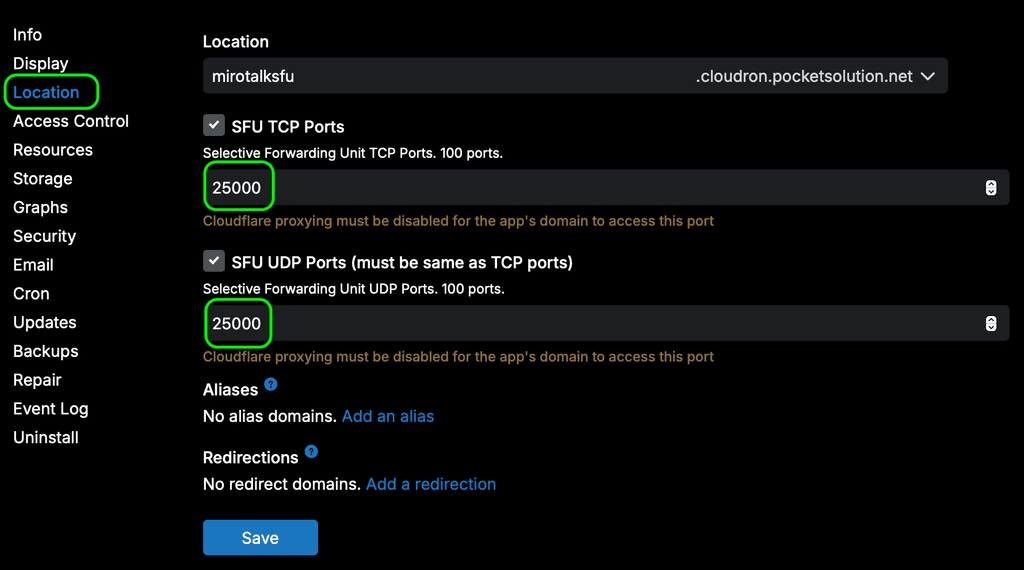
or enable WebRTC server mode in the env (edit it via Cloudron file manager), which requires fewer ports, as described above.
SFU_SERVER=trueThen restart the instance.
Edit: The second option requires implementation on the Cloudron side, as described here:
https://forum.cloudron.io/post/117374 -
It's happening again, and this time I don't see a container conflict but rather a health check failure that it cant find it's public IP:
Mar 30 09:06:14 [3/30/2026, 16:06:14:098] [Server] Failed to detect IP from http://api.ipify.org 'getaddrinfo EAI_AGAIN api.ipify.org'
Mar 30 09:06:14 [3/30/2026, 16:06:14:101] [Server] Failed to detect IP from http://ipinfo.io/ip 'getaddrinfo EAI_AGAIN ipinfo.io'
Mar 30 09:06:14 [3/30/2026, 16:06:14:102] [Server] Failed to detect IP from http://ifconfig.me/ip 'getaddrinfo EAI_AGAIN ifconfig.me'
Mar 30 09:06:14 [3/30/2026, 16:06:14:103] [Server] Public IP detection failed 'All public IP detection services failed! Please check your network connection'
Mar 30 09:06:14 ⠙
Mar 30 09:06:23 => Healthcheck error: Error: connect EHOSTUNREACH 172.18.16.130:3010
When I check what is using port 3010, it's nodeJS running /home/yellowtent/box/box.js
-
It's happening again, and this time I don't see a container conflict but rather a health check failure that it cant find it's public IP:
Mar 30 09:06:14 [3/30/2026, 16:06:14:098] [Server] Failed to detect IP from http://api.ipify.org 'getaddrinfo EAI_AGAIN api.ipify.org'
Mar 30 09:06:14 [3/30/2026, 16:06:14:101] [Server] Failed to detect IP from http://ipinfo.io/ip 'getaddrinfo EAI_AGAIN ipinfo.io'
Mar 30 09:06:14 [3/30/2026, 16:06:14:102] [Server] Failed to detect IP from http://ifconfig.me/ip 'getaddrinfo EAI_AGAIN ifconfig.me'
Mar 30 09:06:14 [3/30/2026, 16:06:14:103] [Server] Public IP detection failed 'All public IP detection services failed! Please check your network connection'
Mar 30 09:06:14 ⠙
Mar 30 09:06:23 => Healthcheck error: Error: connect EHOSTUNREACH 172.18.16.130:3010
When I check what is using port 3010, it's nodeJS running /home/yellowtent/box/box.js
Mar 30 09:06:14 [3/30/2026, 16:06:14:098] [Server] Failed to detect IP from http://api.ipify.org 'getaddrinfo EAI_AGAIN api.ipify.org'
Mar 30 09:06:14 [3/30/2026, 16:06:14:101] [Server] Failed to detect IP from http://ipinfo.io/ip 'getaddrinfo EAI_AGAIN ipinfo.io'
Mar 30 09:06:14 [3/30/2026, 16:06:14:102] [Server] Failed to detect IP from http://ifconfig.me/ip 'getaddrinfo EAI_AGAIN ifconfig.me'
Mar 30 09:06:14 [3/30/2026, 16:06:14:103] [Server] Public IP detection failed 'All public IP detection services failed! Please check your network connection'
This looks like a
network-related issuerather than something specific to MiroTalk.If
SFU_ANNOUNCED_IPis not configured, the system will automatically rely on three external services to determine the instance’s public IPv4 address.
Is there a
firewallor network filter in between that might beblocking traffic?
NOTE: As I can see, on Cloudron this is handled by the command in:
https://git.cloudron.io/packages/mirotalksfu-app/-/blob/main/start.sh#L39If it fails (mean not set SFU_ANNOUNCED_IP), MiroTalk SFU uses an internal fallback mechanism that queries three external services in sequence to determine a valid public IPv4 address for the instance.
-
Mar 30 09:06:14 [3/30/2026, 16:06:14:098] [Server] Failed to detect IP from http://api.ipify.org 'getaddrinfo EAI_AGAIN api.ipify.org'
Mar 30 09:06:14 [3/30/2026, 16:06:14:101] [Server] Failed to detect IP from http://ipinfo.io/ip 'getaddrinfo EAI_AGAIN ipinfo.io'
Mar 30 09:06:14 [3/30/2026, 16:06:14:102] [Server] Failed to detect IP from http://ifconfig.me/ip 'getaddrinfo EAI_AGAIN ifconfig.me'
Mar 30 09:06:14 [3/30/2026, 16:06:14:103] [Server] Public IP detection failed 'All public IP detection services failed! Please check your network connection'
This looks like a
network-related issuerather than something specific to MiroTalk.If
SFU_ANNOUNCED_IPis not configured, the system will automatically rely on three external services to determine the instance’s public IPv4 address.
Is there a
firewallor network filter in between that might beblocking traffic?
NOTE: As I can see, on Cloudron this is handled by the command in:
https://git.cloudron.io/packages/mirotalksfu-app/-/blob/main/start.sh#L39If it fails (mean not set SFU_ANNOUNCED_IP), MiroTalk SFU uses an internal fallback mechanism that queries three external services in sequence to determine a valid public IPv4 address for the instance.
@MiroTalk I can't speak for what Cloudron is doing - but after changing the port ranges again and restarting the app, it starts working again. Perhaps there's a step (getting the public IP) that only happens on reconfiguration but the app expects it to happen on every start?





Hello! It looks like you're interested in this conversation, but you don't have an account yet.
Getting fed up of having to scroll through the same posts each visit? When you register for an account, you'll always come back to exactly where you were before, and choose to be notified of new replies (either via email, or push notification). You'll also be able to save bookmarks and upvote posts to show your appreciation to other community members.
With your input, this post could be even better 💗
Register Login