
Cloudron update recreated docker cloudron network causing database connectivity issues for all apps
-
Are those posts just AI gibberish to keep people busy?
Are those posts just AI gibberish to keep people busy?
No, as I said in my original post, I used AI to troubleshoot the issue - I'm just trying to provide as much information as possible to get to the issue fixed permanently.
-
2026-05-09: After Proxmox host kernel update + reboot
That could be the culprit… (e.g. LXC is not supported)
https://forum.cloudron.io/tags/proxmoxHave you already eliminated Proxmox and /or your network setup as the source of errors?
-
Also:
[FAIL] Could not load dashboard domain.
Hairpin NAT is not working. Please check if your router supports ithttps://docs.cloudron.io/installation/home-server#nat-loopback
-
2026-05-09: After Proxmox host kernel update + reboot
That could be the culprit… (e.g. LXC is not supported)
https://forum.cloudron.io/tags/proxmoxHave you already eliminated Proxmox and /or your network setup as the source of errors?
2026-05-09: After Proxmox host kernel update + reboot
That could be the culprit… (e.g. LXC is not supported)
https://forum.cloudron.io/tags/proxmoxHave you already eliminated Proxmox and /or your network setup as the source of errors?
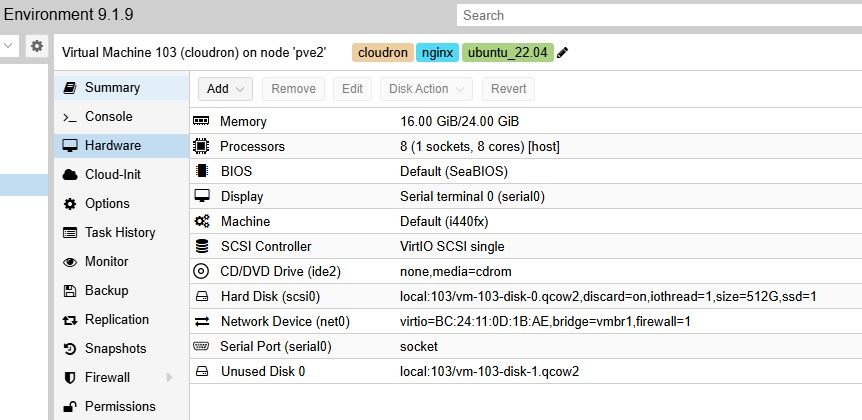
I run Cloudron on a dedicated VM, not as an LXC. It has been running flawlessly for about six months, with regular updates as and when they come out (to both Cloudron and PVE). The upgrade to 9.1.7 and today's PVE kernel update reboot are the only times this issue has occurred.
-
Also:
[FAIL] Could not load dashboard domain.
Hairpin NAT is not working. Please check if your router supports ithttps://docs.cloudron.io/installation/home-server#nat-loopback
Also:
[FAIL] Could not load dashboard domain.
Hairpin NAT is not working. Please check if your router supports ithttps://docs.cloudron.io/installation/home-server#nat-loopback
My PVE physical host is in a datacenter and all access to the apps are either public or private over VPN from my home site. I use split DNS where it matters which is preferable to NAT reflection in my use cases.
Cheers
Leigh
-
Hello @leighmhart
At this point your Cloudron system has become a black box, and we can not analyse this issue from just forum posts.
Since you have run some nft commands, please ensure that the servicenftables.serviceis not enabled or running.systemctl disable --now nftables.serviceiptablesandnftablescan be run together, but we do not support this at all and it will cause issues if not done properly.Reboot your system after that. This should ensure that the Cloudron default for iptables is restored.
If the issue persists, please report back here. -
Hello @leighmhart
At this point your Cloudron system has become a black box, and we can not analyse this issue from just forum posts.
Since you have run some nft commands, please ensure that the servicenftables.serviceis not enabled or running.systemctl disable --now nftables.serviceiptablesandnftablescan be run together, but we do not support this at all and it will cause issues if not done properly.Reboot your system after that. This should ensure that the Cloudron default for iptables is restored.
If the issue persists, please report back here.Hello @leighmhart
At this point your Cloudron system has become a black box, and we can not analyse this issue from just forum posts.
Since you have run some nft commands, please ensure that the servicenftables.serviceis not enabled or running.systemctl disable --now nftables.serviceiptablesandnftablescan be run together, but we do not support this at all and it will cause issues if not done properly.Reboot your system after that. This should ensure that the Cloudron default for iptables is restored.
If the issue persists, please report back here.Hi @james,
root@cloudron:~# systemctl status nftables.service
○ nftables.service - nftables
     Loaded: loaded (/lib/systemd/system/nftables.service; disabled; vendor pre>
     Active: inactive (dead)
       Docs: man:nft(8)
             http://wiki.nftables.org
I did not enable nftables, I just used those commands to resolve the issue with the tables - the system is currently in a broken state if you are able to take a look.
appreciate your continued support!
Regards
Leigh
-
@leighmhart can you write to me on support@cloudron.io ? We can take a look
-
I have been debugging this set up on support . The issue is that 172.18.x.x for some reason does not work on that VM. The minimal repo is (I cleared all containers, cleared docker and just the below):
docker network create --subnet=172.18.0.0/16 cloudron
docker run -d --name c1 --network cloudron alpine sleep 1d
docker run -d --name c2 --network cloudron alpine sleep 1d
docker exec c1 sh -c "apk add --no-cache iputils >/dev/null && ping -4 -c 3 c2"
The above does not work. Changing network to anything other than 172.18, say 172.19 works. I suspect somehow host rules and/or host network is interfering with the docker network. I am not sure how this is possible, but it does interfere

-
Alright, found the issue! This magical command helped me debug the complete firewall rules:
{ echo '=== iptables-save ==='; iptables-save; \
  echo '=== ip6tables-save ==='; ip6tables-save; \
  echo '=== nft ruleset ==='; nft list ruleset; \
  echo '=== ip route ==='; ip route; \
  echo '=== ip -6 route ==='; ip -6 route; \
  echo '=== ip a ==='; ip -br addr; \
  echo '=== bridges ==='; bridge link; } > /tmp/netdump.txt
What I found is that it had PREROUTING rules pointing to a stale bridge. The issue was that a package called
netfilter-persistentwas enabled on the server.netfilter-persistentwill dump the current iptable rules at /etc/ipta/bles/* and restore it on reboot. Cloudron recreates thecloudrondocker network during some updates like 9.1.7. When the network got re-created, it got a new bridge network id. However, the old iptable rules were referencing the previously dead bridge id and when restoring corrupting iptables. The solution was simply to purgenetfilter-persistentpackage. -
J joseph has marked this topic as solved on
-
@joseph thank you so much! What a wild ride this was - I found the smoking gun by checking package manager logs:
On 2026-03-29 21:23:20 I installed prometheus-node-exporter to ship metrics to my Grafana monitoring stack - apparently the workflow also installed iptables-persistent which installed netfilter-persistent as a dependency. why, I don't know - but lesson learned.


Hello! It looks like you're interested in this conversation, but you don't have an account yet.
Getting fed up of having to scroll through the same posts each visit? When you register for an account, you'll always come back to exactly where you were before, and choose to be notified of new replies (either via email, or push notification). You'll also be able to save bookmarks and upvote posts to show your appreciation to other community members.
With your input, this post could be even better 💗
Register Login