
NocoDB and Metabase on my Cloudron instance
-
Cloudron Support,
I have installed both NocoDB and Metabase on my Cloudron instance.
Both apps installed successfully, but I am unable to connect Metabase to NocoDB’s database.NocoDB is running with SQLite by default, and when I try to configure it to use the PostgreSQL addon, the connection does not work.
I would like to clarify the following:
Does the Free plan support internal networking between apps (for example, allowing Metabase to connect to NocoDB through the PostgreSQL addon)?
Is the failure to switch NocoDB to PostgreSQL related to Free plan limitations?
After upgrading to the Pro plan, will I be able to configure NocoDB to use PostgreSQL and then allow Metabase to connect to that PostgreSQL database normally?
Thanks in advance.
Luis@luisegundo said in NocoDB and Metabase on my Cloudron instance:
NocoDB is running with SQLite by default
NocoDB is using postgres by default. What makes you think it is using SQLite by default? If you open Web Terminal, you can run
env | grep POSTGRES_and you will see the postgres credentials nocodb uses. You can put these credentials in metabase to connect.Does the Free plan support internal networking between apps (for example, allowing Metabase to connect to NocoDB through the PostgreSQL addon)?
All this is not related to subscription and plans. It's deployed the same way in all the plans.
-
Hi,
I have a clean Cloudron Pro installation.
- Metabase installed from Cloudron App Store
- I completed the initial Metabase setup
- I can access Metabase normally
- However, I do NOT see "Admin settings" anywhere
- There is no option to add a database
In the top-right settings menu, I only see:
- Account settings
- Help
- About Metabase
This suggests my user is not an admin.
Questions:
- How can I confirm if my Metabase user is an admin on Cloudron?
- How can I promote my user to admin?
- Is there a Cloudron-supported way to reset or assign the Metabase admin user?
Thanks.
-
Hi Cloudron Support,
We have a fresh Cloudron Pro installation (domain dados.server.seuimovel.com.br). All the apps we plan to use are already installed and the admin user (admin@cloudron.local) is working, so we have full administrative access in the UI.
Our stack will consist of the following Cloudron apps (plus a few external services that must be connected to them):
Category Cloudron App Purpose
Data & Processes NocoDB Low‑code relational data store (tables/funnels)
Automations n8n Workflow engine (triggered by webhooks, timers, etc.)
Customer Service Chatwoot Live‑chat / ticketing system
Email Marketing Listmonk Newsletter & bulk‑email campaigns
Analytics Metabase BI dashboards and reportingExportar
Copiar
External services we need to connect:Z‑API – WhatsApp gateway (to be called from Chatwoot and n8n)
Amazon SES – high‑deliverability SMTP for Listmonk
The core open question is how to provide a single PostgreSQL database that can be used by both NocoDB and Metabase (and optionally by n8n for its own data). We have identified three possible approaches, but we need confirmation on whether each is supported on Cloudron, and, if so, the exact steps to implement them:1️⃣ Use the internal PostgreSQL instance that NocoDB runs on (the one that is not exposed in the Cloudron UI).
Is it possible to expose that internal database to other apps (Metabase, n8n) via a network‑allowed hostname/port?
If it is possible, what configuration changes (e.g., Cloudron networking, app permissions, environment variables) are required?2️⃣ Deploy a dedicated PostgreSQL app on Cloudron (the “PostgreSQL” addon) and configure both NocoDB and Metabase to connect to it.
What are the exact steps to:Create the PostgreSQL app (or enable the addon) on Cloudron Pro
Retrieve the connection credentials (host, port, database, user, password) from the Cloudron UI
Configure NocoDB to use this external PostgreSQL (via its Settings → Database page)
Configure Metabase (Admin → Databases → Add database) with the same credentials
Optionally point n8n to the same PostgreSQL instance (if we want to store workflow data there)
3️⃣ Use an external PostgreSQL service (e.g., Supabase, Amazon RDS, Neon) and have all Cloudron apps connect to it.
What is the recommended way to store the external credentials securely in each app (environment variables, Cloudron Secrets, etc.)?
Are there any Cloudron‑specific networking restrictions we need to be aware of when an app connects to an external host?Additional integration questions
n8n Chatwoot – We want n8n to listen to Chatwoot webhook events (new tickets, status changes) and also to push updates back to Chatwoot. Is there a built‑in “Chatwoot” node in n8n, or do we need to use generic HTTP/Webhook nodes? Any documentation for the required authentication (API token, JWT) would be appreciated.
Chatwoot
Z‑API (WhatsApp) – We plan to forward incoming WhatsApp messages from Z‑API to Chatwoot and send replies back through Z‑API. What is the recommended webhook configuration on Z‑API, and does Chatwoot support a custom “WhatsApp” channel out‑of‑the‑box, or must we use the generic “API” channel?Listmonk
Amazon SES – We intend to use Amazon SES as the SMTP relay for Listmonk. Are there any Cloudron‑specific steps (e.g., adding SES credentials as a “Mail Server” addon, or setting environment variables) to make this work reliably?Metabase
NocoDB tables – Once the PostgreSQL connection is established (options 1‑3 above), will Metabase automatically discover the NocoDB tables (including the separate tables we will create for each funnel: Captação, Oportunidades, Follow‑up, Relacionamento, Gestão)? If not, what is the minimal configuration needed in NocoDB to expose those tables to external queries?Automation of “Responsável” field – In NocoDB we need the “Responsável” column to be automatically populated based on the ticket owner in Chatwoot (or the workflow owner in n8n). Is there a native NocoDB trigger we can use, or should we create an n8n workflow that updates the record via NocoDB’s REST API? Any example workflow would be helpful.
Documentation request – Could you provide (or point us to) a consolidated Cloudron documentation page that covers:
Managing app‑to‑app networking and permissions (especially for database sharing)
Storing and retrieving secret credentials for external services (SES, Z‑API, external PostgreSQL)
Exporting/importing NocoDB schemas so that we can version‑control our funnel tables
Summary of what we need
Confirmation on whether Option 1 (internal NocoDB PostgreSQL) can be exposed, and the exact steps if it is possible.
Full, step‑by‑step guide for Option 2 (dedicated Cloudron PostgreSQL), including how to point NocoDB, Metabase, and optionally n8n to it.
Guidance for Option 3 (external PostgreSQL), especially regarding secret handling and network policies.
Answers to the integration questions (n8n Chatwoot, Chatwoot Z‑API, Listmonk SES, Metabase NocoDB tables, automation of “Responsável”).
Links to any relevant Cloudron documentation or example repositories that cover the above topics.
We prefer to keep everything inside Cloudron whenever possible to reduce external dependencies, but we are open to using external services (SES, Z‑API, external PostgreSQL) if they are required for robustness.Thank you for your help – we look forward to a detailed response so we can move forward without further trial‑and‑error.
Best regards,
Luis -
@luisegundo after you intsall metabase, the initial admin credentials are:
Username: admin@cloudron.local
Password: changeme123
You should see a popup after installation with the above info. Otherwise, in the App -> Info.
We have a fresh Cloudron Pro installation (domain dados.server.seuimovel.com.br ). All the apps we plan to use are already installed and the admin user (admin@cloudron.local) is working, so we have full administrative access in the UI.
Our stack will consist of the following Cloudron apps (plus a few external services that must be connected to them):
Category Cloudron App Purpose
Data & Processes NocoDB Low‑code relational data store (tables/funnels)
Automations n8n Workflow engine (triggered by webhooks, timers, etc.)
Customer Service Chatwoot Live‑chat / ticketing system
Email Marketing Listmonk Newsletter & bulk‑email campaigns
Analytics Metabase BI dashboards and reportingExportar
Copiar
External services we need to connect:Z‑API – WhatsApp gateway (to be called from Chatwoot and n8n)
Amazon SES – high‑deliverability SMTP for Listmonk
The core open question is how to provide a single PostgreSQL database that can be used by both NocoDB and Metabase (and optionally by n8n for its own data). We have identified three possible approaches, but we need confirmation on whether each is supported on Cloudron, and, if so, the exact steps to implement them:1️⃣ Use the internal PostgreSQL instance that NocoDB runs on (the one that is not exposed in the Cloudron UI).
Is it possible to expose that internal database to other apps (Metabase, n8n) via a network‑allowed hostname/port?
If it is possible, what configuration changes (e.g., Cloudron networking, app permissions, environment variables) are required?2️⃣ Deploy a dedicated PostgreSQL app on Cloudron (the “PostgreSQL” addon) and configure both NocoDB and Metabase to connect to it.
What are the exact steps to:Create the PostgreSQL app (or enable the addon) on Cloudron Pro
Retrieve the connection credentials (host, port, database, user, password) from the Cloudron UI
Configure NocoDB to use this external PostgreSQL (via its Settings → Database page)
Configure Metabase (Admin → Databases → Add database) with the same credentials
Optionally point n8n to the same PostgreSQL instance (if we want to store workflow data there)
3️⃣ Use an external PostgreSQL service (e.g., Supabase, Amazon RDS, Neon) and have all Cloudron apps connect to it.
What is the recommended way to store the external credentials securely in each app (environment variables, Cloudron Secrets, etc.)?
Are there any Cloudron‑specific networking restrictions we need to be aware of when an app connects to an external host?Additional integration questions
n8n Chatwoot – We want n8n to listen to Chatwoot webhook events (new tickets, status changes) and also to push updates back to Chatwoot. Is there a built‑in “Chatwoot” node in n8n, or do we need to use generic HTTP/Webhook nodes? Any documentation for the required authentication (API token, JWT) would be appreciated.Chatwoot
Z‑API (WhatsApp) – We plan to forward incoming WhatsApp messages from Z‑API to Chatwoot and send replies back through Z‑API. What is the recommended webhook configuration on Z‑API, and does Chatwoot support a custom “WhatsApp” channel out‑of‑the‑box, or must we use the generic “API” channel?Listmonk
Amazon SES – We intend to use Amazon SES as the SMTP relay for Listmonk. Are there any Cloudron‑specific steps (e.g., adding SES credentials as a “Mail Server” addon, or setting environment variables) to make this work reliably?Metabase
NocoDB tables – Once the PostgreSQL connection is established (options 1‑3 above), will Metabase automatically discover the NocoDB tables (including the separate tables we will create for each funnel: Captação, Oportunidades, Follow‑up, Relacionamento, Gestão)? If not, what is the minimal configuration needed in NocoDB to expose those tables to external queries?Automation of “Responsável” field – In NocoDB we need the “Responsável” column to be automatically populated based on the ticket owner in Chatwoot (or the workflow owner in n8n). Is there a native NocoDB trigger we can use, or should we create an n8n workflow that updates the record via NocoDB’s REST API? Any example workflow would be helpful.
Documentation request – Could you provide (or point us to) a consolidated Cloudron documentation page that covers:
Managing app‑to‑app networking and permissions (especially for database sharing)
Storing and retrieving secret credentials for external services (SES, Z‑API, external PostgreSQL)
Exporting/importing NocoDB schemas so that we can version‑control our funnel tables
Summary of what we need
Confirmation on whether Option 1 (internal NocoDB PostgreSQL) can be exposed, and the exact steps if it is possible.
Full, step‑by‑step guide for Option 2 (dedicated Cloudron PostgreSQL), including how to point NocoDB, Metabase, and optionally n8n to it.
Guidance for Option 3 (external PostgreSQL), especially regarding secret handling and network policies.
Answers to the integration questions (n8n Chatwoot, Chatwoot Z‑API, Listmonk SES, Metabase NocoDB tables, automation of “Responsável”).
Links to any relevant Cloudron documentation or example repositories that cover the above topics.
We prefer to keep everything inside Cloudron whenever possible to reduce external dependencies, but we are open to using external services (SES, Z‑API, external PostgreSQL) if they are required for robustness.Thank you for your help – we look forward to a detailed response so we can move forward without further trial‑and‑error.
Best regards,
Luis -
@luisegundo I think what you are looking for is https://docs.cloudron.io/guides/connect-postgresql/ . Using that you can get the NocoDB postgresql addon credentials. Then, you would add it into metabase .
We don't have docs on how to configure metabase, you have to check the metabase docs for that. For exmaple, https://www.metabase.com/docs/latest/databases/connections/postgresql
-
@luisegundo I think what you are looking for is https://docs.cloudron.io/guides/connect-postgresql/ . Using that you can get the NocoDB postgresql addon credentials. Then, you would add it into metabase .
We don't have docs on how to configure metabase, you have to check the metabase docs for that. For exmaple, https://www.metabase.com/docs/latest/databases/connections/postgresql
@joseph Hi again,
Thanks for your previous reply and for sending the documentation link.
I read the full guide you mentioned (https://docs.cloudron.io/guides/connect-postgresql/) and also checked the Metabase documentation for PostgreSQL connections.However, I still cannot identify where exactly Cloudron exposes the PostgreSQL addon credentials for NocoDB. The UI layout on my server does not look like the one shown in the guide, and no credentials or addon entries appear under the app settings.
Since you mentioned that NocoDB does not use SQLite on Cloudron, I want to follow the official and supported path, but I need your help to understand the correct steps.
Could you please provide a clear step‑by‑step explanation of the process below?
Where exactly do I find the PostgreSQL addon credentials for the NocoDB app in the current Cloudron UI?
If the addon must be enabled manually, what is the exact procedure to enable it?
Once I have the credentials, what is the correct sequence to connect Metabase to the NocoDB PostgreSQL database?
If NocoDB requires a re‑installation to activate PostgreSQL, can you confirm that and describe the correct way to perform it?
I want to make sure I am following the supported method, and since I did not find the steps in the documentation, I would appreciate a detailed walkthrough.Thank you very much.
-
Hello Cloudron Support,
I opened this forum topic and I am still waiting for an official response before moving forward with the deployment:
https://forum.cloudron.io/topic/14708/nocodb-and-metabase-on-my-cloudron-instance/8?_=1765639092991
We are Cloudron Pro customers and this question is blocking the continuation of our setup.
What we need is a step‑by‑step explanation on how to view or enable the PostgreSQL addon credentials for the NocoDB app in the current Cloudron UI, because the interface shown in the documentation does not match the interface we see.
We read the documentation you shared: https://docs.cloudron.io/guides/connect-postgresql/
However, we were not able to find where the PostgreSQL addon credentials appear for NocoDB, nor how to enable them if they are not visible. We do not want to make any configuration attempts without official guidance.
Our request:
We need Cloudron to explain exactly:Where in the current Cloudron interface the PostgreSQL addon for NocoDB appears.
If it needs to be enabled manually, how to do that.
Whether NocoDB requires reinstallation in order for the PostgreSQL addon to be activated.
The correct procedure to connect Metabase to NocoDB’s PostgreSQL after retrieving the credentials.
Steps to Reproduce
Fresh Cloudron Pro installation.
Install NocoDB app normally.
Open the app's settings (Resources, Storage, etc.).
No PostgreSQL addon is shown anywhere in the interface.
Logs
No relevant error logs appear, because the issue is not an error — the database credentials are simply not visible anywhere in the UI.Troubleshooting Already Performed
Verified all app tabs: Info, Resources, Storage, Access Control, Security, etc.
Compared interface with Cloudron documentation.
Reinstalled NocoDB once to test UI changes (no effect).
Asked in the forum and read the suggested documentation.
Did not attempt any manual modifications or unsupported actions.System Details
Cloudron Version
YourVersion: (paste your Cloudron version here)Ubuntu Version
YourDetails: (paste your Ubuntu version here)Cloudron Installation Method
Cloud Image on Vultr (adjust if needed) -
L luisegundo referenced this topic on
-
Hello @luisegundo
To get the PostgreSQL credentials of the nocodb app open the web terminal of the nocodb app:
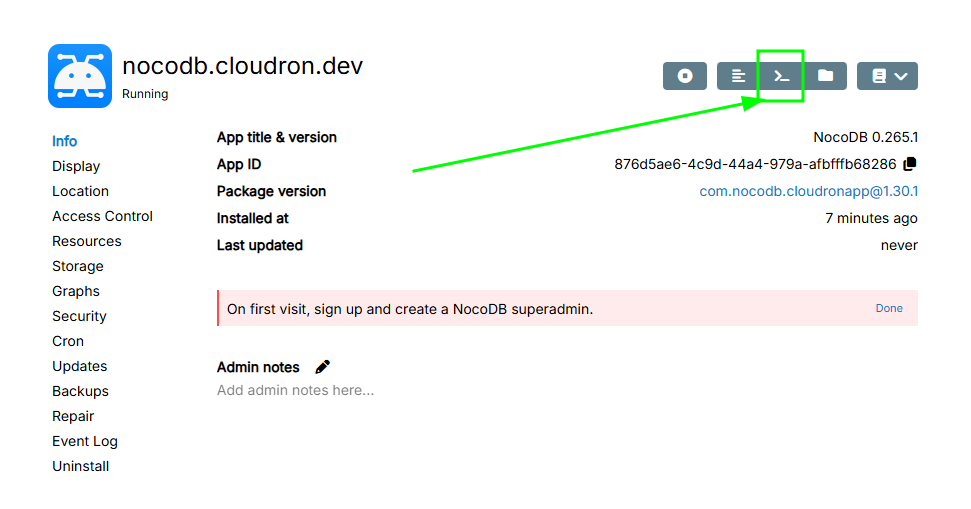
In this terminal copy and paste the following command and press enter:
printenv | grep -i POSTGRESQLYou will get an output like this:
CLOUDRON_POSTGRESQL_URL=postgres://user876d5ae64c9d44a4979aafbfffb68286:25025a6a57810a29ae4a052a416291bda191d339b63f129e42a512e07ba0b8f36fe6fccddbf3f1c15fd607d6d81d84ab9a1fee67547ff498890405a594d1bdd6@postgresql/db876d5ae64c9d44a4979aafbfffb68286
CLOUDRON_POSTGRESQL_DATABASE=db876d5ae64c9d44a4979aafbfffb68286
CLOUDRON_POSTGRESQL_PASSWORD=25025a6a57810a29ae4a052a416291bda191d339b63f129e42a512e07ba0b8f36fe6fccddbf3f1c15fd607d6d81d84ab9a1fee67547ff498890405a594d1bdd6
CLOUDRON_POSTGRESQL_USERNAME=user876d5ae64c9d44a4979aafbfffb68286
CLOUDRON_POSTGRESQL_HOST=postgresql
CLOUDRON_POSTGRESQL_PORT=5432
Copy and save this output somewhere, you will need it later.
Now in the metabase web UI I can add a database with the previous credentials.
Tip, use theCLOUDRON_POSTGRESQL_URLand put in theConnection string (optional)field in Metabase and give it a descriptive display name instead of the long generated stringdb876d5ae64c9d44a4979aafbfffb68286: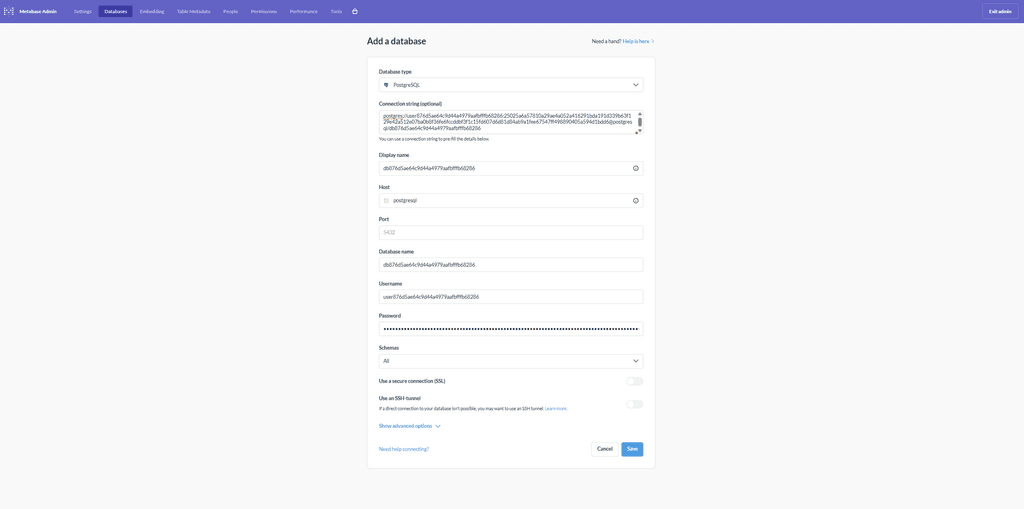
Now I can access the NocoDB PostgreSQL database in Metabase: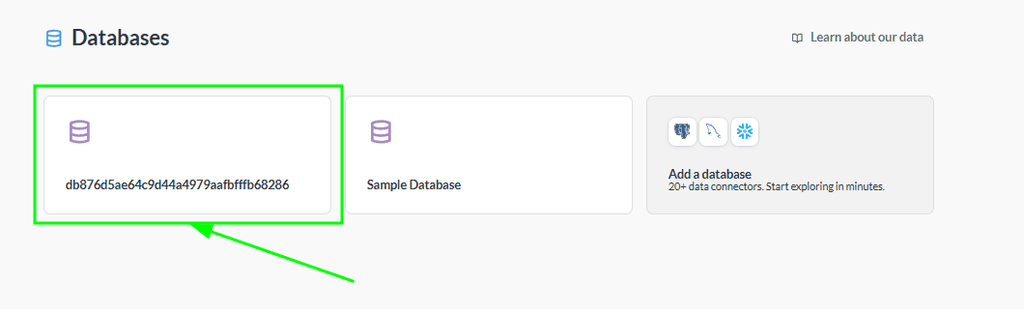
Is this what you needed?
-
Hello Cloudron Support,
I need assistance with an internal app-to-app database connection.
Context:
We are using NocoDB and Metabase on Cloudron Pro.
NocoDB is working correctly with the internal PostgreSQL addon (confirmed through Web Terminal usingprintenv | grep POSTGRESQL).
Metabase was freshly reinstalled and is working normally.Problem:
We cannot establish a connection from Metabase to NocoDB’s PostgreSQL database.Metabase shows this error:
“No pg_hba.conf entry for host 172.x.x.x”The Cloudron documentation says that apps can access another app’s PostgreSQL addon via the hostname “postgresql”, and that the addon credentials can be used directly in other apps.
We followed the guide:
https://docs.cloudron.io/guides/connect-postgresql/We retrieved the credentials inside NocoDB:
- CLOUDRON_POSTGRESQL_URL
- CLOUDRON_POSTGRESQL_DATABASE
- CLOUDRON_POSTGRESQL_USERNAME
- CLOUDRON_POSTGRESQL_PASSWORD
- CLOUDRON_POSTGRESQL_HOST (postgresql)
- CLOUDRON_POSTGRESQL_PORT (5432)
These credentials work inside NocoDB itself, but Metabase cannot connect using them.
It looks like the Metabase container is not allowed to access the NocoDB PostgreSQL addon.Issue:
We are unable to locate any “Access Control”, “Network Policy”, or “Database addon permissions” screen in the current Cloudron UI for the NocoDB app.
Without these options, we cannot confirm whether Metabase is allowed to reach the internal PostgreSQL service of NocoDB.What we need clarified:
-
Where exactly, in the current Cloudron UI, can we allow Metabase to access NocoDB’s PostgreSQL addon?
(or confirm if this access is automatically allowed) -
Does Cloudron require any explicit permission or network configuration for one app (Metabase) to connect to another app’s PostgreSQL addon?
-
Is the “postgresql” hostname the correct one for inter-app communication in this scenario?
-
If additional configuration is required, could you provide the exact step-by-step instructions?
This is blocking our setup, and we would appreciate detailed guidance.
Thank you.
-
Hello @luisegundo
Have you seen my previous answer? Just want to make sure it was not overlooked.
https://forum.cloudron.io/post/116969@luisegundo said in NocoDB and Metabase on my Cloudron instance:
Where exactly, in the current Cloudron UI, can we allow Metabase to access NocoDB’s PostgreSQL addon?
(or confirm if this access is automatically allowed)There is no such feature in the Dashboard to check this.
Network accessibility between apps is default and should work.@luisegundo said in NocoDB and Metabase on my Cloudron instance:
Does Cloudron require any explicit permission or network configuration for one app (Metabase) to connect to another app’s PostgreSQL addon?
No.
@luisegundo said in NocoDB and Metabase on my Cloudron instance:
Is the “postgresql” hostname the correct one for inter-app communication in this scenario?
Yes.
@luisegundo said in NocoDB and Metabase on my Cloudron instance:
If additional configuration is required, could you provide the exact step-by-step instructions?
-
Hello @james, thanks for your reply.
Yes, I saw your previous message and I’ve read the referenced post.
However, the issue is still happening even after following all steps exactly as described.Key points:
- You said that inter‑app network access is automatic and always allowed.
- You confirmed that no permissions or UI settings are required.
- You confirmed that the hostname "postgresql" is correct.
Given all of that, Metabase is still unable to connect to NocoDB’s internal PostgreSQL addon, and keeps returning:
“No pg_hba.conf entry for host 172.x.x.x”
This indicates that:
- Metabase is NOT using the hostname “postgresql”
- Metabase is instead falling back to an internal Docker IP (172.x.x.x)
- The connection is being rejected at the PostgreSQL level
To help us properly debug this, could you clarify:
- Why would Metabase try to connect using a 172.x.x.x container IP if “postgresql” is always resolvable between apps?
- Is there a way to verify inside each container that the hostname “postgresql” resolves correctly (for example, via ping, nslookup, or another command)?
- Is there any scenario where the hostname “postgresql” would NOT resolve automatically?
- Is there a way to confirm that both apps are on the same internal Cloudron network?
- Could you provide the exact expected behavior when an app tries to use the environment variables of another app’s addon?
We are simply trying to connect Metabase → NocoDB PostgreSQL using the internal addon credentials.
NocoDB works with these credentials, but Metabase refuses the same connection.We would appreciate a more detailed explanation so we can proceed.
-
Hello @luisegundo
@luisegundo said in NocoDB and Metabase on my Cloudron instance:
Why would Metabase try to connect using a 172.x.x.x container IP if “postgresql” is always resolvable between apps?
By default, the Cloudron internal PostgreSQL Service container with hostname
postgresqlresolves to the IP address172.18.30.2.
If Metabase resolves the hostnamepostgresqlto172.18.30.2that is correct.@luisegundo said in NocoDB and Metabase on my Cloudron instance:
Is there a way to verify inside each container that the hostname “postgresql” resolves correctly (for example, via ping, nslookup, or another command)?
Yes, if you open the Web Terminal of an app, you can verify this with either
nslookupordig.Example from a Cloudron server with just 1x LAMP app and from inside that LAMP apps Web Terminal
root@fbbbe700-24f0-4832-89e8-487e633c35d3:/app/code# nslookup postgresql Server: 127.0.0.11 Address: 127.0.0.11#53 Non-authoritative answer: Name: postgresql Address: 172.18.30.2 Name: postgresql Address: fd00:c107:d509::f root@fbbbe700-24f0-4832-89e8-487e633c35d3:/app/code# dig postgresql ; <<>> DiG 9.18.30-0ubuntu0.24.04.2-Ubuntu <<>> postgresql ;; global options: +cmd ;; Got answer: ;; ->>HEADER<<- opcode: QUERY, status: NOERROR, id: 26454 ;; flags: qr rd ra; QUERY: 1, ANSWER: 1, AUTHORITY: 0, ADDITIONAL: 0 ;; QUESTION SECTION: ;postgresql. IN A ;; ANSWER SECTION: postgresql. 600 IN A 172.18.30.2 ;; Query time: 2 msec ;; SERVER: 127.0.0.11#53(127.0.0.11) (UDP) ;; WHEN: Wed Dec 17 19:17:33 UTC 2025 ;; MSG SIZE rcvd: 54@luisegundo said in NocoDB and Metabase on my Cloudron instance:
Is there a way to confirm that both apps are on the same internal Cloudron network?
If the Metabase app is resolving
postgresqlto172.18.30.2then it is in the same network.
@luisegundo said in NocoDB and Metabase on my Cloudron instance:
We are simply trying to connect Metabase → NocoDB PostgreSQL using the internal addon credentials.
I just want to make sure we are speaking about the same thing here.
Since in my previous post, the Metabase UI statesAdd a databaseand you are writing aboutusing the internal addon credentials.
You are trying to add the NocoDB Database inside Metabase with theAdd a database, correct?If you feel like this is going nowhere, please enable Remote Support and write an email to support@cloudron.io and reference this topic in your email.
-
I need to link the NocoDB database to Metabase, but I need the following information: Database name
Username
Password
Host
PortHow can I get this information?
-
This post is deleted!
-
My knowledge level is beginner, and I was using AI assistance, but it's not working either.
I already asked a colleague for guidance, and he's also having trouble.
Could you tell me exactly how to obtain the following information from NocoDB?
Database name
Username
Password
Host
PortPlease provide a step-by-step guide on how to do this, considering my beginner level.
-
Hello @luisegundo
I have written a guide with screenshots, did you see that one? https://forum.cloudron.io/post/116969
Have you tried following these steps?
At which step do you run into issues?

Hello! It looks like you're interested in this conversation, but you don't have an account yet.
Getting fed up of having to scroll through the same posts each visit? When you register for an account, you'll always come back to exactly where you were before, and choose to be notified of new replies (either via email, or push notification). You'll also be able to save bookmarks and upvote posts to show your appreciation to other community members.
With your input, this post could be even better 💗
Register Login