Cloudron makes it easy to run web apps like WordPress, Nextcloud, GitLab on your server. Find out more or install now.


Skip to content
  • Categories
  • Recent
  • Tags
  • Popular
  • Bookmarks
  • Search
Skins
  • Light
  • Brite
  • Cerulean
  • Cosmo
  • Flatly
  • Journal
  • Litera
  • Lumen
  • Lux
  • Materia
  • Minty
  • Morph
  • Pulse
  • Sandstone
  • Simplex
  • Sketchy
  • Spacelab
  • United
  • Yeti
  • Zephyr
  • Dark
  • Cyborg
  • Darkly
  • Quartz
  • Slate
  • Solar
  • Superhero
  • Vapor

  • Default (No Skin)
  • No Skin
Collapse
Brand Logo

Cloudron Forum

Apps | Demo | Docs | Install
  1. Cloudron Forum
  2. Support
  3. VPS with 8GB RAM, only 4 used

VPS with 8GB RAM, only 4 used

Scheduled Pinned Locked Moved Solved Support
7 Posts 3 Posters 73 Views 3 Watching
  • Oldest to Newest
  • Newest to Oldest
  • Most Votes
Reply
  • Reply as topic
Log in to reply
This topic has been deleted. Only users with topic management privileges can see it.
  • sebastienserreS Offline
    sebastienserreS Offline
    sebastienserre
    wrote last edited by sebastienserre
    #1

    Hello

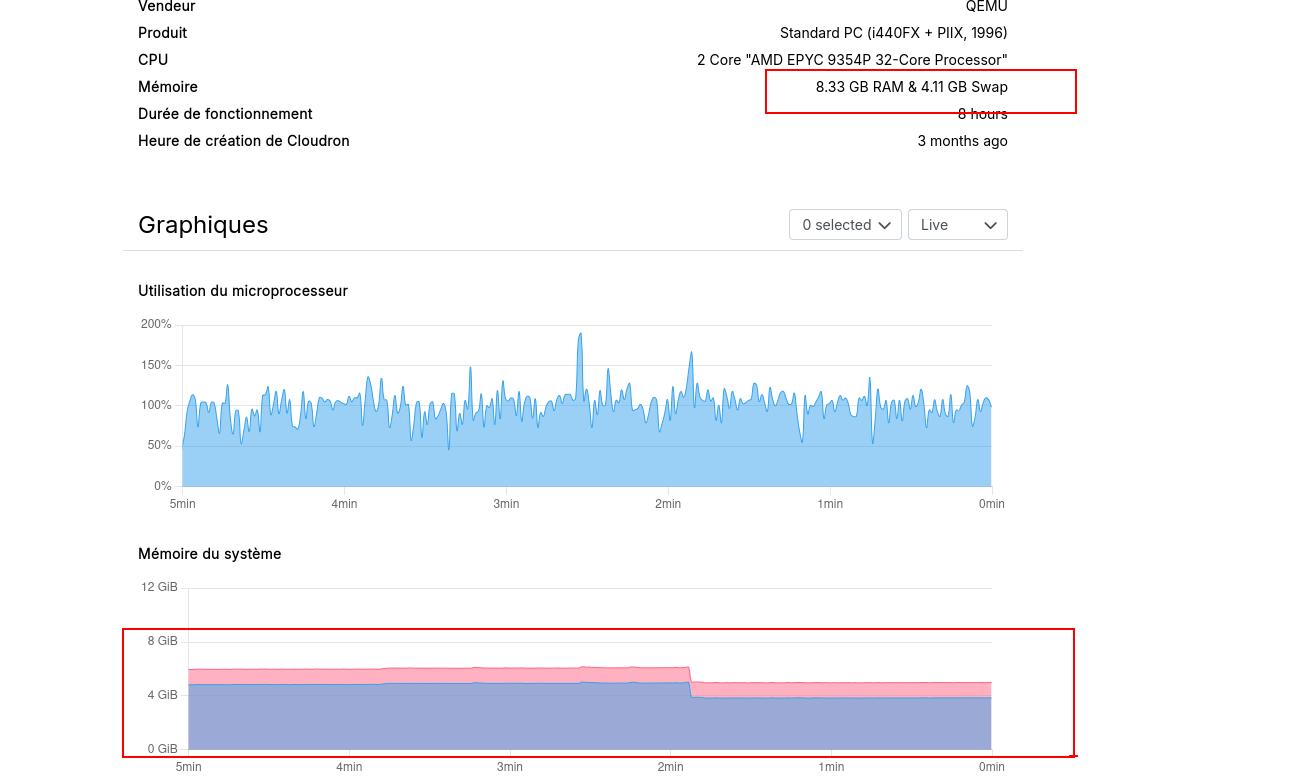
    I have upgraded my VPS from a 4GB RAM one to an 8 GB RAM.
    It seems my Cloudron is blocked on 4GB... Is there something to do to allow Cloudron to use the full available RAM ?
    Cloudron Server setting

    System Details

    Generate Diagnostics Data

    https://paste.cloudron.io/abupiyelot

    He/Him - Native language: French

    luckowL 1 Reply Last reply
    0
    • jamesJ Online
      jamesJ Online
      james
      Staff
      wrote last edited by
      #6

      Hello @sebastienserre

      A personal desktop setup is not a server setup and can not be compared in a 1-to-1 sentiment.
      Even on a personal desktop swap can be important for example, hibernation.
      Without a swap partition, your desktop/notebook setup will never be able to use the hibernation feature (suspend to disk).
      If you wish to read more on this: https://wiki.archlinux.org/title/Power_management/Suspend_and_hibernate

      Cloudron does allocate for each app memory some swap memory.
      This ensures, that if a system is running out of physical memory, there is some headroom for the app to continue working.

      1 Reply Last reply
      2
      • sebastienserreS sebastienserre

        Hello

        I have upgraded my VPS from a 4GB RAM one to an 8 GB RAM.
        It seems my Cloudron is blocked on 4GB... Is there something to do to allow Cloudron to use the full available RAM ?

        Cloudron Server setting

        System Details

        Generate Diagnostics Data

        https://paste.cloudron.io/abupiyelot

        luckowL Offline
        luckowL Offline
        luckow
        translator
        wrote last edited by
        #2

        @sebastienserre Everything looks good. 4.11 GB is the additional memory as swap. What is swap?

        Pronouns: he/him | Primary language: German

        1 Reply Last reply
        0
        • sebastienserreS Offline
          sebastienserreS Offline
          sebastienserre
          wrote last edited by
          #3

          But my VPS is 'ot a 4gb ram, it's an 8gb one.
          So I should have 8gb + swap

          He/Him - Native language: French

          1 Reply Last reply
          0
          • jamesJ Online
            jamesJ Online
            james
            Staff
            wrote last edited by
            #4

            Hello @sebastienserre
            Your total memory is 7.755GiB (8GB) and 4.11 GB of SWAP memory.
            What makes you think it is still only 4 GB?
            If you are referring to the graph, memory is used as needed, your 8 GB of memery will not be in full use all of the time unless it is needed.

            1 Reply Last reply
            0
            • sebastienserreS Offline
              sebastienserreS Offline
              sebastienserre
              wrote last edited by
              #5

              OK, so what I do not understand is why the system is using Swap evenif there's free RAM available.
              On my personnal desktop (Linux Mint),I have no Swap partition for example

              He/Him - Native language: French

              1 Reply Last reply
              0
              • jamesJ Online
                jamesJ Online
                james
                Staff
                wrote last edited by
                #6

                Hello @sebastienserre

                A personal desktop setup is not a server setup and can not be compared in a 1-to-1 sentiment.
                Even on a personal desktop swap can be important for example, hibernation.
                Without a swap partition, your desktop/notebook setup will never be able to use the hibernation feature (suspend to disk).
                If you wish to read more on this: https://wiki.archlinux.org/title/Power_management/Suspend_and_hibernate

                Cloudron does allocate for each app memory some swap memory.
                This ensures, that if a system is running out of physical memory, there is some headroom for the app to continue working.

                1 Reply Last reply
                2
                • sebastienserreS Offline
                  sebastienserreS Offline
                  sebastienserre
                  wrote last edited by
                  #7

                  thank you for all your explanations

                  He/Him - Native language: French

                  1 Reply Last reply
                  3
                  • sebastienserreS sebastienserre has marked this topic as solved
                  Reply
                  • Reply as topic
                  Log in to reply
                  • Oldest to Newest
                  • Newest to Oldest
                  • Most Votes


                  • Login

                  • Don't have an account? Register

                  • Login or register to search.
                  • First post
                    Last post
                  0
                  • Categories
                  • Recent
                  • Tags
                  • Popular
                  • Bookmarks
                  • Search