Cloudron makes it easy to run web apps like WordPress, Nextcloud, GitLab on your server. Find out more or install now.


Skip to content
  • Categories
  • Recent
  • Tags
  • Popular
  • Bookmarks
  • Search
Skins
  • Light
  • Brite
  • Cerulean
  • Cosmo
  • Flatly
  • Journal
  • Litera
  • Lumen
  • Lux
  • Materia
  • Minty
  • Morph
  • Pulse
  • Sandstone
  • Simplex
  • Sketchy
  • Spacelab
  • United
  • Yeti
  • Zephyr
  • Dark
  • Cyborg
  • Darkly
  • Quartz
  • Slate
  • Solar
  • Superhero
  • Vapor

  • Default (No Skin)
  • No Skin
Collapse
Brand Logo

Cloudron Forum

Apps - Status | Demo | Docs | Install
  1. Cloudron Forum
  2. App Wishlist
  3. Tymeslot - Better Meeting Scheduling than cal.com

Tymeslot - Better Meeting Scheduling than cal.com

Scheduled Pinned Locked Moved App Wishlist
35 Posts 10 Posters 1.3k Views 10 Watching
  • Oldest to Newest
  • Newest to Oldest
  • Most Votes
Reply
  • Reply as topic
Log in to reply
This topic has been deleted. Only users with topic management privileges can see it.
  • E Offline
    E Offline
    enerch
    wrote last edited by
    #24

    Thanks for adding the community version!
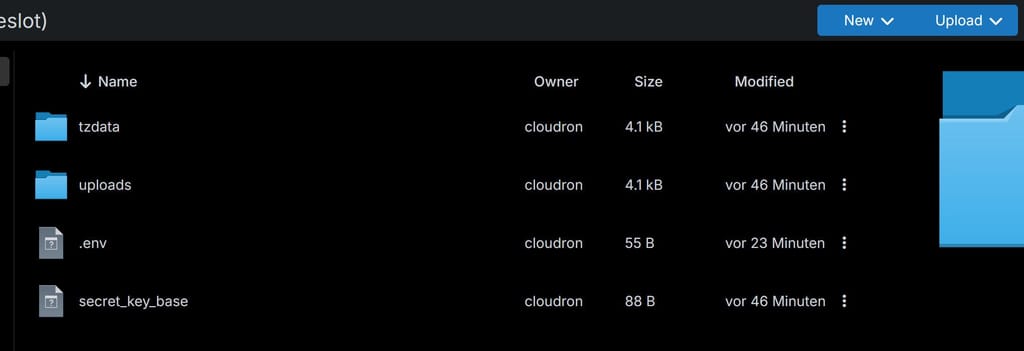
    I installed tymeslot. How can I deactivate the user login? I tried adding a .env with

    REGISTRATION_ENABLED=false
    PASSWORD_AUTH_ENABLED=false
    

    but the login/registration for external users is still possible. Could somebody give me a hint whats wrong here?
    f36e58ed-7fb8-4eb3-a007-4309322b36a9-image.jpeg

    1 Reply Last reply
    0
    • E Offline
      E Offline
      ekevu123
      wrote last edited by
      #25

      Try using the Cloudron CLI to set these!

      1 Reply Last reply
      1
      • E Offline
        E Offline
        enerch
        wrote last edited by
        #26

        solved 🙂
        thanks @ekevu123

        1 Reply Last reply
        1
        • jamesJ Online
          jamesJ Online
          james
          Staff
          wrote last edited by
          #27

          Hello @ekevu123

          Since not everyone is comfortable using the cloudron cli maybe you could add a .env.sh handler like we do with many packages.
          Many Cloudron users also know this flow from us, guess that is why @enerch tried that approach first.

          E 1 Reply Last reply
          5
          • sponchS Offline
            sponchS Offline
            sponch
            wrote last edited by
            #28

            thanks for it! Just tested. It connects to my caldav calendar shows the diefferent calendars but doesnt sync them. Any idea?

            E 1 Reply Last reply
            0
            • sponchS sponch

              thanks for it! Just tested. It connects to my caldav calendar shows the diefferent calendars but doesnt sync them. Any idea?

              E Offline
              E Offline
              ekevu123
              wrote last edited by
              #29

              @sponch said:

              thanks for it! Just tested. It connects to my caldav calendar shows the diefferent calendars but doesnt sync them. Any idea?

              Which Caldav calendar are you using? And how do you assume it doesn't sync them?

              sponchS 1 Reply Last reply
              1
              • jamesJ james

                Hello @ekevu123

                Since not everyone is comfortable using the cloudron cli maybe you could add a .env.sh handler like we do with many packages.
                Many Cloudron users also know this flow from us, guess that is why @enerch tried that approach first.

                E Offline
                E Offline
                ekevu123
                wrote last edited by
                #30

                @james said:

                Hello @ekevu123

                Since not everyone is comfortable using the cloudron cli maybe you could add a .env.sh handler like we do with many packages.
                Many Cloudron users also know this flow from us, guess that is why @enerch tried that approach first.

                I didn't know people use it usually like that, will do!

                1 Reply Last reply
                0
                • jamesJ Online
                  jamesJ Online
                  james
                  Staff
                  wrote last edited by james
                  #31

                  Hello @ekevu123
                  If you'd like some examples for how we do that, you could check out the start.sh of the mirotalk app or the start.sh form the Kutt URL shortener app to just name two examples.


                  One small note on that topic.
                  When merging env files together like we sometimes do, ensure that a newline is present otherwise it could end up appended to the last string.
                  See: https://git.cloudron.io/packages/twenty-app/-/merge_requests/6/diffs

                  Without the linked diff, if a new line in /app/data/env is missing the string gets appended.
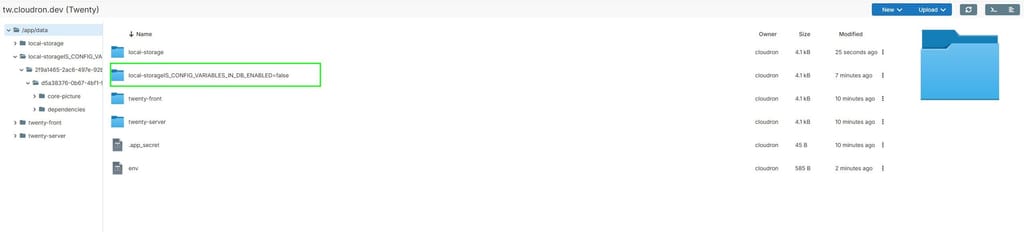
                  So if your last line in /app/data/env is STORAGE_LOCAL_PATH=/app/data/local-storage and it gets appended to /run/twenty-server/.env it results in:

                  STORAGE_LOCAL_PATH=/app/data/local-storageIS_CONFIG_VARIABLES_IN_DB_ENABLED=false
                  

                  344fa16c-dce1-47e4-8d85-2ac80f4b916f-image.jpeg
                  so to ensure this never happens the adding a newline after the cat >> /run/twenty-server/.env <<EOT is enough.

                  E 1 Reply Last reply
                  0
                  • jamesJ james

                    Hello @ekevu123
                    If you'd like some examples for how we do that, you could check out the start.sh of the mirotalk app or the start.sh form the Kutt URL shortener app to just name two examples.


                    One small note on that topic.
                    When merging env files together like we sometimes do, ensure that a newline is present otherwise it could end up appended to the last string.
                    See: https://git.cloudron.io/packages/twenty-app/-/merge_requests/6/diffs

                    Without the linked diff, if a new line in /app/data/env is missing the string gets appended.
                    So if your last line in /app/data/env is STORAGE_LOCAL_PATH=/app/data/local-storage and it gets appended to /run/twenty-server/.env it results in:

                    STORAGE_LOCAL_PATH=/app/data/local-storageIS_CONFIG_VARIABLES_IN_DB_ENABLED=false
                    

                    344fa16c-dce1-47e4-8d85-2ac80f4b916f-image.jpeg
                    so to ensure this never happens the adding a newline after the cat >> /run/twenty-server/.env <<EOT is enough.

                    E Offline
                    E Offline
                    ekevu123
                    wrote last edited by
                    #32

                    @james said:

                    Hello @ekevu123
                    If you'd like some examples for how we do that, you could check out the start.sh of the mirotalk app or the start.sh form the Kutt URL shortener app to just name two examples.


                    One small note on that topic.
                    When merging env files together like we sometimes do, ensure that a newline is present otherwise it could end up appended to the last string.
                    See: https://git.cloudron.io/packages/twenty-app/-/merge_requests/6/diffs

                    Without the linked diff, if a new line in /app/data/env is missing the string gets appended.
                    So if your last line in /app/data/env is STORAGE_LOCAL_PATH=/app/data/local-storage and it gets appended to /run/twenty-server/.env it results in:

                    STORAGE_LOCAL_PATH=/app/data/local-storageIS_CONFIG_VARIABLES_IN_DB_ENABLED=false
                    

                    344fa16c-dce1-47e4-8d85-2ac80f4b916f-image.jpeg
                    so to ensure this never happens the adding a newline after the cat >> /run/twenty-server/.env <<EOT is enough.

                    Thank you, I will look into that!

                    1 Reply Last reply
                    1
                    • E ekevu123

                      @sponch said:

                      thanks for it! Just tested. It connects to my caldav calendar shows the diefferent calendars but doesnt sync them. Any idea?

                      Which Caldav calendar are you using? And how do you assume it doesn't sync them?

                      sponchS Offline
                      sponchS Offline
                      sponch
                      wrote last edited by
                      #33

                      @ekevu123 Hi. Caldav via SoGo and mailbox.org
                      The calendars do appear when I enter my login credentials, but the appointments aren't syncing. at least with one account - the other only sync partially.
                      "Some calendars have never been synced" - refreh doenst help.

                      E 2 Replies Last reply
                      0
                      • sponchS sponch

                        @ekevu123 Hi. Caldav via SoGo and mailbox.org
                        The calendars do appear when I enter my login credentials, but the appointments aren't syncing. at least with one account - the other only sync partially.
                        "Some calendars have never been synced" - refreh doenst help.

                        E Offline
                        E Offline
                        ekevu123
                        wrote last edited by
                        #34

                        @sponch So far, Sogo and mailbox.org aren't officially supported, and some Caldav providers handle things differently.

                        I'll create accounts and see if I can test it and see what happens!

                        1 Reply Last reply
                        1
                        • sponchS sponch

                          @ekevu123 Hi. Caldav via SoGo and mailbox.org
                          The calendars do appear when I enter my login credentials, but the appointments aren't syncing. at least with one account - the other only sync partially.
                          "Some calendars have never been synced" - refreh doenst help.

                          E Offline
                          E Offline
                          ekevu123
                          wrote last edited by
                          #35

                          @sponch said:

                          @ekevu123 Hi. Caldav via SoGo and mailbox.org
                          The calendars do appear when I enter my login credentials, but the appointments aren't syncing. at least with one account - the other only sync partially.
                          "Some calendars have never been synced" - refreh doenst help.

                          Okay, I got it, the next update will support mailbox.org as well, but this might require 2-3 days to implement!
                          From what I am seeing, you would want to create an app-specific password in mailbox.org, though, as Sogo acts as another frontend, but correct me if I am wrong here.


                          1 Reply Last reply
                          1

                          Hello! It looks like you're interested in this conversation, but you don't have an account yet.

                          Getting fed up of having to scroll through the same posts each visit? When you register for an account, you'll always come back to exactly where you were before, and choose to be notified of new replies (either via email, or push notification). You'll also be able to save bookmarks and upvote posts to show your appreciation to other community members.

                          With your input, this post could be even better 💗

                          Register Login
                          Reply
                          • Reply as topic
                          Log in to reply
                          • Oldest to Newest
                          • Newest to Oldest
                          • Most Votes


                          • Login

                          • Don't have an account? Register

                          • Login or register to search.
                          • First post
                            Last post
                          0
                          • Categories
                          • Recent
                          • Tags
                          • Popular
                          • Bookmarks
                          • Search