
Error in apps accessing NFS volume after upgrade to v9.1.6
-
Hi here are the results:
root@v2202403157799261297:~# uname -r
5.15.0-176-generic
I only tried installing
nfs-kernel-serveras it was suggested as a fix for NFS not working, so I might just uninstall it if it doesn't affect anything.I will try updating now. Thanks for your help!
-
I updated to 9.1.7 and now there is a big error at the top of the page:
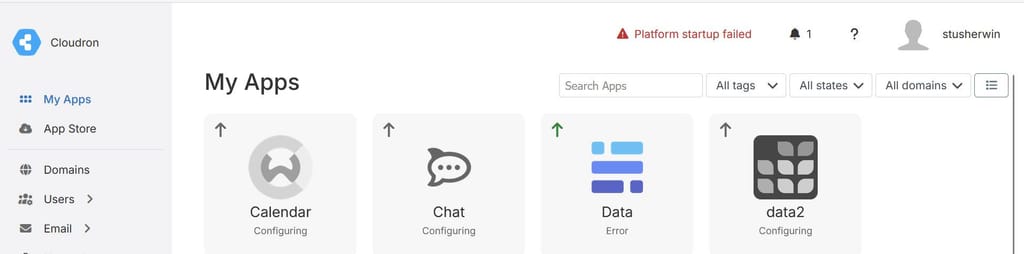
Error message:
Platform startup failed Failed to start services. f472efd072b2282e1479f0dd3a3bbd6e75e7a1f82d6d65e66071c370c5b48d4f docker: Error response from daemon: failed to set up container networking: driver failed programming external connectivity on endpoint mail (389b0e33027509943a51f0908370f4bcb89cf1add91a68aee6e8ddbfd50b3590): failed to bind host port 0.0.0.0:995/tcp: address already in use Run 'docker run --help' for more information -
Hi here are the results:
root@v2202403157799261297:~# uname -r
5.15.0-176-generic
I only tried installing
nfs-kernel-serveras it was suggested as a fix for NFS not working, so I might just uninstall it if it doesn't affect anything.I will try updating now. Thanks for your help!
Hello @stirchley.coop
I only tried installing nfs-kernel-server as it was suggested as a fix for NFS not working, so I might just uninstall it if it doesn't affect anything.
As a rule of thumb for Cloudron.
Cloudron should work out of the box without any issues.
Any suggested fix with installing apt packages should be considered to cause more harm than solve anything.
I would advise to always open a topic in our forum first before trying anything on your own.
For the port
995already in use issue.Could it be that by installation of some apt package, some recommended other apt packages got installed which is now using port
995?Can you check the following command:
netstat -tulpen | grep -i 995And also:
lsof -i :995Please share the output of these commands.
-
Is there a way to downgrade to 9.1.6? I can't see an option to do this from the UI
Hello @stirchley.coop
Is there a way to downgrade to 9.1.6? I can't see an option to do this from the UI
No. Downgrading Cloudron is not an option.
-
Hi James.
Output:root@v2202403157799261297:~# netstat -tulpen | grep -i 995 Command 'netstat' not found, but can be installed with: apt install net-tools root@v2202403157799261297:~# lsof -i :995 root@v2202403157799261297:~#Should I apt install
net-tools? -
Ok after installing I get this:
root@v2202403157799261297:~# netstat -tulpen | grep -i 995 root@v2202403157799261297:~# lsof -i :995 root@v2202403157799261297:~# -
root@v2202403157799261297:~# docker ps -a CONTAINER ID IMAGE COMMAND CREATED STATUS PORTS NAMES f472efd072b2 registry.docker.com/cloudron/mail:3.18.2 "/app/code/start.sh" 17 minutes ago Created mail root@v2202403157799261297:~# docker network list NETWORK ID NAME DRIVER SCOPE cbe520222cfe bridge bridge local e28b8f24a89c cloudron bridge local f8d98b330cd7 host host local d58248fbb326 none null local root@v2202403157799261297:~# -
I'm thinking I uninstall Cloudron from the server and reinstall version 9.1.5 with yesterday's backup
Hello @stirchley.coop
I'm thinking I uninstall Cloudron from the server and reinstall version 9.1.5 with yesterday's backup
This would be the easy / safe route.
I think we can figure out this issue together and fix your server without restoring from a backup.
But the decision is up to you.
This output:
root@v2202403157799261297:~# docker ps -a
CONTAINER ID   IMAGE                                      COMMAND                CREATED          STATUS    PORTS     NAMES
f472efd072b2   registry.docker.com/cloudron/mail:3.18.2   "/app/code/start.sh"   17 minutes ago   Created             mail
is very suspicious.
No other docker container running from cloudron except this one.Can you try to restart the
box.servicewith:systemcrtl restart box.serviceThen you can also observe the
box.logwith:tail -f /home/yellowtent/platformdata/logs/box.logTo see all log messages from Cloudron.
-
@james a lot of network errors so far:
root@v2202403157799261297:~# systemcrtl restart box.service Command 'systemcrtl' not found, did you mean: command 'systemctl' from deb systemd (249.11-0ubuntu3.20) command 'systemctl' from deb systemctl (1.4.4181-1.1) Try: apt install <deb name> root@v2202403157799261297:~# systemctl restart box.service root@v2202403157799261297:~# tail -f /home/yellowtent/platformdata/logs/box.log 2026-04-24T17:54:34.309Z docker: deleteContainer: deleting turn 2026-04-24T17:54:34.310Z services: startTurn: starting turn container 2026-04-24T17:54:34.310Z shell: services: /bin/bash -c docker run --restart=unless-stopped -d --name=turn --hostname turn --net host --log-driver syslog --log-opt syslog-address=unix:///home/yellowtent/platformdata/logs/syslog.sock --log-opt syslog-format=rfc5424 --log-opt tag=turn -m 268435456 --memory-swap -1 -e CLOUDRON_TURN_SECRET=-REDACTED- -e CLOUDRON_REALM=my.stirchley.coop -e CLOUDRON_VERBOSE_LOGS= --label isCloudronManaged=true --read-only -v /tmp -v /run registry.docker.com/cloudron/turn:1.8.2@sha256:9f3609969a5757837505c584c98246a3035a84a273b9be491665ac026423fd5f 2026-04-24T17:54:34.526Z services: startMysql: stopping and deleting previous mysql container 2026-04-24T17:54:34.526Z docker: stopContainer: stopping container mysql 2026-04-24T17:54:34.529Z docker: deleteContainer: deleting mysql 2026-04-24T17:54:34.530Z services: startMysql: starting mysql container 2026-04-24T17:54:34.530Z shell: services: /bin/bash -c docker run --restart=unless-stopped -d --name=mysql --hostname mysql --net cloudron --net-alias mysql --log-driver syslog --log-opt syslog-address=unix:///home/yellowtent/platformdata/logs/syslog.sock --log-opt syslog-format=rfc5424 --log-opt tag=mysql --ip xxx -e CLOUDRON_MYSQL_TOKEN=xxx -e CLOUDRON_MYSQL_ROOT_HOST=xxx -e CLOUDRON_MYSQL_ROOT_PASSWORD=xxx -v /home/yellowtent/platformdata/mysql:/var/lib/mysql --label isCloudronManaged=true --cap-add SYS_NICE --read-only -v /tmp -v /run registry.docker.com/cloudron/mysql:3.5.3@sha256:615057dbfeb5d979ab17c3e4cef240f11ae63b95feadbaf95a30e730472980aa 2026-04-24T17:54:34.909Z services: Waiting for mysql 2026-04-24T17:54:34.914Z services: Attempt 1 failed. Will retry: Network error waiting for mysql: connect ECONNREFUSED 172.18.30.1:3000 2026-04-24T17:54:50.061Z services: startPostgresql: stopping and deleting previous postgresql container 2026-04-24T17:54:50.061Z docker: stopContainer: stopping container postgresql 2026-04-24T17:54:50.063Z docker: deleteContainer: deleting postgresql 2026-04-24T17:54:50.063Z services: startPostgresql: starting postgresql container 2026-04-24T17:54:50.063Z shell: services: /bin/bash -c docker run --restart=unless-stopped -d --name=postgresql --hostname postgresql --net cloudron --net-alias postgresql --log-driver syslog --log-opt syslog-address=unix:///home/yellowtent/platformdata/logs/syslog.sock --log-opt syslog-format=rfc5424 --log-opt tag=postgresql --ip 172.18.30.2 --shm-size=128M -e CLOUDRON_POSTGRESQL_ROOT_PASSWORD=xxx -e CLOUDRON_POSTGRESQL_TOKEN=xxx -v /home/yellowtent/platformdata/postgresql:/var/lib/postgresql --label isCloudronManaged=true --read-only -v /tmp -v /run registry.docker.com/cloudron/postgresql:6.3.1@sha256:95a2e1e298fb88740c6d1d200657dcce993346ba500870e8e885a1aee519dc20 2026-04-24T17:54:50.455Z services: Waiting for postgresql 2026-04-24T17:54:50.458Z services: Attempt 1 failed. Will retry: Network error waiting for postgresql: connect ECONNREFUSED 172.18.30.2:3000 2026-04-24T17:55:05.613Z services: startMongodb: stopping and deleting previous mongodb container 2026-04-24T17:55:05.613Z docker: stopContainer: stopping container mongodb 2026-04-24T17:55:05.615Z docker: deleteContainer: deleting mongodb 2026-04-24T17:55:05.616Z shell: services: grep -q avx /proc/cpuinfo 2026-04-24T17:55:05.619Z services: startMongodb: starting mongodb container 2026-04-24T17:55:05.619Z shell: services: /bin/bash -c docker run --restart=unless-stopped -d --name=mongodb --hostname mongodb --net cloudron --net-alias mongodb --log-driver syslog --log-opt syslog-address=unix:///home/yellowtent/platformdata/logs/syslog.sock --log-opt syslog-format=rfc5424 --log-opt tag=mongodb --ip 172.18.30.3 -e CLOUDRON_MONGODB_ROOT_PASSWORD=xxx -e CLOUDRON_MONGODB_TOKEN=xxx -v /home/yellowtent/platformdata/mongodb:/var/lib/mongodb --label isCloudronManaged=true --read-only -v /tmp -v /run registry.docker.com/cloudron/mongodb:6.3.0@sha256:8757111970a99fb9a9880f02a2a77fe9cb7368745fcff555bf528471ecb50ec3 2026-04-24T17:55:05.995Z services: Waiting for mongodb 2026-04-24T17:55:05.998Z services: Attempt 1 failed. Will retry: Network error waiting for mongodb: connect ECONNREFUSED 172.18.30.3:3000 2026-04-24T17:55:21.502Z services: Attempt 2 failed. Will retry: Error waiting for mongodb. Status code: 200 message: Not ready yet: uptime=3 2026-04-24T17:55:36.979Z services: startRedis: stopping and deleting previous redis container redis-1502ffae-d38e-4b8a-a75d-c833b1355a4d 2026-04-24T17:55:36.979Z docker: stopContainer: stopping container redis-1502ffae-d38e-4b8a-a75d-c833b1355a4d 2026-04-24T17:55:36.981Z docker: deleteContainer: deleting redis-1502ffae-d38e-4b8a-a75d-c833b1355a4d 2026-04-24T17:55:36.982Z services: startRedis: starting redis container redis-1502ffae-d38e-4b8a-a75d-c833b1355a4d 2026-04-24T17:55:36.988Z shell: services: /bin/bash -c docker create --restart=unless-stopped --name=redis-1502ffae-d38e-4b8a-a75d-c833b1355a4d --hostname redis-1502ffae-d38e-4b8a-a75d-c833b1355a4d --label=location=data2.stirchley.coop --net cloudron --net-alias redis-1502ffae-d38e-4b8a-a75d-c833b1355a4d --log-driver syslog --log-opt syslog-address=unix:///home/yellowtent/platformdata/logs/syslog.sock --log-opt syslog-format=rfc5424 --log-opt tag=redis-1502ffae-d38e-4b8a-a75d-c833b1355a4d -m 268435456 --memory-swap -1 -e CLOUDRON_REDIS_PASSWORD=xxx -e CLOUDRON_REDIS_TOKEN=xxx -v /home/yellowtent/platformdata/redis/1502ffae-d38e-4b8a-a75d-c833b1355a4d:/var/lib/redis --label isCloudronManaged=true --read-only -v /tmp -v /run registry.docker.com/cloudron/redis:3.8.0@sha256:54a12252edbc326fd4d10e8c00836cc68776f3463f22366279f7cd8d4dafd20f 2026-04-24T17:55:37.211Z services: startRedis: stopping and deleting previous redis container redis-1aa55af7-48e4-4f6f-816f-46185ef4cf73 2026-04-24T17:55:37.211Z docker: stopContainer: stopping container redis-1aa55af7-48e4-4f6f-816f-46185ef4cf73 2026-04-24T17:55:37.213Z docker: deleteContainer: deleting redis-1aa55af7-48e4-4f6f-816f-46185ef4cf73 2026-04-24T17:55:37.213Z services: startRedis: starting redis container redis-1aa55af7-48e4-4f6f-816f-46185ef4cf73 2026-04-24T17:55:37.217Z shell: services: /bin/bash -c docker run -d --restart=unless-stopped --name=redis-1aa55af7-48e4-4f6f-816f-46185ef4cf73 --hostname redis-1aa55af7-48e4-4f6f-816f-46185ef4cf73 --label=location=docs2.stirchley.coop --net cloudron --net-alias redis-1aa55af7-48e4-4f6f-816f-46185ef4cf73 --log-driver syslog --log-opt syslog-address=unix:///home/yellowtent/platformdata/logs/syslog.sock --log-opt syslog-format=rfc5424 --log-opt tag=redis-1aa55af7-48e4-4f6f-816f-46185ef4cf73 -m 268435456 --memory-swap -1 -e CLOUDRON_REDIS_PASSWORD= -e CLOUDRON_REDIS_TOKEN=xxx -v /home/yellowtent/platformdata/redis/1aa55af7-48e4-4f6f-816f-46185ef4cf73:/var/lib/redis --label isCloudronManaged=true --read-only -v /tmp -v /run registry.docker.com/cloudron/redis:3.8.0@sha256:54a12252edbc326fd4d10e8c00836cc68776f3463f22366279f7cd8d4dafd20f 2026-04-24T17:55:37.465Z services: Waiting for redis-1aa55af7-48e4-4f6f-816f-46185ef4cf73 2026-04-24T17:55:37.468Z services: Attempt 1 failed. Will retry: Network error waiting for redis-1aa55af7-48e4-4f6f-816f-46185ef4cf73: connect ECONNREFUSED 172.18.0.2:3000 -
That's fine I spotted and corrected it
-
Sure will do
-
It seems to have settled into this state:
2026-04-24T18:01:40.032Z apphealthmonitor: app health: 8 running / 5 stopped / 5 unresponsive
2026-04-24T18:01:50.030Z apphealthmonitor: app health: 8 running / 5 stopped / 5 unresponsive
2026-04-24T18:02:00.043Z apphealthmonitor: app health: 8 running / 5 stopped / 5 unresponsive
2026-04-24T18:02:10.027Z apphealthmonitor: app health: 8 running / 5 stopped / 5 unresponsive
2026-04-24T18:02:20.032Z apphealthmonitor: app health: 8 running / 5 stopped / 5 unresponsive
2026-04-24T18:02:30.028Z apphealthmonitor: app health: 8 running / 5 stopped / 5 unresponsive
2026-04-24T18:02:40.034Z apphealthmonitor: app health: 8 running / 5 stopped / 5 unresponsive
2026-04-24T18:02:50.028Z apphealthmonitor: app health: 8 running / 5 stopped / 5 unresponsive
2026-04-24T18:03:00.040Z apphealthmonitor: app health: 8 running / 5 stopped / 5 unresponsive
2026-04-24T18:03:10.027Z apphealthmonitor: app health: 8 running / 5 stopped / 5 unresponsive
2026-04-24T18:03:20.029Z apphealthmonitor: app health: 8 running / 5 stopped / 5 unresponsive
2026-04-24T18:03:30.027Z apphealthmonitor: app health: 8 running / 5 stopped / 5 unresponsive
2026-04-24T18:03:40.030Z apphealthmonitor: app health: 8 running / 5 stopped / 5 unresponsive
2026-04-24T18:03:50.031Z apphealthmonitor: app health: 8 running / 5 stopped / 5 unresponsive
2026-04-24T18:04:00.037Z apphealthmonitor: app health: 8 running / 5 stopped / 5 unresponsive
2026-04-24T18:04:10.029Z apphealthmonitor: app health: 8 running / 5 stopped / 5 unresponsive
2026-04-24T18:04:20.035Z apphealthmonitor: app health: 8 running / 5 stopped / 5 unresponsive
2026-04-24T18:04:30.029Z apphealthmonitor: app health: 8 running / 5 stopped / 5 unresponsive
2026-04-24T18:04:40.037Z apphealthmonitor: app health: 8 running / 5 stopped / 5 unresponsive
There are 5 apps in Error state with the same mount error above. I assume they correspond to the 5 unresponsive apps in the logs. There are also 5 other stopped apps
-
Hello @stirchley.coop
Can you check in your Cloudron dashboard underVolumes?
If the volume has a red dot, please press the...button to the right side and then pressRemount.
When the remount works signalled by a green dot, you can go to your apps that are unresponsive into theRepairsection and pressRetry task.
This should repair the unresponsive apps back into a working state. -
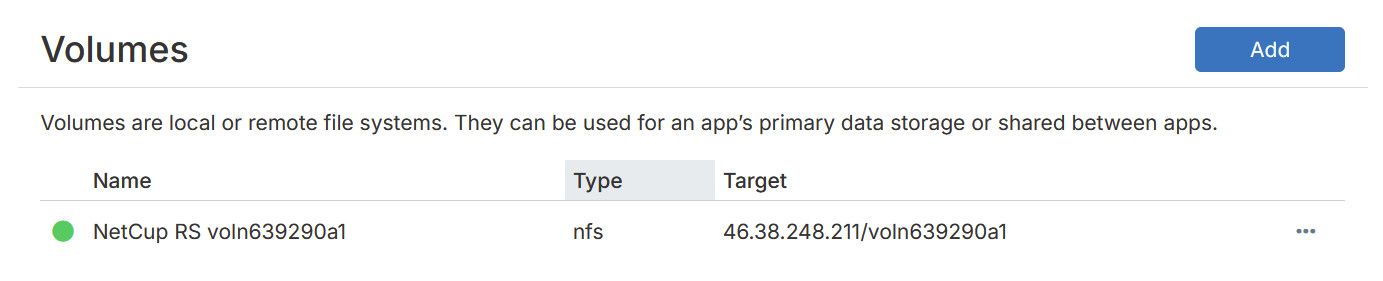
The volume has always had a green dot:

Retry taskhas sorted it thank you (for one app anyway) - it still showed the mount error in the logs, but it carried on past the error this time and the app has started successfully

Hello! It looks like you're interested in this conversation, but you don't have an account yet.
Getting fed up of having to scroll through the same posts each visit? When you register for an account, you'll always come back to exactly where you were before, and choose to be notified of new replies (either via email, or push notification). You'll also be able to save bookmarks and upvote posts to show your appreciation to other community members.
With your input, this post could be even better 💗
Register Login