
Error in apps accessing NFS volume after upgrade to v9.1.6
-
That's fine I spotted and corrected it
-
Sure will do
-
It seems to have settled into this state:
2026-04-24T18:01:40.032Z apphealthmonitor: app health: 8 running / 5 stopped / 5 unresponsive
2026-04-24T18:01:50.030Z apphealthmonitor: app health: 8 running / 5 stopped / 5 unresponsive
2026-04-24T18:02:00.043Z apphealthmonitor: app health: 8 running / 5 stopped / 5 unresponsive
2026-04-24T18:02:10.027Z apphealthmonitor: app health: 8 running / 5 stopped / 5 unresponsive
2026-04-24T18:02:20.032Z apphealthmonitor: app health: 8 running / 5 stopped / 5 unresponsive
2026-04-24T18:02:30.028Z apphealthmonitor: app health: 8 running / 5 stopped / 5 unresponsive
2026-04-24T18:02:40.034Z apphealthmonitor: app health: 8 running / 5 stopped / 5 unresponsive
2026-04-24T18:02:50.028Z apphealthmonitor: app health: 8 running / 5 stopped / 5 unresponsive
2026-04-24T18:03:00.040Z apphealthmonitor: app health: 8 running / 5 stopped / 5 unresponsive
2026-04-24T18:03:10.027Z apphealthmonitor: app health: 8 running / 5 stopped / 5 unresponsive
2026-04-24T18:03:20.029Z apphealthmonitor: app health: 8 running / 5 stopped / 5 unresponsive
2026-04-24T18:03:30.027Z apphealthmonitor: app health: 8 running / 5 stopped / 5 unresponsive
2026-04-24T18:03:40.030Z apphealthmonitor: app health: 8 running / 5 stopped / 5 unresponsive
2026-04-24T18:03:50.031Z apphealthmonitor: app health: 8 running / 5 stopped / 5 unresponsive
2026-04-24T18:04:00.037Z apphealthmonitor: app health: 8 running / 5 stopped / 5 unresponsive
2026-04-24T18:04:10.029Z apphealthmonitor: app health: 8 running / 5 stopped / 5 unresponsive
2026-04-24T18:04:20.035Z apphealthmonitor: app health: 8 running / 5 stopped / 5 unresponsive
2026-04-24T18:04:30.029Z apphealthmonitor: app health: 8 running / 5 stopped / 5 unresponsive
2026-04-24T18:04:40.037Z apphealthmonitor: app health: 8 running / 5 stopped / 5 unresponsive
There are 5 apps in Error state with the same mount error above. I assume they correspond to the 5 unresponsive apps in the logs. There are also 5 other stopped apps
-
Hello @stirchley.coop
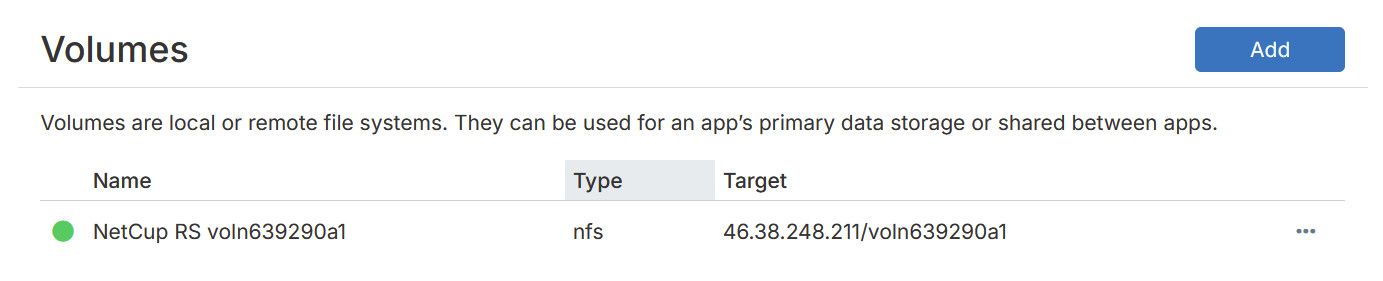
Can you check in your Cloudron dashboard underVolumes?
If the volume has a red dot, please press the...button to the right side and then pressRemount.
When the remount works signalled by a green dot, you can go to your apps that are unresponsive into theRepairsection and pressRetry task.
This should repair the unresponsive apps back into a working state. -
The volume has always had a green dot:

Retry taskhas sorted it thank you (for one app anyway) - it still showed the mount error in the logs, but it carried on past the error this time and the app has started successfully -
@james that app is now up and seems to be functioning correctly, all the data is there. Waiting for the rest to start up
-
@james the other apps seem to be stuck in an error state:
Apr 24 19:17:05 taskworker: Starting task 14154. Logs are at /home/yellowtent/platformdata/logs/74f9b0b7-8fb9-4805-9057-5d3bcf33d36b/apptask.log Apr 24 19:17:05 taskworker: Running task of type app Apr 24 19:17:05 apptask: run: startTask installationState: pending_configure runState: running Apr 24 19:17:05 tasks: updating task 14154 with: {"percent":10,"message":"Deleting old containers"} Apr 24 19:17:05 shell: reverseproxy: /usr/bin/sudo --non-interactive /home/yellowtent/box/src/scripts/restartservice.sh nginx Apr 24 19:17:05 apptask: deleteContainer: deleting app containers (app, scheduler) Apr 24 19:17:05 shell: apptask: /usr/bin/sudo --non-interactive /home/yellowtent/box/src/scripts/configurelogrotate.sh remove 74f9b0b7-8fb9-4805-9057-5d3bcf33d36b Apr 24 19:17:05 tasks: updating task 14154 with: {"percent":20,"message":"Downloading icon"} Apr 24 19:17:05 apptask: downloadIcon: Downloading icon of org.wordpress.cloudronapp@3.16.3 Apr 24 19:17:06 tasks: updating task 14154 with: {"percent":40,"message":"Downloading image"} Apr 24 19:17:06 shell: df: df -B1 --output=source,fstype,size,used,avail,pcent,target /var/lib/docker Apr 24 19:17:06 docker: downloadImage: cloudron/org.wordpress.cloudronapp:202603120114210000 Apr 24 19:17:06 tasks: updating task 14154 with: {"percent":50,"message":"Ensuring app data directory"} Apr 24 19:17:06 tasks: updating task 14154 with: {"percent":55,"message":"Setting up addons"} Apr 24 19:17:06 services: Setting up mysql Apr 24 19:17:06 services: setupAddons: Setting up ["mysql","localstorage","sendmail","oidc","scheduler"] Apr 24 19:17:06 services: setupAddons: setting up addon mysql with options {} Apr 24 19:17:06 services: Setting mysql addon config to [{"name":"CLOUDRON_MYSQL_USERNAME","value":"xxx"},{"name":"CLOUDRON_MYSQL_PASSWORD","value":"xxx"},{"name":"CLOUDRON_MYSQL_HOST","value":"mysql"},{"name":"CLOUDRON_MYSQL_PORT","value":"3306"},{"name":"CLOUDRON_MYSQL_URL","value":"xxx"},{"name":"CLOUDRON_MYSQL_DATABASE","value":"xxx"}] Apr 24 19:17:06 services: setupAddons: setting up addon localstorage with options {"ftp":{"uid":33,"uname":"www-data"}} Apr 24 19:17:06 services: setupLocalStorage Apr 24 19:17:06 shell: services: /usr/bin/sudo --non-interactive /home/yellowtent/box/src/scripts/setupvolume.sh /mnt/volumes/00fd99454f384c91a83326ad3097bb1e/www Apr 24 19:17:06 services: setupAddons: setting up addon sendmail with options {"optional":true,"supportsDisplayName":true} Apr 24 19:17:06 services: Setting sendmail addon config to [{"name":"CLOUDRON_MAIL_SMTP_SERVER","value":"mail"},{"name":"CLOUDRON_MAIL_SMTP_PORT","value":"2525"},{"name":"CLOUDRON_MAIL_SMTPS_PORT","value":"2465"},{"name":"CLOUDRON_MAIL_STARTTLS_PORT","value":"2587"},{"name":"CLOUDRON_MAIL_SMTP_USERNAME","value":"xxx"},{"name":"CLOUDRON_MAIL_SMTP_PASSWORD","value":"xxx"},{"name":"CLOUDRON_MAIL_FROM","value":"xxx"},{"name":"CLOUDRON_MAIL_DOMAIN","value":"stirchley.coop"},{"name":"CLOUDRON_MAIL_FROM_DISPLAY_NAME","value":""}] Apr 24 19:17:06 services: Setting up SendMail Apr 24 19:17:06 services: setupAddons: setting up addon oidc with options {"loginRedirectUri":"/wp-admin/admin-ajax.php?action=openid-connect-authorize"} Apr 24 19:17:06 services: Setting up OIDC Apr 24 19:17:06 services: setupAddons: setting up addon scheduler with options {"wpcron":{"schedule":"*/5 * * * *","command":"/app/pkg/cron.sh"}} Apr 24 19:17:06 tasks: updating task 14154 with: {"percent":60,"message":"Creating container"} Apr 24 19:17:06 apptask: createContainer: creating container Apr 24 19:17:06 shell: mounts: mountpoint -q -- /mnt/volumes/00fd99454f384c91a83326ad3097bb1e Apr 24 19:17:06 shell: apptask: /usr/bin/sudo --non-interactive /home/yellowtent/box/src/scripts/configurelogrotate.sh add 74f9b0b7-8fb9-4805-9057-5d3bcf33d36b /tmp/74f9b0b7-8fb9-4805-9057-5d3bcf33d36b.logrotate Apr 24 19:17:06 apptask: startApp: starting container Apr 24 19:17:06 tasks: updating task 14154 with: {"percent":90,"message":"Configuring reverse proxy"} Apr 24 19:17:06 shell: openssl: openssl x509 -noout -subject -issuer Apr 24 19:17:06 reverseproxy: providerMatches: subject=CN = *.stirchley.coop domain=*.stirchley.coop issuer=C = US, O = Let's Encrypt, CN = E7 wildcard=true/true prod=true/true issuerMismatch=false wildcardMismatch=false match=true Apr 24 19:17:06 shell: openssl: openssl x509 -startdate -enddate -subject -noout Apr 24 19:17:06 openssl: expiryDate: subject=CN = *.stirchley.coop notBefore=Apr 5 18:12:13 2026 GMT notAfter=Jul 4 18:12:12 2026 GMT daysLeft=70.9965897337963 Apr 24 19:17:06 reverseproxy: ensureCertificate: www.stirchley.coop acme cert exists and is up to date Apr 24 19:17:06 reverseproxy: needsRenewal: false. ARI {"start":"Wed, 03 Jun 2026 20:56:17 GMT","end":"Fri, 05 Jun 2026 16:07:06 GMT","rt":"Thu, 04 Jun 2026 03:54:39 GMT","valid":"Fri, 24 Apr 2026 22:54:51 GMT","url":"https://acme-v02.api.letsencrypt.org/acme/renewal-info","ts":"Fri, 24 Apr 2026 17:57:02 GMT"} Apr 24 19:17:06 shell: openssl: openssl x509 -noout -subject -issuer Apr 24 19:17:06 reverseproxy: getRenewalInfo: stirchley.coop refreshing Apr 24 19:17:06 reverseproxy: providerMatches: subject=CN = stirchley.coop domain=stirchley.coop issuer=C = US, O = Let's Encrypt, CN = E7 wildcard=false/true prod=true/true issuerMismatch=false wildcardMismatch=false match=true Apr 24 19:17:06 shell: openssl: openssl x509 -noout -text Apr 24 19:17:06 shell: openssl: openssl x509 -noout -serial Apr 24 19:17:06 ==> Changing permissions Apr 24 19:17:07 reverseproxy: getRenewalInfo: stirchley.coop updated: {"start":"Wed, 27 May 2026 20:56:10 GMT","end":"Fri, 29 May 2026 16:06:59 GMT","rt":"Fri, 29 May 2026 01:30:42 GMT","valid":"Fri, 24 Apr 2026 23:46:26 GMT","url":"https://acme-v02.api.letsencrypt.org/acme/renewal-info","ts":"Fri, 24 Apr 2026 18:17:06 GMT"} Apr 24 19:17:07 shell: openssl: openssl x509 -startdate -enddate -subject -noout Apr 24 19:17:07 openssl: expiryDate: subject=CN = stirchley.coop notBefore=Mar 29 18:12:06 2026 GMT notAfter=Jun 27 18:12:05 2026 GMT daysLeft=63.99650290509259 Apr 24 19:17:07 reverseproxy: ensureCertificate: stirchley.coop acme cert exists and is up to date Apr 24 19:17:07 reverseproxy: needsRenewal: false. ARI {"start":"Wed, 27 May 2026 20:56:10 GMT","end":"Fri, 29 May 2026 16:06:59 GMT","rt":"Fri, 29 May 2026 01:30:42 GMT","valid":"Fri, 24 Apr 2026 23:46:26 GMT","url":"https://acme-v02.api.letsencrypt.org/acme/renewal-info","ts":"Fri, 24 Apr 2026 18:17:06 GMT"} Apr 24 19:17:07 reverseproxy: writeAppLocationNginxConfig: writing config for "www.stirchley.coop" to /home/yellowtent/platformdata/nginx/applications/74f9b0b7-8fb9-4805-9057-5d3bcf33d36b/www.stirchley.coop.conf with options {"sourceDir":"/home/yellowtent/box","vhost":"www.stirchley.coop","hasIPv6":true,"ip":"172.18.16.234","port":80,"endpoint":"app","redirectTo":null,"certFilePath":"/home/yellowtent/platformdata/nginx/cert/_.stirchley.coop.cert","keyFilePath":"/home/yellowtent/platformdata/nginx/cert/_.stirchley.coop.key","robotsTxtQuoted":null,"cspQuoted":null,"hideHeaders":[],"proxyAuth":{"id":"74f9b0b7-8fb9-4805-9057-5d3bcf33d36b","location":"/"},"upstreamUri":"","hstsPreload":false} Apr 24 19:17:07 reverseproxy: writeAppLocationNginxConfig: writing config for "stirchley.coop" to /home/yellowtent/platformdata/nginx/applications/74f9b0b7-8fb9-4805-9057-5d3bcf33d36b/stirchley.coop.conf with options {"sourceDir":"/home/yellowtent/box","vhost":"stirchley.coop","hasIPv6":true,"ip":null,"port":null,"endpoint":"redirect","redirectTo":"www.stirchley.coop","certFilePath":"/home/yellowtent/platformdata/nginx/cert/stirchley.coop.cert","keyFilePath":"/home/yellowtent/platformdata/nginx/cert/stirchley.coop.key","robotsTxtQuoted":null,"cspQuoted":null,"hideHeaders":[],"proxyAuth":{"enabled":false,"id":"74f9b0b7-8fb9-4805-9057-5d3bcf33d36b","location":"/"},"upstreamUri":"","hstsPreload":false} Apr 24 19:17:07 shell: reverseproxy: /usr/bin/sudo --non-interactive /home/yellowtent/box/src/scripts/restartservice.sh nginx Apr 24 19:17:07 tasks: updating task 14154 with: {"percent":100,"message":"Done"} Apr 24 19:17:07 tasks: setCompleted - 14154: {"result":null,"error":null,"percent":100} Apr 24 19:17:07 tasks: updating task 14154 with: {"completed":true,"result":null,"error":null,"percent":100} Apr 24 19:17:07 taskworker: Task took 1.755 seconds Apr 24 19:17:07 Exiting with code 0 Apr 24 19:17:10 => Healthcheck error: Error: connect ECONNREFUSED 172.18.16.234:80 Apr 24 19:17:20 => Healthcheck error: Error: connect ECONNREFUSED 172.18.16.234:80 Apr 24 19:17:30 => Healthcheck error: Error: connect ECONNREFUSED 172.18.16.234:80 Apr 24 19:17:40 => Healthcheck error: Error: connect ECONNREFUSED 172.18.16.234:80 Apr 24 19:17:50 => Healthcheck error: Error: connect ECONNREFUSED 172.18.16.234:80 Apr 24 19:17:50 BoxError: Storage volume "NetCup RS voln639290a1" is not active. Could not determine mount failure reason. Apr 24 19:17:50 } Apr 24 19:17:50 } Apr 24 19:18:00 => Healthcheck error: Error: connect ECONNREFUSED 172.18.16.234:80 Apr 24 19:18:10 => Healthcheck error: Error: connect ECONNREFUSED 172.18.16.234:80 Apr 24 19:18:20 => Healthcheck error: Error: connect ECONNREFUSED 172.18.16.234:80 Apr 24 19:18:30 => Healthcheck error: Error: connect ECONNREFUSED 172.18.16.234:80 Apr 24 19:18:40 => Healthcheck error: Error: connect ECONNREFUSED 172.18.16.234:80 Apr 24 19:18:50 => Healthcheck error: Error: connect ECONNREFUSED 172.18.16.234:80 Apr 24 19:19:00 => Healthcheck error: Error: connect ECONNREFUSED 172.18.16.234:80 Apr 24 19:19:10 => Healthcheck error: Error: connect ECONNREFUSED 172.18.16.234:80 Apr 24 19:19:20 => Healthcheck error: Error: connect ECONNREFUSED 172.18.16.234:80 Apr 24 19:19:30 => Healthcheck error: Error: connect ECONNREFUSED 172.18.16.234:80 Apr 24 19:19:40 => Healthcheck error: Error: connect ECONNREFUSED 172.18.16.234:80 Apr 24 19:19:50 => Healthcheck error: Error: connect ECONNREFUSED 172.18.16.234:80 Apr 24 19:20:00 => Healthcheck error: Error: connect ECONNREFUSED 172.18.16.234:80 Apr 24 19:20:10 => Healthcheck error: Error: connect ECONNREFUSED 172.18.16.234:80 Apr 24 19:20:20 => Healthcheck error: Error: connect ECONNREFUSED 172.18.16.234:80 Apr 24 19:20:30 => Healthcheck error: Error: connect ECONNREFUSED 172.18.16.234:80 Apr 24 19:20:40 => Healthcheck error: Error: connect ECONNREFUSED 172.18.16.234:80 Apr 24 19:20:50 => Healthcheck error: Error: connect ECONNREFUSED 172.18.16.234:80 Apr 24 19:21:00 => Healthcheck error: Error: connect ECONNREFUSED 172.18.16.234:80 Apr 24 19:21:10 => Healthcheck error: Error: connect ECONNREFUSED 172.18.16.234:80 Apr 24 19:21:20 => Healthcheck error: Error: connect ECONNREFUSED 172.18.16.234:80 Apr 24 19:21:30 => Healthcheck error: Error: connect ECONNREFUSED 172.18.16.234:80 Apr 24 19:21:40 => Healthcheck error: Error: connect ECONNREFUSED 172.18.16.234:80 Apr 24 19:21:50 => Healthcheck error: Error: connect ECONNREFUSED 172.18.16.234:80 Apr 24 19:22:00 => Healthcheck error: Error: connect ECONNREFUSED 172.18.16.234:80 Apr 24 19:22:10 => Healthcheck error: Error: connect ECONNREFUSED 172.18.16.234:80 Apr 24 19:22:20 => Healthcheck error: Error: connect ECONNREFUSED 172.18.16.234:80 Apr 24 19:22:30 => Healthcheck error: Error: connect ECONNREFUSED 172.18.16.234:80 Apr 24 19:22:40 => Healthcheck error: Error: connect ECONNREFUSED 172.18.16.234:80 Apr 24 19:22:50 => Healthcheck error: Error: connect ECONNREFUSED 172.18.16.234:80 Apr 24 19:23:00 => Healthcheck error: Error: connect ECONNREFUSED 172.18.16.234:80 Apr 24 19:23:10 => Healthcheck error: Error: connect ECONNREFUSED 172.18.16.234:80 Apr 24 19:23:20 => Healthcheck error: Error: connect ECONNREFUSED 172.18.16.234:80 Apr 24 19:23:30 => Healthcheck error: Error: connect ECONNREFUSED 172.18.16.234:80 Apr 24 19:23:40 => Healthcheck error: Error: connect ECONNREFUSED 172.18.16.234:80 Apr 24 19:23:50 => Healthcheck error: Error: connect ECONNREFUSED 172.18.16.234:80 Apr 24 19:24:00 => Healthcheck error: Error: connect ECONNREFUSED 172.18.16.234:80 Apr 24 19:24:10 => Healthcheck error: Error: connect ECONNREFUSED 172.18.16.234:80 Apr 24 19:24:20 => Healthcheck error: Error: connect ECONNREFUSED 172.18.16.234:80 Apr 24 19:24:30 => Healthcheck error: Error: connect ECONNREFUSED 172.18.16.234:80 Apr 24 19:24:40 => Healthcheck error: Error: connect ECONNREFUSED 172.18.16.234:80 Apr 24 19:24:50 => Healthcheck error: Error: connect ECONNREFUSED 172.18.16.234:80 Apr 24 19:25:00 => Healthcheck error: Error: connect ECONNREFUSED 172.18.16.234:80 -
@james the other apps seem to be stuck in an error state:
Apr 24 19:17:05 taskworker: Starting task 14154. Logs are at /home/yellowtent/platformdata/logs/74f9b0b7-8fb9-4805-9057-5d3bcf33d36b/apptask.log Apr 24 19:17:05 taskworker: Running task of type app Apr 24 19:17:05 apptask: run: startTask installationState: pending_configure runState: running Apr 24 19:17:05 tasks: updating task 14154 with: {"percent":10,"message":"Deleting old containers"} Apr 24 19:17:05 shell: reverseproxy: /usr/bin/sudo --non-interactive /home/yellowtent/box/src/scripts/restartservice.sh nginx Apr 24 19:17:05 apptask: deleteContainer: deleting app containers (app, scheduler) Apr 24 19:17:05 shell: apptask: /usr/bin/sudo --non-interactive /home/yellowtent/box/src/scripts/configurelogrotate.sh remove 74f9b0b7-8fb9-4805-9057-5d3bcf33d36b Apr 24 19:17:05 tasks: updating task 14154 with: {"percent":20,"message":"Downloading icon"} Apr 24 19:17:05 apptask: downloadIcon: Downloading icon of org.wordpress.cloudronapp@3.16.3 Apr 24 19:17:06 tasks: updating task 14154 with: {"percent":40,"message":"Downloading image"} Apr 24 19:17:06 shell: df: df -B1 --output=source,fstype,size,used,avail,pcent,target /var/lib/docker Apr 24 19:17:06 docker: downloadImage: cloudron/org.wordpress.cloudronapp:202603120114210000 Apr 24 19:17:06 tasks: updating task 14154 with: {"percent":50,"message":"Ensuring app data directory"} Apr 24 19:17:06 tasks: updating task 14154 with: {"percent":55,"message":"Setting up addons"} Apr 24 19:17:06 services: Setting up mysql Apr 24 19:17:06 services: setupAddons: Setting up ["mysql","localstorage","sendmail","oidc","scheduler"] Apr 24 19:17:06 services: setupAddons: setting up addon mysql with options {} Apr 24 19:17:06 services: Setting mysql addon config to [{"name":"CLOUDRON_MYSQL_USERNAME","value":"xxx"},{"name":"CLOUDRON_MYSQL_PASSWORD","value":"xxx"},{"name":"CLOUDRON_MYSQL_HOST","value":"mysql"},{"name":"CLOUDRON_MYSQL_PORT","value":"3306"},{"name":"CLOUDRON_MYSQL_URL","value":"xxx"},{"name":"CLOUDRON_MYSQL_DATABASE","value":"xxx"}] Apr 24 19:17:06 services: setupAddons: setting up addon localstorage with options {"ftp":{"uid":33,"uname":"www-data"}} Apr 24 19:17:06 services: setupLocalStorage Apr 24 19:17:06 shell: services: /usr/bin/sudo --non-interactive /home/yellowtent/box/src/scripts/setupvolume.sh /mnt/volumes/00fd99454f384c91a83326ad3097bb1e/www Apr 24 19:17:06 services: setupAddons: setting up addon sendmail with options {"optional":true,"supportsDisplayName":true} Apr 24 19:17:06 services: Setting sendmail addon config to [{"name":"CLOUDRON_MAIL_SMTP_SERVER","value":"mail"},{"name":"CLOUDRON_MAIL_SMTP_PORT","value":"2525"},{"name":"CLOUDRON_MAIL_SMTPS_PORT","value":"2465"},{"name":"CLOUDRON_MAIL_STARTTLS_PORT","value":"2587"},{"name":"CLOUDRON_MAIL_SMTP_USERNAME","value":"xxx"},{"name":"CLOUDRON_MAIL_SMTP_PASSWORD","value":"xxx"},{"name":"CLOUDRON_MAIL_FROM","value":"xxx"},{"name":"CLOUDRON_MAIL_DOMAIN","value":"stirchley.coop"},{"name":"CLOUDRON_MAIL_FROM_DISPLAY_NAME","value":""}] Apr 24 19:17:06 services: Setting up SendMail Apr 24 19:17:06 services: setupAddons: setting up addon oidc with options {"loginRedirectUri":"/wp-admin/admin-ajax.php?action=openid-connect-authorize"} Apr 24 19:17:06 services: Setting up OIDC Apr 24 19:17:06 services: setupAddons: setting up addon scheduler with options {"wpcron":{"schedule":"*/5 * * * *","command":"/app/pkg/cron.sh"}} Apr 24 19:17:06 tasks: updating task 14154 with: {"percent":60,"message":"Creating container"} Apr 24 19:17:06 apptask: createContainer: creating container Apr 24 19:17:06 shell: mounts: mountpoint -q -- /mnt/volumes/00fd99454f384c91a83326ad3097bb1e Apr 24 19:17:06 shell: apptask: /usr/bin/sudo --non-interactive /home/yellowtent/box/src/scripts/configurelogrotate.sh add 74f9b0b7-8fb9-4805-9057-5d3bcf33d36b /tmp/74f9b0b7-8fb9-4805-9057-5d3bcf33d36b.logrotate Apr 24 19:17:06 apptask: startApp: starting container Apr 24 19:17:06 tasks: updating task 14154 with: {"percent":90,"message":"Configuring reverse proxy"} Apr 24 19:17:06 shell: openssl: openssl x509 -noout -subject -issuer Apr 24 19:17:06 reverseproxy: providerMatches: subject=CN = *.stirchley.coop domain=*.stirchley.coop issuer=C = US, O = Let's Encrypt, CN = E7 wildcard=true/true prod=true/true issuerMismatch=false wildcardMismatch=false match=true Apr 24 19:17:06 shell: openssl: openssl x509 -startdate -enddate -subject -noout Apr 24 19:17:06 openssl: expiryDate: subject=CN = *.stirchley.coop notBefore=Apr 5 18:12:13 2026 GMT notAfter=Jul 4 18:12:12 2026 GMT daysLeft=70.9965897337963 Apr 24 19:17:06 reverseproxy: ensureCertificate: www.stirchley.coop acme cert exists and is up to date Apr 24 19:17:06 reverseproxy: needsRenewal: false. ARI {"start":"Wed, 03 Jun 2026 20:56:17 GMT","end":"Fri, 05 Jun 2026 16:07:06 GMT","rt":"Thu, 04 Jun 2026 03:54:39 GMT","valid":"Fri, 24 Apr 2026 22:54:51 GMT","url":"https://acme-v02.api.letsencrypt.org/acme/renewal-info","ts":"Fri, 24 Apr 2026 17:57:02 GMT"} Apr 24 19:17:06 shell: openssl: openssl x509 -noout -subject -issuer Apr 24 19:17:06 reverseproxy: getRenewalInfo: stirchley.coop refreshing Apr 24 19:17:06 reverseproxy: providerMatches: subject=CN = stirchley.coop domain=stirchley.coop issuer=C = US, O = Let's Encrypt, CN = E7 wildcard=false/true prod=true/true issuerMismatch=false wildcardMismatch=false match=true Apr 24 19:17:06 shell: openssl: openssl x509 -noout -text Apr 24 19:17:06 shell: openssl: openssl x509 -noout -serial Apr 24 19:17:06 ==> Changing permissions Apr 24 19:17:07 reverseproxy: getRenewalInfo: stirchley.coop updated: {"start":"Wed, 27 May 2026 20:56:10 GMT","end":"Fri, 29 May 2026 16:06:59 GMT","rt":"Fri, 29 May 2026 01:30:42 GMT","valid":"Fri, 24 Apr 2026 23:46:26 GMT","url":"https://acme-v02.api.letsencrypt.org/acme/renewal-info","ts":"Fri, 24 Apr 2026 18:17:06 GMT"} Apr 24 19:17:07 shell: openssl: openssl x509 -startdate -enddate -subject -noout Apr 24 19:17:07 openssl: expiryDate: subject=CN = stirchley.coop notBefore=Mar 29 18:12:06 2026 GMT notAfter=Jun 27 18:12:05 2026 GMT daysLeft=63.99650290509259 Apr 24 19:17:07 reverseproxy: ensureCertificate: stirchley.coop acme cert exists and is up to date Apr 24 19:17:07 reverseproxy: needsRenewal: false. ARI {"start":"Wed, 27 May 2026 20:56:10 GMT","end":"Fri, 29 May 2026 16:06:59 GMT","rt":"Fri, 29 May 2026 01:30:42 GMT","valid":"Fri, 24 Apr 2026 23:46:26 GMT","url":"https://acme-v02.api.letsencrypt.org/acme/renewal-info","ts":"Fri, 24 Apr 2026 18:17:06 GMT"} Apr 24 19:17:07 reverseproxy: writeAppLocationNginxConfig: writing config for "www.stirchley.coop" to /home/yellowtent/platformdata/nginx/applications/74f9b0b7-8fb9-4805-9057-5d3bcf33d36b/www.stirchley.coop.conf with options {"sourceDir":"/home/yellowtent/box","vhost":"www.stirchley.coop","hasIPv6":true,"ip":"172.18.16.234","port":80,"endpoint":"app","redirectTo":null,"certFilePath":"/home/yellowtent/platformdata/nginx/cert/_.stirchley.coop.cert","keyFilePath":"/home/yellowtent/platformdata/nginx/cert/_.stirchley.coop.key","robotsTxtQuoted":null,"cspQuoted":null,"hideHeaders":[],"proxyAuth":{"id":"74f9b0b7-8fb9-4805-9057-5d3bcf33d36b","location":"/"},"upstreamUri":"","hstsPreload":false} Apr 24 19:17:07 reverseproxy: writeAppLocationNginxConfig: writing config for "stirchley.coop" to /home/yellowtent/platformdata/nginx/applications/74f9b0b7-8fb9-4805-9057-5d3bcf33d36b/stirchley.coop.conf with options {"sourceDir":"/home/yellowtent/box","vhost":"stirchley.coop","hasIPv6":true,"ip":null,"port":null,"endpoint":"redirect","redirectTo":"www.stirchley.coop","certFilePath":"/home/yellowtent/platformdata/nginx/cert/stirchley.coop.cert","keyFilePath":"/home/yellowtent/platformdata/nginx/cert/stirchley.coop.key","robotsTxtQuoted":null,"cspQuoted":null,"hideHeaders":[],"proxyAuth":{"enabled":false,"id":"74f9b0b7-8fb9-4805-9057-5d3bcf33d36b","location":"/"},"upstreamUri":"","hstsPreload":false} Apr 24 19:17:07 shell: reverseproxy: /usr/bin/sudo --non-interactive /home/yellowtent/box/src/scripts/restartservice.sh nginx Apr 24 19:17:07 tasks: updating task 14154 with: {"percent":100,"message":"Done"} Apr 24 19:17:07 tasks: setCompleted - 14154: {"result":null,"error":null,"percent":100} Apr 24 19:17:07 tasks: updating task 14154 with: {"completed":true,"result":null,"error":null,"percent":100} Apr 24 19:17:07 taskworker: Task took 1.755 seconds Apr 24 19:17:07 Exiting with code 0 Apr 24 19:17:10 => Healthcheck error: Error: connect ECONNREFUSED 172.18.16.234:80 Apr 24 19:17:20 => Healthcheck error: Error: connect ECONNREFUSED 172.18.16.234:80 Apr 24 19:17:30 => Healthcheck error: Error: connect ECONNREFUSED 172.18.16.234:80 Apr 24 19:17:40 => Healthcheck error: Error: connect ECONNREFUSED 172.18.16.234:80 Apr 24 19:17:50 => Healthcheck error: Error: connect ECONNREFUSED 172.18.16.234:80 Apr 24 19:17:50 BoxError: Storage volume "NetCup RS voln639290a1" is not active. Could not determine mount failure reason. Apr 24 19:17:50 } Apr 24 19:17:50 } Apr 24 19:18:00 => Healthcheck error: Error: connect ECONNREFUSED 172.18.16.234:80 Apr 24 19:18:10 => Healthcheck error: Error: connect ECONNREFUSED 172.18.16.234:80 Apr 24 19:18:20 => Healthcheck error: Error: connect ECONNREFUSED 172.18.16.234:80 Apr 24 19:18:30 => Healthcheck error: Error: connect ECONNREFUSED 172.18.16.234:80 Apr 24 19:18:40 => Healthcheck error: Error: connect ECONNREFUSED 172.18.16.234:80 Apr 24 19:18:50 => Healthcheck error: Error: connect ECONNREFUSED 172.18.16.234:80 Apr 24 19:19:00 => Healthcheck error: Error: connect ECONNREFUSED 172.18.16.234:80 Apr 24 19:19:10 => Healthcheck error: Error: connect ECONNREFUSED 172.18.16.234:80 Apr 24 19:19:20 => Healthcheck error: Error: connect ECONNREFUSED 172.18.16.234:80 Apr 24 19:19:30 => Healthcheck error: Error: connect ECONNREFUSED 172.18.16.234:80 Apr 24 19:19:40 => Healthcheck error: Error: connect ECONNREFUSED 172.18.16.234:80 Apr 24 19:19:50 => Healthcheck error: Error: connect ECONNREFUSED 172.18.16.234:80 Apr 24 19:20:00 => Healthcheck error: Error: connect ECONNREFUSED 172.18.16.234:80 Apr 24 19:20:10 => Healthcheck error: Error: connect ECONNREFUSED 172.18.16.234:80 Apr 24 19:20:20 => Healthcheck error: Error: connect ECONNREFUSED 172.18.16.234:80 Apr 24 19:20:30 => Healthcheck error: Error: connect ECONNREFUSED 172.18.16.234:80 Apr 24 19:20:40 => Healthcheck error: Error: connect ECONNREFUSED 172.18.16.234:80 Apr 24 19:20:50 => Healthcheck error: Error: connect ECONNREFUSED 172.18.16.234:80 Apr 24 19:21:00 => Healthcheck error: Error: connect ECONNREFUSED 172.18.16.234:80 Apr 24 19:21:10 => Healthcheck error: Error: connect ECONNREFUSED 172.18.16.234:80 Apr 24 19:21:20 => Healthcheck error: Error: connect ECONNREFUSED 172.18.16.234:80 Apr 24 19:21:30 => Healthcheck error: Error: connect ECONNREFUSED 172.18.16.234:80 Apr 24 19:21:40 => Healthcheck error: Error: connect ECONNREFUSED 172.18.16.234:80 Apr 24 19:21:50 => Healthcheck error: Error: connect ECONNREFUSED 172.18.16.234:80 Apr 24 19:22:00 => Healthcheck error: Error: connect ECONNREFUSED 172.18.16.234:80 Apr 24 19:22:10 => Healthcheck error: Error: connect ECONNREFUSED 172.18.16.234:80 Apr 24 19:22:20 => Healthcheck error: Error: connect ECONNREFUSED 172.18.16.234:80 Apr 24 19:22:30 => Healthcheck error: Error: connect ECONNREFUSED 172.18.16.234:80 Apr 24 19:22:40 => Healthcheck error: Error: connect ECONNREFUSED 172.18.16.234:80 Apr 24 19:22:50 => Healthcheck error: Error: connect ECONNREFUSED 172.18.16.234:80 Apr 24 19:23:00 => Healthcheck error: Error: connect ECONNREFUSED 172.18.16.234:80 Apr 24 19:23:10 => Healthcheck error: Error: connect ECONNREFUSED 172.18.16.234:80 Apr 24 19:23:20 => Healthcheck error: Error: connect ECONNREFUSED 172.18.16.234:80 Apr 24 19:23:30 => Healthcheck error: Error: connect ECONNREFUSED 172.18.16.234:80 Apr 24 19:23:40 => Healthcheck error: Error: connect ECONNREFUSED 172.18.16.234:80 Apr 24 19:23:50 => Healthcheck error: Error: connect ECONNREFUSED 172.18.16.234:80 Apr 24 19:24:00 => Healthcheck error: Error: connect ECONNREFUSED 172.18.16.234:80 Apr 24 19:24:10 => Healthcheck error: Error: connect ECONNREFUSED 172.18.16.234:80 Apr 24 19:24:20 => Healthcheck error: Error: connect ECONNREFUSED 172.18.16.234:80 Apr 24 19:24:30 => Healthcheck error: Error: connect ECONNREFUSED 172.18.16.234:80 Apr 24 19:24:40 => Healthcheck error: Error: connect ECONNREFUSED 172.18.16.234:80 Apr 24 19:24:50 => Healthcheck error: Error: connect ECONNREFUSED 172.18.16.234:80 Apr 24 19:25:00 => Healthcheck error: Error: connect ECONNREFUSED 172.18.16.234:80Hello @stirchley.coop
Apr 24 19:17:50 BoxError: Storage volume "NetCup RS voln639290a1" is not active. Could not determine mount failure reason.
Can you validate if the mount is actually active and working?
You can use themount -lcommand to show you all mounts on your system.There is also this log entry:
Apr 24 19:17:06 shell: mounts: mountpoint -q -- /mnt/volumes/00fd99454f384c91a83326ad3097bb1eDo these mounts exist and are accessible?
-
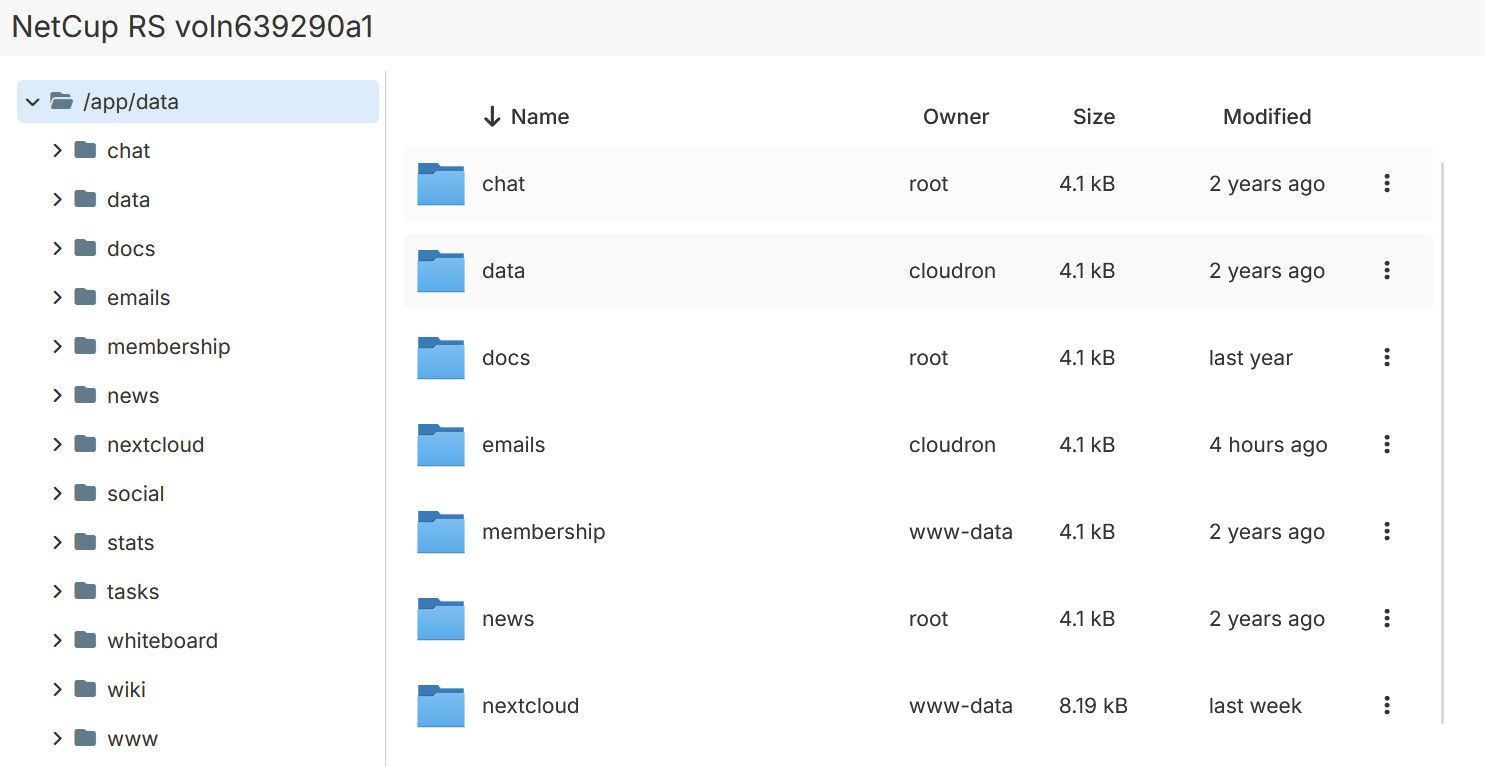
Yes the mount is active and working. The remaining apps are slowly coming back online with all their data
-
The wordpress site above eventually started responding:
Apr 24 19:28:30 => Healthcheck error: Error: connect ECONNREFUSED 172.18.16.234:80 Apr 24 19:28:40 => Healthcheck error: Error: connect ECONNREFUSED 172.18.16.234:80 Apr 24 19:28:50 => Healthcheck error: Error: connect ECONNREFUSED 172.18.16.234:80 Apr 24 19:29:00 => Healthcheck error: Error: connect ECONNREFUSED 172.18.16.234:80 Apr 24 19:29:08 => Updating db settings Apr 24 19:29:08 Success: Updated the constant 'DB_HOST' in the 'wp-config.php' file with the value 'mysql:3306'. Apr 24 19:29:08 Success: Updated the constant 'DB_NAME' in the 'wp-config.php' file with the value 'xxx'. Apr 24 19:29:09 Success: Updated the constant 'DB_USER' in the 'wp-config.php' file with the value 'xxx'. Apr 24 19:29:09 Success: Updated the constant 'DB_PASSWORD' in the 'wp-config.php' file with the value 'xxx'. Apr 24 19:29:09 ==> Updating wordpress database Apr 24 19:29:10 => Healthcheck error: Error: connect ECONNREFUSED 172.18.16.234:80 Apr 24 19:29:10 Success: WordPress database already at latest db version 60717. Apr 24 19:29:10 ==> Updating domain related settings Apr 24 19:29:10 Success: Updated the constant 'WP_HOME' in the 'wp-config.php' file with the value 'https://www.stirchley.coop'. Apr 24 19:29:11 Success: Updated the constant 'WP_SITEURL' in the 'wp-config.php' file with the value 'https://www.stirchley.coop'. Apr 24 19:29:11 Success: Updated the constant 'WP_CONTENT_DIR' in the 'wp-config.php' file with the value '/app/data/wp-content'. Apr 24 19:29:12 Success: Value passed for 'siteurl' option is unchanged. Apr 24 19:29:12 Success: Value passed for 'home' option is unchanged. Apr 24 19:29:12 ==> Configuring smtp mail Apr 24 19:29:14 Success: Value passed for 'smtp_mailer_options' option is unchanged. Apr 24 19:29:20 => Healthcheck error: Error: connect ECONNREFUSED 172.18.16.234:80 Apr 24 19:29:20 Unpacking the package... Apr 24 19:29:20 Installing the plugin... Apr 24 19:29:20 Removing the old version of the plugin... Apr 24 19:29:20 Plugin updated successfully. Apr 24 19:29:23 Success: Installed 1 of 1 plugins. Apr 24 19:29:24 Warning: Plugin 'cloudron-sso' is already active. Apr 24 19:29:24 Success: Plugin already activated. Apr 24 19:29:25 ==> Configuring OIDC Apr 24 19:29:25 Success: Value passed for 'openid_connect_generic_settings' option is unchanged. Apr 24 19:29:25 ==> Starting apache Apr 24 19:29:26 [Fri Apr 24 18:29:26.197242 2026] [mpm_prefork:notice] [pid 1] AH00163: Apache/2.4.58 (Ubuntu) mod_perl/2.0.13 Perl/v5.38.2 configured -- resuming normal operations Apr 24 19:29:26 [Fri Apr 24 18:29:26.197291 2026] [core:notice] [pid 1] AH00094: Command line: '/usr/sbin/apache2 -D FOREGROUND' Apr 24 19:29:30 - - - [24/Apr/2026:18:29:30 +0000] "GET /wp-includes/version.php HTTP/1.1" 200 - "-" "Mozilla (CloudronHealth)" Apr 24 19:29:40 - - - [24/Apr/2026:18:29:40 +0000] "GET /wp-includes/version.php HTTP/1.1" 200 - "-" "Mozilla (CloudronHealth)" Apr 24 19:29:50 - - - [24/Apr/2026:18:29:50 +0000] "GET /wp-includes/version.php HTTP/1.1" 200 - "-" "Mozilla (CloudronHealth)" Apr 24 19:29:57 104.23.208.140 - - [24/Apr/2026:18:29:32 +0000] "GET /wp-login.php HTTP/1.1" 200 2980 "-" "Mozilla/5.0 (Macintosh; Intel Mac OS X 10_12_6) AppleWebKit/537.36 (KHTML, like Gecko) Chrome/67.0.3396.87 Safari/537.36" Apr 24 19:29:58 172.68.229.208 - - [24/Apr/2026:18:29:46 +0000] "GET / HTTP/1.1" 200 14761 "-" "Mozilla/5.0 (Android 16; Mobile; rv:150.0) Gecko/150.0 Firefox/150.0" Apr 24 19:29:58 172.69.224.18 - - [24/Apr/2026:18:29:58 +0000] "GET /wp-content/themes/twentytwenty-child/style.css?ver=1.0.1 HTTP/1.1" 200 582 "https://www.stirchley.coop/" "Mozilla/5.0 (Android 16; Mobile; rv:150.0) Gecko/150.0 Firefox/150.0" Apr 24 19:29:58 162.158.216.166 - - [24/Apr/2026:18:29:58 +0000] "GET /wp-content/themes/twentytwenty/style.css?ver=3.0 HTTP/1.1" 200 23204 "https://www.stirchley.coop/" "Mozilla/5.0 (Android 16; Mobile; rv:150.0) Gecko/150.0 Firefox/150.0" Apr 24 19:29:58 141.101.98.55 - - [24/Apr/2026:18:29:58 +0000] "GET /wp-content/themes/twentytwenty/assets/css/font-inter.css?ver=1.0.1 HTTP/1.1" 200 268 "https://www.stirchley.coop/" "Mozilla/5.0 (Android 16; Mobile; rv:150.0) Gecko/150.0 Firefox/150.0" Apr 24 19:29:58 172.69.224.29 - - [24/Apr/2026:18:29:58 +0000] "GET /wp-content/uploads/2026/03/cropped-SCD-logo-1.png HTTP/1.1" 304 - "https://www.stirchley.coop/" "Mozilla/5.0 (Android 16; Mobile; rv:150.0) Gecko/150.0 Firefox/150.0" Apr 24 19:29:58 172.71.178.90 - - [24/Apr/2026:18:29:58 +0000] "GET /wp-content/uploads/2023/06/16-06-23_-_GSA_Stirchley-43-1200x801.jpg HTTP/1.1" 304 - "https://www.stirchley.coop/" "Mozilla/5.0 (Android 16; Mobile; rv:150.0) Gecko/150.0 Firefox/150.0" Apr 24 19:29:58 162.158.216.38 - - [24/Apr/2026:18:29:58 +0000] "GET /wp-content/uploads/2025/12/DSC08223-1200x800.jpg HTTP/1.1" 304 - "https://www.stirchley.coop/" "Mozilla/5.0 (Android 16; Mobile; rv:150.0) Gecko/150.0 Firefox/150.0" Apr 24 19:29:58 172.71.241.139 - - [24/Apr/2026:18:29:58 +0000] "GET /wp-content/themes/twentytwenty/assets/js/index.js?ver=1.0.1 HTTP/1.1" 200 7401 "https://www.stirchley.coop/" "Mozilla/5.0 (Android 16; Mobile; rv:150.0) Gecko/150.0 Firefox/150.0" Apr 24 19:29:58 162.158.216.213 - - [24/Apr/2026:18:29:58 +0000] "GET /wp-content/uploads/2024/05/29-04-2024_GSA_Stirchley-81-1-1200x801.jpg HTTP/1.1" 200 271929 "https://www.stirchley.coop/" "Mozilla/5.0 (Android 16; Mobile; rv:150.0) Gecko/150.0 Firefox/150.0" Apr 24 19:29:58 172.71.178.15 - - [24/Apr/2026:18:29:58 +0000] "GET /wp-content/themes/twentytwenty/print.css?ver=1.0.1 HTTP/1.1" 200 1006 "https://www.stirchley.coop/" "Mozilla/5.0 (Android 16; Mobile; rv:150.0) Gecko/150.0 Firefox/150.0" Apr 24 19:29:58 162.158.216.140 - - [24/Apr/2026:18:29:58 +0000] "GET /wp-content/themes/twentytwenty/assets/fonts/inter/Inter-upright-var.woff2 HTTP/1.1" 304 - "https://www.stirchley.coop/wp-content/themes/twentytwenty/assets/css/font-inter.css?ver=1.0.1" "Mozilla/5.0 (Android 16; Mobile; rv:150.0) Gecko/150.0 Firefox/150.0" Apr 24 19:29:58 162.158.216.209 - - [24/Apr/2026:18:29:53 +0000] "GET / HTTP/1.1" 200 14761 "-" "Mozilla/5.0 (Windows NT 10.0; Win64; x64; rv:149.0) Gecko/20100101 Firefox/149.0" Apr 24 19:29:58 172.69.43.177 - - [24/Apr/2026:18:29:58 +0000] "GET /wp-content/uploads/2026/03/cropped-cropped-SCD-logo-1-180x180.png HTTP/1.1" 304 - "-" "Mozilla/5.0 (Android 16; Mobile; rv:150.0) Gecko/150.0 Firefox/150.0" Apr 24 19:29:59 172.71.178.109 - - [24/Apr/2026:18:29:59 +0000] "GET /wp-includes/js/wp-emoji-release.min.js?ver=6.9.4 HTTP/1.1" 200 5375 "https://www.stirchley.coop/" "Mozilla/5.0 (Android 16; Mobile; rv:150.0) Gecko/150.0 Firefox/150.0" Apr 24 19:29:59 172.71.178.89 - - [24/Apr/2026:18:29:59 +0000] "GET /wp-content/uploads/2023/06/16-06-23_-_GSA_Stirchley-43-1980x1322.jpg HTTP/1.1" 304 - "https://www.stirchley.coop/" "Mozilla/5.0 (Windows NT 10.0; Win64; x64; rv:149.0) Gecko/20100101 Firefox/149.0" Apr 24 19:29:59 172.69.194.198 - - [24/Apr/2026:18:29:59 +0000] "GET /wp-content/uploads/2025/12/DSC08223-1536x1024.jpg HTTP/1.1" 304 - "https://www.stirchley.coop/" "Mozilla/5.0 (Windows NT 10.0; Win64; x64; rv:149.0) Gecko/20100101 Firefox/149.0" Apr 24 19:29:59 141.101.98.52 - - [24/Apr/2026:18:29:59 +0000] "GET /wp-content/uploads/2024/05/29-04-2024_GSA_Stirchley-81-1-1536x1025.jpg HTTP/1.1" 304 - "https://www.stirchley.coop/" "Mozilla/5.0 (Windows NT 10.0; Win64; x64; rv:149.0) Gecko/20100101 Firefox/149.0" Apr 24 19:30:00 - - - [24/Apr/2026:18:30:00 +0000] "GET /wp-includes/version.php HTTP/1.1" 200 - "-" "Mozilla (CloudronHealth)" Apr 24 19:30:00 172.69.43.165 - - [24/Apr/2026:18:30:00 +0000] "GET /wp-content/uploads/2026/03/cropped-cropped-SCD-logo-1-192x192.png HTTP/1.1" 304 - "https://www.stirchley.coop/" "Mozilla/5.0 (Windows NT 10.0; Win64; x64; rv:149.0) Gecko/20100101 Firefox/149.0" Apr 24 19:30:00 172.71.178.104 - - [24/Apr/2026:18:30:00 +0000] "GET /wp-content/uploads/2026/03/cropped-cropped-SCD-logo-1-32x32.png HTTP/1.1" 304 - "https://www.stirchley.coop/" "Mozilla/5.0 (Windows NT 10.0; Win64; x64; rv:149.0) Gecko/20100101 Firefox/149.0" Apr 24 19:30:00 172.68.186.17 - - [24/Apr/2026:18:30:00 +0000] "GET /wp-content/uploads/2024/05/29-04-2024_GSA_Stirchley-89-1024x683.jpg HTTP/1.1" 304 - "https://www.stirchley.coop/" "Mozilla/5.0 (Android 16; Mobile; rv:150.0) Gecko/150.0 Firefox/150.0" Apr 24 19:30:03 172.71.178.31 - - [24/Apr/2026:18:30:03 +0000] "GET /wp-content/uploads/2020/05/powertochange-e1642966595878.png HTTP/1.1" 200 89055 "https://www.stirchley.coop/" "Mozilla/5.0 (Android 16; Mobile; rv:150.0) Gecko/150.0 Firefox/150.0" Apr 24 19:30:03 172.71.178.6 - - [24/Apr/2026:18:30:03 +0000] "GET /wp-content/uploads/2023/05/CHARM-logo-1024x426.png HTTP/1.1" 304 - "https://www.stirchley.coop/" "Mozilla/5.0 (Android 16; Mobile; rv:150.0) Gecko/150.0 Firefox/150.0" Apr 24 19:30:10 - - - [24/Apr/2026:18:30:10 +0000] "GET /wp-includes/version.php HTTP/1.1" 200 - "-" "Mozilla (CloudronHealth)" Apr 24 19:30:14 104.23.248.105 - - [24/Apr/2026:18:30:08 +0000] "POST /xmlrpc.php HTTP/1.1" 200 225 "-" "Mozilla/5.0 (Windows NT 6.1; WOW64; Trident/7.0; BOIE9;ENCA; rv:11.0) like Gecko" Apr 24 19:30:20 - - - [24/Apr/2026:18:30:20 +0000] "GET /wp-includes/version.php HTTP/1.1" 200 - "-" "Mozilla (CloudronHealth)" Apr 24 19:30:22 172.70.86.175 - - [24/Apr/2026:18:30:15 +0000] "GET /blog/ HTTP/1.1" 200 31864 "https://www.stirchley.coop/" "Mozilla/5.0 (Android 16; Mobile; rv:150.0) Gecko/150.0 Firefox/150.0" Apr 24 19:30:22 172.71.178.109 - - [24/Apr/2026:18:30:22 +0000] "GET /wp-content/uploads/2025/12/signal-2025-12-22-171922_002-1200x900.jpeg HTTP/1.1" 304 - "https://www.stirchley.coop/blog/" "Mozilla/5.0 (Android 16; Mobile; rv:150.0) Gecko/150.0 Firefox/150.0" Apr 24 19:30:22 172.69.194.85 - - [24/Apr/2026:18:30:22 +0000] "GET /wp-content/uploads/2026/03/2505_stirchley-website-image-DRAFT-colour-2.pdf-1200x910.jpg HTTP/1.1" 304 - "https://www.stirchley.coop/blog/" "Mozilla/5.0 (Android 16; Mobile; rv:150.0) Gecko/150.0 Firefox/150.0" Apr 24 19:30:22 172.69.194.46 - - [24/Apr/2026:18:30:22 +0000] "GET /wp-content/uploads/2025/12/AA-43-1200x800.jpg HTTP/1.1" 304 - "https://www.stirchley.coop/blog/" "Mozilla/5.0 (Android 16; Mobile; rv:150.0) Gecko/150.0 Firefox/150.0" Apr 24 19:30:22 172.70.162.13 - - [24/Apr/2026:18:30:22 +0000] "GET /wp-content/themes/twentytwenty/assets/fonts/inter/Inter-italic-var.woff2 HTTP/1.1" 304 - "https://www.stirchley.coop/wp-content/themes/twentytwenty/assets/css/font-inter.css?ver=1.0.1" "Mozilla/5.0 (Android 16; Mobile; rv:150.0) Gecko/150.0 Firefox/150.0" Apr 24 19:30:22 172.69.195.246 - - [24/Apr/2026:18:30:22 +0000] "GET /wp-content/uploads/2023/05/CHARM-logo-1200x499.png HTTP/1.1" 304 - "https://www.stirchley.coop/blog/" "Mozilla/5.0 (Android 16; Mobile; rv:150.0) Gecko/150.0 Firefox/150.0" Apr 24 19:30:30 - - - [24/Apr/2026:18:30:30 +0000] "GET /wp-includes/version.php HTTP/1.1" 200 - "-" "Mozilla (CloudronHealth)" Apr 24 19:30:30 162.158.162.68 - - [24/Apr/2026:18:30:24 +0000] "GET /robots.txt HTTP/1.1" 200 113 "-" "Mozilla/5.0 (compatible;PetalBot;+https://webmaster.petalsearch.com/site/petalbot)" Apr 24 19:30:33 => Run cron job Apr 24 19:30:40 - - - [24/Apr/2026:18:30:40 +0000] "GET /wp-includes/version.php HTTP/1.1" 200 - "-" "Mozilla (CloudronHealth)" Apr 24 19:30:42 Executed the cron event 'wp_privacy_delete_old_export_files' in 0.041s. Apr 24 19:30:45 172.68.229.208 - - [24/Apr/2026:18:30:39 +0000] "GET / HTTP/1.1" 200 14761 "-" "Mozilla/5.0 (X11; Linux x86_64; rv:149.0) Gecko/20100101 Firefox/149.0" Apr 24 19:30:45 141.101.98.120 - - [24/Apr/2026:18:30:45 +0000] "GET /wp-content/uploads/2024/05/29-04-2024_GSA_Stirchley-81-1-1024x683.jpg HTTP/1.1" 304 - "https://www.stirchley.coop/" "Mozilla/5.0 (X11; Linux x86_64; rv:149.0) Gecko/20100101 Firefox/149.0" Apr 24 19:30:45 172.70.162.207 - - [24/Apr/2026:18:30:45 +0000] "GET /wp-content/uploads/2025/12/DSC08223-1024x683.jpg HTTP/1.1" 304 - "https://www.stirchley.coop/" "Mozilla/5.0 (X11; Linux x86_64; rv:149.0) Gecko/20100101 Firefox/149.0" Apr 24 19:30:50 - - - [24/Apr/2026:18:30:50 +0000] "GET /wp-includes/version.php HTTP/1.1" 200 - "-" "Mozilla (CloudronHealth)" Apr 24 19:30:51 Executed the cron event 'wp_cache_gc' in 8.484s. Apr 24 19:30:51 Executed the cron event 'jetpack_clean_nonces' in 0.003s. Apr 24 19:30:51 Executed the cron event 'wc_admin_process_orders_milestone' in 0.002s. Apr 24 19:31:00 - - - [24/Apr/2026:18:31:00 +0000] "GET /wp-includes/version.php HTTP/1.1" 200 - "-" "Mozilla (CloudronHealth)" Apr 24 19:31:10 - - - [24/Apr/2026:18:31:10 +0000] "GET /wp-includes/version.php HTTP/1.1" 200 - "-" "Mozilla (CloudronHealth)" Apr 24 19:31:13 Executed the cron event 'wp_version_check' in 21.979s. Apr 24 19:31:13 Executed the cron event 'wp_update_plugins' in 0.066s. Apr 24 19:31:13 Executed the cron event 'wp_update_themes' in 0.013s. Apr 24 19:31:13 Executed the cron event 'recovery_mode_clean_expired_keys' in 0.004s. Apr 24 19:31:13 Executed the cron event 'wp_scheduled_delete' in 0.005s. Apr 24 19:31:13 Executed the cron event 'delete_expired_transients' in 0.046s. Apr 24 19:31:13 Executed the cron event 'wp_scheduled_auto_draft_delete' in 0.002s. Apr 24 19:31:13 Executed the cron event 'simple_history/maybe_purge_db' in 0.003s. Apr 24 19:31:13 Executed the cron event 'wp_update_user_counts' in 0.009s. Apr 24 19:31:13 Executed the cron event 'woocommerce_marketplace_cron_fetch_promotions' in 0.007s. Apr 24 19:31:15 Executed the cron event 'wp_cache_full_preload_hook' in 1.923s. Apr 24 19:31:16 Executed the cron event 'simple_history/core_files_integrity_check' in 1.323s. Apr 24 19:31:17 Executed the cron event 'mc4wp_refresh_mailchimp_lists' in 0.387s. Apr 24 19:31:17 Executed the cron event 'openid-connect-generic-cron-daily' in 0.005s. Apr 24 19:31:17 Executed the cron event 'jetpack_v2_heartbeat' in 0.005s. Apr 24 19:31:17 Executed the cron event 'wp_delete_temp_updater_backups' in 0.004s. Apr 24 19:31:17 Success: Executed a total of 20 cron events. Apr 24 19:31:20 - - - [24/Apr/2026:18:31:20 +0000] "GET /wp-includes/version.php HTTP/1.1" 200 - "-" "Mozilla (CloudronHealth)" Apr 24 19:31:30 - - - [24/Apr/2026:18:31:30 +0000] "GET /wp-includes/version.php HTTP/1.1" 200 - "-" "Mozilla (CloudronHealth)" Apr 24 19:31:40 - - - [24/Apr/2026:18:31:40 +0000] "GET /wp-includes/version.php HTTP/1.1" 200 - "-" "Mozilla (CloudronHealth)" -
@james can we delete this thread? Realising there's sensitive info in all the log messages
-
 J james has marked this topic as solved
-
@james there's usernames and passwords in there, I'm going through and redacting them but I'd rather delete the thread completely if possible in case I've missed something
-
Hello @stirchley.coop
I also had a look and redacted some content.
Also, the content that was not redacted are not critical since Cloudron ensures that non of the Cloudron services are accessible from the internet.But if you still feel more comfortable to delete the whole topic, I can do that.
Hello! It looks like you're interested in this conversation, but you don't have an account yet.
Getting fed up of having to scroll through the same posts each visit? When you register for an account, you'll always come back to exactly where you were before, and choose to be notified of new replies (either via email, or push notification). You'll also be able to save bookmarks and upvote posts to show your appreciation to other community members.
With your input, this post could be even better 💗
Register Login