
Qdrant on Cloudron - Community Package
-
[Packaging Notes] Qdrant 1.18.2
Thank You Everybody!
We want to thank everybody in the Cloudron community for your excellent examples and inspiration.
You are amazing. This wouldn't have happened without you!Please take a look in the Docs in the repo, especially the integrations. We have tried to setup this package so that it will work well with other applications on Cloudron. We also wanted it to be a bit easier to maintain.
We hope you like it.
What do you think of this format for announcing a new Community Package?
At a glance
Field Value Application Qdrant Upstream repo https://github.com/qdrant/qdrant Upstream version packaged 1.18.2 (pinned: yes, by sha256 digest) Package repo https://github.com/OrcVole/qdrant-cloudron Packaging type Community (written to official-track standard) Current status Working Cloudron version tested 9.1.x Base image cloudron/base:5.0.0 Addons used localstorage, proxyAuth, scheduler Process model single (one binary) Memory limit set 2048 MB Time invested about one focused day Difficulty 3 Would package again Yes TL;DR
Qdrant is a vector database written in Rust (similarity search over REST and gRPC, for RAG and
semantic search). Packaging succeeded and is verified live on a box: the SSO topology, a cross
version update, and a real backup then restore into a clean app all pass. The single most important
thing to know: Qdrant serves its web dashboard and its API on the same HTTP port, split only by path,
so scope theproxyAuthwall to the dashboard path only. A whole-domain auth wall would redirect
every API client to a login page and break all integrations.Installation
Click on the Add custom app drop down top right in the App Store and choose Community app:
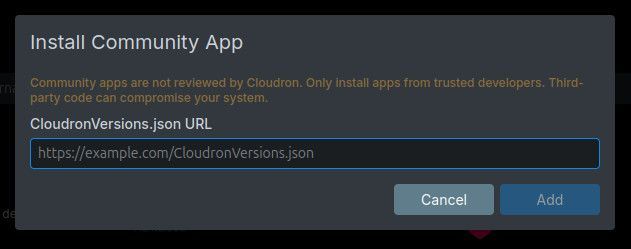
Then paste in the CloudronVersions.json URL into the box that pops up: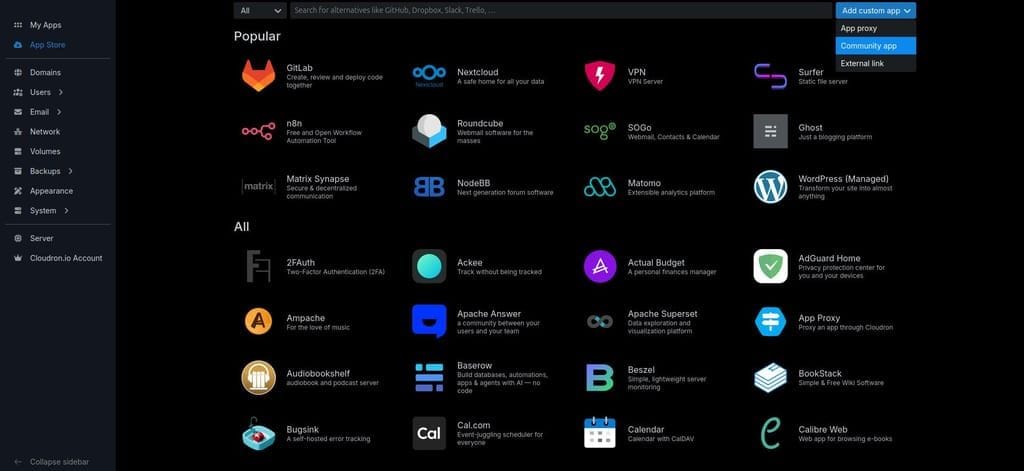
What worked well
- A single dynamically linked binary copied onto
cloudron/basewith a multi-stage build. The
runtime surface is tiny (libc, libm, libgcc_s, libunwind, liblzma), all present on the base. - Putting 100 percent of state under
/app/datamade thelocalstoragebackup just work. A real
backup createthencloneinto a fresh app carried the data, the config, and the API key. proxyAuthwith apathrestriction cleanly separates the two surfaces (dashboard behind SSO,
API and gRPC left to the app's own key).- Qdrant 1.18's
strict_mode.max_resident_memory_percent(a percent of the cgroup limit) lets the
package make Qdrant reject writes and stay alive under memory pressure, rather than be OOM killed. - gRPC over a
tcpPortwith server reflection enabled meansgrpcurland Rust clients (rig-qdrant)
work against it with just the API key.
Gotchas and difficulties
Gotcha: manifest validation rejects the proxyAuth addon
- Symptom:
cloudron installrejects the manifest at/addonsbefore any build. - Cause: the proxy-auth addon key is camelCase
proxyAuth. The Cloudron packaging skill's addon
reference shows it lowercaseproxyauth, which the box rejects. - Fix:
"addons": { "proxyAuth": { "path": "/dashboard", "supportsBearerAuth": true } }. - Routes to: documentation
- Tags: #manifest #addon-proxyauth #healthcheck
Gotcha: read-only filesystem warning at boot
- Symptom: boot log shows
Failed to create init file indicator: .qdrant-initialized: Permission denied. - Cause: Qdrant writes a marker into its working directory, which by default is the read-only
/app/code. - Fix: run Qdrant from a writable working directory (
/run/qdrant) with the dashboardstatic
dir and the config symlinked in. This also lets you setRUN_MODE=productionand link the operator
config asconfig/production.yaml, which silences a secondconfig/development not foundwarning. - Routes to: packaging-only (and a gentle upstream ask: let the marker path follow the data dir)
- Tags: #readonly-fs #permissions
Gotcha: app OOM-killed on the first real collection
- Symptom: the app restarts as soon as a collection is created or grown.
- Cause: the platform default memoryLimit is 256 MB; Qdrant keeps the HNSW graph and vectors in
RAM by default. - Fix: set
memoryLimitto 2 GB and shipstrict_modeenabled with
max_resident_memory_percentso writes are rejected rather than the process killed. Document
on-disk vectors and TurboQuant for larger collections. The guard counts heap, not page cache. - Routes to: packaging-only
- Tags: #memory
Gotcha: /metrics returns 401
- Symptom: a Prometheus scrape of
/metricsreturns 401. - Cause:
/metricsis behind the API key; only/,/healthz,/livez,/readyzare open. - Fix: scrape with the API key (a read-only key is enough).
- Routes to: documentation
- Tags: #auth #metrics
Gotcha: gRPC port unreachable behind Cloudflare
- Symptom: a gRPC client times out on the data-plane TCP port.
- Cause: a Cloudflare-proxied (orange-cloud) domain proxies only HTTP, so the raw TCP port does
not pass. - Fix: use a DNS-only (grey-cloud) record for the host serving the gRPC port. The channel is
plaintext (the tcpPort is not TLS terminated), so use-plaintextand a trusted network. - Routes to: Cloudron platform / documentation
- Tags: #tcpport #cloudflare #grpc
Gotcha: cloudron clone is interactive and "latest" did not resolve
- Symptom:
cloudron clone ... --backup latestin a non-interactive shell dies with
process.stdin.setRawMode is not a function, and even interactivelylatestreturned
Backup not found. - Cause: clone prompts for a new TCP host port (the source's port is taken), which needs a TTY,
and on a box with several backup sites thelatestalias did not resolve. - Fix: drive it through a pseudo-TTY (
script -qefc "cloudron clone ..." /dev/null), feed the
new port, and pass a concrete backup id fromcloudron backup listinstead oflatest. - Routes to: Cloudron platform (CLI)
- Tags: #cli #backup #clone
Gotcha: live backup of a running datastore is only crash-consistent
- Symptom: none in practice, but a concern: Cloudron copies
/app/datalive while the app runs. - Cause: a live copy of an embedded datastore is crash-consistent, not transactionally
consistent.backupCommandruns in a separate temp container and cannot quiesce the live process. - Fix: rely on Qdrant's write-ahead log (it replays on restore; the empirical backup-restore
cycle passed), and offer an opt-in in-container snapshot cron (scheduler addon, off by default)
that writes a full Qdrant snapshot into the backup for a transactionally consistent artifact. - Routes to: Cloudron platform / documentation
- Tags: #backup #consistency #wal
Gotcha: /app/data ownership resets across restart and restore
- Symptom: permission errors after a restore or update if ownership is assumed.
- Cause: ownership under
/app/datais not preserved across backup and restore. - Fix:
chown -R cloudron:cloudron /app/dataat the top ofstart.sh, every boot, before
touching anything. - Routes to: documentation
- Tags: #permissions
Gotcha: insecure-by-default upstream settings
- Symptom: none visible, but the defaults are unsafe in a container.
- Cause: Qdrant's API is open by default, telemetry is on, and snapshot recovery from arbitrary
remote URLs is enabled (an SSRF risk). - Fix: generate API keys on first run and inject them via
QDRANT__SERVICE__API_KEYand
QDRANT__SERVICE__READ_ONLY_API_KEY; setjwt_rbac: true; settelemetry_disabled: true; set
service.enable_snapshot_url_recovery: false. - Routes to: upstream app (secure defaults) / packaging-only
- Tags: #security #ssrf
Gotcha: io_uring under the container seccomp profile
- Symptom: none by default; relevant only if you enable the async scorer.
- Cause: Qdrant can use io_uring for quantized multi-vector rescoring, but Docker's default
seccomp profile commonly restricts io_uring syscalls and there is no confirmed graceful fallback. - Fix: leave
storage.performance.async_scoreroff (its default). Treat io_uring as an
opportunistic speedup only, and check the container seccomp posture before enabling it. - Routes to: Cloudron platform / upstream app
- Tags: #performance #seccomp #io_uring
Cloudron specifics
- Filesystem and persistence:
/app/codeis read-only, so Qdrant runs from a writable
/run/qdrantworking directory withstaticandconfigsymlinked in./app/datais the only
persistent path; storage, snapshots, the operator config, and the keys are all forced there with
QDRANT__STORAGE__STORAGE_PATH,QDRANT__STORAGE__SNAPSHOTS_PATH, and a seeded
/app/data/config/production.yaml. NopersistentDirsare needed. - Addons:
localstoragefor the backup;proxyAuthscoped topath: /dashboardwith
supportsBearerAuth;schedulerfor an opt-in snapshot task. The proxyAuth key is camelCase. - Healthcheck:
/healthz, which returns 200 as soon as the listener binds and bypasses the API
key. Not/readyz, which returns 503 until shards load and would risk a restart loop during a
large collection load. - Manifest quirks: one
httpPort(6333) carries both the dashboard and the API split by path; a
tcpPortcarries gRPC (6334), with a default host port outside the Linux ephemeral range;
memoryLimit2 GB;optionalSso: true;configurePath: /dashboard. - Build and CLI: on-server build works with no local Docker; rootless podman works locally. The
image is roughly 2.7 GB becausecloudron/baseis a full Ubuntu. The icon is not baked into the
image; the CLI uploadslogo.pngat install or update, and a community (--versions-url) install
takes its icon fromiconUrl.
Notes for the Cloudron maintainers
Friendly asks for the platform, from packaging this app:
iconUrlcouples to theminBoxVersionfloor. In aCloudronVersions.json, includingiconUrl
forcesminBoxVersion >= 9.1.0, but omittingiconUrlmakes the versions-url install fail
validation (Invalid manifest: iconUrl is missing in manifest). So there is no 8.3.0-compatible
versions-url manifest at all: any community-channel app is pinned to box 9.1.0+ purely by the icon
requirement, even when the app itself runs fine on 8.3. Please either document this coupling, or
decouple the icon from the version floor (accept a versions-url manifest withouticonUrland fall
back to thefile://icon, or stop gatingiconUrlat 9.1.0). Only the real--versions-urlpath
surfaces this; on-servercloudron installvalidates a looser schema and accepts the same manifest
at 8.3.0, so the failure is easy to miss until publish. (This vindicates the reference package's
choice of 9.1.0.)- Document the
proxyAuthaddon key casing. It is camelCaseproxyAuth; the packaging skill's
addon reference shows it lowercase, which fails manifest validation at/addons. - A pre-backup hook that runs inside the live app container would let a stateful app quiesce or
snapshot itself before the live/app/datacopy.backupCommandruns in a separate temporary
container and cannot reach the running process, so it cannot make a busy datastore's live copy
transactionally consistent. - Clarify
proxyAuthpath arrays and exclusions. The docs show a singlepathstring; whether
multiple positive paths or!-exclusions can be combined is undocumented.
Notes for the upstream developers
Friendly asks that would make Qdrant easier to run in any container:
- Document a minimum glibc version per release. The binary is dynamically linked, and a slim base
image needs to know the floor; a toolchain bump that raises it fails at runtime, not build time. - Provide a single-command, atomic "snapshot the whole storage to a directory" that is safe to run
continuously, so a platform backup can capture a consistent artifact without quiescing the process. - Clarify whether a live filesystem copy (rsync or tar) of the storage directory is restore-safe and
exactly what the write-ahead log guarantees on recovery. This is the crux for managed-backup
platforms. - Consider a readiness signal on the main listener, or clearer health-versus-ready semantics, so a
reverse proxy can health-check without choosing between "restart loops during load" and "reports
healthy before ready". - Default
service.enable_snapshot_url_recoveryto false; recovering snapshots from arbitrary URLs
is a server-side request forgery risk in a networked container.
Reusable snippets
<details>
<summary>Dockerfile fragment (multi-stage copy plus build-time linkage gate)</summary>ARG QDRANT_VERSION=v1.18.2 FROM qdrant/qdrant:v1.18.2@sha256:<digest> AS upstream FROM cloudron/base:5.0.0@sha256:<digest> COPY --from=upstream /qdrant/qdrant /app/code/qdrant COPY --from=upstream /qdrant/static /app/code/static COPY --from=upstream /qdrant/config/config.yaml /app/code/config/config.yaml COPY start.sh /app/code/start.sh # Fail the BUILD if the binary cannot resolve its libs or glibc on this base. RUN set -eux; ldd /app/code/qdrant; \ if ldd /app/code/qdrant 2>&1 | grep -qE 'not found'; then exit 1; fi; \ /app/code/qdrant --version WORKDIR /app/code CMD [ "/app/code/start.sh" ]</details>
<details>
<summary>start.sh fragment (ownership, key generation, run from a writable workdir)</summary>#!/bin/bash set -euo pipefail chown -R cloudron:cloudron /app/data # ownership is not preserved across restore # generate keys once, inject via env (env overrides Qdrant's config files) [ -f /app/data/.secrets/keys.env ] || { mkdir -p /app/data/.secrets; \ printf 'QDRANT_ADMIN_API_KEY=%s\n' "$(openssl rand -hex 32)" > /app/data/.secrets/keys.env; } . /app/data/.secrets/keys.env export QDRANT__SERVICE__API_KEY="$QDRANT_ADMIN_API_KEY" export QDRANT__STORAGE__STORAGE_PATH=/app/data/storage # run from a writable cwd so Qdrant's marker file does not hit the read-only /app/code mkdir -p /run/qdrant/config ln -sfn /app/code/static /run/qdrant/static ln -sf /app/data/config/production.yaml /run/qdrant/config/production.yaml chown cloudron:cloudron /run/qdrant /run/qdrant/config export RUN_MODE=production cd /run/qdrant exec gosu cloudron:cloudron /app/code/qdrant</details>
Open questions
- The best practice for a transactionally consistent live backup of a running embedded datastore on
Cloudron. A pre-backup hook that ran inside the live app container (rather than the separate temp
container thatbackupCommanduses) would let the app quiesce or snapshot itself first. - Whether
proxyAuthsupports an array of paths or path exclusions in one app; the docs show a
single string. A single positive path was enough here.
References
- Package source: https://github.com/OrcVole/qdrant-cloudron
- Upstream docs: https://qdrant.tech/documentation/ and the repo
config/config.yaml - Cloudron packaging docs: https://docs.cloudron.io/packaging/
Verdict
Official-app candidate. It is a clean single-binary multi-stage build on the current base, with
correct read-only filesystem handling, a working unauthenticated health check, instant usability with
no setup screen, secure-by-default settings, a complete manifest with the official icon, and full
documentation, including verified upgrade and backup gates. Ship it on the community channel now; it
is written to the standard the official track expects.
#packaging-notes #qdrant #cloudron-9.1 #status-working
- A single dynamically linked binary copied onto
-
Who is Friendly ?
Indie app dev, huge fan of Cloudron PaaS, scratching my itches : communityapps.appx.uk
-
Who is Friendly ?
@timconsidine The one who asks



Hello! It looks like you're interested in this conversation, but you don't have an account yet.
Getting fed up of having to scroll through the same posts each visit? When you register for an account, you'll always come back to exactly where you were before, and choose to be notified of new replies (either via email, or push notification). You'll also be able to save bookmarks and upvote posts to show your appreciation to other community members.
With your input, this post could be even better 💗
Register Login