
Cloudron makes it easy to run web apps like WordPress, Nextcloud, GitLab on your server. Find out more or install now.


Skip to content
  • Categories
  • Recent
  • Tags
  • Popular
  • Bookmarks
  • Search
Skins
  • Light
  • Brite
  • Cerulean
  • Cosmo
  • Flatly
  • Journal
  • Litera
  • Lumen
  • Lux
  • Materia
  • Minty
  • Morph
  • Pulse
  • Sandstone
  • Simplex
  • Sketchy
  • Spacelab
  • United
  • Yeti
  • Zephyr
  • Dark
  • Cyborg
  • Darkly
  • Quartz
  • Slate
  • Solar
  • Superhero
  • Vapor

  • Default (No Skin)
  • No Skin
Collapse
Brand Logo

Cloudron Forum

Apps - Status | Demo | Docs | Install
  1. Cloudron Forum
  2. Support
  3. Installing Cloudron on Scaleway misses tzdata

Installing Cloudron on Scaleway misses tzdata

Scheduled Pinned Locked Moved Solved Support
6 Posts 2 Posters 2.4k Views 2 Watching
  • Oldest to Newest
  • Newest to Oldest
  • Most Votes
Reply
  • Reply as topic
Log in to reply
This topic has been deleted. Only users with topic management privileges can see it.
  • C Offline
    C Offline
    Camille
    wrote on last edited by
    #1

    Hi,

    The install script will fail on Scaleway / Ubuntu 18.04 Bionic as

    export DEBIAN_FRONTEND=noninteractive
    apt install tzdata
    

    fixed it for me.
    Maybe the install script could be updated to take this into account?

    Thanks,
    Camille

    1 Reply Last reply
    0
    • nebulonN Offline
      nebulonN Offline
      nebulon
      Staff
      wrote on last edited by
      #2

      Hi,

      thanks for reporting. The tzdata issue is fixed with https://git.cloudron.io/cloudron/box/commit/1b6af9bd12aea8008ff7c86a51199fa86bb7527b but is pending a release.

      Still trying to reproduce the apt interactive issue. Which package required this for you?

      1 Reply Last reply
      0
      • C Offline
        C Offline
        Camille
        wrote on last edited by
        #3

        Hi,
        Thanks for the fix.
        Regarding the export DEBIAN_FRONTEND=noninteractive statement : I'm really not sure it's required, but apt-ing tzdata will prompt an interactive interface that might not be needed.
        Best,
        Camille

        1 Reply Last reply
        0
        • nebulonN Offline
          nebulonN Offline
          nebulon
          Staff
          wrote on last edited by
          #4

          Actually I think I found the issue, it is the sudo package:

          Setting up sudo (1.8.21p2-3ubuntu1) ...
          
          Configuration file '/etc/sudoers'
           ==> File on system created by you or by a script.
           ==> File also in package provided by package maintainer.
             What would you like to do about it ?  Your options are:
              Y or I  : install the package maintainer's version
              N or O  : keep your currently-installed version
                D     : show the differences between the versions
                Z     : start a shell to examine the situation
           The default action is to keep your current version.
          *** sudoers (Y/I/N/O/D/Z) [default=N] ?
          

          Did you also see this or is that something else?

          C 1 Reply Last reply
          0
          • nebulonN nebulon

            Actually I think I found the issue, it is the sudo package:

            Setting up sudo (1.8.21p2-3ubuntu1) ...
            
            Configuration file '/etc/sudoers'
             ==> File on system created by you or by a script.
             ==> File also in package provided by package maintainer.
               What would you like to do about it ?  Your options are:
                Y or I  : install the package maintainer's version
                N or O  : keep your currently-installed version
                  D     : show the differences between the versions
                  Z     : start a shell to examine the situation
             The default action is to keep your current version.
            *** sudoers (Y/I/N/O/D/Z) [default=N] ?
            

            Did you also see this or is that something else?

            C Offline
            C Offline
            Camille
            wrote on last edited by
            #5

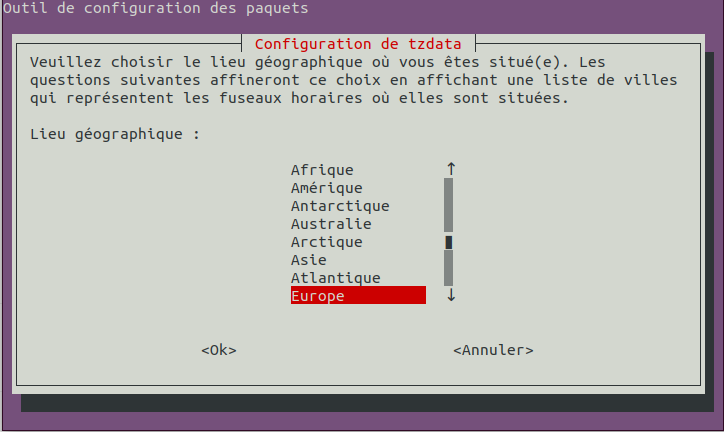
            @nebulon Yes I saw this pb with sudo, (but that can be solved if you tail -f in another terminal as advised: you can type the answer in the original terminal and see the result in the second). Tzdata has a text UI, but I don't know if it will create problems in the context of the install script :
            04c06d68-3191-41ca-8cb0-d7b4e4bf3286-image.png

            HTH,
            Camille

            1 Reply Last reply
            0
            • nebulonN Offline
              nebulonN Offline
              nebulon
              Staff
              wrote on last edited by
              #6

              The tzdata package will fallback to UTC which is correct already, however sudo on scaleway comes pre-installed with a custom sudoers file, which we want to keep. So the fix is pushed via https://git.cloudron.io/cloudron/box/commit/9d237e7bd68f43ae59b4bbc591ef1d7680918567 and will be part of the next release.

              1 Reply Last reply
              0

              Hello! It looks like you're interested in this conversation, but you don't have an account yet.

              Getting fed up of having to scroll through the same posts each visit? When you register for an account, you'll always come back to exactly where you were before, and choose to be notified of new replies (either via email, or push notification). You'll also be able to save bookmarks and upvote posts to show your appreciation to other community members.

              With your input, this post could be even better 💗

              Register Login
              Reply
              • Reply as topic
              Log in to reply
              • Oldest to Newest
              • Newest to Oldest
              • Most Votes


              • Login

              • Don't have an account? Register

              • Login or register to search.
              • First post
                Last post
              0
              • Categories
              • Recent
              • Tags
              • Popular
              • Bookmarks
              • Search