Cloudron makes it easy to run web apps like WordPress, Nextcloud, GitLab on your server. Find out more or install now.


Skip to content
  • Categories
  • Recent
  • Tags
  • Popular
  • Bookmarks
  • Search
Skins
  • Light
  • Brite
  • Cerulean
  • Cosmo
  • Flatly
  • Journal
  • Litera
  • Lumen
  • Lux
  • Materia
  • Minty
  • Morph
  • Pulse
  • Sandstone
  • Simplex
  • Sketchy
  • Spacelab
  • United
  • Yeti
  • Zephyr
  • Dark
  • Cyborg
  • Darkly
  • Quartz
  • Slate
  • Solar
  • Superhero
  • Vapor

  • Default (No Skin)
  • No Skin
Collapse
Brand Logo

Cloudron Forum

Apps - Status | Demo | Docs | Install
  1. Cloudron Forum
  2. Change Detection
  3. Web driver / Chrome support?

Web driver / Chrome support?

Scheduled Pinned Locked Moved Solved Change Detection
21 Posts 8 Posters 8.0k Views 9 Watching
  • Oldest to Newest
  • Newest to Oldest
  • Most Votes
Reply
  • Reply as topic
Log in to reply
This topic has been deleted. Only users with topic management privileges can see it.
  • girishG girish

    Unfortunately, even the old package does not run anymore with a recent build. I am debugging as to why.

    ajtatumA Offline
    ajtatumA Offline
    ajtatum
    wrote on last edited by
    #10

    @girish Any update by change? I managed to get browserless.io self hosted and have incorporated it into other projects, and would love to use it in Change Detection.

    1 Reply Last reply
    1
    • ajtatumA Offline
      ajtatumA Offline
      ajtatum
      wrote on last edited by
      #11

      Sorry to be pestering, but any luck here? Would really love to use this app!

      3699n3 1 Reply Last reply
      3
      • ajtatumA ajtatum

        Sorry to be pestering, but any luck here? Would really love to use this app!

        3699n3 Offline
        3699n3 Offline
        3699n
        wrote on last edited by
        #12

        Would also love to see web driver support, even if it is via an external service!

        1 Reply Last reply
        0
        • ajtatumA Offline
          ajtatumA Offline
          ajtatum
          wrote on last edited by
          #13

          Just wanted to let everyone know that getting this working in Portainer/docker compose is extremely easy and once I setup NGINX Proxy Manager (outside of Cloudron) it's pretty sweet.

          Here's the docker compose script I used:

          version: '3.3'
          x-logging: &default-logging
            options:
              max-size: "200k"
              max-file: "10"
            driver: json-file
                
            changedetection:
                image: ghcr.io/dgtlmoon/changedetection.io:latest
                container_name: changedetection
                hostname: changedetection
                volumes:
                  - changedetection-data:/datastore
                environment:
                  - PORT=5000
                  - PGID=${PGID}
                  - PUID=${PUID}
                  - TZ=${TZ}
                  - WEBDRIVER_URL=http://browser-chrome:4444/wd/hub
                  - PLAYWRIGHT_DRIVER_URL=ws://playwright-chrome:3000/?stealth=1&--disable-web-security=true
                  - BASE_URL=http://192.168.195.150
                logging: *default-logging
                ports:
                  - 5000:5000
                restart: unless-stopped
           
            browser-chrome:
              hostname: browser-chrome
              image: selenium/standalone-chrome-debug:3.141.59
              environment:
                 - VNC_NO_PASSWORD=1
                 - SCREEN_WIDTH=1920
                 - SCREEN_HEIGHT=1080
                 - SCREEN_DEPTH=24
              logging: *default-logging
              volumes:
                 - /dev/shm:/dev/shm
              restart: unless-stopped
           
            playwright-chrome:
                hostname: playwright-chrome
                image: browserless/chrome:latest
                restart: unless-stopped
                environment:
                    - SCREEN_WIDTH=1920
                    - SCREEN_HEIGHT=1024
                    - SCREEN_DEPTH=16
                    - ENABLE_DEBUGGER=false
                    - PREBOOT_CHROME=true
                    - CONNECTION_TIMEOUT=300000
                    - MAX_CONCURRENT_SESSIONS=10
                    - CHROME_REFRESH_TIME=600000
                    - DEFAULT_BLOCK_ADS=true
                    - DEFAULT_STEALTH=true
                logging: *default-logging
                
          volumes:
            changedetection-data:
          

          PGID and PUID are 1000 in my use case. And TZ, for me, is set to America/New_York.

          andreasduerenA 1 Reply Last reply
          3
          • ajtatumA ajtatum

            Just wanted to let everyone know that getting this working in Portainer/docker compose is extremely easy and once I setup NGINX Proxy Manager (outside of Cloudron) it's pretty sweet.

            Here's the docker compose script I used:

            version: '3.3'
            x-logging: &default-logging
              options:
                max-size: "200k"
                max-file: "10"
              driver: json-file
                  
              changedetection:
                  image: ghcr.io/dgtlmoon/changedetection.io:latest
                  container_name: changedetection
                  hostname: changedetection
                  volumes:
                    - changedetection-data:/datastore
                  environment:
                    - PORT=5000
                    - PGID=${PGID}
                    - PUID=${PUID}
                    - TZ=${TZ}
                    - WEBDRIVER_URL=http://browser-chrome:4444/wd/hub
                    - PLAYWRIGHT_DRIVER_URL=ws://playwright-chrome:3000/?stealth=1&--disable-web-security=true
                    - BASE_URL=http://192.168.195.150
                  logging: *default-logging
                  ports:
                    - 5000:5000
                  restart: unless-stopped
             
              browser-chrome:
                hostname: browser-chrome
                image: selenium/standalone-chrome-debug:3.141.59
                environment:
                   - VNC_NO_PASSWORD=1
                   - SCREEN_WIDTH=1920
                   - SCREEN_HEIGHT=1080
                   - SCREEN_DEPTH=24
                logging: *default-logging
                volumes:
                   - /dev/shm:/dev/shm
                restart: unless-stopped
             
              playwright-chrome:
                  hostname: playwright-chrome
                  image: browserless/chrome:latest
                  restart: unless-stopped
                  environment:
                      - SCREEN_WIDTH=1920
                      - SCREEN_HEIGHT=1024
                      - SCREEN_DEPTH=16
                      - ENABLE_DEBUGGER=false
                      - PREBOOT_CHROME=true
                      - CONNECTION_TIMEOUT=300000
                      - MAX_CONCURRENT_SESSIONS=10
                      - CHROME_REFRESH_TIME=600000
                      - DEFAULT_BLOCK_ADS=true
                      - DEFAULT_STEALTH=true
                  logging: *default-logging
                  
            volumes:
              changedetection-data:
            

            PGID and PUID are 1000 in my use case. And TZ, for me, is set to America/New_York.

            andreasduerenA Online
            andreasduerenA Online
            andreasdueren
            App Dev
            wrote on last edited by
            #14

            @ajtatum This hasn't been implemented yet, correct?

            1 Reply Last reply
            1
            • girishG Offline
              girishG Offline
              girish
              Staff
              wrote on last edited by
              #15

              Looks like @vladimir-d has managed to get this working! Let's see if we can get an update out in the coming days.

              imc67I 1 Reply Last reply
              3
              • nebulonN nebulon marked this topic as a question on
              • nebulonN nebulon has marked this topic as solved on
              • girishG girish

                Looks like @vladimir-d has managed to get this working! Let's see if we can get an update out in the coming days.

                imc67I Online
                imc67I Online
                imc67
                translator
                wrote on last edited by
                #16

                @girish said in Web driver / Chrome support?:

                Looks like @vladimir-d has managed to get this working! Let's see if we can get an update out in the coming days.

                Any update?

                1 Reply Last reply
                0
                • imc67I Online
                  imc67I Online
                  imc67
                  translator
                  wrote on last edited by
                  #17

                  I see it’s working! Was debugging an URL that resolves to ERR_NAME_NOT_RESOLVED

                  1 Reply Last reply
                  0
                  • girishG Offline
                    girishG Offline
                    girish
                    Staff
                    wrote on last edited by
                    #18

                    Yes, we have been using it for many months now. It's how we detect changes in Minecraft releases page

                    1 Reply Last reply
                    2
                    • nichu42N Offline
                      nichu42N Offline
                      nichu42
                      wrote on last edited by
                      #19

                      Is there an idiot's guide to getting web driver running with Change Detection on Cloudron?

                      Matrix: @nichu42:blueplanet.social

                      1 Reply Last reply
                      0
                      • girishG Offline
                        girishG Offline
                        girish
                        Staff
                        wrote on last edited by
                        #20

                        @nichu42 there is nothing to setup. Just choose "Playwright Chromium" in the Request tab of your URL.
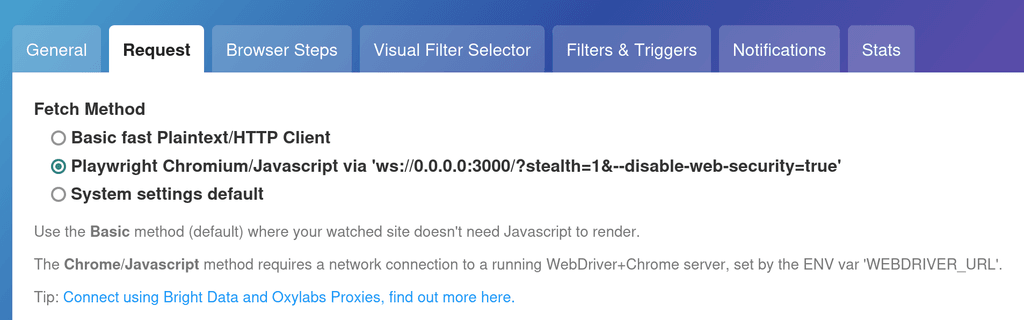

                        image.png

                        nichu42N 1 Reply Last reply
                        1
                        • girishG girish

                          @nichu42 there is nothing to setup. Just choose "Playwright Chromium" in the Request tab of your URL.

                          image.png

                          nichu42N Offline
                          nichu42N Offline
                          nichu42
                          wrote on last edited by
                          #21

                          @girish 🀦 Thank you, I obviously didn't use the word idiot for nothing.

                          Matrix: @nichu42:blueplanet.social

                          1 Reply Last reply
                          0

                          Hello! It looks like you're interested in this conversation, but you don't have an account yet.

                          Getting fed up of having to scroll through the same posts each visit? When you register for an account, you'll always come back to exactly where you were before, and choose to be notified of new replies (either via email, or push notification). You'll also be able to save bookmarks and upvote posts to show your appreciation to other community members.

                          With your input, this post could be even better πŸ’—

                          Register Login
                          Reply
                          • Reply as topic
                          Log in to reply
                          • Oldest to Newest
                          • Newest to Oldest
                          • Most Votes


                          • Login

                          • Don't have an account? Register

                          • Login or register to search.
                          • First post
                            Last post
                          0
                          • Categories
                          • Recent
                          • Tags
                          • Popular
                          • Bookmarks
                          • Search