
Cannot set environment variables
-
Hello everyone,
I'd like to know what is the way to set custom env variables in this app.
I tried setting them in the /app/data/env and restarting the app, but that didn't seem to work. Specifically, I exported N8N_BLOCK_ENV_ACCESS_IN_NODE as false (that should be the default), but still no luck.
How could this be achieved? -
Hello everyone,
I'd like to know what is the way to set custom env variables in this app.
I tried setting them in the /app/data/env and restarting the app, but that didn't seem to work. Specifically, I exported N8N_BLOCK_ENV_ACCESS_IN_NODE as false (that should be the default), but still no luck.
How could this be achieved? -
@garza Did you put the export in the front? Like this:
export N8N_BLOCK_ENV_ACCESS_IN_NODE=false -
@garza Do other variables work ? Maybe try to change something which is easy to check and check if that works. How are you reproducing the issue ? I can check in a test installation and we can see if it's a package issue or upstream bug.
@girish Yes, at least I tried with N8N_LOG_LEVEL to change it to the debug level and that worked without any problem.
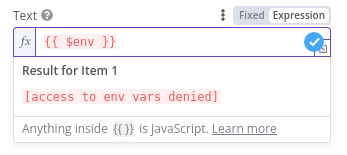
I'm testing the env updates the regular way, changing the /app/data/env (now /app/data/env.sh in today's app update) and restarting the app. Then, specifically for the N8N_BLOCK_ENV_ACCESS_IN_NODE flag, I'm testing in node fields that accept an expression, but still without access (please refer to the screenshot attached).
-
@girish Yes, at least I tried with N8N_LOG_LEVEL to change it to the debug level and that worked without any problem.
I'm testing the env updates the regular way, changing the /app/data/env (now /app/data/env.sh in today's app update) and restarting the app. Then, specifically for the N8N_BLOCK_ENV_ACCESS_IN_NODE flag, I'm testing in node fields that accept an expression, but still without access (please refer to the screenshot attached).
-
 G girish has marked this topic as solved on
-
@garza Looks like this is a known issue. See https://community.n8n.io/t/no-access-to-env/20665/ . Using the environment variable will work it seems, just the preview in the UI does not work.
Hello! It looks like you're interested in this conversation, but you don't have an account yet.
Getting fed up of having to scroll through the same posts each visit? When you register for an account, you'll always come back to exactly where you were before, and choose to be notified of new replies (either via email, or push notification). You'll also be able to save bookmarks and upvote posts to show your appreciation to other community members.
With your input, this post could be even better 💗
Register Login