Cloudron makes it easy to run web apps like WordPress, Nextcloud, GitLab on your server. Find out more or install now.


Skip to content
  • Categories
  • Recent
  • Tags
  • Popular
  • Bookmarks
  • Search
Skins
  • Light
  • Brite
  • Cerulean
  • Cosmo
  • Flatly
  • Journal
  • Litera
  • Lumen
  • Lux
  • Materia
  • Minty
  • Morph
  • Pulse
  • Sandstone
  • Simplex
  • Sketchy
  • Spacelab
  • United
  • Yeti
  • Zephyr
  • Dark
  • Cyborg
  • Darkly
  • Quartz
  • Slate
  • Solar
  • Superhero
  • Vapor

  • Default (No Skin)
  • No Skin
Collapse
Brand Logo

Cloudron Forum

Apps - Status | Demo | Docs | Install
T

tachy

@tachy
Unfollow Follow
About
Posts
7
Topics
3
Shares
0
Groups
0
Followers
0
Following
0

Posts

Recent Best Controversial

  • TShock — Terraria server
    T tachy

    I'm the one who deployed to the demo instance to test if the image/manifest could be pulled from an instance without credentials.
    And yes, the HTTP endpoint returns a 404 because it's a REST API.
    You can fetch the server status even without a token :

    curl https://terraria.demo.cloudron.io/v2/server/status
    {
      "status": "200",
      "name": "",
      "serverversion": "v1.4.5.6",
      "tshockversion": "6.1.0.0",
      "port": 7777,
      "playercount": 0,
      "maxplayers": 16,
      "world": "World",
      "uptime": "0.02:02:19",
      "serverpassword": false
    }
    
    Community Apps

  • TShock — Terraria server
    T tachy

    Done ! Pushed to image to GitHub registry and generated the config file.
    I had to build the image twice with cloudron build and docker build/push then I could cloudron versions add AND change the path to the image in the CloudronVersions.json to use the image in the GitHub registry.

    Have I missed something, or could it be easier to use a different Docker registry ?

    Here is the CloudronVersions.json : https://raw.githubusercontent.com/EliottGoye/cloudron-tshock/refs/heads/main/CloudronVersions.json

    Community Apps

  • TShock — Terraria server
    T tachy

    Hey everyone !

    I've packaged TShock for Cloudron. TShock is a Terraria server. It adds user/group management, anti-cheat, protected regions, a SQLite database, and a full REST API on top of the vanilla Terraria dedicated server.

    TShock source: https://github.com/Pryaxis/TShock
    Package: https://github.com/EliottGoye/cloudron-tshock

    Installation

    Clone and install :

    git clone https://github.com/EliottGoye/cloudron-tshock
    cd tshock-cloudron
    cloudron install -p GAME_PORT=7777
    

    How it works

    • Game port (TCP) — exposed via tcpPorts, configurable at install time. Point your Terraria client at your-cloudron-ip:GAME_PORT.
    • REST API (port 7878) — served through the standard Cloudron HTTPS proxy at your app domain. The health check uses /v2/server/status.
    • Persistent data in /app/data/:
      • tshock/ — config, SQLite database, logs, backups
      • worlds/ — world files
      • plugins/ — drop .dll plugin files here and restart to load them

    On first start a world is auto-created (large size) and a superadmin REST token is written to /app/data/rest-api-credentials.txt. Retrieve it with cloudron exec.

    First-time admin setup: check the app logs for the /setup <token> line, connect with a Terraria client, and run /setup <token> in chat.

    Notes

    • Tested with TShock 6.1 / Terraria 1.4.5.6 / Cloudron 9.2.0
    • Memory limit set to 2 GB (world generation is hungry, afterward 1 GB is fine)
    • TERRARIA_PASSWORD env var can be set to require a server password
    • The image uses ghcr.io/pryaxis/tshock with a pined version
    • I should connect Renovate to auto update the image and build a CloudronVersions.json, but I might be too lazy for that 😄

    Feedback welcome!

    Community Apps

  • [SpotDL] on Cloudron - Download Youtube music from Spotify playlist
    T tachy
    • Main Page: https://github.com/spotDL/spotify-downloader
    • Git: https://github.com/spotDL/spotify-downloader
    • Licence: MIT
    • Docker: Yes

    • Summary: Download Spotify playlist using Youtube music.

    Gets the file on the disk and available in the browser.

    Got it working with this remixed Dockerfile :

    • Dockerfile
    FROM python:3-alpine
    
    LABEL maintainer="xnetcat (Jakub)"
    
    # Install dependencies
    RUN apk add --no-cache \
        ca-certificates \
        ffmpeg \
        openssl \
        aria2 \
        g++ \
        git \
        py3-cffi \
        libffi-dev \
        zlib-dev
    
    # Install uv and update pip/wheel
    RUN pip install --upgrade pip yt-dlp spotdl==4.2.11
    
    # Change Workdir to download location
    WORKDIR /app/data
    
    RUN mkdir -p /run/.spotdl && ln -s /run/.spotdl /root/.spotdl
    
    # Entrypoint command
    ENTRYPOINT ["spotdl", "web", "--host", "0.0.0.0", "--web-use-output-dir", "--output", "/app/data/{artist}/{title}.{output-ext}", "--keep-alive"]
    
    • CloudronManifest.json
    {
      "title": "SpotDL",
      "description": "Download file from Youtube using Spotify ressources",
            "version": "0.0.1",
      "httpPort": 8800,
      "addons": {
        "localstorage": {},
                    "proxyAuth": { "path": "/" }
      },
      "manifestVersion": 2
    }
    

    Screenshots
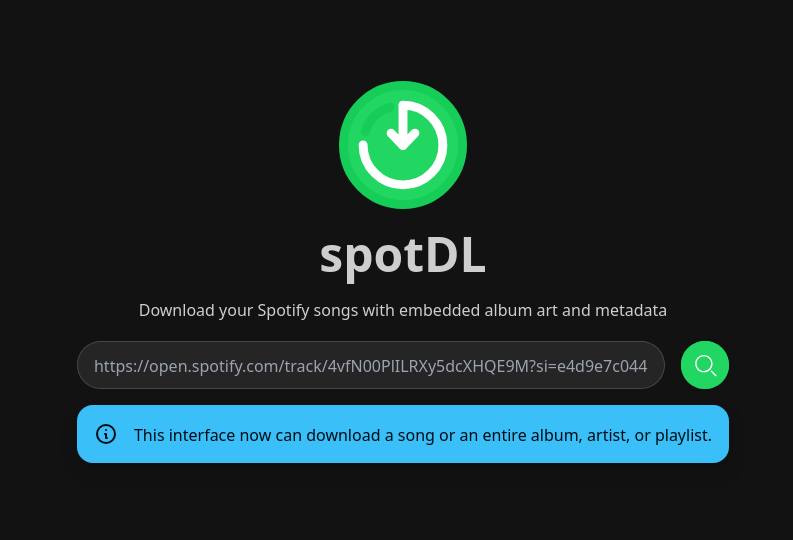
    4a8bcb62-8aa0-413f-aac0-80ea0f8d0142-image.png

    App Wishlist

  • spliit
    T tachy

    Nope, you just create a "room" with a generated id url like an Etherpad

    App Wishlist

  • Transmission + OpenVPN/WireGuard tunnel
    T tachy

    Transmission + OpenVPN/WireGuard tunnel

    • Main Page: https://haugene.github.io/docker-transmission-openvpn/
    • Git: https://github.com/haugene/docker-transmission-openvpn
    • Licence: GPL 3
    • Docker: Yes

    • Summary:
      If you want to download via Torrent without leaking your IP, an outgoing VPN is mandatory. But maybe you don't want all your traffic going through the VPN.
      This project solves it all : Transmission packaged with OpenVPN & WireGuard and easy configuration whatever VPN provider you are using.
      Would be incredible to see this integrated in Cloudron package.

    • Notes :
      Might be difficult to package as some paths are hardcoded (OpenVPN paths especially) and need read/write permissions.

    App Wishlist

  • spliit
    T tachy

    Hi,
    I forked the Spliit GitHub project and with very little configuration, I got it up and running :

    CloudronManifest.json

    {
      "id": "spliit.cloudron",
      "title": "Spliit",
      "author": "spliit-app",
      "version": "1.0.0",
      "httpPort": 3000,
      "addons": {
        "postgresql": {}
      },
      "manifestVersion": 2
    }
    
    diff --git a/scripts/container-entrypoint.sh b/scripts/container-entrypoint.sh
    index f6b0572..3a20463 100755
    --- a/scripts/container-entrypoint.sh
    +++ b/scripts/container-entrypoint.sh
    @@ -2,5 +2,8 @@
     
     set -euxo pipefail
     
    +export POSTGRES_PRISMA_URL=${CLOUDRON_POSTGRESQL_URL}
    +export POSTGRES_URL_NON_POOLING=${CLOUDRON_POSTGRESQL_URL}
     npx prisma migrate deploy
     exec npm run start
    
    docker build Dockerfile -t docker-registry.*******/spliit
    docker push docker-registry.*******/spliit
    cloudron install --image docker-registry.*******/spliit
    

    The only hiccup is the health check with a documented bug. The app needs to be called with an Accept-Language header, but Cloudron manifest cannot specify headers to my knowledge. So I can't enable the healthcheck.
    https://github.com/spliit-app/spliit/issues/221

    Enjoy 👋

    App Wishlist
  • Login

  • Don't have an account? Register

  • Login or register to search.
  • First post
    Last post
0
  • Categories
  • Recent
  • Tags
  • Popular
  • Bookmarks
  • Search