
Default config changes
-
-
-
-
Yes I suspected that's how it would work.
What if we configure Gitea admin group claims from OIDC tokens? Can cloudron add a claim to the token when the authenticated user is an operator?
--group-claim-name: Claim name providing group names for this source. (Optional)--admin-group: Group Claim value for administrator users. (Optional)
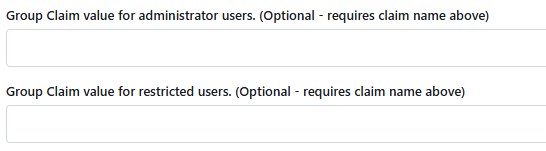
https://github.com/search?q=repo%3Ago-gitea%2Fgitea oauth2_group_claim_name&type=code
https://github.com/search?q=repo%3Ago-gitea%2Fgitea+oauth2groupclaimname&type=code
https://github.com/search?q=repo%3Ago-gitea%2Fgitea GroupClaimName&type=codeOk it looks like these configs are not settable by app.ini. I'll ask in the discord and post back here.
-
Ok I found that the configuration is loaded from the
login_sorucetable, which has a JSON columncfgwith OAuth2-specific fields. For reference it works like this:- OAuth2 login starts in
SignInOAuthCallback- This calls
GetActiveOAuth2SourceByAuthNameto get the OAuth config GetActiveOAuth2SourceByAuthNameloads the login configuration from the database- This populates a
models.auth.Sourcestruct from thelogin_sourcetable - The
Cfgfield is parsed into the source-specific structservices.auth.source.oauth2.Sourcewhich contains theGroupClaimNameandAdminGroupfields.
- This calls
- Then
SignInOAuthCallbackcalls functiongetUserAdminAndRestrictedFromGroupClaimsto read these fields to get the user's admin status from the oauth claims.
I looked at my
login_sourcetable:SELECT * FROM login_source WHERE type = 6 /*OAuth2*/ AND name = 'cloudron' AND is_active = 1;+----+------+----------+-----------------+--------------------------------------------------------------------------------------------------------------------------------------------------------------------------------------------------------------------------------------------------------------------------------------------------------------------------------------------------------------------------------------------------------------+--------------+--------------+-----------+-------------------+ | id | type | name | is_sync_enabled | cfg | created_unix | updated_unix | is_active | two_factor_policy | +----+------+----------+-----------------+--------------------------------------------------------------------------------------------------------------------------------------------------------------------------------------------------------------------------------------------------------------------------------------------------------------------------------------------------------------------------------------------------------------+--------------+--------------+-----------+-------------------+ | 1 | 6 | cloudron | 0 | {"Provider":"openidConnect","ClientID":"<snip>","ClientSecret":"<snip>","OpenIDConnectAutoDiscoveryURL":"https://my.<cloudron domain>/openid/.well-known/openid-configuration","CustomURLMapping":null,"IconURL":"","Scopes":["openid email profile"],"RequiredClaimName":"","RequiredClaimValue":"","GroupClaimName":"","AdminGroup":"","GroupTeamMap":"","GroupTeamMapRemoval":false,"RestrictedGroup":""} | 1752293846 | 1752293846 | 1 | | +----+------+----------+-----------------+--------------------------------------------------------------------------------------------------------------------------------------------------------------------------------------------------------------------------------------------------------------------------------------------------------------------------------------------------------------------------------------------------------------+--------------+--------------+-----------+-------------------+Here you can see the JSON fields
GroupClaimNameandAdminGroupin the cfg column.So these configuration settings can be updated today with a query like this:
UPDATE login_source
SET cfg = JSON_SET(cfg, '$.GroupClaimName', '<group claim name>', '$.AdminGroup', '<operators group name>')
WHERE type = 6 /*OAuth2*/ AND name = 'cloudron' AND is_active = 1;
Obviously it would be better if this setting was exposed in
app.ini, but this is enough for testing. And we'll have a stronger case for a PR to add this if we come with a live use-case.To me it seems like the next steps are:
- Figure out if Cloudron even exposes the group names and the app's operators group via OAuth2 claims
- Test to see if filling in the GroupClaimName and AdminGroup fields in the UI works
- Test to see if changing it by sql works
- Decide if this makes sense as a default
- Update the app to use it by default
a.start.shcan open a subshell that tries to update these settings by direct query, checking in a loop every 5 seconds waiting for the schema to populate on first boot and for thelogin_sourcerow to be created from config.
b. Add the settingsENABLE_PASSWORD_SIGNIN_FORM = falseandENABLE_BASIC_AUTHENTICATION = false, and remove the first-time setup task to change the root password.
c. Open an issue with Gitea to expose these settings viaapp.ini, remove the subshell workaround and use the exposed config options when they are available.
- OAuth2 login starts in
-
-
Cloudron will return the groups a user is part of. However admin or app operator are roles not groups. So an app does not know if a user is also an admin on your Cloudron or such.
Long ago we did expose this, but this usually does not map well to apps. Roles and groups often mean different things within different apps.
-
I see. Having some impedance mismatch between cloudron roles and app groups makes sense.
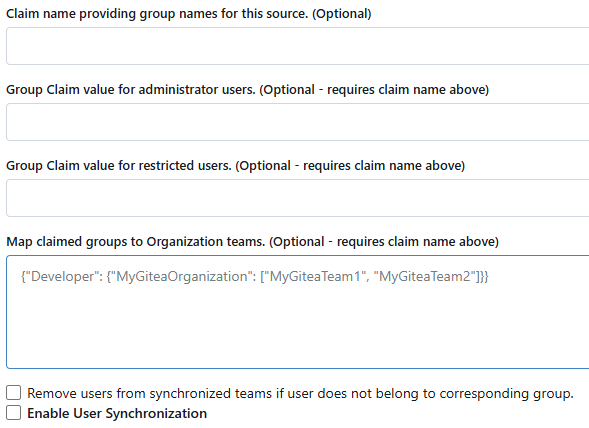
What if cloudron exposed a separate "roles" claim in addition to groups? Gitea could be configured to use the cloudron role claim as Claim name providing groups for this source, then set
administratoras the Group Claim value for administrator users. Or set it tooperatorsif you want to allow every operator to act as a Gitea Site Administrator.In this case as long as Map claimed groups to Organization teams is left blank then there's no mapping that will confuse the app.
-
 N nebulon referenced this topic on
-
-
What I was aiming for with this was to simplify the Gitea app install process for new instances. This would:
- Remove the step where new app owners must change the root password and save it, eliminating the initial period where new installs are vulnerable to spam and abuse, and eliminating the need for a root user at all.
- Allow for disabling username/password entry form, streamlining cloudron logins.
- Derive Gitea Site Administrator privileges directly from app owner/operator role, simplifying app administrator delegation.
These goals are related to the default initial configuration of the gitea app, and are thus not possible to achieve with cloudron groups.
To do this, cloudron would need to:
- Add a
roleclaim (mayberolesplural) to the claims returned bygetClaims, corresponding to the user's role assignment for that app. - Accept a PR to the gitea app that configures it to use these claims to set the site administrator role, after waiting for gitea to implement the ability to configure these settings from
app.ini.
I understand if you are not interested at this time.

Hello! It looks like you're interested in this conversation, but you don't have an account yet.
Getting fed up of having to scroll through the same posts each visit? When you register for an account, you'll always come back to exactly where you were before, and choose to be notified of new replies (either via email, or push notification). You'll also be able to save bookmarks and upvote posts to show your appreciation to other community members.
With your input, this post could be even better 💗
Register Login