
-
Hello @andreasdueren
I have just installed the Rallly app and there was no issue with the startup.
Could you please elaborate why this causes issues for you?@james This line in the
start.shfile breaks the app. At some point it didn't start anymore after an update and the logs led me to it, thought I may have done something and manually changed it. But I think every upgrade changes it back and breaks it again. -
Hello @andreasdueren
Like I wrote, I just installed Rallly from the app store where it is:export SMTP_PORT=${CLOUDRON_MAIL_SMTP_PORT}and there was no issue.
So I must assume there is something else going on.@james said in Fix Rallly start.sh:
Hello @andreasdueren
Like I wrote, I just installed Rallly from the app store where it is:export SMTP_PORT=${CLOUDRON_MAIL_SMTP_PORT}and there was no issue.
So I must assume there is something else going on.I'm just telling you what I experienced. It kept refusing to load without the quotation marks.

-
@girish said in Fix Rallly start.sh:
Strange, in bash, both are the same. Given that CLOUDRON_MAIL_SMTP_PORT is just a number.
Yeah no idea. But these were my logs (I think, pulled this out of my clipboard manager):
Oct 18 08:14:43 => Healthcheck error: Error: connect ECONNREFUSED 172.18.16.158:3000 Oct 18 08:14:43 => Healthcheck error: Error: connect ECONNREFUSED 172.18.16.158:3000 Oct 18 08:14:43 => Healthcheck error: Error: connect ECONNREFUSED 172.18.16.158:3000 Oct 18 08:14:43 => Healthcheck error: Error: connect ECONNREFUSED 172.18.16.158:3000 Oct 18 08:14:44 /app/pkg/start.sh: line 54: prisma: command not found Oct 18 08:14:44 => Updating permissions Oct 18 08:14:44 => prisma migrate Oct 18 08:14:55 => Healthcheck error: Error: connect EHOSTUNREACH 172.18.16.158:3000 Oct 18 08:15:03 => Healthcheck error: Error: connect EHOSTUNREACH 172.18.16.158:3000 Oct 18 08:15:13 => Healthcheck error: Error: connect EHOSTUNREACH 172.18.16.158:3000 Oct 18 08:15:23 => Healthcheck error: Error: connect EHOSTUNREACH 172.18.16.158:3000 Oct 18 08:15:33 => Healthcheck error: Error: connect EHOSTUNREACH 172.18.16.158:3000 Oct 18 08:15:44 => Healthcheck error: Error: connect EHOSTUNREACH 172.18.16.158:3000 Oct 18 08:15:48 /app/pkg/start.sh: line 54: prisma: command not found Oct 18 08:15:48 => Updating permissions Oct 18 08:15:48 => prisma migrate Oct 18 08:15:57 => Healthcheck error: AbortError: The operation was aborted Oct 18 08:16:03 => Healthcheck error: Error: connect EHOSTUNREACH 172.18.16.158:3000 Oct 18 08:16:13 => Healthcheck error: Error: connect EHOSTUNREACH 172.18.16.158:3000 Oct 18 08:16:23 => Healthcheck error: Error: connect EHOSTUNREACH 172.18.16.158:3000 Oct 18 08:16:33 => Healthcheck error: Error: connect EHOSTUNREACH 172.18.16.158:3000 Oct 18 08:16:43 => Healthcheck error: Error: connect EHOSTUNREACH 172.18.16.158:3000 Oct 18 08:16:49 => Updating permissions Oct 18 08:16:49 => prisma migrate Oct 18 08:16:49 /app/pkg/start.sh: line 54: prisma: command not found Oct 18 08:17:03 => Healthcheck error: AbortError: The operation was aborted Oct 18 08:17:07 => Healthcheck error: AbortError: The operation was aborted Oct 18 08:17:13 => Healthcheck error: Error: connect EHOSTUNREACH 172.18.16.158:3000 Oct 18 08:17:23 => Healthcheck error: Error: connect EHOSTUNREACH 172.18.16.158:3000 -
That error is even more peculiar. So the start.sh just runs
prismawhich should be in the path and part of the app image: https://git.cloudron.io/packages/rallly-app/-/blob/main/start.sh?ref_type=heads#L54Are there any variables in the /app/data/env which may interfere with prisma or the PATH ?
-
That error is even more peculiar. So the start.sh just runs
prismawhich should be in the path and part of the app image: https://git.cloudron.io/packages/rallly-app/-/blob/main/start.sh?ref_type=heads#L54Are there any variables in the /app/data/env which may interfere with prisma or the PATH ?
@nebulon said in Fix Rallly start.sh:
That error is even more peculiar. So the start.sh just runs
prismawhich should be in the path and part of the app image: https://git.cloudron.io/packages/rallly-app/-/blob/main/start.sh?ref_type=heads#L54Are there any variables in the /app/data/env which may interfere with prisma or the PATH ?
I haven't touched the devault ENV
SECRET_PASSWORD='STRING' NEXTAUTH_SECRET='STRING' # Comma separated list of email addresses that are allowed to register and login. # You can use wildcard syntax to match a range of email addresses. # Example: "john@example.com,jane@example.com" or "*@example.com" ALLOWED_EMAILS= -
Hello, same error here.
I did reinstall the application once, from scratch. At first, it did work, until it did not.
@andreasdueren suggested fix worked for me. Thank you.
-
would be great to have a way to reproduce this. Especially since
prismais just part of the image itself.Can you for example run
which prisma? It should print/tmp/pnpm/prismaif the PATH env is correct. Though I cannot quite see why that wouldn't be the case unless the image is somehow broken locally. Like https://git.cloudron.io/packages/rallly-app/-/blob/main/start.sh?ref_type=heads this is all the app does when the container starts. -
would be great to have a way to reproduce this. Especially since
prismais just part of the image itself.Can you for example run
which prisma? It should print/tmp/pnpm/prismaif the PATH env is correct. Though I cannot quite see why that wouldn't be the case unless the image is somehow broken locally. Like https://git.cloudron.io/packages/rallly-app/-/blob/main/start.sh?ref_type=heads this is all the app does when the container starts. -
Some logs as well below.
So until ~19:34 this is the original configuration.
Then I did reboot to emergency mode, fixed the brackets, and then rebooted.
When I reboot the container and it works,
which prismacorrectly prints the path. If the host is rebooted, then it fails again (as the fix / workaround is, as expected, not retained)I assume that adding the brackets would have no adverse effects.
Oct 27 19:34:15 /app/pkg/start.sh: line 54: prisma: command not found
Oct 27 19:34:15 => Setting up OIDC
Oct 27 19:34:15 => Updating permissions
Oct 27 19:34:15 => prisma migrate
Oct 27 19:35:12 Repair mode. Use the webterminal or cloudron exec to repair. Sleeping
Oct 27 19:37:55 => Setting up OIDC
Oct 27 19:37:55 => Updating permissions
Oct 27 19:37:55 => prisma migrate
Oct 27 19:37:58 2025-10-27T19:37:58+01:00
Oct 27 19:37:58 2025-10-27T19:37:58+01:00
Oct 27 19:37:58 2025-10-27T19:37:58+01:00
Oct 27 19:37:58 > Downloading Prisma engines for Node-API for debian-openssl-3.0.x [] 0%> Downloading Prisma engines for Node-API for debian-openssl-3.0.x [] 1%> Downloading Prisma engines for Node-API for debian-openssl-3.0.x [] 3%> Downloading Prisma engines for Node-API for debian-openssl-3.0.x [] 4%> Downloading Prisma engines for Node-API for debian-openssl-3.0.x [] 6%> Downloading Prisma engines for Node-API for debian-openssl-3.0.x [] 7%> Downloading Prisma engines for Node-API for debian-openssl-3.0.x [] 8%> Downloading Prisma engines for Node-API for debian-openssl-3.0.x [] 11%> Downloading Prisma engines for Node-API for debian-openssl-3.0.x [] 16%> Downloading Prisma engines for Node-API for debian-openssl-3.0.x [] 20%> Downloading Prisma engines for Node-API for debian-openssl-3.0.x [] 22%> Downloading Prisma engines for Node-API for debian-openssl-3.0.x [] 25%> Downloading Prisma engines for Node-API for debian-openssl-3.0.x [] 27%> Downloading Prisma engines for Node-API for debian-openssl-3.0.x [] 28%> Downloading Prisma engines for Node-API for debian-openssl-3.0.x [] 31%> Downloading Prisma engines for Node-API for debian-openssl-3.0.x [] 33%> Downloading Prisma engines for Node-API for debian-openssl-3.0.x [] 35%> Downloading Prisma engines for Node-API for debian-openssl-3.0.x [] 37%> Downloading Prisma engines for Node-API for debian-openssl-3.0.x [] 39%> Downloading Prisma engines for Node-API for debian-openssl-3.0.x [] 43%> Downloading Prisma engines for Node-API for debian-openssl-3.0.x [] 46%> Downloading Prisma engines for Node-API for debian-openssl-3.0.x [] 48%> Downloading Prisma engines for Node-API for debian-openssl-3.0.x [] 50%> Downloading Prisma engines for Node-API for debian-openssl-3.0.x [] 55%> Downloading Prisma engines for Node-API for debian-openssl-3.0.x [] 60%> Downloading Prisma engines for Node-API for debian-openssl-3.0.x [] 64%> Downloading Prisma engines for Node-API for debian-openssl-3.0.x [] 69%> Downloading Prisma engines for Node-API for debian-openssl-3.0.x [] 73%> Downloading Prisma engines for Node-API for debian-openssl-3.0.x [] 78%> Downloading Prisma engines for Node-API for debian-openssl-3.0.x [] 82%> Downloading Prisma engines for Node-API for debian-openssl-3.0.x [] 88%> Downloading Prisma engines for Node-API for debian-openssl-3.0.x [] 91%> Downloading Prisma engines for Node-API for debian-openssl-3.0.x [] 93%> Downloading Prisma engines for Node-API for debian-openssl-3.0.x [] 95%> Downloading Prisma engines for Node-API for debian-openssl-3.0.x [] 97%> Downloading Prisma engines for Node-API for debian-openssl-3.0.x [] 98%> Downloading Prisma engines for Node-API for debian-openssl-3.0.x [] 100%Environment variables loaded from .env
Oct 27 19:37:58 Datasource "db": PostgreSQL database "dbe49f54e745c046d38f7e4a0e61387c84", schema "public" at "postgresql:5432"
Oct 27 19:37:58 Prisma schema loaded from ../../../pkg/prisma/schema.prisma
Oct 27 19:37:58 No pending migrations to apply.
Oct 27 19:37:58 96 migrations found in prisma/migrations
Oct 27 19:37:58 => Starting Rallly
Oct 27 19:37:59 2025-10-27T19:37:59+01:00
Oct 27 19:37:59 ▲ Next.js 15.4.6
Oct 27 19:37:59 ✓ Ready in 430ms
Oct 27 19:37:59 ✓ Starting...
Oct 27 19:37:59 - Local: http://e49f54e7-45c0-46d3-8f7e-4a0e61387c84:3000
Oct 27 19:37:59 - Network: http://e49f54e7-45c0-46d3-8f7e-4a0e61387c84:3000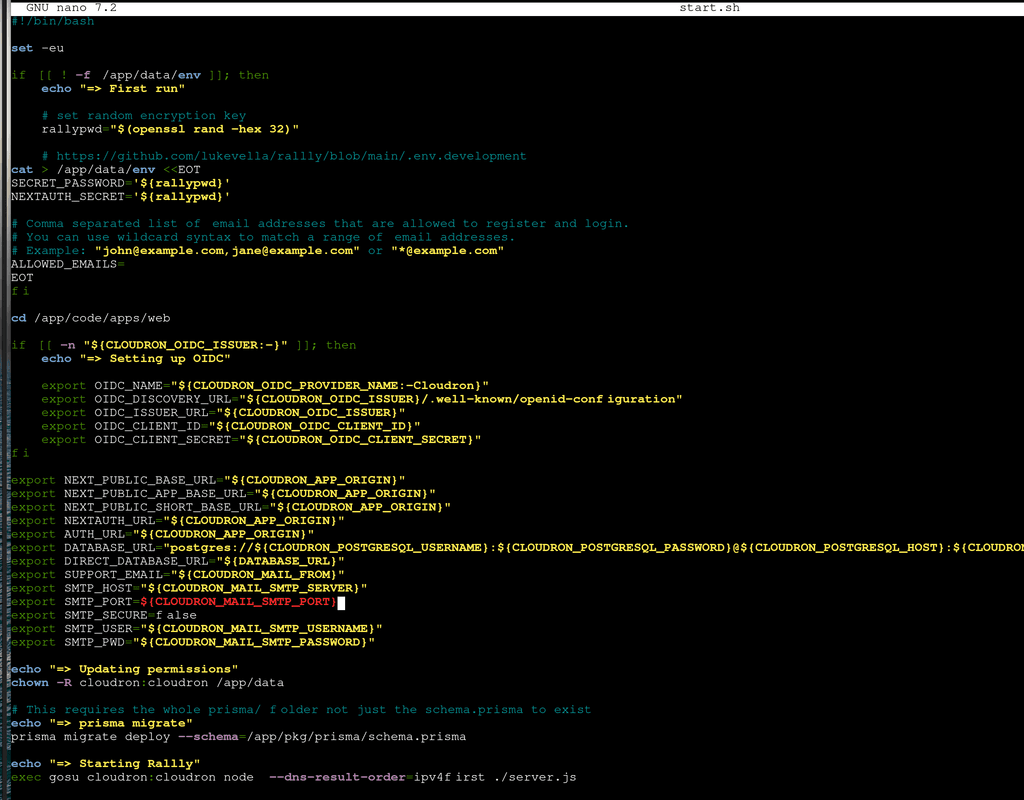
-
Still wasn't able to reproduce to debug this. However, looking at it just now with fresh eyes on the topic, I think the error comes from the fact that pnpm for some reason is setup to use
/tmpwhich I didn't realize before:ENV PNPM_HOME="/tmp/pnpm" ENV PATH="$PNPM_HOME:$PATH"Not yet sure why this works in the first place, since
/tmpis mounted as a temporary volume into the container as well as regularily purged, since it is a temporary storage. Hopefully better understand the root issue tomorrow and the provide a fix for it. -
 N nebulon marked this topic as a question on
-
N nebulon has marked this topic as solved on



Hello! It looks like you're interested in this conversation, but you don't have an account yet.
Getting fed up of having to scroll through the same posts each visit? When you register for an account, you'll always come back to exactly where you were before, and choose to be notified of new replies (either via email, or push notification). You'll also be able to save bookmarks and upvote posts to show your appreciation to other community members.
With your input, this post could be even better 💗
Register Login