
Cloudron API Docu - Set Operators correction?
-
Hi @girish et al, I may read this wrong but when I troubleshot a n8n call to set an operator for an app, the manual says:
{
  "accessRestriction": {
    "users": [
      "uid-321dsa..."
    ],
    "groups": [
      "gid-321dsa..."
    ]
  }
}
But when I ran it I kept getting errors until:
{
  "operators": {
    "users": [
      "uid-321dsa..."
    ]
}
}
The manual also says in the main part:
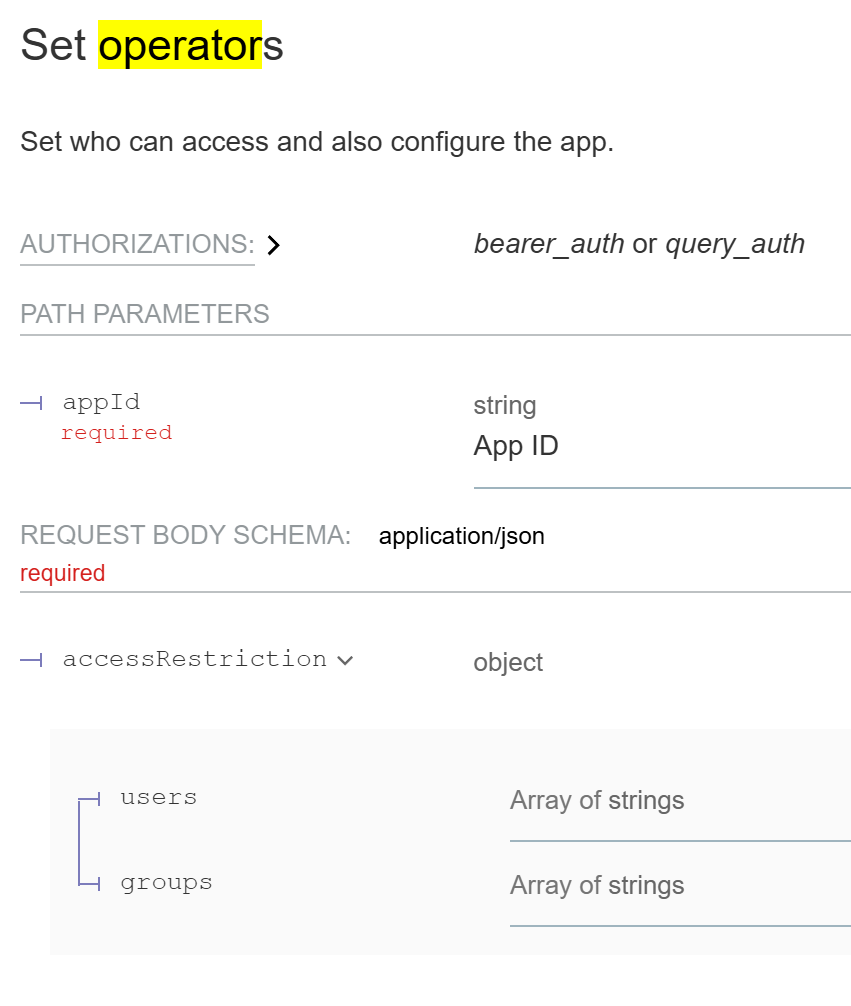
accessRestriction instead of operators.
Am I reading it wrong or should it be updated to say operators?
Ref. https://docs.cloudron.io/api.html#tag/Apps/operation/setAppOperators
-
Hello @3246
The API doc is currently outdated.
Here is a full curl example for making a user / a group an app operator:curl "https://my.$DOMAIN.$TLD/api/v1/apps/$APPID/configure/operators" \ -H "Authorization: Bearer $APITOKEN" \ -H 'content-type: application/json' \ --data-raw '{"operators":{"users":["uid-3eca9898-baca-473c-a988-d127967218c9"],"groups":[]}}'You can always grab the API paths from the Cloudron dashboard in the browser network inspect when you do the task in the dashboard.

-
Hello @3246
With the cloudron cli you can run e.g:cloudron exec --app $APP -- fallocate -l 4M /app/data/4MSee
cloudron exec --help:Usage: cloudron exec [options] [cmd...] Exec a command in an application Options: -t,--tty Allocate tty --app <id/location> App id or location -h, --help display help for command Examples: $ cloudron exec --app myapp # run an interactive shell $ cloudron exec --app myapp ls # run command $ cloudron exec --app myapp -- ls -l # use -- to indicate end of optionsWas not sure if possible via the API but since I can debug the cloudron cli and see what it do I figured something out.
Send the to /api/v1/apps/$APPID/exec
# Command is an array `ls -lah /app/data` would become for each space ["ls", "-lah", "/app/data/"]
curl "https://my.$DOMAIN.$TLD/api/v1/apps/$APPID/exec" \
  -H 'Authorization: Bearer $APITOKEN' \
  -H 'content-type: application/json' \
  --data-raw '["ls", "-lah", "/app/data/"]'
# this returns and id
{
  "id": "a90bcfcec1d29f7a595638ea66c8ac0bb53b594047ac74fc80bf97f75fed0c19"
}
But getting the output of the executed command is. . . tricky.
Just look at the source code for the cli for this part:const searchParams = new URLSearchParams({ rows: stdout.rows || 24, columns: stdout.columns || 80, access_token: token, tty }); const req = https.request({ hostname: adminFqdn, path: `/api/v1/apps/${app.id}/exec/${execId}/start?${searchParams.toString()}`, method: 'GET', headers: { 'Connection': 'Upgrade', 'Upgrade': 'tcp' }, rejectUnauthorized }, function handler(res) { if (res.statusCode === 403) exit('Unauthorized.'); // only admin or only owner (for docker addon) exit('Could not upgrade connection to tcp. http status:', res.statusCode); }); req.on('upgrade', function (resThatShouldNotBeUsed, socket /*, upgradeHead*/) { // do not use res here! it's all socket from here on socket.on('error', exit); socket.setNoDelay(true); socket.setKeepAlive(true); if (tty) { stdin.setRawMode(true); stdin.pipe(socket, { end: false }); // the remote will close the connection socket.pipe(stdout); // in tty mode, stdout/stderr is merged socket.on('end', exitWithCode); // server closed the socket } else { // create stdin process on demand if (typeof stdin === 'function') stdin = stdin(); stdin.on('data', function (d) { var buf = Buffer.alloc(4); buf.writeUInt32BE(d.length, 0 /* offset */); socket.write(buf); socket.write(d); }); stdin.on('end', function () { var buf = Buffer.alloc(4); buf.writeUInt32BE(0, 0 /* offset */); socket.write(buf); }); stdout.on('close', exitWithCode); // this is only emitted when stdout is a file and not the terminal demuxStream(socket, stdout, process.stderr); // can get separate streams in non-tty mode socket.on('end', function () { // server closed the socket if (typeof stdin.end === 'function') stdin.end(); // required for this process to 'exit' cleanly. do not call exit() because writes may not have finished . the type check is required for when stdin: 'ignore' in execSync, not sure why if (stdout !== process.stdout) stdout.end(); // for push stream socket.end(); // process._getActiveHandles(); process._getActiveRequests(); if (stdout === process.stdout) setImmediate(exitWithCode); // otherwise, we rely on the 'close' event above }); } }); req.on('error', exit); // could not make a request req.end(); // this makes the requestFrom a little debugging I got the API path:
/api/v1/apps/$APPID/exec/$EXECID/start?rows=21&columns=257&tty=falseBut when CURL'ing this:
curl "https://my.$DOMAIN.TLD/api/v1/apps/$APPID/exec/$EXECID/start?rows=21&columns=257&tty=false" \
  -H "Authorization: Bearer $APITOKEN" \
  -H 'content-type: application/json'
{
  "status": "Not Found",
  "message": "exec requires TCP upgrade"
}
And I am not sure how to "TCP upgrade" the curl request.
I will ask the team.


Hello! It looks like you're interested in this conversation, but you don't have an account yet.
Getting fed up of having to scroll through the same posts each visit? When you register for an account, you'll always come back to exactly where you were before, and choose to be notified of new replies (either via email, or push notification). You'll also be able to save bookmarks and upvote posts to show your appreciation to other community members.
With your input, this post could be even better 💗
Register Login