
MiroTalk SFU: Recording not possible?
-
Ok from what understand: Cloudron allows writing only to
/app/data, while/app/codeis read-only, so all dynamic folders (rec, rtmp, uploads, etc.) must be moved into/app/data. -
Thanks for all the insights here. So I think the folder to store recordings should then default to
/app/data/recor so with an option to configure that to use a different volume (not sure how large those recordings are)For
RTMP_DIRis this some kind of temporary directory and thus maybe should be configured as/tmp/...or maybe even/run/...? -
Yeah, setting the recordings directory
RECORDING_DIRto/app/data/recmakes sense. This keeps all generated recordings inside the application’s persistent data area, which is consistent and easy to manage.Regarding
RTMP_DIR, it is not a temporary directory.
This directory is used to store the media files that will be streamed via RTMP. Since these files may need to remain available for repeated or scheduled streaming, it’s better to keep them in a persistent and organized location. Can be also in/app/data/rtmpas consistent with the rest of the project’s data layout.So in summary:
-
RECORDING_DIR→/app/data/rec
Stores recordings generated by the application. -
RTMP_DIR→/app/data/rtmp
Stores video files intended for RTMP streaming, not temporary, should persist.
-
-
perfect, I will prepare a package update then. So just to double check, this only applies to the SFU flavor of mirotalk?
WIP on MiroTalk SFU: Let me fix this first, then I’ll ping you when done

-
Implemented in MiroTalk SFU v2.0.14 —
Docker image is building now (available in ~1 hour).For Cloudron deployments, server-side recording should now work using the following configuration:
Recording
RECORDING_ENABLED=true
RECORDING_DIR='../data/rec'            # Path relative to /app/code → resolves to /app/data/rec
RECORDING_MAX_FILE_SIZE=1073741824     # Max file size in bytes (default: 1GB)
RTMP
RTMP_DIR='../data/rtmp' # Path relative to /app/code → resolves to /app/data/rtmpNote
If the target directories do not exist, MiroTalk SFU will automatically create them at runtime, just like before.
Cloudron automatically mounts
/app/data, so using../data/...ensures the app writes to the persistent, writable directory. -
New package is out. Thanks for all the work @mirotalk-57bab571 and being so proactive here!
@nebulon said in MiroTalk SFU: Recording not possible?:
New package is out. Thanks for all the work @mirotalk-57bab571 and being so proactive here!
Good! I’m always here to help. Thanks to Cloudron for trusting MiroTalk and supporting us! By the way, I love the new Cloudron UI v.9.0.10, it looks amazing!
-
Hi @nebulon @mirotalk-57bab571
So, i'm still unable to boot up the app after settingRECORDING_ENABLED=true:Nov 15 09:36:54 node:fs:1364 Nov 15 09:36:54 const result = binding.mkdir( Nov 15 09:36:54 ^ Nov 15 09:36:54 2025-11-15T04:06:54Z Nov 15 09:36:54 Error: ENOENT: no such file or directory, mkdir '/app/code/app/rec/' Nov 15 09:36:54 at Object.mkdirSync (node:fs:1364:26) Nov 15 09:36:54 at Object.<anonymous> (/app/code/app/src/Server.js:280:12) Nov 15 09:36:54 at Module._compile (node:internal/modules/cjs/loader:1554:14) Nov 15 09:36:54 at Object..js (node:internal/modules/cjs/loader:1706:10) Nov 15 09:36:54 at Module.load (node:internal/modules/cjs/loader:1289:32) Nov 15 09:36:54 at Function._load (node:internal/modules/cjs/loader:1108:12) Nov 15 09:36:54 at TracingChannel.traceSync (node:diagnostics_channel:322:14) Nov 15 09:36:54 at wrapModuleLoad (node:internal/modules/cjs/loader:220:24) Nov 15 09:36:54 at Function.executeUserEntryPoint [as runMain] (node:internal/modules/run_main:170:5) Nov 15 09:36:54 at node:internal/main/run_main_module:36:49 { Nov 15 09:36:54 errno: -2, Nov 15 09:36:54 code: 'ENOENT', Nov 15 09:36:54 syscall: 'mkdir', Nov 15 09:36:54 path: '/app/code/app/rec/' Nov 15 09:36:54 } Nov 15 09:36:54 2025-11-15T04:06:54Z Nov 15 09:36:54 Node.js v22.14.0 Nov 15 09:36:54 \ -
Hi @nebulon @mirotalk-57bab571
So, i'm still unable to boot up the app after settingRECORDING_ENABLED=true:Nov 15 09:36:54 node:fs:1364 Nov 15 09:36:54 const result = binding.mkdir( Nov 15 09:36:54 ^ Nov 15 09:36:54 2025-11-15T04:06:54Z Nov 15 09:36:54 Error: ENOENT: no such file or directory, mkdir '/app/code/app/rec/' Nov 15 09:36:54 at Object.mkdirSync (node:fs:1364:26) Nov 15 09:36:54 at Object.<anonymous> (/app/code/app/src/Server.js:280:12) Nov 15 09:36:54 at Module._compile (node:internal/modules/cjs/loader:1554:14) Nov 15 09:36:54 at Object..js (node:internal/modules/cjs/loader:1706:10) Nov 15 09:36:54 at Module.load (node:internal/modules/cjs/loader:1289:32) Nov 15 09:36:54 at Function._load (node:internal/modules/cjs/loader:1108:12) Nov 15 09:36:54 at TracingChannel.traceSync (node:diagnostics_channel:322:14) Nov 15 09:36:54 at wrapModuleLoad (node:internal/modules/cjs/loader:220:24) Nov 15 09:36:54 at Function.executeUserEntryPoint [as runMain] (node:internal/modules/run_main:170:5) Nov 15 09:36:54 at node:internal/main/run_main_module:36:49 { Nov 15 09:36:54 errno: -2, Nov 15 09:36:54 code: 'ENOENT', Nov 15 09:36:54 syscall: 'mkdir', Nov 15 09:36:54 path: '/app/code/app/rec/' Nov 15 09:36:54 } Nov 15 09:36:54 2025-11-15T04:06:54Z Nov 15 09:36:54 Node.js v22.14.0 Nov 15 09:36:54 \@shrey said in MiroTalk SFU: Recording not possible?:
So, i'm still unable to boot up the app after setting RECORDING_ENABLED=true
Forget the previous env configuration. In the latest Cloudron commit, recording is enabled by default, and the
app/datapath now appears to be automatically resolved as well.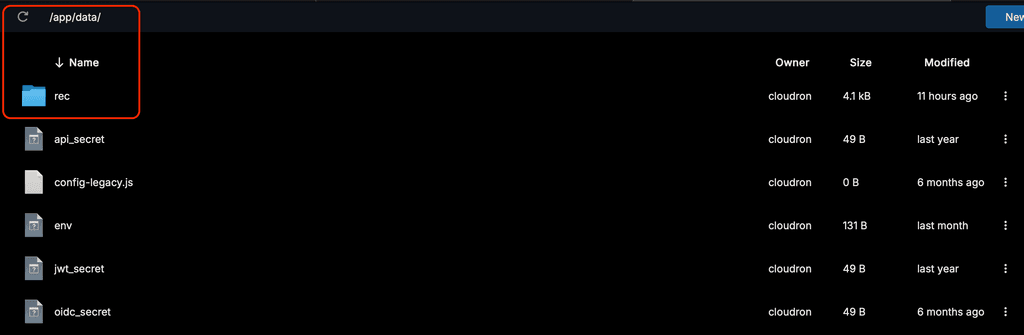
-
I restarted the updated app, but i still get only this:
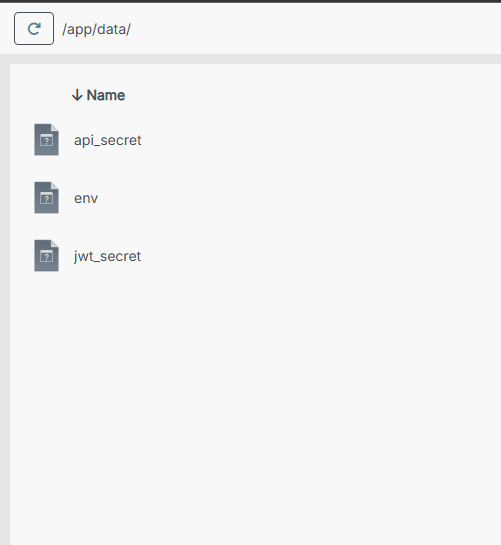
No
recfolder available, and no default recording taking place.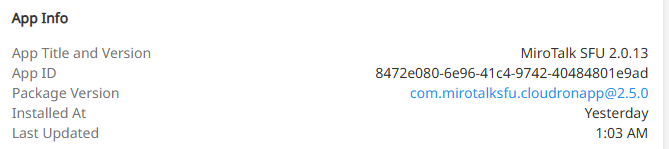
-
It seems like 2 separate updated packages have been released for this.
Just came across the 2nd one and updated the app again.- The
recfolder is now available in/app/data/ - All recordings are still being saved on the local device only. No server-side recording. No S3 recording.
- The
-
It seems like 2 separate updated packages have been released for this.
Just came across the 2nd one and updated the app again.- The
recfolder is now available in/app/data/ - All recordings are still being saved on the local device only. No server-side recording. No S3 recording.
Hello @shrey
I have just updated my Mirotalk SFU app and now the recordings are stored inside the Mirotalk SFU app in/app/data/rec/.
Please share your/app/data/envfile.
With the updated app and a fresh installed app the recording works.
In a meeting I can do:

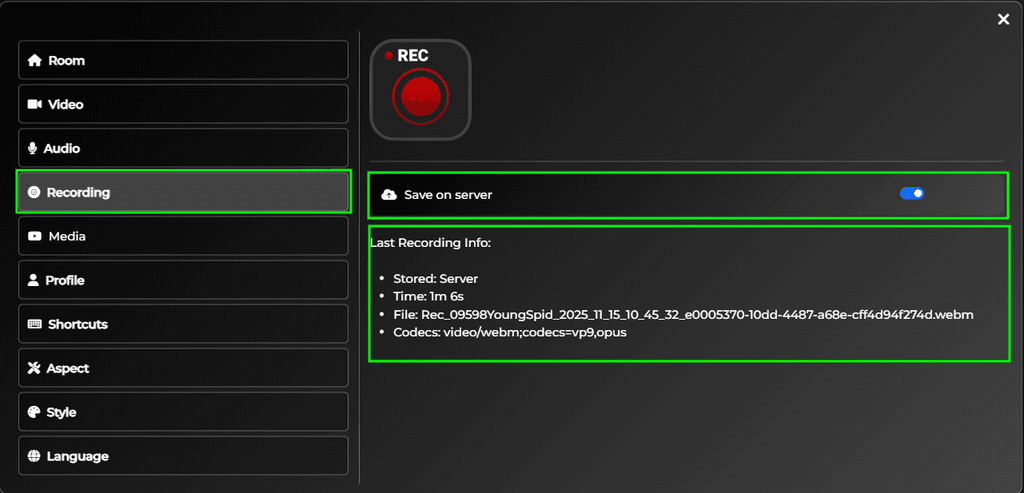
ls -lah /app/data/rec/ total 5.2M drwxr-xr-x 2 cloudron cloudron 4.0K Nov 15 09:46 . drwxr-xr-x 3 cloudron cloudron 4.0K Nov 15 09:44 .. -rw-r--r-- 1 cloudron cloudron 5.2M Nov 15 09:46 Rec_09598YoungSpid_2025_11_15_10_45_32_e0005370-10dd-4487-a68e-cff4d94f274d.webm - The
-
Hi @james , thanks for the screenshots. I can now see that there's a "Save on server" option in the UI, and it's working for me as well.
Now, just S3 is left to work.
Myenvfile -># Recording RECORDING_ENABLED=true # Enable recording functionality (true|false) RECORDING_UPLOAD_TO_S3=false # Upload recording to AWS S3 bucket [true/false] # AWS S3 Configuration AWS_S3_ENABLED=true # Enable AWS S3 storage (true|false) AWS_S3_BUCKET_NAME=<bucket-name> # Name of your S3 bucket (must exist) AWS_ACCESS_KEY_ID=<key-id> # AWS Access Key ID (leave empty for IAM roles) AWS_SECRET_ACCESS_KEY=<key-secret> # AWS Secret Access Key (leave empty for IAM roles) AWS_REGION=<region> # AWS region (e.g., us-east-2, eu-west-2) AWS_S3_ENDPOINT=https://<region>.digitaloceanspaces.comNote: Although i didn't find the "AWS_S3_ENDPOINT" key in the
envtemplate, i configured it because it seems to work with most S3 client libraries, and is a necessity to be able to connect to S3 spaces other than AWS. -
Hello @shrey
The library used in MiroTalk SFU for AWS/S3 is aws-sdk/client-s3.
It seems MiroTalk SFU does not have the option to configure the endpoint.
From the MiroTalk SFU Code handling the configuration:aws: { enabled: process.env.AWS_S3_ENABLED === 'true', accessKeyId: process.env.AWS_ACCESS_KEY_ID || 'your-access-key-id', secretAccessKey: process.env.AWS_SECRET_ACCESS_KEY || 'your-secret-access-key', region: process.env.AWS_REGION || 'us-east-2', bucket: process.env.AWS_S3_BUCKET || 'mirotalk', },Also in the
server.jswhere theS3Clientis initialized, the endpoint is never configured, thus using the default, resolving the endpoint from theAWS_REGION.
https://github.com/miroslavpejic85/mirotalksfu/blob/b2a41e597610524b259097d2e1b52674dda631c0/app/src/Server.js#L297-L303const s3Client = new S3Client({ region: config?.integrations?.aws?.region, // Set your AWS region credentials: { accessKeyId: config?.integrations?.aws?.accessKeyId, secretAccessKey: config?.integrations?.aws?.secretAccessKey, }, });So we need to ask @mirotalk-57bab571 to add the option to configure the endpoint as well.
Adding to that, when a non AWS endpoint is used, the optionforcePathStyle: truemight also be needed for the best compatibility with e.g. MinIO and most S3-compatible systems.
@mirotalk-57bab571
It is the weekend, please don't feel pressured or forced to work on the weekend.
Would it be possible to add the option to configure theS3Clientendpointconfig andS3ClientforcePathStyleconfig? -
Hello @shrey
The library used in MiroTalk SFU for AWS/S3 is aws-sdk/client-s3.
It seems MiroTalk SFU does not have the option to configure the endpoint.
From the MiroTalk SFU Code handling the configuration:aws: { enabled: process.env.AWS_S3_ENABLED === 'true', accessKeyId: process.env.AWS_ACCESS_KEY_ID || 'your-access-key-id', secretAccessKey: process.env.AWS_SECRET_ACCESS_KEY || 'your-secret-access-key', region: process.env.AWS_REGION || 'us-east-2', bucket: process.env.AWS_S3_BUCKET || 'mirotalk', },Also in the
server.jswhere theS3Clientis initialized, the endpoint is never configured, thus using the default, resolving the endpoint from theAWS_REGION.
https://github.com/miroslavpejic85/mirotalksfu/blob/b2a41e597610524b259097d2e1b52674dda631c0/app/src/Server.js#L297-L303const s3Client = new S3Client({ region: config?.integrations?.aws?.region, // Set your AWS region credentials: { accessKeyId: config?.integrations?.aws?.accessKeyId, secretAccessKey: config?.integrations?.aws?.secretAccessKey, }, });So we need to ask @mirotalk-57bab571 to add the option to configure the endpoint as well.
Adding to that, when a non AWS endpoint is used, the optionforcePathStyle: truemight also be needed for the best compatibility with e.g. MinIO and most S3-compatible systems.
@mirotalk-57bab571
It is the weekend, please don't feel pressured or forced to work on the weekend.
Would it be possible to add the option to configure theS3Clientendpointconfig andS3ClientforcePathStyleconfig?@james said in MiroTalk SFU: Recording not possible?:
Would it be possible to add the option to configure the S3Client endpoint config and S3Client forcePathStyle config?
So the goal is to avoid hard-coding support only for AWS S3.
To extend the configuration so it also supports any S3-compatible storage (MinIO, Wasabi, DigitalOcean Spaces, etc.), i need to add the following to the.envfile:AWS_S3_ENDPOINT= # e.g., http://localhost:9000 for MinIO AWS_S3_FORCE_PATH_STYLE=false # Set to true for S3-compatible servicesThen expose these values in
config.js:aws: { // ... endpoint: process.env.AWS_S3_ENDPOINT || '', forcePathStyle: process.env.AWS_S3_FORCE_PATH_STYLE === 'true', },Finally, update the S3 client configuration in
Server.js:const s3Client = new S3Client({ // ... endpoint: config?.integrations?.aws?.endpoint || undefined, forcePathStyle: config?.integrations?.aws?.forcePathStyle === true, });With this setup, the application continues to work with AWS S3 as it currently does, but can also switch to any S3-compatible service simply by adjusting environment variables and no additional code changes required.
Sounds good to me! @James just confirm.
-
J joseph marked this topic as a regular topic on


 Implemented in MiroTalk SFU v.2.0.16
Hello! It looks like you're interested in this conversation, but you don't have an account yet.
Getting fed up of having to scroll through the same posts each visit? When you register for an account, you'll always come back to exactly where you were before, and choose to be notified of new replies (either via email, or push notification). You'll also be able to save bookmarks and upvote posts to show your appreciation to other community members.
With your input, this post could be even better 💗
Register Login