Cloudron makes it easy to run web apps like WordPress, Nextcloud, GitLab on your server. Find out more or install now.


Skip to content
  • Categories
  • Recent
  • Tags
  • Popular
  • Bookmarks
  • Search
Skins
  • Light
  • Brite
  • Cerulean
  • Cosmo
  • Flatly
  • Journal
  • Litera
  • Lumen
  • Lux
  • Materia
  • Minty
  • Morph
  • Pulse
  • Sandstone
  • Simplex
  • Sketchy
  • Spacelab
  • United
  • Yeti
  • Zephyr
  • Dark
  • Cyborg
  • Darkly
  • Quartz
  • Slate
  • Solar
  • Superhero
  • Vapor

  • Default (No Skin)
  • No Skin
Collapse
Brand Logo

Cloudron Forum

Apps | Demo | Docs | Install
  1. Cloudron Forum
  2. MiroTalk
  3. MiroTalk SFU: Recording not possible?

MiroTalk SFU: Recording not possible?

Scheduled Pinned Locked Moved MiroTalk
51 Posts 4 Posters 1.8k Views 4 Watching
  • Oldest to Newest
  • Newest to Oldest
  • Most Votes
Reply
  • Reply as topic
Log in to reply
This topic has been deleted. Only users with topic management privileges can see it.
  • nebulonN Offline
    nebulonN Offline
    nebulon
    Staff
    wrote on last edited by
    #18

    New package is out. Thanks for all the work @mirotalk-57bab571 and being so proactive here!

    MiroTalkM 1 Reply Last reply
    4
    • nebulonN nebulon

      New package is out. Thanks for all the work @mirotalk-57bab571 and being so proactive here!

      MiroTalkM Offline
      MiroTalkM Offline
      MiroTalk
      wrote on last edited by MiroTalk
      #19

      @nebulon said in MiroTalk SFU: Recording not possible?:

      New package is out. Thanks for all the work @mirotalk-57bab571 and being so proactive here!

      Good! I’m always here to help. Thanks to Cloudron for trusting MiroTalk and supporting us! By the way, I love the new Cloudron UI v.9.0.10, it looks amazing!

      1 Reply Last reply
      4
      • MiroTalkM Offline
        MiroTalkM Offline
        MiroTalk
        wrote on last edited by
        #20

        PS: Thanks also to @James for his IT support and excellent debugging and suggestions.

        1 Reply Last reply
        3
        • S Offline
          S Offline
          shrey
          wrote on last edited by
          #21

          Hi @nebulon @mirotalk-57bab571
          So, i'm still unable to boot up the app after setting RECORDING_ENABLED=true :

          Nov 15 09:36:54 node:fs:1364
          Nov 15 09:36:54 const result = binding.mkdir(
          Nov 15 09:36:54 ^
          Nov 15 09:36:54 2025-11-15T04:06:54Z
          Nov 15 09:36:54 Error: ENOENT: no such file or directory, mkdir '/app/code/app/rec/'
          Nov 15 09:36:54 at Object.mkdirSync (node:fs:1364:26)
          Nov 15 09:36:54 at Object.<anonymous> (/app/code/app/src/Server.js:280:12)
          Nov 15 09:36:54 at Module._compile (node:internal/modules/cjs/loader:1554:14)
          Nov 15 09:36:54 at Object..js (node:internal/modules/cjs/loader:1706:10)
          Nov 15 09:36:54 at Module.load (node:internal/modules/cjs/loader:1289:32)
          Nov 15 09:36:54 at Function._load (node:internal/modules/cjs/loader:1108:12)
          Nov 15 09:36:54 at TracingChannel.traceSync (node:diagnostics_channel:322:14)
          Nov 15 09:36:54 at wrapModuleLoad (node:internal/modules/cjs/loader:220:24)
          Nov 15 09:36:54 at Function.executeUserEntryPoint [as runMain] (node:internal/modules/run_main:170:5)
          Nov 15 09:36:54 at node:internal/main/run_main_module:36:49 {
          Nov 15 09:36:54 errno: -2,
          Nov 15 09:36:54 code: 'ENOENT',
          Nov 15 09:36:54 syscall: 'mkdir',
          Nov 15 09:36:54 path: '/app/code/app/rec/'
          Nov 15 09:36:54 }
          Nov 15 09:36:54 2025-11-15T04:06:54Z
          Nov 15 09:36:54 Node.js v22.14.0
          Nov 15 09:36:54 \
          
          MiroTalkM 1 Reply Last reply
          0
          • S shrey

            Hi @nebulon @mirotalk-57bab571
            So, i'm still unable to boot up the app after setting RECORDING_ENABLED=true :

            Nov 15 09:36:54 node:fs:1364
            Nov 15 09:36:54 const result = binding.mkdir(
            Nov 15 09:36:54 ^
            Nov 15 09:36:54 2025-11-15T04:06:54Z
            Nov 15 09:36:54 Error: ENOENT: no such file or directory, mkdir '/app/code/app/rec/'
            Nov 15 09:36:54 at Object.mkdirSync (node:fs:1364:26)
            Nov 15 09:36:54 at Object.<anonymous> (/app/code/app/src/Server.js:280:12)
            Nov 15 09:36:54 at Module._compile (node:internal/modules/cjs/loader:1554:14)
            Nov 15 09:36:54 at Object..js (node:internal/modules/cjs/loader:1706:10)
            Nov 15 09:36:54 at Module.load (node:internal/modules/cjs/loader:1289:32)
            Nov 15 09:36:54 at Function._load (node:internal/modules/cjs/loader:1108:12)
            Nov 15 09:36:54 at TracingChannel.traceSync (node:diagnostics_channel:322:14)
            Nov 15 09:36:54 at wrapModuleLoad (node:internal/modules/cjs/loader:220:24)
            Nov 15 09:36:54 at Function.executeUserEntryPoint [as runMain] (node:internal/modules/run_main:170:5)
            Nov 15 09:36:54 at node:internal/main/run_main_module:36:49 {
            Nov 15 09:36:54 errno: -2,
            Nov 15 09:36:54 code: 'ENOENT',
            Nov 15 09:36:54 syscall: 'mkdir',
            Nov 15 09:36:54 path: '/app/code/app/rec/'
            Nov 15 09:36:54 }
            Nov 15 09:36:54 2025-11-15T04:06:54Z
            Nov 15 09:36:54 Node.js v22.14.0
            Nov 15 09:36:54 \
            
            MiroTalkM Offline
            MiroTalkM Offline
            MiroTalk
            wrote on last edited by MiroTalk
            #22

            @shrey said in MiroTalk SFU: Recording not possible?:

            So, i'm still unable to boot up the app after setting RECORDING_ENABLED=true

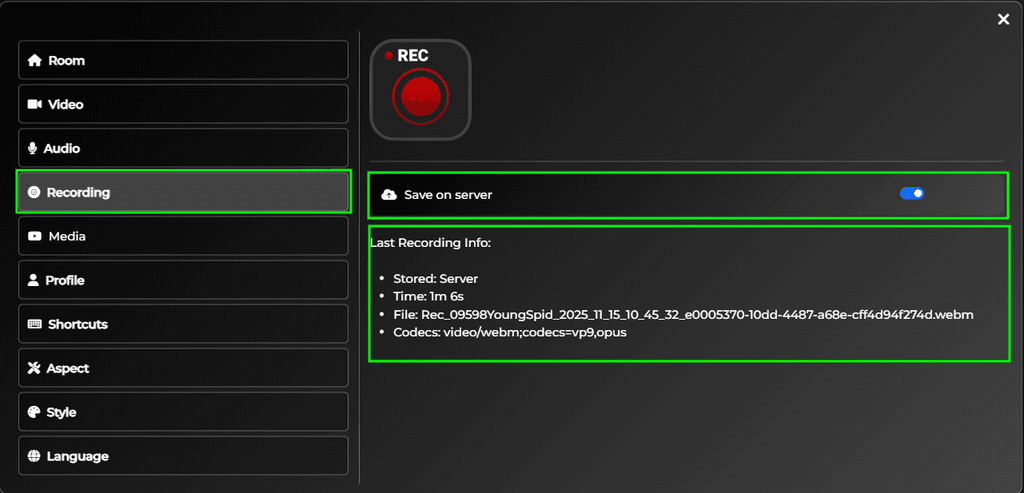
            Forget the previous env configuration. In the latest Cloudron commit, recording is enabled by default, and the app/data path now appears to be automatically resolved as well.
            rec.png

            1 Reply Last reply
            0
            • S Offline
              S Offline
              shrey
              wrote on last edited by
              #23

              @mirotalk-57bab571

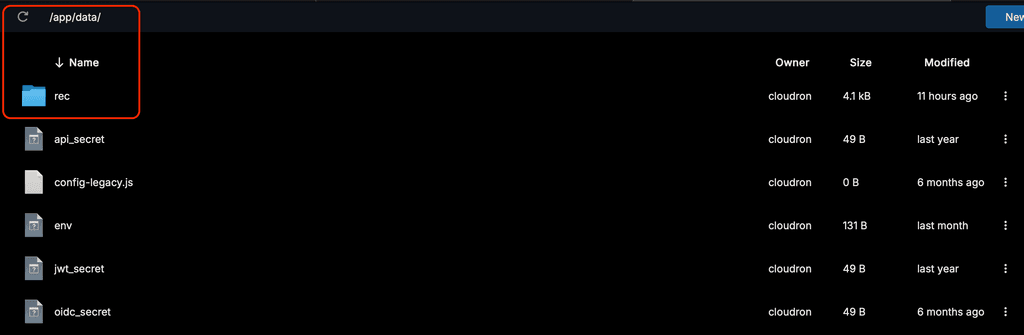
              I restarted the updated app, but i still get only this:
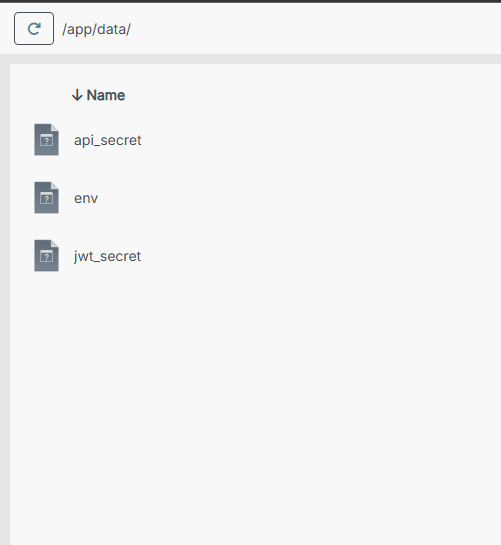
              image.png

              No rec folder available, and no default recording taking place.
              image.png

              1 Reply Last reply
              0
              • S Offline
                S Offline
                shrey
                wrote on last edited by shrey
                #24

                @mirotalk-57bab571

                It seems like 2 separate updated packages have been released for this.
                Just came across the 2nd one and updated the app again.

                1. The rec folder is now available in /app/data/
                2. All recordings are still being saved on the local device only. No server-side recording. No S3 recording.
                jamesJ 1 Reply Last reply
                0
                • S shrey

                  @mirotalk-57bab571

                  It seems like 2 separate updated packages have been released for this.
                  Just came across the 2nd one and updated the app again.

                  1. The rec folder is now available in /app/data/
                  2. All recordings are still being saved on the local device only. No server-side recording. No S3 recording.
                  jamesJ Offline
                  jamesJ Offline
                  james
                  Staff
                  wrote on last edited by
                  #25

                  Hello @shrey
                  I have just updated my Mirotalk SFU app and now the recordings are stored inside the Mirotalk SFU app in /app/data/rec/.
                  Please share your /app/data/env file.
                  With the updated app and a fresh installed app the recording works.
                  In a meeting I can do:

                  25148661-faea-4ff2-9c2d-854f2cc505d2-image.png

                  0d480e1b-0961-49df-a606-a2eaee3e27d0-image.png

                  ls -lah /app/data/rec/
                  total 5.2M
                  drwxr-xr-x 2 cloudron cloudron 4.0K Nov 15 09:46 .
                  drwxr-xr-x 3 cloudron cloudron 4.0K Nov 15 09:44 ..
                  -rw-r--r-- 1 cloudron cloudron 5.2M Nov 15 09:46 Rec_09598YoungSpid_2025_11_15_10_45_32_e0005370-10dd-4487-a68e-cff4d94f274d.webm
                  
                  1 Reply Last reply
                  1
                  • S Offline
                    S Offline
                    shrey
                    wrote on last edited by
                    #26

                    Hi @james , thanks for the screenshots. I can now see that there's a "Save on server" option in the UI, and it's working for me as well.

                    Now, just S3 is left to work.
                    My env file ->

                    # Recording
                    RECORDING_ENABLED=true                           # Enable recording functionality (true|false)
                    RECORDING_UPLOAD_TO_S3=false                      # Upload recording to AWS S3 bucket [true/false]
                    
                    # AWS S3 Configuration  
                    AWS_S3_ENABLED=true                              # Enable AWS S3 storage (true|false)  
                    AWS_S3_BUCKET_NAME=<bucket-name>                       # Name of your S3 bucket (must exist)  
                    AWS_ACCESS_KEY_ID=<key-id>                                # AWS Access Key ID (leave empty for IAM roles)  
                    AWS_SECRET_ACCESS_KEY=<key-secret>                            # AWS Secret Access Key (leave empty for IAM roles)  
                    AWS_REGION=<region>                                   # AWS region (e.g., us-east-2, eu-west-2)  
                    AWS_S3_ENDPOINT=https://<region>.digitaloceanspaces.com
                    

                    Note: Although i didn't find the "AWS_S3_ENDPOINT" key in the env template, i configured it because it seems to work with most S3 client libraries, and is a necessity to be able to connect to S3 spaces other than AWS.

                    MiroTalkM 1 Reply Last reply
                    0
                    • jamesJ Offline
                      jamesJ Offline
                      james
                      Staff
                      wrote on last edited by
                      #27

                      Hello @shrey
                      The library used in MiroTalk SFU for AWS/S3 is aws-sdk/client-s3.
                      It seems MiroTalk SFU does not have the option to configure the endpoint.
                      From the MiroTalk SFU Code handling the configuration:

                      https://github.com/miroslavpejic85/mirotalksfu/blob/b2a41e597610524b259097d2e1b52674dda631c0/app/src/config.template.js#L948-L954

                              aws: {
                                  enabled: process.env.AWS_S3_ENABLED === 'true',
                                  accessKeyId: process.env.AWS_ACCESS_KEY_ID || 'your-access-key-id',
                                  secretAccessKey: process.env.AWS_SECRET_ACCESS_KEY || 'your-secret-access-key',
                                  region: process.env.AWS_REGION || 'us-east-2',
                                  bucket: process.env.AWS_S3_BUCKET || 'mirotalk',
                              },
                      

                      Also in the server.js where the S3Client is initialized, the endpoint is never configured, thus using the default, resolving the endpoint from the AWS_REGION.
                      https://github.com/miroslavpejic85/mirotalksfu/blob/b2a41e597610524b259097d2e1b52674dda631c0/app/src/Server.js#L297-L303

                      const s3Client = new S3Client({
                          region: config?.integrations?.aws?.region, // Set your AWS region
                          credentials: {
                              accessKeyId: config?.integrations?.aws?.accessKeyId,
                              secretAccessKey: config?.integrations?.aws?.secretAccessKey,
                          },
                      });
                      

                      So we need to ask @mirotalk-57bab571 to add the option to configure the endpoint as well.
                      Adding to that, when a non AWS endpoint is used, the option forcePathStyle: true might also be needed for the best compatibility with e.g. MinIO and most S3-compatible systems.


                      @mirotalk-57bab571
                      It is the weekend, please don't feel pressured or forced to work on the weekend.
                      Would it be possible to add the option to configure the S3Client endpoint config and S3Client forcePathStyle config?

                      MiroTalkM 1 Reply Last reply
                      2
                      • jamesJ james

                        Hello @shrey
                        The library used in MiroTalk SFU for AWS/S3 is aws-sdk/client-s3.
                        It seems MiroTalk SFU does not have the option to configure the endpoint.
                        From the MiroTalk SFU Code handling the configuration:

                        https://github.com/miroslavpejic85/mirotalksfu/blob/b2a41e597610524b259097d2e1b52674dda631c0/app/src/config.template.js#L948-L954

                                aws: {
                                    enabled: process.env.AWS_S3_ENABLED === 'true',
                                    accessKeyId: process.env.AWS_ACCESS_KEY_ID || 'your-access-key-id',
                                    secretAccessKey: process.env.AWS_SECRET_ACCESS_KEY || 'your-secret-access-key',
                                    region: process.env.AWS_REGION || 'us-east-2',
                                    bucket: process.env.AWS_S3_BUCKET || 'mirotalk',
                                },
                        

                        Also in the server.js where the S3Client is initialized, the endpoint is never configured, thus using the default, resolving the endpoint from the AWS_REGION.
                        https://github.com/miroslavpejic85/mirotalksfu/blob/b2a41e597610524b259097d2e1b52674dda631c0/app/src/Server.js#L297-L303

                        const s3Client = new S3Client({
                            region: config?.integrations?.aws?.region, // Set your AWS region
                            credentials: {
                                accessKeyId: config?.integrations?.aws?.accessKeyId,
                                secretAccessKey: config?.integrations?.aws?.secretAccessKey,
                            },
                        });
                        

                        So we need to ask @mirotalk-57bab571 to add the option to configure the endpoint as well.
                        Adding to that, when a non AWS endpoint is used, the option forcePathStyle: true might also be needed for the best compatibility with e.g. MinIO and most S3-compatible systems.


                        @mirotalk-57bab571
                        It is the weekend, please don't feel pressured or forced to work on the weekend.
                        Would it be possible to add the option to configure the S3Client endpoint config and S3Client forcePathStyle config?

                        MiroTalkM Offline
                        MiroTalkM Offline
                        MiroTalk
                        wrote on last edited by
                        #28

                        @james said in MiroTalk SFU: Recording not possible?:

                        Would it be possible to add the option to configure the S3Client endpoint config and S3Client forcePathStyle config?

                        So the goal is to avoid hard-coding support only for AWS S3.
                        To extend the configuration so it also supports any S3-compatible storage (MinIO, Wasabi, DigitalOcean Spaces, etc.), i need to add the following to the .env file:

                        AWS_S3_ENDPOINT=                     # e.g., http://localhost:9000 for MinIO
                        AWS_S3_FORCE_PATH_STYLE=false        # Set to true for S3-compatible services
                        

                        Then expose these values in config.js:

                        aws: {
                            // ...
                            endpoint: process.env.AWS_S3_ENDPOINT || '',
                            forcePathStyle: process.env.AWS_S3_FORCE_PATH_STYLE === 'true',
                        },
                        

                        Finally, update the S3 client configuration in Server.js:

                        const s3Client = new S3Client({
                            // ...
                            endpoint: config?.integrations?.aws?.endpoint || undefined,
                            forcePathStyle: config?.integrations?.aws?.forcePathStyle === true,
                        });
                        

                        With this setup, the application continues to work with AWS S3 as it currently does, but can also switch to any S3-compatible service simply by adjusting environment variables and no additional code changes required.

                        Sounds good to me! @James just confirm.

                        1 Reply Last reply
                        3
                        • jamesJ Offline
                          jamesJ Offline
                          james
                          Staff
                          wrote on last edited by
                          #29

                          Hello @mirotalk-57bab571

                          LGTM!
                          Maybe adding a doc string in the env to AWS_S3_ENDPOINT that if left empty it will use region to resolve it automatically.

                          1 Reply Last reply
                          1
                          • MiroTalkM Offline
                            MiroTalkM Offline
                            MiroTalk
                            wrote on last edited by
                            #30

                            ✅ Implemented in MiroTalk SFU v.2.0.16

                            • Commit
                            • Build
                            1 Reply Last reply
                            3
                            • J joseph marked this topic as a regular topic on
                            • jamesJ Offline
                              jamesJ Offline
                              james
                              Staff
                              wrote on last edited by
                              #31

                              I am running the following env file:

                              
                              All config options at https://github.com/miroslavpejic85/mirotalksfu/blob/main/.env.template
                              PRESENTERS=admin@cloudron.local
                              EMAIL_SEND_TO=admin@cloudron.local
                              STATS_ENABLED=false
                              RECORDING_UPLOAD_TO_S3=true
                              AWS_S3_ENABLED=true
                              AWS_S3_ENDPOINT=https://minio-api.cloudron.dev
                              AWS_S3_BUCKET_NAME=sfu
                              AWS_S3_FORCE_PATH_STYLE=true
                              AWS_ACCESS_KEY_ID=LJQVOTFR3DZDG1QPOL0Y
                              AWS_SECRET_ACCESS_KEY=j6w8j73VF8NE9wzsi4aupJICTrn45I0MKIoYUCk9
                              

                              This access key and secret have full access to all buckets.
                              Buckets are backup and sfu.
                              The backup bucket I used for testing for Cloudron Backups, which works.

                              But with MiroTalk SFU there seems to be an issue:

                              Nov 16 16:43:28 [11/16/2025, 15:43:28:847] [Server] [Upload] Saved Rec_13172BasicZebra_2025_11_16_16_43_23_f6ee8290-dcb8-44ec-b30e-dab24b4bae36.webm (0.07 MB) in 0.00s ''
                              Nov 16 16:43:30 [11/16/2025, 15:43:30:316] [Server] Rec Finalization error 'The specified bucket does not exist'
                              

                              Without the AWS_S3_FORCE_PATH_STYLE variable I get:

                              Nov 16 16:44:56 [11/16/2025, 15:44:56:198] [Server] Rec Finalization error 'getaddrinfo ENOTFOUND mirotalk.minio-api.cloudron.dev'
                              

                              Which would suggest that AWS_S3_BUCKET_NAME which I set to sfu is getting ignored and default mirotalk is used?
                              So I add the AWS_S3_FORCE_PATH_STYLE=true again and create a bucket named mirotalk.
                              Confirmed working.

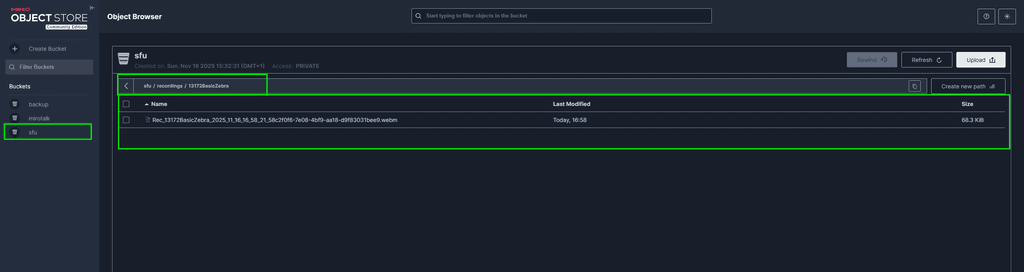
                              Nov 16 16:49:29 [11/16/2025, 15:49:29:552] [Server] [Upload] Saved Rec_13172BasicZebra_2025_11_16_16_49_23_3e9ab0ce-5148-43b3-a827-e524537fd01b.webm (0.95 MB) in 0.01s ''
                              Nov 16 16:49:29 [11/16/2025, 15:49:29:702] [Server] [Upload] Saved Rec_13172BasicZebra_2025_11_16_16_49_23_3e9ab0ce-5148-43b3-a827-e524537fd01b.webm (0.20 MB) in 0.00s ''
                              Nov 16 16:49:30 [11/16/2025, 15:49:30:586] [Server] [Rec Finalization] done Rec_13172BasicZebra_2025_11_16_16_49_23_3e9ab0ce-5148-43b3-a827-e524537fd01b.webm in 0.32s {
                              Nov 16 16:49:30 success: true,
                              Nov 16 16:49:30 fileName: 'Rec_13172BasicZebra_2025_11_16_16_49_23_3e9ab0ce-5148-43b3-a827-e524537fd01b.webm',
                              Nov 16 16:49:30 key: 'recordings/13172BasicZebra/Rec_13172BasicZebra_2025_11_16_16_49_23_3e9ab0ce-5148-43b3-a827-e524537fd01b.webm'
                              Nov 16 16:49:30 }
                              Nov 16 16:49:30 [11/16/2025, 15:49:30:587] [Server] [Upload] File /app/data/rec/Rec_13172BasicZebra_2025_11_16_16_49_23_3e9ab0ce-5148-43b3-a827-e524537fd01b.webm removed from local after S3 upload ''
                              

                              /app/data/env is:

                              
                              All config options at https://github.com/miroslavpejic85/mirotalksfu/blob/main/.env.template
                              PRESENTERS=admin@cloudron.local
                              EMAIL_SEND_TO=admin@cloudron.local
                              STATS_ENABLED=false
                              RECORDING_UPLOAD_TO_S3=true
                              AWS_S3_ENABLED=true
                              AWS_S3_ENDPOINT=https://minio-api.cloudron.dev
                              AWS_S3_BUCKET_NAME=sfu
                              AWS_S3_FORCE_PATH_STYLE=true
                              AWS_ACCESS_KEY_ID=LJQVOTFR3DZDG1QPOL0Y
                              AWS_SECRET_ACCESS_KEY=j6w8j73VF8NE9wzsi4aupJICTrn45I0MKIoYUCk9
                              

                              And I created a bucket named mirotalk.

                              96905172-5b71-467b-ac99-f7d77b79d026-image.png

                              1 Reply Last reply
                              0
                              • jamesJ Offline
                                jamesJ Offline
                                james
                                Staff
                                wrote on last edited by james
                                #32

                                I found the offending lines:

                                https://github.com/miroslavpejic85/mirotalksfu/blob/e59b24bb37a7b19560a03de1a5abb5fb79a2c6b4/app/src/config.template.js#L961

                                            bucket: process.env.AWS_S3_BUCKET || 'mirotalk',
                                

                                https://github.com/miroslavpejic85/mirotalksfu/blob/e59b24bb37a7b19560a03de1a5abb5fb79a2c6b4/app/src/Server.js#L1118

                                            const bucket = config?.integrations?.aws?.bucket;
                                

                                This would mean the env would be AWS_S3_BUCKET and not AWS_S3_BUCKET_NAME.
                                Confirmed with this env

                                
                                All config options at https://github.com/miroslavpejic85/mirotalksfu/blob/main/.env.template
                                PRESENTERS=admin@cloudron.local
                                EMAIL_SEND_TO=admin@cloudron.local
                                STATS_ENABLED=false
                                RECORDING_UPLOAD_TO_S3=true
                                AWS_S3_ENABLED=true
                                AWS_S3_ENDPOINT=https://minio-api.cloudron.dev
                                AWS_S3_BUCKET_NAME=sfu
                                AWS_S3_BUCKET=sfu
                                AWS_S3_FORCE_PATH_STYLE=true
                                AWS_ACCESS_KEY_ID=LJQVOTFR3DZDG1QPOL0Y
                                AWS_SECRET_ACCESS_KEY=j6w8j73VF8NE9wzsi4aupJICTrn45I0MKIoYUCk9
                                

                                423a4072-aee5-4995-a69a-960f60ea1a42-image.png

                                PR created @mirotalk-57bab571 https://github.com/miroslavpejic85/mirotalksfu/pull/228

                                MiroTalkM 1 Reply Last reply
                                2
                                • jamesJ james

                                  I found the offending lines:

                                  https://github.com/miroslavpejic85/mirotalksfu/blob/e59b24bb37a7b19560a03de1a5abb5fb79a2c6b4/app/src/config.template.js#L961

                                              bucket: process.env.AWS_S3_BUCKET || 'mirotalk',
                                  

                                  https://github.com/miroslavpejic85/mirotalksfu/blob/e59b24bb37a7b19560a03de1a5abb5fb79a2c6b4/app/src/Server.js#L1118

                                              const bucket = config?.integrations?.aws?.bucket;
                                  

                                  This would mean the env would be AWS_S3_BUCKET and not AWS_S3_BUCKET_NAME.
                                  Confirmed with this env

                                  
                                  All config options at https://github.com/miroslavpejic85/mirotalksfu/blob/main/.env.template
                                  PRESENTERS=admin@cloudron.local
                                  EMAIL_SEND_TO=admin@cloudron.local
                                  STATS_ENABLED=false
                                  RECORDING_UPLOAD_TO_S3=true
                                  AWS_S3_ENABLED=true
                                  AWS_S3_ENDPOINT=https://minio-api.cloudron.dev
                                  AWS_S3_BUCKET_NAME=sfu
                                  AWS_S3_BUCKET=sfu
                                  AWS_S3_FORCE_PATH_STYLE=true
                                  AWS_ACCESS_KEY_ID=LJQVOTFR3DZDG1QPOL0Y
                                  AWS_SECRET_ACCESS_KEY=j6w8j73VF8NE9wzsi4aupJICTrn45I0MKIoYUCk9
                                  

                                  423a4072-aee5-4995-a69a-960f60ea1a42-image.png

                                  PR created @mirotalk-57bab571 https://github.com/miroslavpejic85/mirotalksfu/pull/228

                                  MiroTalkM Offline
                                  MiroTalkM Offline
                                  MiroTalk
                                  wrote on last edited by
                                  #33

                                  @james said in MiroTalk SFU: Recording not possible?:

                                  PR created @mirotalk-57bab571 https://github.com/miroslavpejic85/mirotalksfu/pull/228

                                  Ops, you’re right, good catch! PR accepted. Thanks for confirming that everything works as expected. MiroTalk SFU can now upload recordings to any S3-compatible storage, not just AWS! 💪

                                  1 Reply Last reply
                                  4
                                  • MiroTalkM Offline
                                    MiroTalkM Offline
                                    MiroTalk
                                    wrote on last edited by MiroTalk
                                    #34

                                    By the way, I opened an issue for MinIO here: https://github.com/minio/minio/issues/21694

                                    It would be great if MinIO could properly show previews for .webm videos as well.
                                    When I store the same recording in a rec folder in Cloudron, the video preview works correctly.
                                    However, when the file is stored in MinIO storage, the preview does not work.

                                    It looks like the MIME type is not detected correctly, which causes the video tag to use:

                                    type="video/mp4"
                                    

                                    even though the file is actually a .webm.
                                    This prevents browsers from playing the video.

                                    Proper support for serving .webm with Content-Type: video/webm would fix the issue.

                                    1 Reply Last reply
                                    2
                                    • S shrey

                                      Hi @james , thanks for the screenshots. I can now see that there's a "Save on server" option in the UI, and it's working for me as well.

                                      Now, just S3 is left to work.
                                      My env file ->

                                      # Recording
                                      RECORDING_ENABLED=true                           # Enable recording functionality (true|false)
                                      RECORDING_UPLOAD_TO_S3=false                      # Upload recording to AWS S3 bucket [true/false]
                                      
                                      # AWS S3 Configuration  
                                      AWS_S3_ENABLED=true                              # Enable AWS S3 storage (true|false)  
                                      AWS_S3_BUCKET_NAME=<bucket-name>                       # Name of your S3 bucket (must exist)  
                                      AWS_ACCESS_KEY_ID=<key-id>                                # AWS Access Key ID (leave empty for IAM roles)  
                                      AWS_SECRET_ACCESS_KEY=<key-secret>                            # AWS Secret Access Key (leave empty for IAM roles)  
                                      AWS_REGION=<region>                                   # AWS region (e.g., us-east-2, eu-west-2)  
                                      AWS_S3_ENDPOINT=https://<region>.digitaloceanspaces.com
                                      

                                      Note: Although i didn't find the "AWS_S3_ENDPOINT" key in the env template, i configured it because it seems to work with most S3 client libraries, and is a necessity to be able to connect to S3 spaces other than AWS.

                                      MiroTalkM Offline
                                      MiroTalkM Offline
                                      MiroTalk
                                      wrote on last edited by MiroTalk
                                      #35

                                      @shrey said in MiroTalk SFU: Recording not possible?:

                                      AWS_S3_ENDPOINT=https://<region>.digitaloceanspaces.com

                                      Just out of curiosity, on DigitalOcean, the web video preview work there?

                                      I'm going also to add also the correct contentType when the recording is uploaded to any S3-compatible storage to avoid MIME-type issues.

                                      S 1 Reply Last reply
                                      0
                                      • MiroTalkM MiroTalk

                                        @shrey said in MiroTalk SFU: Recording not possible?:

                                        AWS_S3_ENDPOINT=https://<region>.digitaloceanspaces.com

                                        Just out of curiosity, on DigitalOcean, the web video preview work there?

                                        I'm going also to add also the correct contentType when the recording is uploaded to any S3-compatible storage to avoid MIME-type issues.

                                        S Offline
                                        S Offline
                                        shrey
                                        wrote on last edited by
                                        #36

                                        @MiroTalk said in MiroTalk SFU: Recording not possible?:

                                        Just out of curiosity, on DigitalOcean, the web video preview work there?

                                        No idea. I'm yet to figure out why uploading to S3 (DigitalOcean Spaces) is not working for me.

                                        MiroTalkM 1 Reply Last reply
                                        0
                                        • S shrey

                                          @MiroTalk said in MiroTalk SFU: Recording not possible?:

                                          Just out of curiosity, on DigitalOcean, the web video preview work there?

                                          No idea. I'm yet to figure out why uploading to S3 (DigitalOcean Spaces) is not working for me.

                                          MiroTalkM Offline
                                          MiroTalkM Offline
                                          MiroTalk
                                          wrote on last edited by MiroTalk
                                          #37

                                          @shrey said in MiroTalk SFU: Recording not possible?:

                                          No idea. I'm yet to figure out why uploading to S3 (DigitalOcean Spaces) is not working for me.

                                          I don’t have a DigitalOcean Space to test, but in case you want to try, you can add AWS_REGION to your environment config like this:

                                          RECORDING_UPLOAD_TO_S3=true                       # Enable uploading recordings to S3-compatible storage
                                          AWS_S3_ENABLED=true                               # Enable S3 storage integration
                                          AWS_S3_ENDPOINT=https://YOUR-REGION.digitaloceanspaces.com  # DO Spaces endpoint (replace YOUR-REGION)
                                          AWS_S3_BUCKET=YOUR-BUCKET                         # Target bucket name
                                          AWS_ACCESS_KEY_ID=YOUR-DO-ACCESS-KEY              # Your DO Spaces access key
                                          AWS_SECRET_ACCESS_KEY=YOUR-DO-SECRET-KEY          # Your DO Spaces secret key
                                          AWS_REGION=YOUR-REGION                            # DO Spaces region (required)
                                          AWS_S3_FORCE_PATH_STYLE=true                      # Required for non-AWS S3 providers
                                          

                                          ✅ Notes

                                          1. Region: Must match your Space’s region (nyc3, ams3, sgp1, etc.).
                                          2. Endpoint: Must include the full URL with https://.
                                          3. MiroTalk SFU: Make sure to use at last the v2.0.17
                                          1 Reply Last reply
                                          2
                                          Reply
                                          • Reply as topic
                                          Log in to reply
                                          • Oldest to Newest
                                          • Newest to Oldest
                                          • Most Votes


                                          • Login

                                          • Don't have an account? Register

                                          • Login or register to search.
                                          • First post
                                            Last post
                                          0
                                          • Categories
                                          • Recent
                                          • Tags
                                          • Popular
                                          • Bookmarks
                                          • Search