
cloudron dashboard error: "This app is currently not responding. Please try refreshing the page in a few minutes."
-
Note: I made a light edit, changing app name to "[this_cloudron.app]"
-
Hello @tshirt-chihuahu
Can you please write a mail to support@cloudron.io ?
It seems that there is an issue with the database that will be hard to resolve. -
Note: I made a light edit, changing app name to "[this_cloudron.app]"
@tshirt-chihuahu not 100% sure since I don't have a way to match ids but it's probably you from support@ some time back.
2025-11-24T03:35:09.353Z BoxError: Unknown column 'pending' in 'field list'
The database migrations did not complete for some reason. Can you run
/home/yellowtent/box/setup/start.shon the server? This will re-run the migrations. -
@tshirt-chihuahu not 100% sure since I don't have a way to match ids but it's probably you from support@ some time back.
2025-11-24T03:35:09.353Z BoxError: Unknown column 'pending' in 'field list'
The database migrations did not complete for some reason. Can you run
/home/yellowtent/box/setup/start.shon the server? This will re-run the migrations.@joseph I ran the script. The migration failed. Here's the output I got back:
1 updates could not be installed automatically. For more details,
see /var/log/unattended-upgrades/unattended-upgrades.log
Last login: Mon Nov 24 03:29:56 2025 from 73.245.168.195 root@wisdom:~# bash /home/yellowtent/box/setup/start.sh 2025-11-24T12:59:37 ==> start: Cloudron Start media:x:500: 2025-11-24T12:59:38 ==> start: Configuring docker Synchronizing state of apparmor.service with SysV service script with /lib/systemd/systemd-sysv-install. Executing: /lib/systemd/systemd-sysv-install enable apparmor 2025-11-24T12:59:40 ==> start: Ensuring directories 2025-11-24T12:59:40 ==> start: Configuring journald 2025-11-24T12:59:41 ==> start: Setting up unbound 2025-11-24T12:59:41 ==> start: Adding systemd services Synchronizing state of unbound.service with SysV service script with /lib/systemd/systemd-sysv-install. Executing: /lib/systemd/systemd-sysv-install enable unbound Synchronizing state of cron.service with SysV service script with /lib/systemd/systemd-sysv-install. Executing: /lib/systemd/systemd-sysv-install enable cron Synchronizing state of rpcbind.service with SysV service script with /lib/systemd/systemd-sysv-install. Executing: /lib/systemd/systemd-sysv-install disable rpcbind 2025-11-24T12:59:52 ==> start: Configuring sudoers 2025-11-24T12:59:52 ==> start: Unconfiguring collectd Synchronizing state of collectd.service with SysV service script with /lib/systemd/systemd-sysv-install. Executing: /lib/systemd/systemd-sysv-install disable collectd 2025-11-24T12:59:55 ==> start: Configuring logrotate 2025-11-24T12:59:55 ==> start: Adding motd message for admins 2025-11-24T12:59:55 ==> start: Configuring nginx 2025-11-24T12:59:55 ==> start: Starting mysql mysqladmin: [Warning] Using a password on the command line interface can be insecure. Warning: Since password will be sent to server in plain text, use ssl connection to ensure password safety. mysql: [Warning] Using a password on the command line interface can be insecure. mysql: [Warning] Using a password on the command line interface can be insecure. 2025-11-24T12:59:56 ==> start: Migrating data [ERROR] AssertionError [ERR_ASSERTION]: ifError got unwanted exception: Data too long for column 'password' at row 1 at /home/yellowtent/box/node_modules/db-migrate/lib/commands/on-complete.js:15:14 at tryCatcher (/home/yellowtent/box/node_modules/bluebird/js/release/util.js:16:23) at Promise.successAdapter (/home/yellowtent/box/node_modules/bluebird/js/release/nodeify.js:22:30) at Promise._settlePromise (/home/yellowtent/box/node_modules/bluebird/js/release/promise.js:601:21) at Promise._settlePromiseCtx (/home/yellowtent/box/node_modules/bluebird/js/release/promise.js:641:10) at _drainQueueStep (/home/yellowtent/box/node_modules/bluebird/js/release/async.js:97:12) at _drainQueue (/home/yellowtent/box/node_modules/bluebird/js/release/async.js:86:9) at Async._drainQueues (/home/yellowtent/box/node_modules/bluebird/js/release/async.js:102:5) at Async.drainQueues [as _onImmediate] (/home/yellowtent/box/node_modules/bluebird/js/release/async.js:15:14) at process.processImmediate (node:internal/timers:485:21) at Packet.asError (/home/yellowtent/box/node_modules/mysql2/lib/packets/packet.js:740:17) at Query.execute (/home/yellowtent/box/node_modules/mysql2/lib/commands/command.js:29:26) at Connection.handlePacket (/home/yellowtent/box/node_modules/mysql2/lib/base/connection.js:477:34) at PacketParser.onPacket (/home/yellowtent/box/node_modules/mysql2/lib/base/connection.js:93:12) at PacketParser.executeStart (/home/yellowtent/box/node_modules/mysql2/lib/packet_parser.js:75:16) at Socket.<anonymous> (/home/yellowtent/box/node_modules/mysql2/lib/base/connection.js:100:25) at Socket.emit (node:events:519:28) at addChunk (node:internal/streams/readable:561:12) at readableAddChunkPushByteMode (node:internal/streams/readable:512:3) at Readable.push (node:internal/streams/readable:392:5) at TCP.onStreamRead (node:internal/stream_base_commons:189:23) 2025-11-24T12:59:57 ==> start: DB migration failed -
@joseph I ran the script. The migration failed. Here's the output I got back:
1 updates could not be installed automatically. For more details,
see /var/log/unattended-upgrades/unattended-upgrades.log
Last login: Mon Nov 24 03:29:56 2025 from 73.245.168.195 root@wisdom:~# bash /home/yellowtent/box/setup/start.sh 2025-11-24T12:59:37 ==> start: Cloudron Start media:x:500: 2025-11-24T12:59:38 ==> start: Configuring docker Synchronizing state of apparmor.service with SysV service script with /lib/systemd/systemd-sysv-install. Executing: /lib/systemd/systemd-sysv-install enable apparmor 2025-11-24T12:59:40 ==> start: Ensuring directories 2025-11-24T12:59:40 ==> start: Configuring journald 2025-11-24T12:59:41 ==> start: Setting up unbound 2025-11-24T12:59:41 ==> start: Adding systemd services Synchronizing state of unbound.service with SysV service script with /lib/systemd/systemd-sysv-install. Executing: /lib/systemd/systemd-sysv-install enable unbound Synchronizing state of cron.service with SysV service script with /lib/systemd/systemd-sysv-install. Executing: /lib/systemd/systemd-sysv-install enable cron Synchronizing state of rpcbind.service with SysV service script with /lib/systemd/systemd-sysv-install. Executing: /lib/systemd/systemd-sysv-install disable rpcbind 2025-11-24T12:59:52 ==> start: Configuring sudoers 2025-11-24T12:59:52 ==> start: Unconfiguring collectd Synchronizing state of collectd.service with SysV service script with /lib/systemd/systemd-sysv-install. Executing: /lib/systemd/systemd-sysv-install disable collectd 2025-11-24T12:59:55 ==> start: Configuring logrotate 2025-11-24T12:59:55 ==> start: Adding motd message for admins 2025-11-24T12:59:55 ==> start: Configuring nginx 2025-11-24T12:59:55 ==> start: Starting mysql mysqladmin: [Warning] Using a password on the command line interface can be insecure. Warning: Since password will be sent to server in plain text, use ssl connection to ensure password safety. mysql: [Warning] Using a password on the command line interface can be insecure. mysql: [Warning] Using a password on the command line interface can be insecure. 2025-11-24T12:59:56 ==> start: Migrating data [ERROR] AssertionError [ERR_ASSERTION]: ifError got unwanted exception: Data too long for column 'password' at row 1 at /home/yellowtent/box/node_modules/db-migrate/lib/commands/on-complete.js:15:14 at tryCatcher (/home/yellowtent/box/node_modules/bluebird/js/release/util.js:16:23) at Promise.successAdapter (/home/yellowtent/box/node_modules/bluebird/js/release/nodeify.js:22:30) at Promise._settlePromise (/home/yellowtent/box/node_modules/bluebird/js/release/promise.js:601:21) at Promise._settlePromiseCtx (/home/yellowtent/box/node_modules/bluebird/js/release/promise.js:641:10) at _drainQueueStep (/home/yellowtent/box/node_modules/bluebird/js/release/async.js:97:12) at _drainQueue (/home/yellowtent/box/node_modules/bluebird/js/release/async.js:86:9) at Async._drainQueues (/home/yellowtent/box/node_modules/bluebird/js/release/async.js:102:5) at Async.drainQueues [as _onImmediate] (/home/yellowtent/box/node_modules/bluebird/js/release/async.js:15:14) at process.processImmediate (node:internal/timers:485:21) at Packet.asError (/home/yellowtent/box/node_modules/mysql2/lib/packets/packet.js:740:17) at Query.execute (/home/yellowtent/box/node_modules/mysql2/lib/commands/command.js:29:26) at Connection.handlePacket (/home/yellowtent/box/node_modules/mysql2/lib/base/connection.js:477:34) at PacketParser.onPacket (/home/yellowtent/box/node_modules/mysql2/lib/base/connection.js:93:12) at PacketParser.executeStart (/home/yellowtent/box/node_modules/mysql2/lib/packet_parser.js:75:16) at Socket.<anonymous> (/home/yellowtent/box/node_modules/mysql2/lib/base/connection.js:100:25) at Socket.emit (node:events:519:28) at addChunk (node:internal/streams/readable:561:12) at readableAddChunkPushByteMode (node:internal/streams/readable:512:3) at Readable.push (node:internal/streams/readable:392:5) at TCP.onStreamRead (node:internal/stream_base_commons:189:23) 2025-11-24T12:59:57 ==> start: DB migration failed@tshirt-chihuahu said in [critical] cloudron dashboard error: "This app is currently not responding. Please try refreshing the page in a few minutes.":
Data too long
I have to guess here since it's not printing which migration is running. Can you please run
mysql -uroot -ppassword -e "SELECT name FROM box.migrations ORDER BY run_on DESC LIMIT 1"? This will give the last successful migration.If I were to guess: Is it possible you use the docker registry feature and password for the registry is > 128 characters?
-
@tshirt-chihuahu said in [critical] cloudron dashboard error: "This app is currently not responding. Please try refreshing the page in a few minutes.":
Data too long
I have to guess here since it's not printing which migration is running. Can you please run
mysql -uroot -ppassword -e "SELECT name FROM box.migrations ORDER BY run_on DESC LIMIT 1"? This will give the last successful migration.If I were to guess: Is it possible you use the docker registry feature and password for the registry is > 128 characters?
Here's what I got back from the mysql command:
+------------------------------------------------+ | name | +------------------------------------------------+ | /20250307100449-tokens-add-allowedIpRangesJson | +------------------------------------------------+ -
Hello @tshirt-chihuahu
Please use code blocks for posting logs or outputs from commands by either typing 3x backticks before and after your code/output, like this:```
THIS IS THE CODE TO PUT IN A CODE BLOCK
MORE LINES
```Or use the editor by highlighting the code and pressing the button:
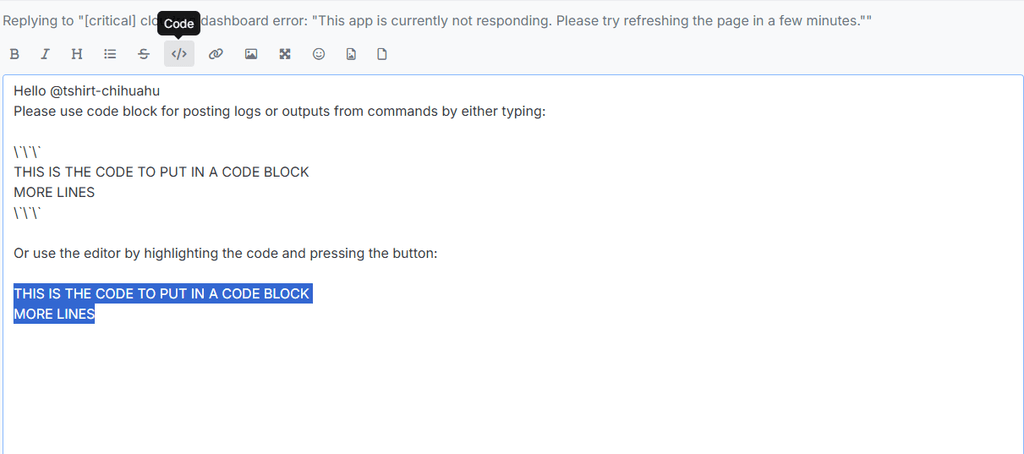
THIS IS THE CODE TO PUT IN A CODE BLOCK MORE LINES -
@tshirt-chihuahu said in [critical] cloudron dashboard error: "This app is currently not responding. Please try refreshing the page in a few minutes.":
Data too long
I have to guess here since it's not printing which migration is running. Can you please run
mysql -uroot -ppassword -e "SELECT name FROM box.migrations ORDER BY run_on DESC LIMIT 1"? This will give the last successful migration.If I were to guess: Is it possible you use the docker registry feature and password for the registry is > 128 characters?
This post is deleted! -
J joseph has marked this topic as solved on
-
I am seeing the same issue. How did you fix it?
-
I am seeing the same issue. How did you fix it?
@saikarthik I deleted the registry config.
mysql -uroot -ppassword -e "DELETE FROM box.settings WHERE name='registry_config'"Then, re-run the migrations:
/home/yellowtent/box/setup/start.shAfter the upgrade, you can re-setup the registry . But you have to shorten the password length to < 128 chars.



Hello! It looks like you're interested in this conversation, but you don't have an account yet.
Getting fed up of having to scroll through the same posts each visit? When you register for an account, you'll always come back to exactly where you were before, and choose to be notified of new replies (either via email, or push notification). You'll also be able to save bookmarks and upvote posts to show your appreciation to other community members.
With your input, this post could be even better 💗
Register Login