
Jellyfin and OIDC passwords
-
After the migration to OIDC, I've had issues due to a number of jellyfin clients not supporting OIDC. In addition, cloudron only supports app passwords for SFTP, so I can't make an app password for these clients to by pass OIDC. Is there a way to allow using app password with jellyfin for clients who need it?
-
After the migration to OIDC, I've had issues due to a number of jellyfin clients not supporting OIDC. In addition, cloudron only supports app passwords for SFTP, so I can't make an app password for these clients to by pass OIDC. Is there a way to allow using app password with jellyfin for clients who need it?
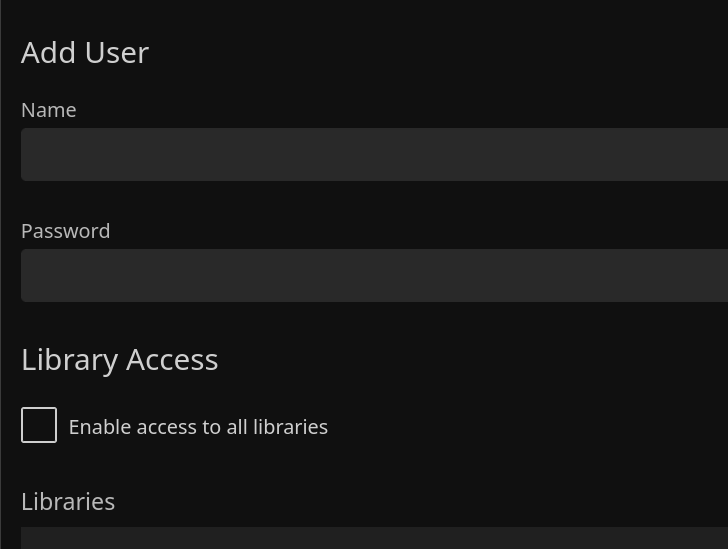
@eyecreate IMHO it should be possible to add user accounts via an administrator account. Does that help/work?
-
-
Surely, the idea is to create an account per user, not per client. In that case, each user should be able to login on multiple clients using OIDC or app passwords, as appropriate to the client. If not, then OIDC is not a lot of use and a retrograde move from LDAP.
-
@eyecreate @roundhouse1924 I guess you have to treat the user that you "Add user" like an app password. Remember that with LDAP all those clients have access to your raw password, so while the whole thing seems a step back, it at least helps a bit in securing your Cloudron password!
-
@eyecreate @roundhouse1924 I guess you have to treat the user that you "Add user" like an app password. Remember that with LDAP all those clients have access to your raw password, so while the whole thing seems a step back, it at least helps a bit in securing your Cloudron password!
@joseph said in Jellyfin and OIDC passwords:
with LDAP all those clients have access to your raw password
Are you saying that LDAP app passwords have access to, for example, the Cloudron dashboard? Surely, an app password created for a specific app (mail, Syncthing, Jellyfin, etc) can access ONLY the expected app.
-
-
I seem to have cracked the original problem as described by the OP.
Cloudron's Jellyfin implementation has Quick Connect disabled; whereas the Jellyfin default is for Quick Connect to be enabled.
https://jellyfin.org/docs/general/server/quick-connect/ describes the procedure nicely.
In a nutshell, a 6-digit PIN is produced on the new client; same is then entered into an already logged-in client.
Voila! No app passwords required.
-
-
Unfortunately, the Home Assistant Jellyfin integration seems to demand username/password. So, in that case, you would need to create a user within Jellyfin for this purpose.



Hello! It looks like you're interested in this conversation, but you don't have an account yet.
Getting fed up of having to scroll through the same posts each visit? When you register for an account, you'll always come back to exactly where you were before, and choose to be notified of new replies (either via email, or push notification). You'll also be able to save bookmarks and upvote posts to show your appreciation to other community members.
With your input, this post could be even better 💗
Register Login