
Cloudron update recreated docker cloudron network causing database connectivity issues for all apps
-
Hi team,
After upgrading to 9.1.7 and a few days later responding to the "reboot required" reminder email, none of my apps would come back up properly - some reported database connection errors so after staring at the logs for a while I set Claude loose on my environment to try and figure out what was going on.
After about an hour of token burning I believe the root cause was:
Root cause: Cloudron's update recreated the Docker cloudron network, assigning a new bridge ID (
br-redacted). The nftablesip raw PREROUTINGchain had stale security rules from the OLD bridge ID (br-also-redacted). These stale rules appeared BEFORE the new bridge's rules and dropped all container-to-database packets at the raw level — BEFORE the FORWARD chain was even reached.Why: Cloudron adds new bridge rules to
ip raw PREROUTINGwhen the network is created but does NOT remove old rules for the previous bridge ID. Old rules silently drop all traffic from containers on the new bridge to database IPs.How to diagnose:
- Check
sudo nft list table ip rawfor rules with old bridge IDs that DROP container IPs - Look for high counters on
iifname != "br-XXXXXXXX"rules — that's the stale rule doing the dropping - The iptables FORWARD chain counter for the database IP will show 0 (packets never reach FORWARD)
- tcpdump on the veth shows SYNs leaving the container, but no SYN-ACKs return
Fix:
sudo nft -a list chain ip raw PREROUTING | grep br-<OLD-ID>  # find stale rule handles
sudo nft delete rule ip raw PREROUTING handle <N>             # delete each stale rule
Delete all rules referencing the old bridge ID. The new bridge rules (for the current bridge) remain and are correct.
How to apply: After any Cloudron update that changes the Docker network bridge ID, check
nft list table ip rawfor stale bridge rules. Also check after any reboot where Docker recreation of the cloudron network is suspected.Hopefully this helps anyone else who encounters this issue - it may be isolated to me, I don't know, but I'm really impressed that Claude was able to figure this out.
Logs: I did not capture the
cloudron-support --troubleshootfor this case as I've resolved the issue, but can do if the dev team thinks this will help them figure out what went wrong. - Check
-
-
-
Hi @girish and team, that's strange, maybe that was Claude's method for determining what the issue was but it certainly seemed to correct the problem (by using nft to clear the rules).
Here's a summary of a re-occurrence after I had to reboot my PVE server (kernel updates, anyone)?
After any event that causes Cloudron to recreate the Docker
cloudronnetwork bridge (software update, host reboot), Cloudron adds newip rawandip6 rawPREROUTING rules for the new bridge interface, but does not remove the old rules for the previous bridge. The stale rules appear before the new rules in the chain and drop all container-to-database traffic, taking all apps offline.This has been reproduced twice:
- 2026-05-07: After Cloudron 9.1.7 software update + reboot
- 2026-05-09: After Proxmox host kernel update + reboot
Environment
cloudron-support --troubleshoot output:

Vendor: QEMU Product: Standard PC (i440FX + PIIX, 1996)
Linux: 5.15.0-177-generic
Ubuntu: jammy 22.04
Cloudron: 9.1.7
Execution environment: kvm
Processor: Intel(R) Xeon(R) E-2288G CPU @ 3.70GHz x 8
RAM: 24604988KB
Disk: /dev/sda2       384G
[OK]    node version is correct
[OK]    IPv6 is enabled in kernel. No public IPv6 address
[OK]    docker is running
[OK]    docker version is correct
[OK]    MySQL is running
[OK]    netplan is good
[OK]    DNS is resolving via systemd-resolved
[OK]    unbound is running
[OK]    nginx is running
[OK]    dashboard cert is valid
[OK]    dashboard is reachable via loopback
[OK]    No pending database migrations
[OK]    Service 'mysql' is running and healthy
[OK]    Service 'postgresql' is running and healthy
[WARN]  Service 'mongodb' is not running (may be lazy-stopped)
[OK]    Service 'mail' is running and healthy
[OK]    Service 'graphite' is running and healthy
[OK]    Service 'sftp' is running and healthy
[OK]    box v9.1.7 is running
[FAIL]  Could not load dashboard domain.
Hairpin NAT is not working. Please check if your router supports it
Technical Detail
Network layout
- Cloudron Docker network:
172.18.0.0/16(IPv4),fd00:c107:d509::/64(IPv6) - MySQL container static IP:
172.18.30.1/fd00:c107:d509::3 - PostgreSQL container static IP:
172.18.30.2 - Old bridge (pre-reboot):
br-c66a5d9c5bbc - New bridge (post-reboot):
br-12c45f5b526a
The bug
Cloudron writes security rules to
ip raw PREROUTINGandip6 raw PREROUTINGthat protect service container IPs. The rule pattern is:iifname != "br-<ID>" ip daddr <service-ip> dropThis means: "if a packet destined for this service IP did NOT arrive on the cloudron bridge, drop it."
When the bridge ID changes (due to Docker network recreation), Cloudron correctly adds new rules for the new bridge ID but does not remove the old rules. The old rules sit earlier in the chain and match all traffic because the current bridge (
br-12c45f5b526a) is not equal to the old bridge (br-c66a5d9c5bbc). Every packet from an app container to MySQL or PostgreSQL is dropped at therawlevel — before connection tracking, before the FORWARD chain.Both the IPv4 (
ip raw) and IPv6 (ip6 raw) tables are affected.State after second reboot (stale rules, handles 3–12 in both tables)
IPv4 (
sudo nft list chain ip raw PREROUTING)iifname != "br-c66a5d9c5bbc" ip daddr 172.18.30.2 counter packets 457 drop # handle 3 iifname != "br-c66a5d9c5bbc" ip daddr 172.18.30.3 counter packets 0 drop # handle 4 iifname != "br-c66a5d9c5bbc" ip daddr 172.18.30.4 counter packets 0 drop # handle 5 iifname != "br-c66a5d9c5bbc" ip daddr 172.18.30.1 counter packets 506 drop # handle 6 ← MySQL iifname != "br-c66a5d9c5bbc" ip daddr 172.18.30.6 counter packets 0 drop # handle 7 iifname != "br-c66a5d9c5bbc" ip daddr 172.18.30.5 counter packets 0 drop # handle 8 iifname != "br-c66a5d9c5bbc" ip daddr 172.18.0.2 counter packets 0 drop # handle 9 iifname != "br-c66a5d9c5bbc" ip daddr 172.18.18.x counter packets 0 drop # handle 10 iifname != "br-c66a5d9c5bbc" ip daddr 172.18.16.x counter packets 0 drop # handle 11 iifname != "br-c66a5d9c5bbc" ip daddr 172.18.20.x counter packets 0 drop # handle 12 # (correct new-bridge rules follow from handle 13+, but are never reached)IPv6 (
sudo nft list chain ip6 raw PREROUTING)iifname != "br-c66a5d9c5bbc" ip6 daddr fd00:c107:d509::3 counter packets 203 drop # handle 3 ← MySQL iifname != "br-c66a5d9c5bbc" ip6 daddr fd00:c107:d509::4 counter packets 0 drop # handle 4 iifname != "br-c66a5d9c5bbc" ip6 daddr fd00:c107:d509::5 counter packets 0 drop # handle 5 iifname != "br-c66a5d9c5bbc" ip6 daddr fd00:c107:d509::6 counter packets 0 drop # handle 6 iifname != "br-c66a5d9c5bbc" ip6 daddr fd00:c107:d509::8 counter packets 84 drop # handle 7 iifname != "br-c66a5d9c5bbc" ip6 daddr fd00:c107:d509::a counter packets 1005 drop # handle 8 iifname != "br-c66a5d9c5bbc" ip6 daddr fd00:c107:d509::b counter packets 2832 drop # handle 9 iifname != "br-c66a5d9c5bbc" ip6 daddr fd00:c107:d509::2 counter packets 0 drop # handle 10 iifname != "br-c66a5d9c5bbc" ip6 daddr fd00:c107:d509::9 counter packets 0 drop # handle 11 iifname != "br-c66a5d9c5bbc" ip6 daddr fd00:c107:d509::7 counter packets 387 drop # handle 12Secondary effect (Roundcube / IPv6)
On the second occurrence, restarting the Roundcube container after the IPv4 fix caused its startup script to connect to MySQL using the hostname
mysql. Docker DNS returns the IPv6 address first (fd00:c107:d509::3). The MySQL client tried IPv6, which was blocked by the staleip6 rawrules, causing the startup to hang for the full TCP timeout duration. This app remained unhealthy until theip6 rawstale rules were also removed.
Diagnosis steps
-
Check packet counters on raw rules:
sudo nft list chain ip raw PREROUTING
sudo nft list chain ip6 raw PREROUTING
Look for rules referencing an old bridge ID with non-zero drop counters.
-
Confirm the current bridge ID:
sudo docker network inspect cloudron | grep -i bridge -
Add a counter to the FORWARD chain to confirm packets never reach it:
sudo nft add rule ip filter FORWARD ip daddr 172.18.30.1 counter
# zero counter confirms packets are being dropped before FORWARD
Manual fix (both occurrences required this)
# IPv4
for h in 3 4 5 6 7 8 9 10 11 12; do
  sudo nft delete rule ip raw PREROUTING handle $h
done

# IPv6
for h in 3 4 5 6 7 8 9 10 11 12; do
  sudo nft delete rule ip6 raw PREROUTING handle $h
done
Note: The handle numbers were 3–12 in both occurrences but may vary. Identify them with:
sudo nft -a list chain ip raw PREROUTING | grep '<old-bridge-id>'
sudo nft -a list chain ip6 raw PREROUTING | grep '<old-bridge-id>'
Expected behaviour
When Cloudron recreates the Docker
cloudronnetwork and generates newraw PREROUTINGrules for the new bridge, it should remove (or replace) all existing rules referencing the previous bridge ID. Accumulating stale drop rules across reboots/updates will eventually break all container networking.
If you like when I reboot next, I can capture more logs before attempting to fix again - let me know what you might like me to capture. Thanks!
-
Are those posts just AI gibberish to keep people busy?
-
Are those posts just AI gibberish to keep people busy?
Are those posts just AI gibberish to keep people busy?
No, as I said in my original post, I used AI to troubleshoot the issue - I'm just trying to provide as much information as possible to get to the issue fixed permanently.
-
2026-05-09: After Proxmox host kernel update + reboot
That could be the culprit… (e.g. LXC is not supported)
https://forum.cloudron.io/tags/proxmoxHave you already eliminated Proxmox and /or your network setup as the source of errors?
-
Also:
[FAIL] Could not load dashboard domain.
Hairpin NAT is not working. Please check if your router supports ithttps://docs.cloudron.io/installation/home-server#nat-loopback
-
2026-05-09: After Proxmox host kernel update + reboot
That could be the culprit… (e.g. LXC is not supported)
https://forum.cloudron.io/tags/proxmoxHave you already eliminated Proxmox and /or your network setup as the source of errors?
2026-05-09: After Proxmox host kernel update + reboot
That could be the culprit… (e.g. LXC is not supported)
https://forum.cloudron.io/tags/proxmoxHave you already eliminated Proxmox and /or your network setup as the source of errors?
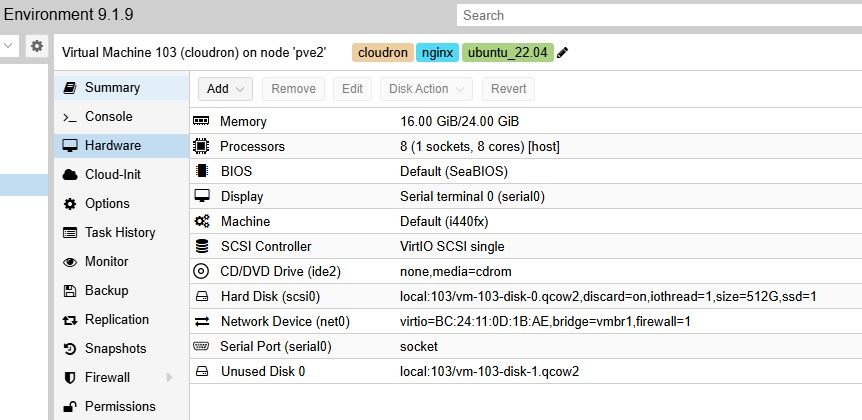
I run Cloudron on a dedicated VM, not as an LXC. It has been running flawlessly for about six months, with regular updates as and when they come out (to both Cloudron and PVE). The upgrade to 9.1.7 and today's PVE kernel update reboot are the only times this issue has occurred.
-
Also:
[FAIL] Could not load dashboard domain.
Hairpin NAT is not working. Please check if your router supports ithttps://docs.cloudron.io/installation/home-server#nat-loopback
Also:
[FAIL] Could not load dashboard domain.
Hairpin NAT is not working. Please check if your router supports ithttps://docs.cloudron.io/installation/home-server#nat-loopback
My PVE physical host is in a datacenter and all access to the apps are either public or private over VPN from my home site. I use split DNS where it matters which is preferable to NAT reflection in my use cases.
Cheers
Leigh
-
Hello @leighmhart
At this point your Cloudron system has become a black box, and we can not analyse this issue from just forum posts.
Since you have run some nft commands, please ensure that the servicenftables.serviceis not enabled or running.systemctl disable --now nftables.serviceiptablesandnftablescan be run together, but we do not support this at all and it will cause issues if not done properly.Reboot your system after that. This should ensure that the Cloudron default for iptables is restored.
If the issue persists, please report back here. -
Hello @leighmhart
At this point your Cloudron system has become a black box, and we can not analyse this issue from just forum posts.
Since you have run some nft commands, please ensure that the servicenftables.serviceis not enabled or running.systemctl disable --now nftables.serviceiptablesandnftablescan be run together, but we do not support this at all and it will cause issues if not done properly.Reboot your system after that. This should ensure that the Cloudron default for iptables is restored.
If the issue persists, please report back here.Hello @leighmhart
At this point your Cloudron system has become a black box, and we can not analyse this issue from just forum posts.
Since you have run some nft commands, please ensure that the servicenftables.serviceis not enabled or running.systemctl disable --now nftables.serviceiptablesandnftablescan be run together, but we do not support this at all and it will cause issues if not done properly.Reboot your system after that. This should ensure that the Cloudron default for iptables is restored.
If the issue persists, please report back here.Hi @james,
root@cloudron:~# systemctl status nftables.service
○ nftables.service - nftables
     Loaded: loaded (/lib/systemd/system/nftables.service; disabled; vendor pre>
     Active: inactive (dead)
       Docs: man:nft(8)
             http://wiki.nftables.org
I did not enable nftables, I just used those commands to resolve the issue with the tables - the system is currently in a broken state if you are able to take a look.
appreciate your continued support!
Regards
Leigh
-
@leighmhart can you write to me on support@cloudron.io ? We can take a look
-
I have been debugging this set up on support . The issue is that 172.18.x.x for some reason does not work on that VM. The minimal repo is (I cleared all containers, cleared docker and just the below):
docker network create --subnet=172.18.0.0/16 cloudron
docker run -d --name c1 --network cloudron alpine sleep 1d
docker run -d --name c2 --network cloudron alpine sleep 1d
docker exec c1 sh -c "apk add --no-cache iputils >/dev/null && ping -4 -c 3 c2"
The above does not work. Changing network to anything other than 172.18, say 172.19 works. I suspect somehow host rules and/or host network is interfering with the docker network. I am not sure how this is possible, but it does interfere

-
Alright, found the issue! This magical command helped me debug the complete firewall rules:
{ echo '=== iptables-save ==='; iptables-save; \
  echo '=== ip6tables-save ==='; ip6tables-save; \
  echo '=== nft ruleset ==='; nft list ruleset; \
  echo '=== ip route ==='; ip route; \
  echo '=== ip -6 route ==='; ip -6 route; \
  echo '=== ip a ==='; ip -br addr; \
  echo '=== bridges ==='; bridge link; } > /tmp/netdump.txt
What I found is that it had PREROUTING rules pointing to a stale bridge. The issue was that a package called
netfilter-persistentwas enabled on the server.netfilter-persistentwill dump the current iptable rules at /etc/ipta/bles/* and restore it on reboot. Cloudron recreates thecloudrondocker network during some updates like 9.1.7. When the network got re-created, it got a new bridge network id. However, the old iptable rules were referencing the previously dead bridge id and when restoring corrupting iptables. The solution was simply to purgenetfilter-persistentpackage. -
J joseph has marked this topic as solved on
-
@joseph thank you so much! What a wild ride this was - I found the smoking gun by checking package manager logs:
On 2026-03-29 21:23:20 I installed prometheus-node-exporter to ship metrics to my Grafana monitoring stack - apparently the workflow also installed iptables-persistent which installed netfilter-persistent as a dependency. why, I don't know - but lesson learned.



Hello! It looks like you're interested in this conversation, but you don't have an account yet.
Getting fed up of having to scroll through the same posts each visit? When you register for an account, you'll always come back to exactly where you were before, and choose to be notified of new replies (either via email, or push notification). You'll also be able to save bookmarks and upvote posts to show your appreciation to other community members.
With your input, this post could be even better 💗
Register Login