
.well-known/openid-configuration returns a white page
-
Hi, I'm a new user of Cloudron. I managed to setup my cloudron behind a cloudflare tunnel.
This his how:- if using subdomain like cloudron.example.com you need to have Cloudflare Advanced Certificates. free accouts have certificates that cover *.example.com ony
- let's say I want to configure it-tools.cloudron.example.com
- remove A record generated by cloudron
- Create a new public hostname in your tunnel configuration with this mapping:
it-tools.cloudron.example.com => https://localhost + No TLS Verify
I managed to expose 2 apps like this. I can login with my.cloudron.example.com
Next step is to use Cloudron built-in OIDC. Unfortunalty when I visit .well-known/openid-configuration I get a white page with no errorsMy access logs from cloudron looks like this:
127.0.0.1 - - [10/Apr/2024:06:16:04 +0000] "GET /.well-known/openid-configuration HTTP/1.1" 200 0 "-" "Mozilla/5.0 (Macintosh; Intel Mac OS X 10_15_7) AppleWebKit/537.36 (KHTML, like Gecko) Chrome/123.0.0.0 Safari/537.36"
127.0.0.1 - - [10/Apr/2024:06:16:05 +0000] "GET /favicon.ico HTTP/1.1" 302 138 "https://my.cloudron.example.com/.well-known/openid-configuration" "Mozilla/5.0 (Macintosh; Intel Mac OS X 10_15_7) AppleWebKit/537.36 (KHTML, like Gecko) Chrome/123.0.0.0 Safari/537.36"
127.0.0.1 - - [10/Apr/2024:06:16:05 +0000] "GET / HTTP/1.1" 200 13777 "https://my.cloudron.example.com/.well-known/openid-configuration" "Mozilla/5.0 (Macintosh; Intel Mac OS X 10_15_7) AppleWebKit/537.36 (KHTML, like Gecko) Chrome/123.0.0.0 Safari/537.36"
This is the timeline from Insomnia:
* Preparing request to https://my.cloudron.example.com/.well-known/openid-configuration
* Current time is 2024-04-10T06:18:47.508Z
* Enable automatic URL encoding
* Using default HTTP version
* Enable SSL validation
* Enable cookie sending with jar of 2 cookies
* Found bundle for host my.cloudron.example.com: 0x110035e9640 [can multiplex]
* Re-using existing connection! (#1) with host my.cloudron.example.com
* Connected to my.cloudron.example.com (2606:4700:20::681a:2ad) port 443 (#1)
* Using Stream ID: 3 (easy handle 0x110009b7600)
* TLSv1.2 (OUT), TLS header, Supplemental data (23):

> GET /.well-known/openid-configuration HTTP/2
> Host: my.cloudron.oniverse.io
> user-agent: insomnia/8.6.0
> accept: */*

* TLSv1.2 (IN), TLS header, Supplemental data (23):

< HTTP/2 200
< date: Wed, 10 Apr 2024 06:18:47 GMT
< content-type: undefined
< content-length: 0
< content-security-policy: default-src 'none'; frame-src 'self' cloudron.io *.cloudron.io; connect-src wss: https: 'self' *.cloudron.io; script-src https: 'self' 'unsafe-inline' 'unsafe-eval'; img-src * data:; style-src https: 'unsafe-inline'; object-src 'none'; font-src https: 'self'; frame-ancestors 'none'; base-uri 'none'; form-action 'self';
< referrer-policy: same-origin
< strict-transport-security: max-age=63072000
< x-content-type-options: nosniff
< x-download-options: noopen
< x-permitted-cross-domain-policies: none
< x-powered-by: Express
< x-xss-protection: 1; mode=block
< cf-cache-status: DYNAMIC
< report-to: {"endpoints":[{"url":"https:\/\/a.nel.cloudflare.com\/report\/v4?s=VOAN6vltVfLXyisO8ZCm5FwmkmkJClBH6t1TGsDBGSidA%2Fs4Kiiq43nALP2OOproyD62u5tX9caOoE%2BDKAgspdseByXkWb8zuppE1RGZGcmj2S199Rv2aPVxvhj8qU4iMzLlXHnaOuw4HesbHXQK0RA1zges"}],"group":"cf-nel","max_age":604800}
< nel: {"success_fraction":0,"report_to":"cf-nel","max_age":604800}
< server: cloudflare
< cf-ray: 87209f1eda862161-CDG
< alt-svc: h3=":443"; ma=86400
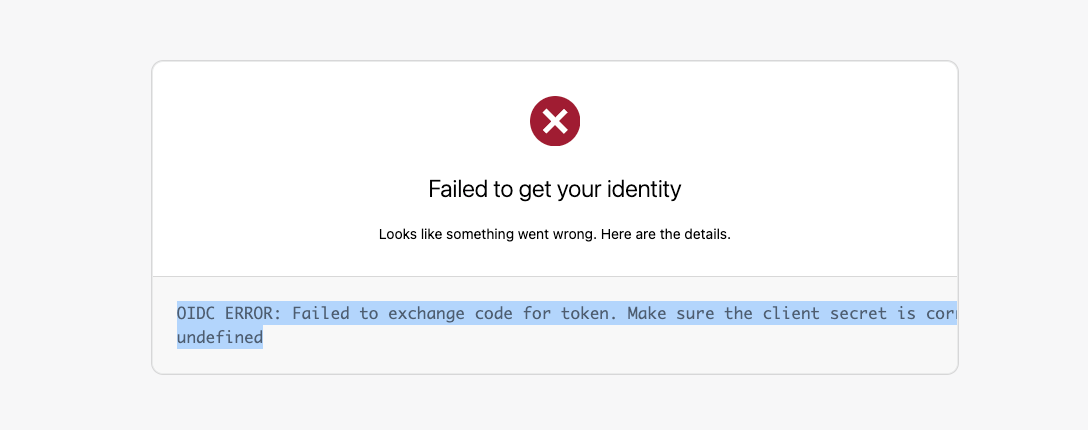
I tried to set the OIDC in Cloudflare Access but I get this page when I try it:
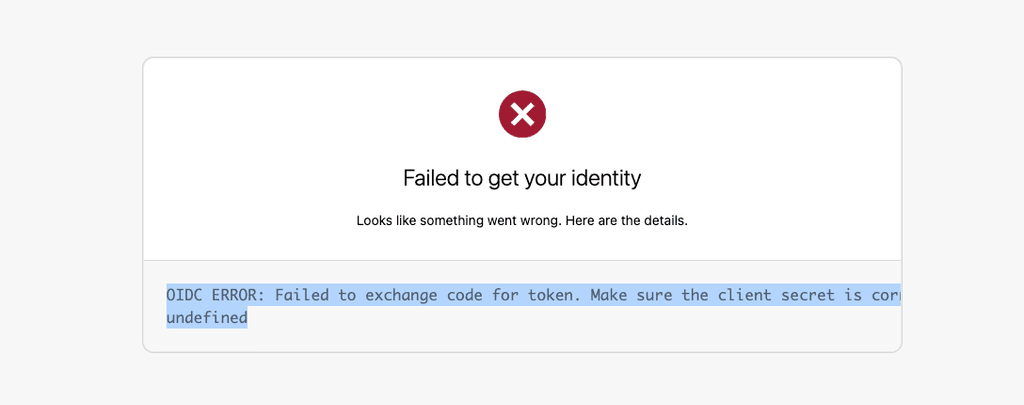
I'm pretty sure of my client credentials are correct, I only have one.
The access logs:
127.0.0.1 - - [10/Apr/2024:06:22:28 +0000] "GET /api/v1/notifications?page=1&per_page=20 HTTP/1.1" 304 0 "https://my.cloudron.example.com/" "Mozilla/5.0 (Macintosh; Intel Mac OS X 10_15_7) AppleWebKit/537.36 (KHTML, like Gecko) Chrome/123.0.0.0 Safari/537.36"
127.0.0.1 - - [10/Apr/2024:06:22:48 +0000] "GET /openid/auth?client_id=cid-fb36343b92c1bd5c9098893116845eb9&domain=cid-fb36343b92c1bd5c9098893116845eb9&redirect_uri=https%3A%2F%2Fexample.cloudflareaccess.com%2Fcdn-cgi%2Faccess%2Fcallback&response_type=code&state=ea1d75aeff7af5413b92df9f70d2c94c6c4bc887ee88324e4b1292d130ffb036.JTdCJTIyaWF0JTIyJTNBMTcxMjczMDE2OSUyQyUyMmF1dGhEb21haW4lMjIlM0ElMjJuZXdwYXJhZGlnbXN0dWRpby5jbG91ZGZsYXJlYWNjZXNzLmNvbSUyMiUyQyUyMmhvc3RuYW1lJTIyJTNBJTIybmV3cGFyYWRpZ21zdHVkaW8uY2xvdWRmbGFyZWFjY2Vzcy5jb20lMjIlMkMlMjJyZWRpcmVjdFVSTCUyMiUzQSUyMiUyRiUyMiUyQyUyMmF1ZCUyMiUzQSUyMiUyMiUyQyUyMmlkcElkJTIyJTNBJTIyYmJlOTJlYmMtNzJmMC00NWUzLWFjMTUtNzcxMzk5Y2E4Nzg2JTIyJTJDJTIyaXNFbnRTZXR1cCUyMiUzQWZhbHNlJTJDJTIyaXNJRFBUZXN0JTIyJTNBdHJ1ZSUyQyUyMmlzU2FtZVNpdGVOb25lQ29tcGF0aWJsZSUyMiUzQXRydWUlMkMlMjJub25jZSUyMiUzQSUyMm41dWs4dklxa05CZnBIMlA1JTIyJTdE&scope=openid+email+profile HTTP/1.1" 303 113 "-" "Mozilla/5.0 (Macintosh; Intel Mac OS X 10_15_7) AppleWebKit/537.36 (KHTML, like Gecko) Chrome/123.0.0.0 Safari/537.36"
127.0.0.1 - - [10/Apr/2024:06:22:48 +0000] "GET /openid/interaction/4APmG06oy-tbtBhV9J4y5 HTTP/1.1" 200 1202 "-" "Mozilla/5.0 (Macintosh; Intel Mac OS X 10_15_7) AppleWebKit/537.36 (KHTML, like Gecko) Chrome/123.0.0.0 Safari/537.36"
127.0.0.1 - - [10/Apr/2024:06:22:48 +0000] "POST /openid/interaction/4APmG06oy-tbtBhV9J4y5/confirm HTTP/1.1" 303 0 "https://my.cloudron.example.com/openid/interaction/4APmG06oy-tbtBhV9J4y5" "Mozilla/5.0 (Macintosh; Intel Mac OS X 10_15_7) AppleWebKit/537.36 (KHTML, like Gecko) Chrome/123.0.0.0 Safari/537.36"
127.0.0.1 - - [10/Apr/2024:06:22:49 +0000] "GET /openid/auth/4APmG06oy-tbtBhV9J4y5 HTTP/1.1" 303 1603 "https://my.cloudron.example.com/openid/interaction/4APmG06oy-tbtBhV9J4y5" "Mozilla/5.0 (Macintosh; Intel Mac OS X 10_15_7) AppleWebKit/537.36 (KHTML, like Gecko) Chrome/123.0.0.0 Safari/537.36"
If anyone could help me with this, I will be grateful.
-
 G girish marked this topic as a question on
-
Hi, I'm a new user of Cloudron. I managed to setup my cloudron behind a cloudflare tunnel.
This his how:- if using subdomain like cloudron.example.com you need to have Cloudflare Advanced Certificates. free accouts have certificates that cover *.example.com ony
- let's say I want to configure it-tools.cloudron.example.com
- remove A record generated by cloudron
- Create a new public hostname in your tunnel configuration with this mapping:
it-tools.cloudron.example.com => https://localhost + No TLS Verify
I managed to expose 2 apps like this. I can login with my.cloudron.example.com
Next step is to use Cloudron built-in OIDC. Unfortunalty when I visit .well-known/openid-configuration I get a white page with no errorsMy access logs from cloudron looks like this:
127.0.0.1 - - [10/Apr/2024:06:16:04 +0000] "GET /.well-known/openid-configuration HTTP/1.1" 200 0 "-" "Mozilla/5.0 (Macintosh; Intel Mac OS X 10_15_7) AppleWebKit/537.36 (KHTML, like Gecko) Chrome/123.0.0.0 Safari/537.36"
127.0.0.1 - - [10/Apr/2024:06:16:05 +0000] "GET /favicon.ico HTTP/1.1" 302 138 "https://my.cloudron.example.com/.well-known/openid-configuration" "Mozilla/5.0 (Macintosh; Intel Mac OS X 10_15_7) AppleWebKit/537.36 (KHTML, like Gecko) Chrome/123.0.0.0 Safari/537.36"
127.0.0.1 - - [10/Apr/2024:06:16:05 +0000] "GET / HTTP/1.1" 200 13777 "https://my.cloudron.example.com/.well-known/openid-configuration" "Mozilla/5.0 (Macintosh; Intel Mac OS X 10_15_7) AppleWebKit/537.36 (KHTML, like Gecko) Chrome/123.0.0.0 Safari/537.36"
This is the timeline from Insomnia:
* Preparing request to https://my.cloudron.example.com/.well-known/openid-configuration
* Current time is 2024-04-10T06:18:47.508Z
* Enable automatic URL encoding
* Using default HTTP version
* Enable SSL validation
* Enable cookie sending with jar of 2 cookies
* Found bundle for host my.cloudron.example.com: 0x110035e9640 [can multiplex]
* Re-using existing connection! (#1) with host my.cloudron.example.com
* Connected to my.cloudron.example.com (2606:4700:20::681a:2ad) port 443 (#1)
* Using Stream ID: 3 (easy handle 0x110009b7600)
* TLSv1.2 (OUT), TLS header, Supplemental data (23):

> GET /.well-known/openid-configuration HTTP/2
> Host: my.cloudron.oniverse.io
> user-agent: insomnia/8.6.0
> accept: */*

* TLSv1.2 (IN), TLS header, Supplemental data (23):

< HTTP/2 200
< date: Wed, 10 Apr 2024 06:18:47 GMT
< content-type: undefined
< content-length: 0
< content-security-policy: default-src 'none'; frame-src 'self' cloudron.io *.cloudron.io; connect-src wss: https: 'self' *.cloudron.io; script-src https: 'self' 'unsafe-inline' 'unsafe-eval'; img-src * data:; style-src https: 'unsafe-inline'; object-src 'none'; font-src https: 'self'; frame-ancestors 'none'; base-uri 'none'; form-action 'self';
< referrer-policy: same-origin
< strict-transport-security: max-age=63072000
< x-content-type-options: nosniff
< x-download-options: noopen
< x-permitted-cross-domain-policies: none
< x-powered-by: Express
< x-xss-protection: 1; mode=block
< cf-cache-status: DYNAMIC
< report-to: {"endpoints":[{"url":"https:\/\/a.nel.cloudflare.com\/report\/v4?s=VOAN6vltVfLXyisO8ZCm5FwmkmkJClBH6t1TGsDBGSidA%2Fs4Kiiq43nALP2OOproyD62u5tX9caOoE%2BDKAgspdseByXkWb8zuppE1RGZGcmj2S199Rv2aPVxvhj8qU4iMzLlXHnaOuw4HesbHXQK0RA1zges"}],"group":"cf-nel","max_age":604800}
< nel: {"success_fraction":0,"report_to":"cf-nel","max_age":604800}
< server: cloudflare
< cf-ray: 87209f1eda862161-CDG
< alt-svc: h3=":443"; ma=86400
I tried to set the OIDC in Cloudflare Access but I get this page when I try it:
I'm pretty sure of my client credentials are correct, I only have one.
The access logs:
127.0.0.1 - - [10/Apr/2024:06:22:28 +0000] "GET /api/v1/notifications?page=1&per_page=20 HTTP/1.1" 304 0 "https://my.cloudron.example.com/" "Mozilla/5.0 (Macintosh; Intel Mac OS X 10_15_7) AppleWebKit/537.36 (KHTML, like Gecko) Chrome/123.0.0.0 Safari/537.36"
127.0.0.1 - - [10/Apr/2024:06:22:48 +0000] "GET /openid/auth?client_id=cid-fb36343b92c1bd5c9098893116845eb9&domain=cid-fb36343b92c1bd5c9098893116845eb9&redirect_uri=https%3A%2F%2Fexample.cloudflareaccess.com%2Fcdn-cgi%2Faccess%2Fcallback&response_type=code&state=ea1d75aeff7af5413b92df9f70d2c94c6c4bc887ee88324e4b1292d130ffb036.JTdCJTIyaWF0JTIyJTNBMTcxMjczMDE2OSUyQyUyMmF1dGhEb21haW4lMjIlM0ElMjJuZXdwYXJhZGlnbXN0dWRpby5jbG91ZGZsYXJlYWNjZXNzLmNvbSUyMiUyQyUyMmhvc3RuYW1lJTIyJTNBJTIybmV3cGFyYWRpZ21zdHVkaW8uY2xvdWRmbGFyZWFjY2Vzcy5jb20lMjIlMkMlMjJyZWRpcmVjdFVSTCUyMiUzQSUyMiUyRiUyMiUyQyUyMmF1ZCUyMiUzQSUyMiUyMiUyQyUyMmlkcElkJTIyJTNBJTIyYmJlOTJlYmMtNzJmMC00NWUzLWFjMTUtNzcxMzk5Y2E4Nzg2JTIyJTJDJTIyaXNFbnRTZXR1cCUyMiUzQWZhbHNlJTJDJTIyaXNJRFBUZXN0JTIyJTNBdHJ1ZSUyQyUyMmlzU2FtZVNpdGVOb25lQ29tcGF0aWJsZSUyMiUzQXRydWUlMkMlMjJub25jZSUyMiUzQSUyMm41dWs4dklxa05CZnBIMlA1JTIyJTdE&scope=openid+email+profile HTTP/1.1" 303 113 "-" "Mozilla/5.0 (Macintosh; Intel Mac OS X 10_15_7) AppleWebKit/537.36 (KHTML, like Gecko) Chrome/123.0.0.0 Safari/537.36"
127.0.0.1 - - [10/Apr/2024:06:22:48 +0000] "GET /openid/interaction/4APmG06oy-tbtBhV9J4y5 HTTP/1.1" 200 1202 "-" "Mozilla/5.0 (Macintosh; Intel Mac OS X 10_15_7) AppleWebKit/537.36 (KHTML, like Gecko) Chrome/123.0.0.0 Safari/537.36"
127.0.0.1 - - [10/Apr/2024:06:22:48 +0000] "POST /openid/interaction/4APmG06oy-tbtBhV9J4y5/confirm HTTP/1.1" 303 0 "https://my.cloudron.example.com/openid/interaction/4APmG06oy-tbtBhV9J4y5" "Mozilla/5.0 (Macintosh; Intel Mac OS X 10_15_7) AppleWebKit/537.36 (KHTML, like Gecko) Chrome/123.0.0.0 Safari/537.36"
127.0.0.1 - - [10/Apr/2024:06:22:49 +0000] "GET /openid/auth/4APmG06oy-tbtBhV9J4y5 HTTP/1.1" 303 1603 "https://my.cloudron.example.com/openid/interaction/4APmG06oy-tbtBhV9J4y5" "Mozilla/5.0 (Macintosh; Intel Mac OS X 10_15_7) AppleWebKit/537.36 (KHTML, like Gecko) Chrome/123.0.0.0 Safari/537.36"
If anyone could help me with this, I will be grateful.
@mrhyk93 said in .well-known/openid-configuration returns a white page:
Next step is to use Cloudron built-in OIDC. Unfortunalty when I visit .well-known/openid-configuration I get a white page with no errors
Does Cloudflare Tunnel also imply Cloudflare proxying? In the past, we have seen such errors when Cloudflare proxying had a bunch of WAF rules. I ask because I see
server: cloudflarein the response.If you can access the dashboard via my.cloudron.example.com but just not the .well-known, it's probably some configuration rule in Cloudflare .
-
Spot on, I created a rule in the WAF to skip the Bot Fight Modeand it worked. Thank you
One last question about the OIDC claims. is the groups included in the id_token ? how can I get them
This is the identity that i get after the OIDC is cloudflare:{
"id": "xxxx",
"email": "xxxxxx@gmail.com",
"idp": {
"id": "bbe92ebc-72f0-45e3-ac15-771399ca8786",
"type": "oidc"
},
"geo": {
"country": "FR"
},
"user_uuid": "4db3b70b-f584-571b-897f-010260e1f503",
"account_id": "9da5e5bad83b88e157b01c4d46791218",
"iat": 1712785677,
"ip": "2a01:e0a:b54:96e0:3c85:d64a:8254:da8c",
"auth_status": "NONE",
"common_name": "",
"is_warp": false,
"is_gateway": false,
"version": 0,
"device_sessions": {},
"custom": {}
}This is the config I'm using:
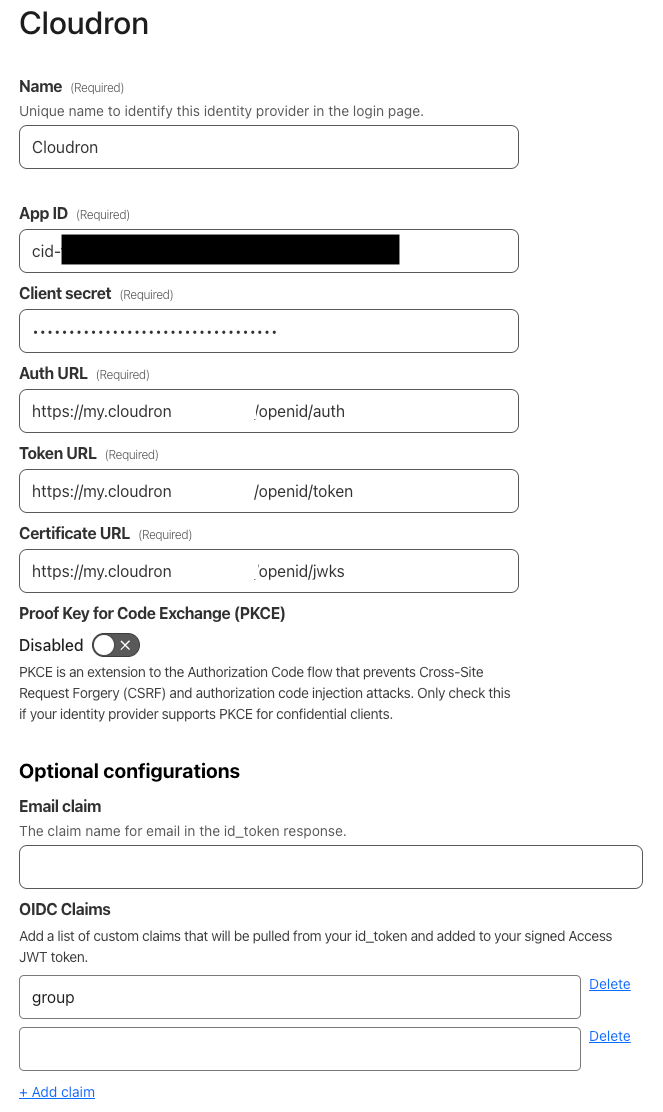
is there some special claims that I need to incluse in otder to get the groups ?
-
G girish marked this topic as a regular topic on
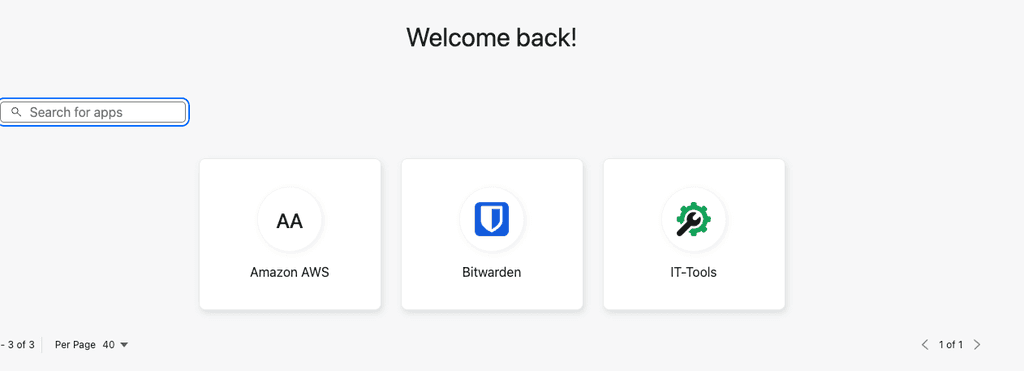 Cloudron => Cloudflare Launcher => AWS
Hello! It looks like you're interested in this conversation, but you don't have an account yet.
Getting fed up of having to scroll through the same posts each visit? When you register for an account, you'll always come back to exactly where you were before, and choose to be notified of new replies (either via email, or push notification). You'll also be able to save bookmarks and upvote posts to show your appreciation to other community members.
With your input, this post could be even better 💗
Register Login