
Cloudron documentation outdated? Bitwarden now supports SSO
-
Hello @inibudi
Currently, the Cloudron @vaultwarden app does not yet support OIDC/SSO.As stated above:
@girish said in Cloudron documentation outdated? Bitwarden now supports SSO:
thanks, I have created a task internally for @vladimir.d .
-
Hello @inibudi
Currently, the Cloudron @vaultwarden app does not yet support OIDC/SSO.As stated above:
@girish said in Cloudron documentation outdated? Bitwarden now supports SSO:
thanks, I have created a task internally for @vladimir.d .
-
I am attempting to get a brand new installation of VaultWarden working with Cloudron OIDC SSO.
I have already very carefully read over:
https://docs.cloudron.io/user-directory/#openid-connect
https://github.com/dani-garcia/vaultwarden/wiki/Enabling-SSO-support-using-OpenId-Connectto produce the below (redacted) config.json..
https://my.knownelement.com/openid/.well-known/openid-configuration/


https://my.cloudron.example/.well-known/openid-configuration
https://my.cloudron.example/openid/.well-known/openid-configuration


 SSO_AUTHORITY : the OpenID Connect Discovery endpoint of your SSO

    Should not include the /.well-known/openid-configuration part and no trailing /
    $SSO_AUTHORITY/.well-known/openid-configuration should return the a json document: https://openid.net/specs/openid-connect-discovery-1_0.html#ProviderConfigurationResponse


{
  "domain": "https://passwords.knownelement.com",
  "sends_allowed": true,
  "incomplete_2fa_time_limit": 3,
  "disable_icon_download": false,
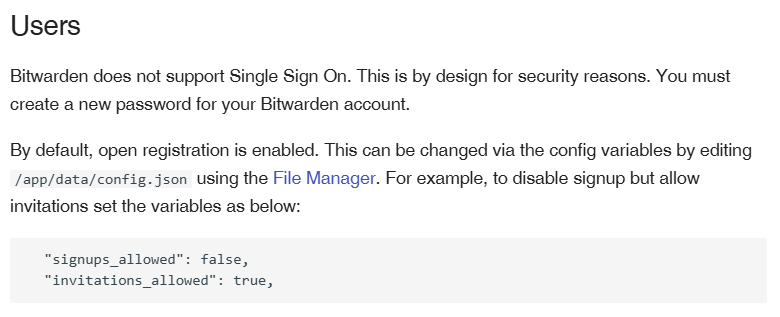
  "signups_allowed": false,
  "signups_verify": false,
  "signups_verify_resend_time": 3600,
  "signups_verify_resend_limit": 6,
  "invitations_allowed": false,
  "emergency_access_allowed": true,
  "email_change_allowed": false,
  "password_iterations": 600000,
  "password_hints_allowed": false,
  "show_password_hint": false,
  "admin_token": "heavily-redacted :) ",
  "invitation_org_name": "KNEL Password Vault",
  "ip_header": "X-Forwarded-For",
  "icon_redirect_code": 302,
  "icon_cache_ttl": 2592000,
  "icon_cache_negttl": 259200,
  "icon_download_timeout": 10,
  "http_request_block_non_global_ips": true,
  "disable_2fa_remember": false,
  "authenticator_disable_time_drift": false,
  "require_device_email": false,
  "reload_templates": false,
  "log_timestamp_format": "%Y-%m-%d %H:%M:%S.%3f",
  "admin_session_lifetime": 20,
  "increase_note_size_limit": false,
  "dns_prefer_ipv6": false,
  "sso_enabled": true,
  "sso_only": true,
  "sso_signups_match_email": true,
  "sso_allow_unknown_email_verification": false,
  "sso_client_id": "redacted",
  "sso_client_secret": "redacted",
  "sso_authority": "https://my.knownelement.com",
  "sso_scopes": "openid email profile",
  "sso_pkce": true,
  "sso_callback_path": "https://passwords.knownelement.com/identity/connect/oidc-signin",
  "sso_auth_only_not_session": true,
  "sso_client_cache_expiration": 0,
  "sso_debug_tokens": false,
  "_enable_yubico": true,
  "_enable_duo": true,
  "_enable_smtp": true,
  "use_sendmail": false,
  "smtp_host": "mail",
  "smtp_security": "off",
  "smtp_port": 2525,
  "smtp_from": "passwords.app@knownelement.com",
  "smtp_from_name": "Vaultwarden",
  "smtp_username": "passwords.app@knownelement.com",
  "smtp_password": "redacted",
  "smtp_auth_mechanism": "Plain",
  "smtp_timeout": 15,
  "smtp_embed_images": true,
  "smtp_accept_invalid_certs": true,
  "smtp_accept_invalid_hostnames": true,
  "_enable_email_2fa": false,
  "email_token_size": 6,
  "email_expiration_time": 600,
  "email_attempts_limit": 3,
  "email_2fa_enforce_on_verified_invite": false,
  "email_2fa_auto_fallback": false
}
I suppose I can increase logging to see if that helps.
Vaultwarden keeps asking for a master password, even though I've disabled that and set sso only.
-
Hello @inibudi
Currently, the Cloudron @vaultwarden app does not yet support OIDC/SSO.As stated above:
@girish said in Cloudron documentation outdated? Bitwarden now supports SSO:
thanks, I have created a task internally for @vladimir.d .
-
@james Oh is this something that actually needs to be changed in the app json to make OIDC integration work at all?
-
@charlesnw there is a task for @vladimir.d to fix the package itself to support SSO. He is still on vacation and should add this when he is back .
-
@charlesnw there is a task for @vladimir.d to fix the package itself to support SSO. He is still on vacation and should add this when he is back .
@joseph I just tested, and now I can use the SSO login. Thank you @james and @vladimir.d
-
@joseph I just tested, and now I can use the SSO login. Thank you @james and @vladimir.d
-
Hi @joseph, I just followed the Vaultwarden instructions to set up Cloudron OIDC.
Here is the reference:
https://github.com/dani-garcia/vaultwarden/wiki/Enabling-SSO-support-using-OpenId-Connect-
Set up SSO on Vaultwarden Admin Dashboard
-
Create OpenID Clients
Add your login callback URL
https://vaultwarden.example.tld/identity/connect/oidc-signin- Make sure your email is the same as your user email on Cloudron.
Login you can log in using SSO.
-
-

Hello! It looks like you're interested in this conversation, but you don't have an account yet.
Getting fed up of having to scroll through the same posts each visit? When you register for an account, you'll always come back to exactly where you were before, and choose to be notified of new replies (either via email, or push notification). You'll also be able to save bookmarks and upvote posts to show your appreciation to other community members.
With your input, this post could be even better 💗
Register Login