
First two quick questions
-
This should work for the start.sh:
#!/bin/bash set -euo pipefail echo "==> Creating directories" mkdir -p /app/data/uploads chown -R cloudron:cloudron /app/data # Generate secret key on first run if [ ! -f /app/data/secret_key.txt ]; then echo "==> Generating new secret key" head -c 48 /dev/urandom | base64 > /app/data/secret_key.txt fi # Create .env file on first run with user-configurable options if [ ! -f /app/data/.env ]; then echo "==> Creating .env file with default configuration" cat > /app/data/.env <<'EOF' # Keila Configuration # This file contains user-configurable options. System-critical settings # (database, URL, deployment) are managed by Cloudron and cannot be changed here. # Logging # Options: debug, info, warning, error LOG_LEVEL=info # User Registration # Set to true to disable new user registration DISABLE_REGISTRATION=false # Captcha Configuration (optional) # Providers: hcaptcha, friendly_captcha # CAPTCHA_PROVIDER= # CAPTCHA_SITE_KEY= # CAPTCHA_SECRET_KEY= # System Mailer Configuration (optional - uses Cloudron defaults) # Only uncomment if you need to override Cloudron's email settings # MAILER_TYPE=smtp # MAILER_SMTP_FROM_EMAIL= # MAILER_SMTP_HOST= # MAILER_SMTP_PORT=587 # MAILER_SMTP_USER= # MAILER_SMTP_PASSWORD= # MAILER_ENABLE_STARTTLS=true # Additional Options # See https://www.keila.io/docs/configuration for more options EOF chown cloudron:cloudron /app/data/.env fi # Load user-configurable environment from .env file if [ -f /app/data/.env ]; then set -a source /app/data/.env set +a fi # Export environment variables for Keila # Note: System-critical variables below override any values from .env export PORT=4000 export DB_URL=${CLOUDRON_POSTGRESQL_URL} export SECRET_KEY_BASE=$(cat /app/data/secret_key.txt) # Configure URLs from Cloudron environment variables export URL_HOST=${CLOUDRON_APP_DOMAIN} export URL_PATH="/" export URL_SCHEMA="https" export URL_PORT="443" # Configure email settings export MAILER_TYPE=smtp export MAILER_SMTP_FROM_EMAIL=${CLOUDRON_MAIL_FROM} export MAILER_SMTP_HOST=${CLOUDRON_MAIL_SMTP_SERVER} export MAILER_SMTP_PORT=${CLOUDRON_MAIL_SMTP_PORT} export MAILER_SMTP_USER=${CLOUDRON_MAIL_SMTP_USERNAME} export MAILER_SMTP_PASSWORD=${CLOUDRON_MAIL_SMTP_PASSWORD} export MAILER_ENABLE_STARTTLS=false # Configure user content directory export USER_CONTENT_DIR=/app/data/uploads export PGPASSWORD=${CLOUDRON_POSTGRESQL_PASSWORD} USER_TABLE_EXISTS=$(psql ${CLOUDRON_POSTGRESQL_URL} -XAwt -c "SELECT EXISTS ( SELECT FROM pg_tables WHERE schemaname = 'public' AND tablename = 'users')") if [[ $USER_TABLE_EXISTS == "t" ]]; then ADMIN_EXISTS=$(PGPASSWORD=${CLOUDRON_POSTGRESQL_PASSWORD} psql -h ${CLOUDRON_POSTGRESQL_HOST} -p ${CLOUDRON_POSTGRESQL_PORT} -U ${CLOUDRON_POSTGRESQL_USERNAME} -d ${CLOUDRON_POSTGRESQL_DATABASE} -AXqtc "SELECT count(*) FROM users u JOIN user_groups ug ON ug.user_id=u.id JOIN groups g ON ug.group_id=g.id WHERE g.name='root'") fi if [[ ${USER_TABLE_EXISTS:-} == "f" || ${ADMIN_EXISTS:-} -eq 0 ]]; then echo "==> Exporting default admin credentials on first run" export KEILA_USER="admin@cloudron.local" export KEILA_PASSWORD="changeme123" fi echo "==> Starting Keila" exec gosu cloudron:cloudron /app/code/bin/keila start -
This should work for the start.sh:
#!/bin/bash set -euo pipefail echo "==> Creating directories" mkdir -p /app/data/uploads chown -R cloudron:cloudron /app/data # Generate secret key on first run if [ ! -f /app/data/secret_key.txt ]; then echo "==> Generating new secret key" head -c 48 /dev/urandom | base64 > /app/data/secret_key.txt fi # Create .env file on first run with user-configurable options if [ ! -f /app/data/.env ]; then echo "==> Creating .env file with default configuration" cat > /app/data/.env <<'EOF' # Keila Configuration # This file contains user-configurable options. System-critical settings # (database, URL, deployment) are managed by Cloudron and cannot be changed here. # Logging # Options: debug, info, warning, error LOG_LEVEL=info # User Registration # Set to true to disable new user registration DISABLE_REGISTRATION=false # Captcha Configuration (optional) # Providers: hcaptcha, friendly_captcha # CAPTCHA_PROVIDER= # CAPTCHA_SITE_KEY= # CAPTCHA_SECRET_KEY= # System Mailer Configuration (optional - uses Cloudron defaults) # Only uncomment if you need to override Cloudron's email settings # MAILER_TYPE=smtp # MAILER_SMTP_FROM_EMAIL= # MAILER_SMTP_HOST= # MAILER_SMTP_PORT=587 # MAILER_SMTP_USER= # MAILER_SMTP_PASSWORD= # MAILER_ENABLE_STARTTLS=true # Additional Options # See https://www.keila.io/docs/configuration for more options EOF chown cloudron:cloudron /app/data/.env fi # Load user-configurable environment from .env file if [ -f /app/data/.env ]; then set -a source /app/data/.env set +a fi # Export environment variables for Keila # Note: System-critical variables below override any values from .env export PORT=4000 export DB_URL=${CLOUDRON_POSTGRESQL_URL} export SECRET_KEY_BASE=$(cat /app/data/secret_key.txt) # Configure URLs from Cloudron environment variables export URL_HOST=${CLOUDRON_APP_DOMAIN} export URL_PATH="/" export URL_SCHEMA="https" export URL_PORT="443" # Configure email settings export MAILER_TYPE=smtp export MAILER_SMTP_FROM_EMAIL=${CLOUDRON_MAIL_FROM} export MAILER_SMTP_HOST=${CLOUDRON_MAIL_SMTP_SERVER} export MAILER_SMTP_PORT=${CLOUDRON_MAIL_SMTP_PORT} export MAILER_SMTP_USER=${CLOUDRON_MAIL_SMTP_USERNAME} export MAILER_SMTP_PASSWORD=${CLOUDRON_MAIL_SMTP_PASSWORD} export MAILER_ENABLE_STARTTLS=false # Configure user content directory export USER_CONTENT_DIR=/app/data/uploads export PGPASSWORD=${CLOUDRON_POSTGRESQL_PASSWORD} USER_TABLE_EXISTS=$(psql ${CLOUDRON_POSTGRESQL_URL} -XAwt -c "SELECT EXISTS ( SELECT FROM pg_tables WHERE schemaname = 'public' AND tablename = 'users')") if [[ $USER_TABLE_EXISTS == "t" ]]; then ADMIN_EXISTS=$(PGPASSWORD=${CLOUDRON_POSTGRESQL_PASSWORD} psql -h ${CLOUDRON_POSTGRESQL_HOST} -p ${CLOUDRON_POSTGRESQL_PORT} -U ${CLOUDRON_POSTGRESQL_USERNAME} -d ${CLOUDRON_POSTGRESQL_DATABASE} -AXqtc "SELECT count(*) FROM users u JOIN user_groups ug ON ug.user_id=u.id JOIN groups g ON ug.group_id=g.id WHERE g.name='root'") fi if [[ ${USER_TABLE_EXISTS:-} == "f" || ${ADMIN_EXISTS:-} -eq 0 ]]; then echo "==> Exporting default admin credentials on first run" export KEILA_USER="admin@cloudron.local" export KEILA_PASSWORD="changeme123" fi echo "==> Starting Keila" exec gosu cloudron:cloudron /app/code/bin/keila start -
Hello @andreasdueren
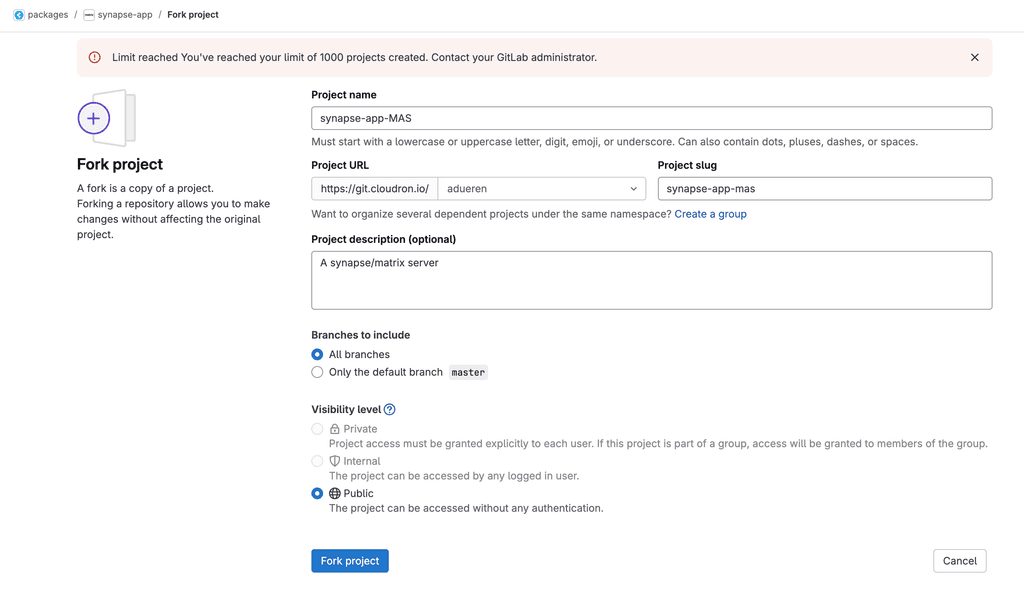
The git repo https://git.cloudron.io/packages/keila-app is publicly accessible and can be cloned publicly:git clone https://git.cloudron.io/packages/keila-appDid you mean you have no permission to fork the repository?
-
Hello @andreasdueren
The git repo https://git.cloudron.io/packages/keila-app is publicly accessible and can be cloned publicly:git clone https://git.cloudron.io/packages/keila-appDid you mean you have no permission to fork the repository?
-
-
@andreasdueren can you check again now?
-
@andreasdueren can you check again now?
-
Nope, must be a different thing blocking it then.



 checking.
Hello! It looks like you're interested in this conversation, but you don't have an account yet.
Getting fed up of having to scroll through the same posts each visit? When you register for an account, you'll always come back to exactly where you were before, and choose to be notified of new replies (either via email, or push notification). You'll also be able to save bookmarks and upvote posts to show your appreciation to other community members.
With your input, this post could be even better 💗
Register Login