
Kuma Uptime - ERROR: Database migration failed
-
That sounds familiar.
https://forum.cloudron.io/topic/14443/uptime-kuma-2.0.0-package/5?_=1761577361678
Solution was:
https://forum.cloudron.io/topic/14444/brief-note-on-backup-and-cloning-versions-prior-to-2.0If it is the root cause: try cloning from a backup that was created before the 2.x update. This may work for you.
-
Whatever this is, it happened after the recent update. When I restore to a working backup before the update, the app comes back online but my entries dont work.
-
I gave it 8GB of RAM and then updated it. At some point it forwarded the domain domain to /migrate-status and then in the log I am getting this:
Oct 28 17:53:59 2025-10-28T14:23:59Z [SERVER] ERROR: Failed to prepare your database: Aggregate table migration is already in progress
Oct 28 17:53:59 2025-10-28T14:23:59Z [SERVER] INFO: Connected to the database
Oct 28 17:53:59 2025-10-28T14:23:59Z [SERVER] INFO: Creating express and socket.io instance
Oct 28 17:53:59 2025-10-28T14:23:59Z [SERVER] INFO: Data Dir: ./data/
Oct 28 17:53:59 2025-10-28T14:23:59Z [SERVER] INFO: Server Type: HTTP
Oct 28 17:53:59 2025-10-28T14:23:59Z [DB] ERROR: Database migration failed
Oct 28 17:53:59 2025-10-28T14:23:59Z [DB] WARN: Aggregate table migration is already in progress, or it was interrupted
Oct 28 17:53:59 2025-10-28T14:23:59Z [DB] INFO: Database Type: sqlite
Oct 28 17:54:03 => Healtheck error: Error: connect EHOSTUNREACH 172.18.16.87:3001
Oct 28 17:54:13 => Healtheck error: Error: connect EHOSTUNREACH 172.18.16.87:3001
Oct 28 17:54:23 => Healtheck error: Error: connect EHOSTUNREACH 172.18.16.87:3001
Oct 28 17:54:33 => Healtheck error: Error: connect EHOSTUNREACH 172.18.16.87:3001
Oct 28 17:54:43 => Healtheck error: Error: connect EHOSTUNREACH 172.18.16.87:3001
Oct 28 17:54:53 => Healtheck error: Error: connect EHOSTUNREACH 172.18.16.87:3001
Oct 28 17:54:59 2025-10-28T14:24:59Z
Oct 28 17:54:59 2025-10-28T14:24:59Z
Oct 28 17:54:59 ==> Overriding settings
Oct 28 17:54:59 ==> Removing sqlite backup files
Oct 28 17:54:59 ==> Starting Uptime Kuma
Oct 28 17:54:59 > node server/server.js
Oct 28 17:54:59 > uptime-kuma@2.0.1 start-server
Oct 28 17:55:00 => Healtheck error: Error: connect ECONNREFUSED 172.18.16.87:3001
Oct 28 17:55:00 Welcome to Uptime Kuma
Oct 28 17:55:00 2025-10-28T14:25:00Z [SERVER] INFO: Env: production
Oct 28 17:55:00 2025-10-28T14:25:00Z [SERVER] INFO: Loading modules
Oct 28 17:55:00 2025-10-28T14:25:00Z [SERVER] INFO: Uptime Kuma Version: 2.0.1
Oct 28 17:55:00 Your Node.js version: 18.20.8
and its getting repeated. Does it mean its migrating?
-
I am sort of stuck here.
I gave it 16 GB of RAM and still at some point same scenario happened.
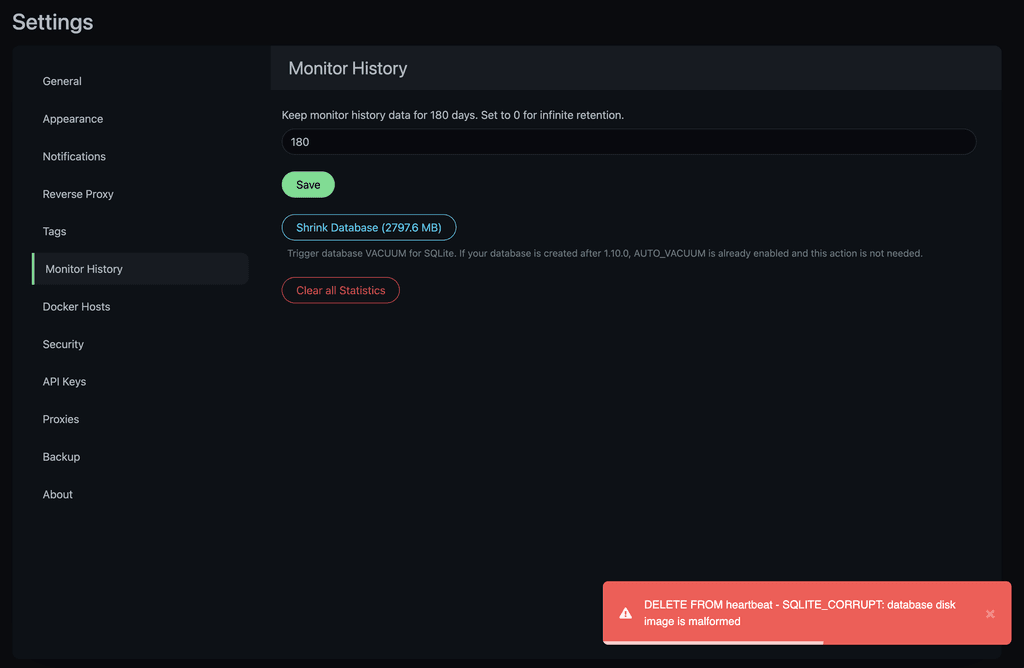
My monitor history is too large, so what I tried was to purge all data so it will be light weight for the upgrade. The history data is not important, I used the tool under setting> Monitor history> Clear StatisticsHowever I get this error:
I dont have any other older working backups.
-
You can try this: https://github.com/louislam/uptime-kuma/issues/5281#issuecomment-2452376039
That didn't work for me. -
I am sort of stuck here.
I gave it 16 GB of RAM and still at some point same scenario happened.
My monitor history is too large, so what I tried was to purge all data so it will be light weight for the upgrade. The history data is not important, I used the tool under setting> Monitor history> Clear StatisticsHowever I get this error:
I dont have any other older working backups.
@arta since the database is corrupt already in your instance, you probably first have to restore the app. Then cleart some historical data and then perform the update.
Also just to keep in mind, increasing the memory limit of an app does not mean it will get all that memory allocated, but that is only the upper limit it may use if the system even has that amount of memory available.
-
You can try this: https://github.com/louislam/uptime-kuma/issues/5281#issuecomment-2452376039
That didn't work for me.@luckow said in Kuma Uptime - ERROR: Database migration failed:
You can try this: https://github.com/louislam/uptime-kuma/issues/5281#issuecomment-2452376039
That didn't work for me.That didn't work for me either!
Funny thing is, since the monitoring data is not important, I took a backup of all my hosts, uninstalled the app, when I want to import it, the backup/restore function is completely removed from Kuma in the new version

/settings/backup does not exit in new update
-
 J james moved this topic from Support on
-
Wanted to share a working solution, lightly adapted for Cloudron from Github issue comment referenced above:
- Enter Recovery Mode
- On the app's terminal:
sqlite3 /app/code/data/kuma.db "DELETE FROM setting WHERE key = 'migrateAggregateTableState';" - Exit Recovery Mode
-
Wanted to share a working solution, lightly adapted for Cloudron from Github issue comment referenced above:
- Enter Recovery Mode
- On the app's terminal:
sqlite3 /app/code/data/kuma.db "DELETE FROM setting WHERE key = 'migrateAggregateTableState';" - Exit Recovery Mode
@sparkwise said in Kuma Uptime - ERROR: Database migration failed:
Wanted to share a working solution, lightly adapted for Cloudron from Github issue comment referenced above:
- Enter Recovery Mode
- On the app's terminal:
bash sqlite3 /app/code/data/kuma.db "DELETE FROM setting WHERE key = 'migrateAggregateTableState';" - Exit Recovery Mode
I've just tried this, without the initial
bashand it seems to have worked. And now I'm starting the major Cloudron upgrade ...
... -
J james has marked this topic as solved on





Hello! It looks like you're interested in this conversation, but you don't have an account yet.
Getting fed up of having to scroll through the same posts each visit? When you register for an account, you'll always come back to exactly where you were before, and choose to be notified of new replies (either via email, or push notification). You'll also be able to save bookmarks and upvote posts to show your appreciation to other community members.
With your input, this post could be even better 💗
Register Login