
Vaultwarden fails to start after update – DB migration error (SSO)
-
@overholt Very likely you've hit the same thing as this thread. Solution here https://forum.cloudron.io/post/117779
-
I used this issue to improve my aidevops cloudron subagent, and it managed to fix the issue on all instances. More info here for anyone interested to add this to your toolkit:
-
-
I have run the command
sed -i 's/\r$//g' /app/data/fix_db.shto fix the new line characters and then runbash /app/data/fix_db.shagain and it ran as expected. Disabled recover mode and confirmed things are back to working as expected.@ChristopherMag Thanks, this fixed my issue.
-
I have run the command
sed -i 's/\r$//g' /app/data/fix_db.shto fix the new line characters and then runbash /app/data/fix_db.shagain and it ran as expected. Disabled recover mode and confirmed things are back to working as expected.@ChristopherMag
That worked for me, Thanks. -
Hello @vaultwarden users
Since users have voiced their concerns about manually editing the database I have created a bash script that does it for you.
Please follow these steps if you have this issue:- create an app backup of your @vaultwarden Cloudron app
- put the erroring @vaultwarden app in recovery mode
- open the File Manager of your @vaultwarden app and create a
fix_db.shfile - copy and paste the following script into the just created
fix_db.shfile:#!/bin/bash echo "=> Checking if DEFAULT_CHARACTER_SET_NAME and DEFAULT_COLLATION_NAME are set to utf8mb4 and utf8mb4_unicode_ci" CURRENT_DEFAULT_CHARACTER_SET_NAME=$(mysql --silent --skip-column-names --user=${CLOUDRON_MYSQL_USERNAME} --password=${CLOUDRON_MYSQL_PASSWORD} --host=${CLOUDRON_MYSQL_HOST} ${CLOUDRON_MYSQL_DATABASE} -e "SELECT DEFAULT_CHARACTER_SET_NAME FROM information_schema.SCHEMATA WHERE SCHEMA_NAME = '${CLOUDRON_MYSQL_DATABASE}';" 2>/dev/null) CURRENT_DEFAULT_COLLATION_NAME=$(mysql --silent --skip-column-names --user=${CLOUDRON_MYSQL_USERNAME} --password=${CLOUDRON_MYSQL_PASSWORD} --host=${CLOUDRON_MYSQL_HOST} ${CLOUDRON_MYSQL_DATABASE} -e "SELECT DEFAULT_COLLATION_NAME FROM information_schema.SCHEMATA WHERE SCHEMA_NAME = '${CLOUDRON_MYSQL_DATABASE}';" 2>/dev/null) FIX_NEEDED=0 if [ "${CURRENT_DEFAULT_CHARACTER_SET_NAME}" != "utf8mb4" ] || [ "${CURRENT_DEFAULT_COLLATION_NAME}" != "utf8mb4_unicode_ci" ]; then echo "=> DEFAULT_CHARACTER_SET_NAME or DEFAULT_COLLATION_NAME is not set to utf8mb4 or utf8mb4_unicode_ci." echo "==> Current values are: DEFAULT_CHARACTER_SET_NAME=${CURRENT_DEFAULT_CHARACTER_SET_NAME}, DEFAULT_COLLATION_NAME=${CURRENT_DEFAULT_COLLATION_NAME}" FIX_NEEDED=1 else echo "=> DEFAULT_CHARACTER_SET_NAME is ${CURRENT_DEFAULT_CHARACTER_SET_NAME} and DEFAULT_COLLATION_NAME is ${CURRENT_DEFAULT_COLLATION_NAME}" echo "=> Nothing to do - quitting." FIX_NEEDED=0 exit 0 fi if [ ${FIX_NEEDED} -eq 1 ]; then read -p "Have you created a backup of your Cloudron Vaultwarden app? (y/N): " yn case $yn in [Yy]* ) echo "=> Setting database character set and collation to utf8mb4 and utf8mb4_unicode_ci." mysql --user=${CLOUDRON_MYSQL_USERNAME} --password=${CLOUDRON_MYSQL_PASSWORD} --host=${CLOUDRON_MYSQL_HOST} ${CLOUDRON_MYSQL_DATABASE} -e "ALTER DATABASE \`${CLOUDRON_MYSQL_DATABASE}\` CHARACTER SET utf8mb4 COLLATE utf8mb4_unicode_ci;" 2>/dev/null echo "=> Converting all tables to character set utf8mb4 and collation utf8mb4_unicode_ci." mysql --silent --skip-column-names \ --user="${CLOUDRON_MYSQL_USERNAME}" \ --password="${CLOUDRON_MYSQL_PASSWORD}" \ --host="${CLOUDRON_MYSQL_HOST}" \ "${CLOUDRON_MYSQL_DATABASE}" \ -e "SELECT CONCAT('ALTER TABLE \`', TABLE_NAME,'\` CONVERT TO CHARACTER SET utf8mb4 COLLATE utf8mb4_unicode_ci;') AS CharSetConvert FROM INFORMATION_SCHEMA.TABLES WHERE TABLE_SCHEMA='${CLOUDRON_MYSQL_DATABASE}' AND TABLE_TYPE=\"BASE TABLE\";" 2>/dev/null | while read -r sql_command; do echo "==> Executing: ${sql_command}" mysql --user=${CLOUDRON_MYSQL_USERNAME} --password=${CLOUDRON_MYSQL_PASSWORD} --host=${CLOUDRON_MYSQL_HOST} ${CLOUDRON_MYSQL_DATABASE} -e "SET foreign_key_checks=0; ${sql_command} SET foreign_key_checks=1;" 2>/dev/null done ;; [Nn]* ) echo "=> Please create a backup of your database before proceeding with the fix. Exiting." exit 1 ;; * ) echo "=> Invalid response. Please answer with y or n. Exiting." exit 1 ;; esac fi - open the Web Terminal of your @vaultwarden Cloudron app
- execute the following command:
bash /app/data/fix_db.sh - Execute the following command to start @vaultwarden:
/app/pkg/start.sh - Validate if your @vaultwarden is now working correctly
- If validated working, you can delete the
fix_db.shfile and disable the recovery mode of your @vaultwarden Cloudron app
Note:
If there are issues with the copy and paste from Windows devices apperent by error messages likeline 2: $'\r': command not found, please run the following command to fix the script:sed -i 's/\r$//g' /app/data/fix_db.sh
If you run into any issues, copy the output of the terminal, post it here and restore your app from the backup created.
-
I have run the command
sed -i 's/\r$//g' /app/data/fix_db.shto fix the new line characters and then runbash /app/data/fix_db.shagain and it ran as expected. Disabled recover mode and confirmed things are back to working as expected.@ChristopherMag Thank you ! It worked for me
-
Hello @factord
This looks like a copy-paste issue from Windows.
\rin line 2 is a blank line, so a line break.
When you copy and pasted, it pasted the line breaks windows style.Please describe how you have copy and pasted the code into the
/app/data/fix_db.shfile. -
Hello @factord
This is due to your forum profile settings.
If you visit https://forum.cloudron.io/user/factord/settings you can see underNotificationsthe optionWhen someone mentions youis set toNone.
If you wish to get notifications on mention, you will have to enable this.
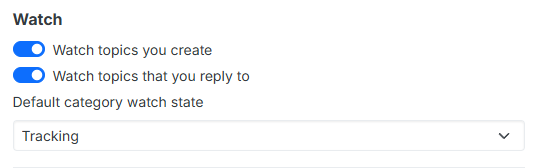
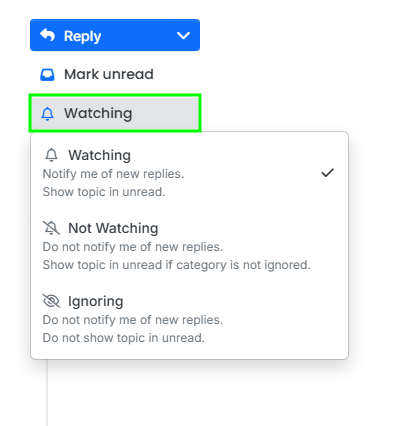
Although, you should have got a notification that there were new posts in this topic unless you have changed the topic notification status toNot WatchingorIgnoringsince in your forum profile settings the following is set:
Did you change the notification setting in this topic (top right bell icon)?
-
-
I've got an error during upgrade of Vaultwarden from
1.22.2to1.23.0or more1.24.0etc... :Please generate a secure Argon2 PHC string by using `vaultwarden hash` or `argon2`. Jan 17 19:10:33 See: https://github.com/dani-garcia/vaultwarden/wiki/Enabling-admin-page#secure-the-admin_token Jan 17 19:10:33 2026-01-17T19:10:33+01:00 Jan 17 19:10:34 [2026-01-17 18:10:34.083][panic][ERROR] thread 'main' panicked at 'Error running migrations: QueryError(DieselMigrationName { name: "2024-03-06-170000_add_sso_users", version: MigrationVersion("20240306170000") }, DatabaseError(Unknown, "Referencing column 'user_uuid' and referenced column 'uuid' in foreign key constraint 'sso_users_ibfk_1' are incompatible."))': src/db/mod.rs:505 Jan 17 19:10:34 0: vaultwarden::init_logging::{{closure}} Jan 17 19:10:34 1: std::panicking::panic_with_hook Jan 17 19:10:34 2: std::panicking::panic_handler::{{closure}} Jan 17 19:10:34 3: std::sys::backtrace::__rust_end_short_backtrace Jan 17 19:10:34 4: __rustc::rust_begin_unwind Jan 17 19:10:34 5: core::panicking::panic_fmt Jan 17 19:10:34 6: core::result::unwrap_failed Jan 17 19:10:34 7: vaultwarden::db::DbPool::from_config Jan 17 19:10:34 8: vaultwarden::main::{{closure}} Jan 17 19:10:34 9: vaultwarden::main Jan 17 19:10:34 10: std::sys::backtrace::__rust_begin_short_backtrace Jan 17 19:10:34 11: main Jan 17 19:10:34 12: <unknown> Jan 17 19:10:34 13: __libc_start_main Jan 17 19:10:34 14: _start Jan 17 19:10:34 2026-01-17T19:10:34+01:00Can you help me ?
Regards
-
-
-
I assume this may be more of Vaultwarden issue than a Cloudron one but I wanted to say the recent image update (https://forum.cloudron.io/topic/2546/vaultwarden-package-updates/79?_=1778039394241) seems to have broken Vaultwarden, requiring me to restore from backup.
May 05 20:47:32 => Exporting env vars expected by Vaultwarden
May 05 20:47:32 => Starting Bitwarden
May 05 20:47:32 /--------------------------------------------------------------------\
May 05 20:47:32 |                        Starting Vaultwarden                        |
May 05 20:47:32 |--------------------------------------------------------------------|
May 05 20:47:32 | This is an *unofficial* Bitwarden implementation, DO NOT use the   |
May 05 20:47:32 | official channels to report bugs/features, regardless of client.   |
May 05 20:47:32 | Send usage/configuration questions or feature requests to:         |
May 05 20:47:32 |   https://github.com/dani-garcia/vaultwarden/discussions or        |
May 05 20:47:32 |   https://vaultwarden.discourse.group/                             |
May 05 20:47:32 | Report suspected bugs/issues in the software itself at:            |
May 05 20:47:32 |   https://github.com/dani-garcia/vaultwarden/issues/new            |
May 05 20:47:32 \--------------------------------------------------------------------/
May 05 20:47:32 2026-05-06T03:47:32Z
May 05 20:47:32 [INFO] Using saved config from `/app/data/config.json` for configuration.
May 05 20:47:32 2026-05-06T03:47:32Z
May 05 20:47:32 [2026-05-06 03:47:32.167][panic][ERROR] thread 'main' panicked at 'Error running migrations: QueryError(DieselMigrationName { name: "2026-03-09-005927_add_archives", version: MigrationVersion("20260309005927") }, DatabaseError(Unknown, "Referencing column 'user_uuid' and referenced column 'uuid' in foreign key constraint 'archives_ibfk_1' are incompatible."))': src/db/mod.rs:501
May 05 20:47:32 0: vaultwarden::init_logging::{{closure}}
May 05 20:47:32 1: std::panicking::panic_with_hook
May 05 20:47:32 2: std::panicking::panic_handler::{closure#0}
May 05 20:47:32 3: std::sys::backtrace::__rust_end_short_backtrace::<std::panicking::panic_handler::{closure#0}, !>
May 05 20:47:32 4: __rustc::rust_begin_unwind
May 05 20:47:32 5: core::panicking::panic_fmt
May 05 20:47:32 6: core::result::unwrap_failed
May 05 20:47:32 7: vaultwarden::db::DbPool::from_config
May 05 20:47:32 8: vaultwarden::main::{{closure}}
May 05 20:47:32 9: vaultwarden::main
May 05 20:47:32 10: std::sys::backtrace::__rust_begin_short_backtrace
May 05 20:47:32 11: main
May 05 20:47:32 12: <unknown>
May 05 20:47:32 13: __libc_start_main
May 05 20:47:32 14: _start
Any ideas on this one?
-
-
-
-
Same as https://github.com/dani-garcia/vaultwarden/issues/7182 and https://github.com/dani-garcia/vaultwarden/discussions/7183 which points to some charset issues .
-
Can you check the encoding of the database and also the tables?
In the web terminal, first get the database name:
echo $CLOUDRON_MYSQL_DATABASEThen, click the mysql button above and press enter. Replace DB_NAME_HERE . You should get utf8mb4
mysql> SELECT   SCHEMA_NAME,   DEFAULT_CHARACTER_SET_NAME,   DEFAULT_COLLATION_NAME FROM information_schema.SCHEMATA WHERE SCHEMA_NAME = 'DB_NAME_HERE';
+------------------+----------------------------+------------------------+
| SCHEMA_NAME      | DEFAULT_CHARACTER_SET_NAME | DEFAULT_COLLATION_NAME |
+------------------+----------------------------+------------------------+
| fb30d5a9f5fd3620 | utf8mb4                    | utf8mb4_unicode_ci     |
+------------------+----------------------------+------------------------+
Then, check all the tables.
mysql> SELECT   TABLE_NAME,   TABLE_TYPE,   ENGINE,   TABLE_COLLATION FROM information_schema.TABLES WHERE TABLE_SCHEMA = 'fb30d5a9f5fd3620' ORDER BY TABLE_NAME;
+----------------------------+------------+--------+--------------------+
| TABLE_NAME                 | TABLE_TYPE | ENGINE | TABLE_COLLATION    |
+----------------------------+------------+--------+--------------------+
| __diesel_schema_migrations | BASE TABLE | InnoDB | utf8mb4_unicode_ci |
| archives                   | BASE TABLE | InnoDB | utf8mb4_unicode_ci |
| attachments                | BASE TABLE | InnoDB | utf8mb4_unicode_ci |
| auth_requests              | BASE TABLE | InnoDB | utf8mb4_unicode_ci |
| ciphers                    | BASE TABLE | InnoDB | utf8mb4_unicode_ci |
| ciphers_collections        | BASE TABLE | InnoDB | utf8mb4_unicode_ci |
| collections                | BASE TABLE | InnoDB | utf8mb4_unicode_ci |
| collections_groups         | BASE TABLE | InnoDB | utf8mb4_unicode_ci |
| devices                    | BASE TABLE | InnoDB | utf8mb4_unicode_ci |
| emergency_access           | BASE TABLE | InnoDB | utf8mb4_unicode_ci |
| event                      | BASE TABLE | InnoDB | utf8mb4_unicode_ci |
| favorites                  | BASE TABLE | InnoDB | utf8mb4_unicode_ci |
| folders                    | BASE TABLE | InnoDB | utf8mb4_unicode_ci |
| folders_ciphers            | BASE TABLE | InnoDB | utf8mb4_unicode_ci |
| groups                     | BASE TABLE | InnoDB | utf8mb4_unicode_ci |
| groups_users               | BASE TABLE | InnoDB | utf8mb4_unicode_ci |
| invitations                | BASE TABLE | InnoDB | utf8mb4_unicode_ci |
| org_policies               | BASE TABLE | InnoDB | utf8mb4_unicode_ci |
| organization_api_key       | BASE TABLE | InnoDB | utf8mb4_unicode_ci |
| organizations              | BASE TABLE | InnoDB | utf8mb4_unicode_ci |
| sends                      | BASE TABLE | InnoDB | utf8mb4_unicode_ci |
| sso_auth                   | BASE TABLE | InnoDB | utf8mb4_unicode_ci |
| sso_users                  | BASE TABLE | InnoDB | utf8mb4_unicode_ci |
| twofactor                  | BASE TABLE | InnoDB | utf8mb4_unicode_ci |
| twofactor_duo_ctx          | BASE TABLE | InnoDB | utf8mb4_unicode_ci |
| twofactor_incomplete       | BASE TABLE | InnoDB | utf8mb4_unicode_ci |
| users                      | BASE TABLE | InnoDB | utf8mb4_unicode_ci |
| users_collections          | BASE TABLE | InnoDB | utf8mb4_unicode_ci |
| users_organizations        | BASE TABLE | InnoDB | utf8mb4_unicode_ci |
+----------------------------+------------+--------+--------------------+
29 rows in set (0.01 sec)
If the table encoding is not the above, then first take a backup of the app and then follow the instructions at https://github.com/dani-garcia/vaultwarden/wiki/Using-the-MariaDB-(MySQL)-Backend#foreign-key-errors-collation-and-charset
-






Hello! It looks like you're interested in this conversation, but you don't have an account yet.
Getting fed up of having to scroll through the same posts each visit? When you register for an account, you'll always come back to exactly where you were before, and choose to be notified of new replies (either via email, or push notification). You'll also be able to save bookmarks and upvote posts to show your appreciation to other community members.
With your input, this post could be even better 💗
Register Login