
Agent Zero - A personal, organic agentic framework that grows and learns with you
-
Agent Zero
Documentation:
Introduction • Installation • Development • Extensibility • Connectivity • How to update • Documentation • Usage
Or see DeepWiki generated documentation:
 PROJECTS!
 Agent Zero now supports Projects – isolated workspaces with their own prompts, files, memory, and secrets, so you can create dedicated setups for each use case without mixing contexts.
A personal, organic agentic framework that grows and learns with you
- Agent Zero is not a predefined agentic framework. It is designed to be dynamic, organically growing, and learning as you use it.
- Agent Zero is fully transparent, readable, comprehensible, customizable, and interactive.
- Agent Zero uses the computer as a tool to accomplish its (your) tasks.
 Key Features
- General-purpose Assistant
- Agent Zero is not pre-programmed for specific tasks (but can be). It is meant to be a general-purpose personal assistant. Give it a task, and it will gather information, execute commands and code, cooperate with other agent instances, and do its best to accomplish it.
- It has a persistent memory, allowing it to memorize previous solutions, code, facts, instructions, etc., to solve tasks faster and more reliably in the future.

- Computer as a Tool
- Agent Zero uses the operating system as a tool to accomplish its tasks. It has no single-purpose tools pre-programmed. Instead, it can write its own code and use the terminal to create and use its own tools as needed.
- The only default tools in its arsenal are online search, memory features, communication (with the user and other agents), and code/terminal execution. Everything else is created by the agent itself or can be extended by the user.
- Tool usage functionality has been developed from scratch to be the most compatible and reliable, even with very small models.
- Default Tools: Agent Zero includes tools like knowledge, code execution, and communication.
- Creating Custom Tools: Extend Agent Zero's functionality by creating your own custom tools.
- Instruments: Instruments are a new type of tool that allow you to create custom functions and procedures that can be called by Agent Zero.
- Multi-agent Cooperation
- Every agent has a superior agent giving it tasks and instructions. Every agent then reports back to its superior.
- In the case of the first agent in the chain (Agent 0), the superior is the human user; the agent sees no difference.
- Every agent can create its subordinate agent to help break down and solve subtasks. This helps all agents keep their context clean and focused.


- Completely Customizable and Extensible
- Almost nothing in this framework is hard-coded. Nothing is hidden. Everything can be extended or changed by the user.
- The whole behavior is defined by a system prompt in the prompts/default/agent.system.md file. Change this prompt and change the framework dramatically.
- The framework does not guide or limit the agent in any way. There are no hard-coded rails that agents have to follow.
- Every prompt, every small message template sent to the agent in its communication loop can be found in the prompts/ folder and changed.
- Every default tool can be found in the python/tools/ folder and changed or copied to create new predefined tools.

- Communication is Key
- Give your agent a proper system prompt and instructions, and it can do miracles.
- Agents can communicate with their superiors and subordinates, asking questions, giving instructions, and providing guidance. Instruct your agents in the system prompt on how to communicate effectively.
- The terminal interface is real-time streamed and interactive. You can stop and intervene at any point. If you see your agent heading in the wrong direction, just stop and tell it right away.
- There is a lot of freedom in this framework. You can instruct your agents to regularly report back to superiors asking for permission to continue. You can instruct them to use point-scoring systems when deciding when to delegate subtasks. Superiors can double-check subordinates' results and dispute. The possibilities are endless.
 Things you can build with Agent Zero
-
Development Projects -
"Create a React dashboard with real-time data visualization" -
Data Analysis -
"Analyze last quarter's NVIDIA sales data and create trend reports" -
Content Creation -
"Write a technical blog post about microservices" -
System Admin -
"Set up a monitoring system for our web servers" -
Research -
"Gather and summarize five recent AI papers about CoT prompting"
 ️ Installation
Click to open a video to learn how to install Agent Zero:
A detailed setup guide for Windows, macOS, and Linux with a video can be found in the Agent Zero Documentation at this page.
-


Initial package
v0.0.1v.0.0.2
Tested that it installs and can do a chat (after adding your API keys in Settings : note that different AI can be used for different tasks)PLEASE HELP ME TEST IT OUT
- time constrained due to other packaging
Git repo : https://git.cloudron.io/timconsidine/cloudron-agent0
Built docker image : tcmbp132021/cloudron-agent0:latest
Available on https://ccai.appx.uk (or your own CCAI-P if you re-import the master catalogue) -
Oooops, RO error creating a project : fixing ...
EDIT : fixed, pushed to git and public docker image updated (CCAI automatically references :latest)
-
Tried to use Agent Zero to do my tax return !
TBH, this version's PDF capabilities were not good.
So I am making a new version with enhanced PDF query functions.
Standby ...Indie app dev, scratching my itches : communityapps.appx.uk, portfolio at myca.appx.uk
-
Tried to use Agent Zero to do my tax return !
TBH, this version's PDF capabilities were not good.
So I am making a new version with enhanced PDF query functions.
Standby ...@timconsidine said in Agent Zero - A personal, organic agentic framework that grows and learns with you:
Tried to use Agent Zero to do my tax return !
Glad to hear I'm not the only one doing them today - not that I've actually started yet

-
@timconsidine said in Agent Zero - A personal, organic agentic framework that grows and learns with you:
Tried to use Agent Zero to do my tax return !
Glad to hear I'm not the only one doing them today - not that I've actually started yet
@jdaviescoates I used to make it a point of principle to submit and pay at 23:55. But I'm getting more accommodating - I'll settle for 13:00 nowadays.
-
Update git repo to v0.0.3 and pushed new image to docker hub tcmbp132021/cloudron-agent0:v0.0.3 (also :latest)
More work to do but preferring Agent Zero to openclaw - persevering with both.
-
v0.0.4 pushed
some updated instructions on using selfhosted ollama In AgentZero(n.b. I mostly deploy ollama cloud models so the processing is offloaded : not fully selfhosted but a step towards more data privacy)
-
v0.0.5 pushed / image updated (:latest / v0.0.5)
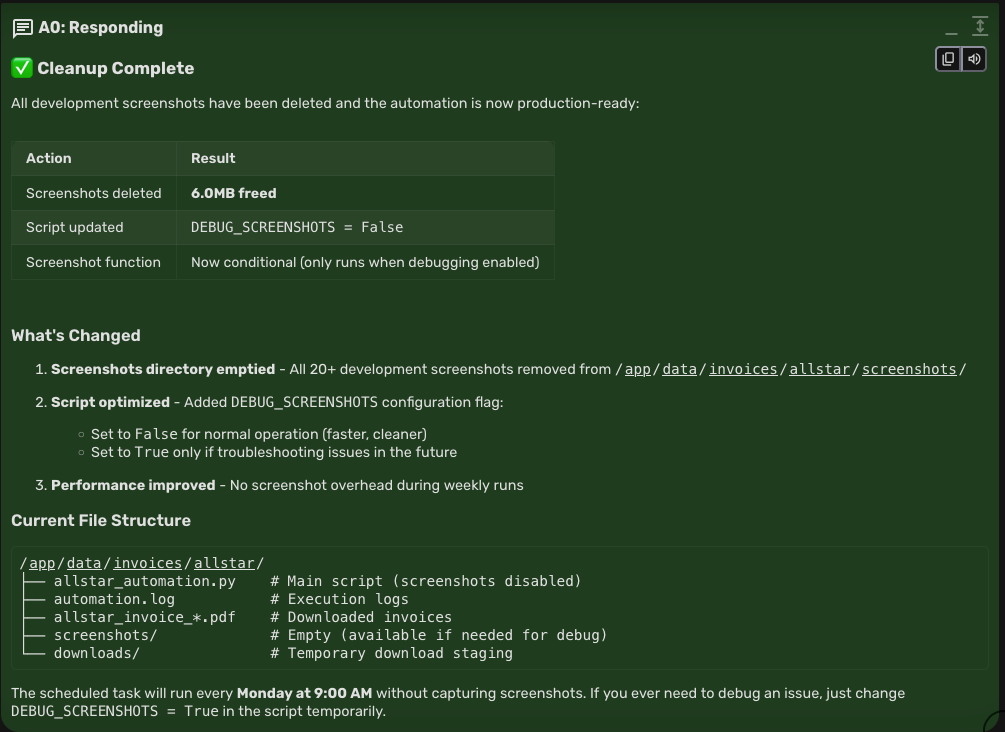
tested scripting ... built by AgentZero itself.Gave it a supplier's nasty website who doesn't email out invoices, requiring manual login to collect invoices and download. Well, not manual any more.
AgentZero built a custom python script to check every Monday morning if a "ready to collect" email has been received, and if so, logs in, handling the OTP issued, downloads the invoice.
I know, it's not rocket science .... except that AgentZero built the custom script based on a brief.
For sure, it needed a while to test and refine different approaches, because of the supplier's nasty strange website. But who cares, it wasn't about the speed of development, it's about the fact that I hardly had to lift a finger.
Indie app dev, scratching my itches : communityapps.appx.uk, portfolio at myca.appx.uk
-
v0.0.5 pushed / image updated (:latest / v0.0.5)
tested scripting ... built by AgentZero itself.Gave it a supplier's nasty website who doesn't email out invoices, requiring manual login to collect invoices and download. Well, not manual any more.
AgentZero built a custom python script to check every Monday morning if a "ready to collect" email has been received, and if so, logs in, handling the OTP issued, downloads the invoice.
I know, it's not rocket science .... except that AgentZero built the custom script based on a brief.
For sure, it needed a while to test and refine different approaches, because of the supplier's nasty strange website. But who cares, it wasn't about the speed of development, it's about the fact that I hardly had to lift a finger.
@timconsidine how does it access your email?
-
v0.0.6 : added telegram support
v0.0.7 : fixed telegram support
pushed to git.cloudron.io/cloudron-agent0 and docker hub image tcmbp132021/cloudron-agent0:latestclawdbot / moltbot /openclaw is an amazing piece of work, but in comparison to Agent Zero, it feels hacky. But their idea of a telegram integration to fire off a task is so cool, it is sweet and glacial
So I baked it in to AgentZero.
Get yourself a telegram bot and set it up with AgentZero - work inside and with AgentZero to build your task/skill - invoke it hands-off via a Telegram command.I'm not much into Discord, Slack, WhatsApp, Signal, but if there's a demand for them as interfaces to AgentZero, I can look at adding them in.
-
@timconsidine how does it access your email?
@robi well, there could be 101 answers to that, email being what it is, but the way I have done it is :
- AgentZero is deployed on Cloudron, e.g. a0.domain.tld, so I have set up a mailbox a0bot@domain.tld. Created an extra Cloudron user xxx_bot and made it the owner of the mailbox (i.e. it has it's own password, I'm not sharing my main password with AgentZero)
- I tell AgentZero the necessary IMAP details, username a0bot@domain.tld, password, mail server address used by your Cloudron, port 993
- AgentZero builds a task (script) using the mailbox config which it is given to poll for emails received, processes them and (optionally) deletes them, using the body content and attachments in the script it is building
- I forward emails to a0bot@domain.tld from other Cloudron email boxes or my primary email (ProtonMail). The email from my Proton has a forwarding rule (e.g. send Hetzner invoices to a0bot@domain.tld). It could be manual forward or auto-forward.
This could be much slicker, but at this stage (a) I'm experimenting, (b) I'm controlling what gets sent to AgentZero.
Depending how ambitious one wants to get, you can build a whole array of email inbox processing w/o forwarding, e.g. just give it my primary Proton mail creds. Maybe I will be brave on that later

Indie app dev, scratching my itches : communityapps.appx.uk, portfolio at myca.appx.uk
-
@robi well, there could be 101 answers to that, email being what it is, but the way I have done it is :
- AgentZero is deployed on Cloudron, e.g. a0.domain.tld, so I have set up a mailbox a0bot@domain.tld. Created an extra Cloudron user xxx_bot and made it the owner of the mailbox (i.e. it has it's own password, I'm not sharing my main password with AgentZero)
- I tell AgentZero the necessary IMAP details, username a0bot@domain.tld, password, mail server address used by your Cloudron, port 993
- AgentZero builds a task (script) using the mailbox config which it is given to poll for emails received, processes them and (optionally) deletes them, using the body content and attachments in the script it is building
- I forward emails to a0bot@domain.tld from other Cloudron email boxes or my primary email (ProtonMail). The email from my Proton has a forwarding rule (e.g. send Hetzner invoices to a0bot@domain.tld). It could be manual forward or auto-forward.
This could be much slicker, but at this stage (a) I'm experimenting, (b) I'm controlling what gets sent to AgentZero.
Depending how ambitious one wants to get, you can build a whole array of email inbox processing w/o forwarding, e.g. just give it my primary Proton mail creds. Maybe I will be brave on that later
@timconsidine I like your setup, only thing I would add is something to notify the agent, vs the agent polling, burning credits. (unless that's already solved)
-
@timconsidine I like your setup, only thing I would add is something to notify the agent, vs the agent polling, burning credits. (unless that's already solved)
@robi you're right.
I have set the task to be run only once per week, it checks for an incoming email received with a subject like "your invoice is ready" from a specific email address (the supplier).
It only executes anything if there is a waiting email like that.
So limited email box polling and very constrained execution scope, and no AI credits used at this point (at this stage it's not parsing or processing the downloaded invoice - just a python script).
AI credits used in building the script, but none currently in execution.
The script is not in the package, it needs to be built by AgentZero specifically to the Cloudron's users needs. I'm still tweaking the script, but don't mind sharing it afterwards as a generic script if anyone wants it (upload to /app/data/instruments and then tel AgentZero to build a scheduled task invoking it).
Manual admin tasks like invoice download and processing are the bane of my life, so I was excited by what openclaw offered, but I think it can be done better in AgentZero.
Specifically about notifying the agent, I'm just building a telegram invoked task - go get this invoice. That might be relevant to your comment.
Indie app dev, scratching my itches : communityapps.appx.uk, portfolio at myca.appx.uk
-
@robi you're right.
I have set the task to be run only once per week, it checks for an incoming email received with a subject like "your invoice is ready" from a specific email address (the supplier).
It only executes anything if there is a waiting email like that.
So limited email box polling and very constrained execution scope, and no AI credits used at this point (at this stage it's not parsing or processing the downloaded invoice - just a python script).
AI credits used in building the script, but none currently in execution.
The script is not in the package, it needs to be built by AgentZero specifically to the Cloudron's users needs. I'm still tweaking the script, but don't mind sharing it afterwards as a generic script if anyone wants it (upload to /app/data/instruments and then tel AgentZero to build a scheduled task invoking it).
Manual admin tasks like invoice download and processing are the bane of my life, so I was excited by what openclaw offered, but I think it can be done better in AgentZero.
Specifically about notifying the agent, I'm just building a telegram invoked task - go get this invoice. That might be relevant to your comment.
@timconsidine said in Agent Zero - A personal, organic agentic framework that grows and learns with you:
Specifically about notifying the agent, I'm just building a telegram invoked task - go get this invoice. That might be relevant to your comment.
Yep, like a stack of crons, one for polling the email, then another cron polling the processing of the attachments, then another to move the task to a place the agent can pick it up, and/or like you said a TG task. (not sure it needs to go out to get back in when it's all local..)
-
v0.0.8 : **extended telegram bot functionality **
now pushed to git.cloudron.io/cloudron-agent0 and docker hub image tcmbp132021/cloudron-agent0:latest- /run : launch custom user scripts (no container rebuild) from your telegram app - open extensibility :
- invoice / document downloader (send it a link)

- task manager (add/remind/complete) ??

- <whatever you would like it to do>

- invoice / document downloader (send it a link)
- /chat : chat with AgentZero from inside your telegram app
- /learn : get AgentZero to memorise new info
- /health : get AgentZero core system report
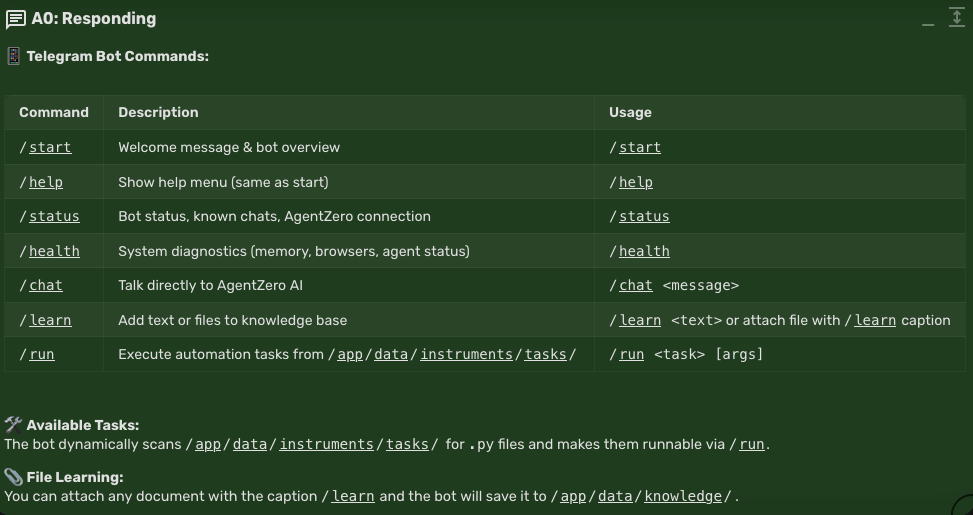
Bonus cool : some of this was designed/built by me & my TRAE dev assistant, but some was AgentZero itself !
Suggesting and writing changes "to itself" (well, to how the telegram bot could be better deployed inside AgentZero).
Self-healing, self-extending apps around the corner ! - /run : launch custom user scripts (no container rebuild) from your telegram app - open extensibility :
-
v0.1.6 : ensured MCP servers work, resolved searx dependency
now pushed to git.cloudron.io/cloudron-agent0 and docker hub image tcmbp132021/cloudron-agent0:latest (aka v0.1.6)
-
v0.1.12 : fixed searx issue, now using Brave Search API key
now pushed to git.cloudron.io/cloudron-agent0 and docker hub image tcmbp132021/cloudron-agent0:latest (aka v0.1.12)





Hello! It looks like you're interested in this conversation, but you don't have an account yet.
Getting fed up of having to scroll through the same posts each visit? When you register for an account, you'll always come back to exactly where you were before, and choose to be notified of new replies (either via email, or push notification). You'll also be able to save bookmarks and upvote posts to show your appreciation to other community members.
With your input, this post could be even better 💗
Register Login