
Issue with app updates when using Box Storage backups
-
Hi everyone,
I’d like to report a strange issue that seems to be related to using Box Storage as the backup provider.
On multiple Cloudron instances where Box Storage is configured, I’ve noticed that manual app updates don’t complete properly. The update process appears to start, but the app only restarts and the update is not applied.
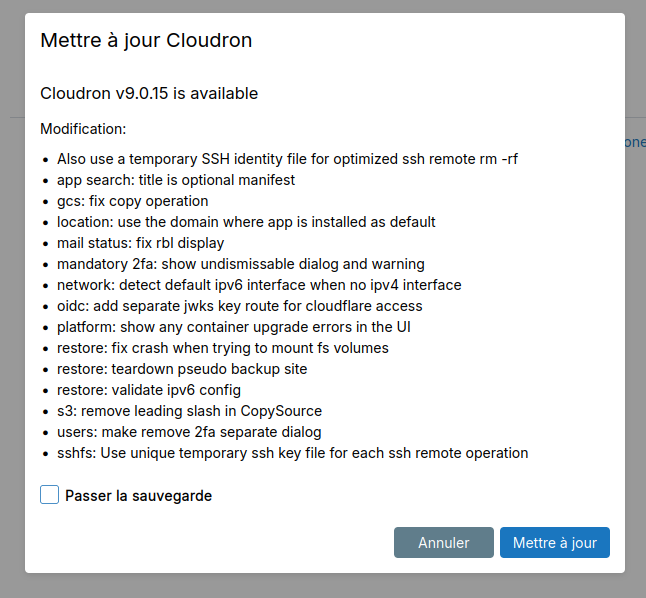
However, if I select “Skip backup” before launching the update, it works as expected.This behavior has been consistent across every Cloudron installation I’ve tested that uses Box Storage for backups.
Has anyone else encountered this issue, or could someone from the team try to reproduce it? It really feels like the update process is getting stuck or aborted during the backup step when Box Storage is involved.
Thanks in advance for your help!
Cloudron version : 9.0.15
Ubuntu version : Ubuntu 24.04.1 LTS Linux 6.8.0-90-generic -
I solved my problem by updating Cloudron to version 9.0.17. There’s no longer any need to run a backup before a manual app update.
-
Yeah, I think I have a problem with Storage Box too. Yesterday, I configured Storage Box to backup Nextcloud (chmura.gadziu.eu), but it stops working because the system says it's bypassed, even though I marked it to do so.
Cloudron version: 9.0.17
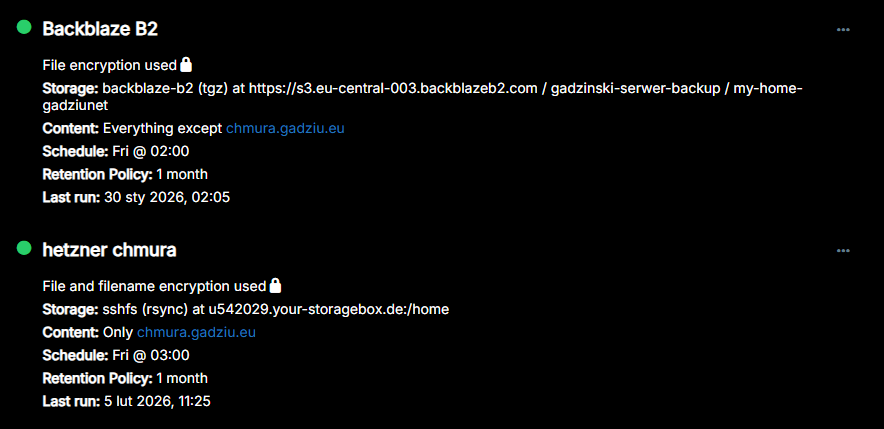
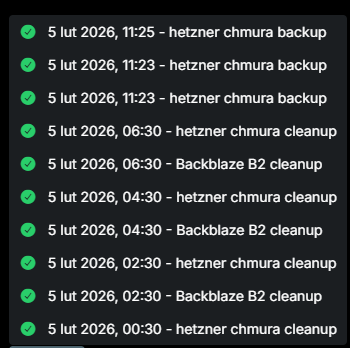
Here are the logs related to Storage Box.
Feb 05 11:25:50 box:taskworker Starting task 5187. Logs are at /home/yellowtent/platformdata/logs/tasks/5187.log Feb 05 11:25:50 box:taskworker Running task of type backup Feb 05 11:25:50 box:backuptask fullBackup: skipped backup chmura.gadziu.eu (1/9) since automatic backup disabled Feb 05 11:25:50 box:backuptask fullBackup: skipped backup przepisy.gadziu.eu (2/9) as it is not in site contents Feb 05 11:25:50 box:backuptask fullBackup: skipped backup stream.gadziu.eu (3/9) as it is not in site contents Feb 05 11:25:50 box:backuptask fullBackup: skipped backup homelab.net.pl (4/9) as it is not in site contents Feb 05 11:25:50 box:backuptask fullBackup: skipped backup error.blwatch.tv (5/9) as it is not in site contents Feb 05 11:25:50 box:backuptask fullBackup: skipped backup pdf.gadziu.eu (6/9) as it is not in site contents Feb 05 11:25:50 box:backuptask fullBackup: skipped backup collabora.gadziu.eu (7/9) as it is not in site contents Feb 05 11:25:50 box:backuptask fullBackup: skipped backup vpn.home.gadziunet.pl (8/9) as it is not in site contents Feb 05 11:25:50 box:backuptask fullBackup: skipped backup dev.blwatch.tv (9/9) as it is not in site contents Feb 05 11:25:50 box:tasks setCompleted - 5187: {"result":[],"error":null,"percent":100} Feb 05 11:25:50 box:tasks updating task 5187 with: {"completed":true,"result":[],"error":null,"percent":100} Feb 05 11:25:50 box:taskworker Task took 0.131 seconds Feb 05 11:25:50 Exiting with code 0 -
@Benoit said in Issue with app updates when using Box Storage backups:
@james SSHFS and RSYNC
Could it just be that you need to re-paste in the private key into the backup config?
I had to do that to get my backup working again, but then they worked fine, see https://forum.cloudron.io/post/119366
-
Hi @jdaviescoates, I tried re-pasting the private key, but it still doesn’t work on my side. I also rebooted Cloudron, and nothing changed.
-
Hello @benoit
Your image that states
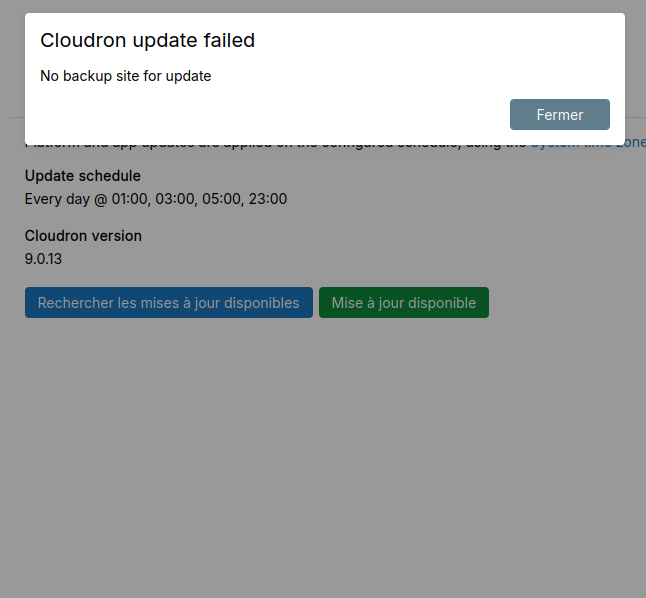
No backup site for updatelooks like the configuration of the backup site might not be correct.
Please check the backup site content configuration if everything is included and Store automatic-update backups is selected.
Go tohttps://my.$DOMAIN.$TLD/#/backup-sitespress the...button and pressContent.
It should look like this:
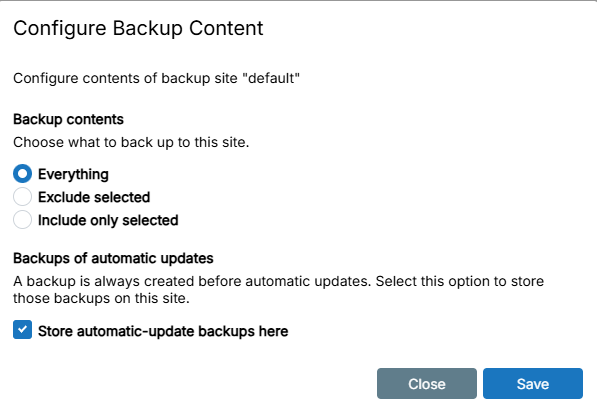
Please also share the logs of the backup that is failing.
A warning for Hetzner Storage Boxes.
Storage Boxes have a concurrent connections limit of 10.
If you use the same Storage Box for multiple Cloudron servers or other services the concurrent connection limit can be exausted leading to failures.
One example.
If you mount the Storage Box on 2x Cloudron servers and use the same Storage Box for 2x Volumes, 4x concurrent connections are persistently used.
Thus, only 6x connections are avaiable.
Just to keep that in mind when using Storage Boxes for multiple servers/services. -
I solved my problem by updating Cloudron to version 9.0.17. There’s no longer any need to run a backup before a manual app update.
-
 J james has marked this topic as solved on



Hello! It looks like you're interested in this conversation, but you don't have an account yet.
Getting fed up of having to scroll through the same posts each visit? When you register for an account, you'll always come back to exactly where you were before, and choose to be notified of new replies (either via email, or push notification). You'll also be able to save bookmarks and upvote posts to show your appreciation to other community members.
With your input, this post could be even better 💗
Register Login