
Tymeslot - Better Meeting Scheduling than cal.com
-
Tymeslot - Better Meeting Scheduling than Cal.com
Main Page: https://tymeslot.app
Git: https://github.com/Tymeslot/tymeslot
Licence: Elastic License 2.0
Dockerfile: Yes
Demo: https://tymeslot.appSummary
Tymeslot is a self-hosted meeting scheduling platform — a privacy-respecting alternative to Calendly and similar tools. It lets you create booking pages for others to schedule time with you, with full timezone awareness, calendar sync, and real-time availability checking.
Key features:
- CalDAV integration — syncs with Nextcloud Calendar, iCloud, Fastmail, and any standards-compliant calendar server
- Google Calendar sync — reads busy times and creates events directly in Google Calendar
- Google Meet integration — automatically generates Meet links for booked meetings
- SSO via OIDC/OAuth — supports Google, GitHub, and any OpenID Connect provider
- Multiple themes, multiple language support (English, German, French, Ukrainian)
- No ads, no tracking, no third-party analytics
- Background jobs with retry logic, rate limiting, structured logging
Built with Elixir/Phoenix LiveView — lightweight, concurrent, and very fast.
Notes
I'm the developer of Tymeslot, and I built Cloudron support in from the start. The cloud version is hosted on Cloudron right now. The app also supports authentication with Cloudron accounts and uses the postgres and sendmail addons.
What makes it a great fit for Cloudron:
Automatic addon integration: The app auto-detects Cloudron's built-in services. The PostgreSQL connection (
CLOUDRON_POSTGRESQL_URL) is picked up automatically — no manual database config needed. Cloudron's mail relay is used for all transactional email out of the box. Cloudron's OIDC identity provider is detected automatically, adding an SSO login button without any configuration.
Already installable today: You can install it right now as a custom app using the Cloudron CLI. Full step-by-step instructions are at: https://tymeslot.app/docs/cloudron
Minimal required config: OnlySECRET_KEY_BASEandPHX_HOSTare needed for a working installation. Everything else is optional or auto-configured.The documentation page at https://tymeslot.app/docs/cloudron walks through the full install in about 3 commands. It also covers optional extras: Google Calendar/Meet setup, GitHub OAuth, switching to an external email provider, and common troubleshooting.
Having it in the official Cloudron app store would make it much more discoverable for the self-hosting community — and would mean users get one-click installs and automatic updates.
If there are any features you are looking for, let me know! The app has been developed daily for weeks now. Please also star it on Github if you like what you see!
Alternative to: Cal.com, Easy Appointments, Calendly
Screenshots: https://tymeslot.app@ekevu123 Cool app, toying with it right now. One observation:
- when trying to connect to my nextcloud calendar, it connects and recognizes the different calendars but when I press
Add integration, it returnsBase url Must be a valid HTTP or HTTPS URL (e.g., https://example.com)nonetheless.
-
@ekevu123 Cool app, toying with it right now. One observation:
- when trying to connect to my nextcloud calendar, it connects and recognizes the different calendars but when I press
Add integration, it returnsBase url Must be a valid HTTP or HTTPS URL (e.g., https://example.com)nonetheless.
@ekevu123 Cool app, toying with it right now. One observation:
- when trying to connect to my nextcloud calendar, it connects and recognizes the different calendars but when I press
Add integration, it returnsBase url Must be a valid HTTP or HTTPS URL (e.g., https://example.com)nonetheless.
This is fixed in the next release coming up today!
- when trying to connect to my nextcloud calendar, it connects and recognizes the different calendars but when I press
-
@ekevu123 Cool app, toying with it right now. One observation:
- when trying to connect to my nextcloud calendar, it connects and recognizes the different calendars but when I press
Add integration, it returnsBase url Must be a valid HTTP or HTTPS URL (e.g., https://example.com)nonetheless.
This is fixed in the next release coming up today!
- when trying to connect to my nextcloud calendar, it connects and recognizes the different calendars but when I press
-
Thanks for adding the community version!
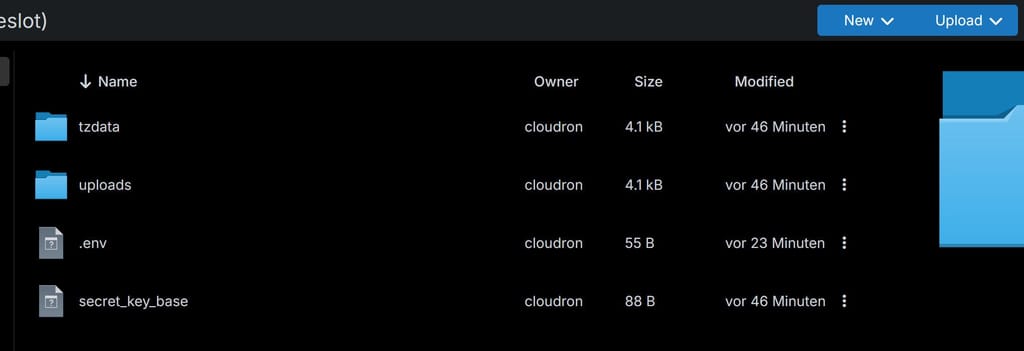
I installed tymeslot. How can I deactivate the user login? I tried adding a .env withREGISTRATION_ENABLED=false PASSWORD_AUTH_ENABLED=falsebut the login/registration for external users is still possible. Could somebody give me a hint whats wrong here?
-
-
thanks for it! Just tested. It connects to my caldav calendar shows the diefferent calendars but doesnt sync them. Any idea?
-
Hello @ekevu123
Since not everyone is comfortable using the cloudron cli maybe you could add a
.env.shhandler like we do with many packages.
Many Cloudron users also know this flow from us, guess that is why @enerch tried that approach first.Hello @ekevu123
Since not everyone is comfortable using the cloudron cli maybe you could add a
.env.shhandler like we do with many packages.
Many Cloudron users also know this flow from us, guess that is why @enerch tried that approach first.I didn't know people use it usually like that, will do!
-
Hello @ekevu123
If you'd like some examples for how we do that, you could check out the start.sh of the mirotalk app or the start.sh form the Kutt URL shortener app to just name two examples.
One small note on that topic.
When merging env files together like we sometimes do, ensure that a newline is present otherwise it could end up appended to the last string.
See: https://git.cloudron.io/packages/twenty-app/-/merge_requests/6/diffsWithout the linked diff, if a new line in
/app/data/envis missing the string gets appended.
So if your last line in/app/data/envisSTORAGE_LOCAL_PATH=/app/data/local-storageand it gets appended to/run/twenty-server/.envit results in:STORAGE_LOCAL_PATH=/app/data/local-storageIS_CONFIG_VARIABLES_IN_DB_ENABLED=false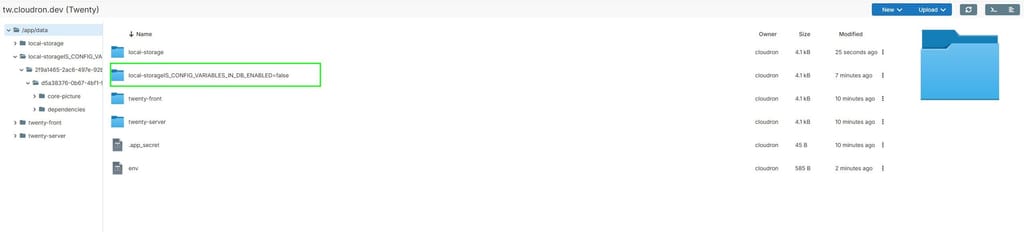
so to ensure this never happens the adding a newline after thecat >> /run/twenty-server/.env <<EOTis enough. -
Hello @ekevu123
If you'd like some examples for how we do that, you could check out the start.sh of the mirotalk app or the start.sh form the Kutt URL shortener app to just name two examples.
One small note on that topic.
When merging env files together like we sometimes do, ensure that a newline is present otherwise it could end up appended to the last string.
See: https://git.cloudron.io/packages/twenty-app/-/merge_requests/6/diffsWithout the linked diff, if a new line in
/app/data/envis missing the string gets appended.
So if your last line in/app/data/envisSTORAGE_LOCAL_PATH=/app/data/local-storageand it gets appended to/run/twenty-server/.envit results in:STORAGE_LOCAL_PATH=/app/data/local-storageIS_CONFIG_VARIABLES_IN_DB_ENABLED=false
so to ensure this never happens the adding a newline after thecat >> /run/twenty-server/.env <<EOTis enough.Hello @ekevu123
If you'd like some examples for how we do that, you could check out the start.sh of the mirotalk app or the start.sh form the Kutt URL shortener app to just name two examples.
One small note on that topic.
When merging env files together like we sometimes do, ensure that a newline is present otherwise it could end up appended to the last string.
See: https://git.cloudron.io/packages/twenty-app/-/merge_requests/6/diffsWithout the linked diff, if a new line in
/app/data/envis missing the string gets appended.
So if your last line in/app/data/envisSTORAGE_LOCAL_PATH=/app/data/local-storageand it gets appended to/run/twenty-server/.envit results in:STORAGE_LOCAL_PATH=/app/data/local-storageIS_CONFIG_VARIABLES_IN_DB_ENABLED=false
so to ensure this never happens the adding a newline after thecat >> /run/twenty-server/.env <<EOTis enough.Thank you, I will look into that!
-
@ekevu123 Hi. Caldav via SoGo and mailbox.org
The calendars do appear when I enter my login credentials, but the appointments aren't syncing. at least with one account - the other only sync partially.
"Some calendars have never been synced" - refreh doenst help.




Hello! It looks like you're interested in this conversation, but you don't have an account yet.
Getting fed up of having to scroll through the same posts each visit? When you register for an account, you'll always come back to exactly where you were before, and choose to be notified of new replies (either via email, or push notification). You'll also be able to save bookmarks and upvote posts to show your appreciation to other community members.
With your input, this post could be even better 💗
Register Login