
box:user verify
-
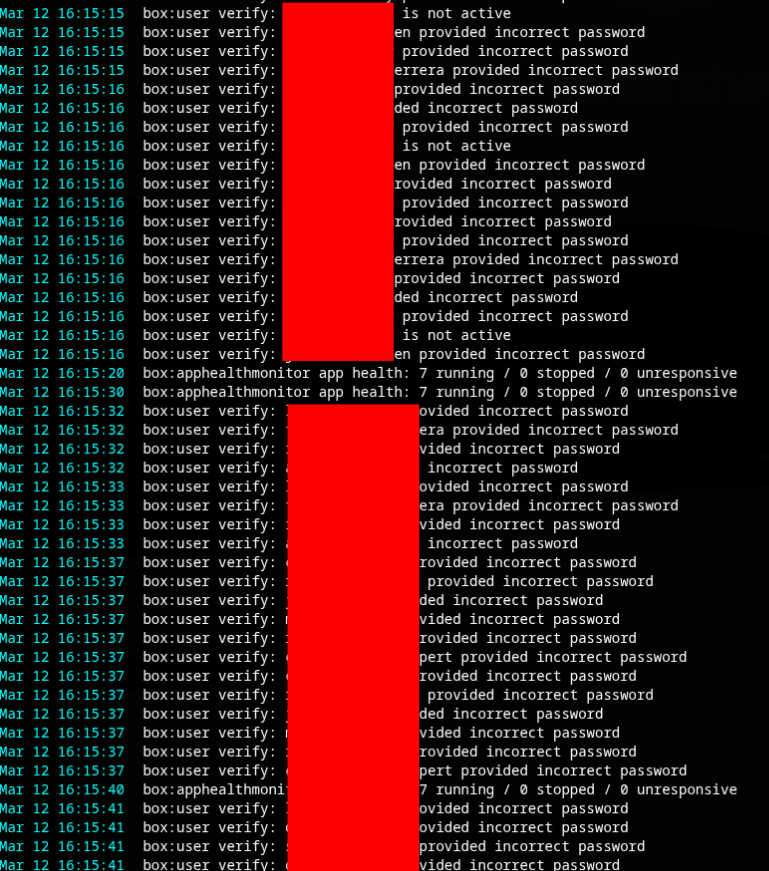
Hi. My server logs are full of these messages
"Mar 12 16:02:09 box:user verify: USERNAME provided incorrect password"
Multiple times per second.
Where do i even start to look for the source? there is no further info in the logs.This instance is used as our mail server and the installed apps are: Surfer, Kutt, Rocket Chat, Minio, Jirafeau, SoGo and Wordpress.
There are 65 users on the server but the names i see in the error log are only roughly 10 of these.
-
Most likely someone runs a script against one of the apps which are integrated via LDAP then. Maybe a quick check can be to stop one after the other and see which one is causing the flood. Otherwise I think currently there is no way to see the origin for that unless we patch the code.
-
Most likely someone runs a script against one of the apps which are integrated via LDAP then. Maybe a quick check can be to stop one after the other and see which one is causing the flood. Otherwise I think currently there is no way to see the origin for that unless we patch the code.
@nebulon Hi! Thank you for your quick reply. I believe I've pinpointed the source of those "user verify" logs, which leads to a specific question.
These users all belong to groups using shared mailboxes. For example, MAILBOX1 is owned by GROUP1, which includes USER1, USER2, and USER3. These users access MAILBOX1 in Outlook but authenticate using their personal Cloudron user passwords.
I monitored the logs as departments shut down their PCs to go home, and those users immediately disappeared from the logs. I also tested by temporarily removing a few users from their groups (while they were still working), and the logs confirmed the pattern. Notably, one user from each group was consistently missing from the logs each time (a different one).
This raises my question: When USER1's Outlook initiates a connection, is the password verified successfully—but due to the group/shared mailbox feature, does Cloudron then check against multiple passwords for that mailbox, logging the "incorrect" ones for the other group members?
-
@nebulon Hi! Thank you for your quick reply. I believe I've pinpointed the source of those "user verify" logs, which leads to a specific question.
These users all belong to groups using shared mailboxes. For example, MAILBOX1 is owned by GROUP1, which includes USER1, USER2, and USER3. These users access MAILBOX1 in Outlook but authenticate using their personal Cloudron user passwords.
I monitored the logs as departments shut down their PCs to go home, and those users immediately disappeared from the logs. I also tested by temporarily removing a few users from their groups (while they were still working), and the logs confirmed the pattern. Notably, one user from each group was consistently missing from the logs each time (a different one).
This raises my question: When USER1's Outlook initiates a connection, is the password verified successfully—but due to the group/shared mailbox feature, does Cloudron then check against multiple passwords for that mailbox, logging the "incorrect" ones for the other group members?
-
 G girish has marked this topic as solved on


Hello! It looks like you're interested in this conversation, but you don't have an account yet.
Getting fed up of having to scroll through the same posts each visit? When you register for an account, you'll always come back to exactly where you were before, and choose to be notified of new replies (either via email, or push notification). You'll also be able to save bookmarks and upvote posts to show your appreciation to other community members.
With your input, this post could be even better 💗
Register Login