
🚀 Speaches: community package now available
-
TL;DR: Speaches is a self-hosted speech server that speaks the OpenAI audio API, giving you speech to text and text to speech on your own hardware. Point OpenWebUI or LibreChat at it and dictation and spoken replies work with no external API and no per-request cost. Now packaged for Cloudron and ready to install. Built and tested on Cloudron 9.x; unofficial and community-maintained.
Links
 Project homepage: https://speaches.ai
 Upstream repo: https://github.com/speaches-ai/speaches
- 🧱 Cloudron package repo: https://github.com/OrcVole/speaches-cloudron
There is no hosted demo, but the app ships its own playground UI at the root of whatever domain you install it on, with tabs for speech to text, text to speech, and audio chat, so you can try everything from a browser before wiring anything up.
 How to install
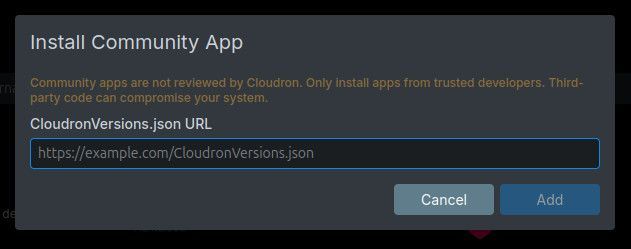
The easiest route is the dashboard. In the App Store, click the Add custom app dropdown at the top right, choose Community app, and paste this URL into the box that appears. Apps installed this way receive automatic updates.
https://raw.githubusercontent.com/OrcVole/speaches-cloudron/main/CloudronVersions.json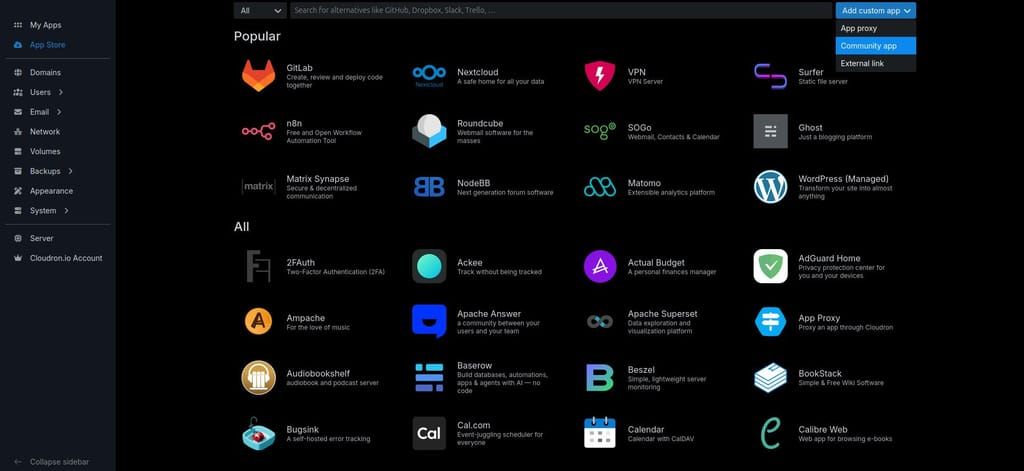
The CLI does the same thing:
cloudron install \
  --versions-url https://raw.githubusercontent.com/OrcVole/speaches-cloudron/main/CloudronVersions.json \
  --location speaches.example.com
Minimums: 5 GiB memory, addon
localstorageonly. No database, no queue, no extra subdomain.First run: there is no login screen. An API key is generated on first boot and lives at
/app/data/.secrets/keys.env, readable from the app's own Terminal in the dashboard. Send it asAuthorization: Bearer <key>to the/v1endpoints. The playground UI is reachable by anyone who can reach the domain, but it cannot transcribe or synthesise anything until that same key is pasted into its own key box, once per browser. First boot downloads roughly 1.6 GB of models before the app is ready, and the health check stays green throughout, so give it a few minutes and watch the logs. For users
Why try it: because the speech features in your existing chat frontend probably still point at somebody else's cloud, and this is the piece that brings them home.
What you get: OpenAI-compatible speech to text on faster-whisper, text to speech with Kokoro and Piper voices, and a realtime websocket endpoint. Cloudron wins: automatic backups of your configuration and key, one-click updates, TLS and DNS handled, and all state under
/app/data.Good fit if you already run OpenWebUI or LibreChat and want dictation and spoken replies without an external API key. Probably not if you need real-time dictation on a busy shared server, because this is CPU inference and speed depends heavily on what else your machine is doing.
On performance, plainly: on a quiet machine the default model transcribes several times faster than real time, and on a heavily loaded one it can be many times slower than that. The honest answer is that it depends on your hardware and your load rather than on any number I can promise you. Smaller and distilled models are much faster if throughput matters more than accuracy.
🧰 For packagers: what we learned
What helped: the whole shape was cribbed from an earlier CPU inference package: a two-stage build onto
cloudron/base, a generated API key in/app/data/.secrets/keys.env, and the model cache on apersistentDirspath with re-download as the restore rather than a backup command.What was tricky: four things, all of which cost real time.
- CTranslate2 defaults to float32 on CPU. Selecting int8 instead is measurably faster and uses far less memory for the same weights. The package now picks quantisation from the CPU's own feature flags at boot rather than hardcoding it, degrading only for genuinely old silicon so that future CPUs get the fast path automatically.
- The bundled Gradio UI derives its own backend URL from the inbound
Hostheader unless a loopback URL is configured. Behind a reverse proxy on a different port, every UI action fails while looking exactly like an authentication problem. huggingface_hubderives its cache path as${HF_HOME}/huband raisesCacheNotFoundif that exact directory does not already exist, which surfaces as a 500 on the model listing endpoint on a fresh install.- Sizing memory from
memory.peakalone is wrong for a model server. The cgroup is also charged the page cache holding the model files, so readanonplusfilefrommemory.statand size from that. Anoom_killcount of zero does not mean a limit is adequate.
Still rough: measuring CPU throughput honestly on a shared machine. Early figures in this project turned out to be measuring the neighbours rather than the package, on a host that was carrying four times its core count in load. Interleaved A/B comparisons and recording the load average alongside every timing are the only things that made the numbers trustworthy.
 ️ For the Cloudron team
Maintenance burden: low. The package is a single Python process behind a thin nginx front end, no database, one addon. Upstream has been quiet since April 2026, so the pinned version is stable by circumstance; the package does not depend on upstream doing anything further to keep working.
Why it suits the App Store: there is longstanding demand on this forum for exactly this, going back to 2023, in threads 9069, 12215 and 13018, the last of which is someone pointing OpenWebUI at cloud Whisper for want of a local backend. Upstream is MIT, widely used, and it completes a stack whose other pieces are already packaged.
Friction worth knowing: a
CloudronVersions.jsonwhosedockerImagesits beside the embedded manifest rather than inside it is rejected with404 Could not resolve CloudronVersions.json from URL. The file was fetchable throughout, from both the workstation and the server, and all three plausible argument forms fail identically. An error naming the schema rather than the URL would have saved an hour, and this seems likely to catch others. For Speaches' developers
Offered gratefully, and all low effort.
- Reserve and document an environment variable namespace. The server currently reads bare names such as
API_KEY, which collide with generic names other software also reads, and gives wrapper authors no safe prefix to work around. - Streamed WAV output from
/v1/audio/speechcarries a placeholder frame count of 2147483647 in its header, so a 4.9 second file claims to be 24.8 hours long. Feeding that straight back into/v1/audio/transcriptionsis an obvious round trip for a user to try. - Every non-streaming transcription logs
Unexpected streaming transcription response typeat ERROR level while still returning a correct 200. - Consider defaulting
compute_typeto int8 on CPU, or documenting the choice prominently. It is the single largest performance and memory lever for CPU users. - There is no authored logo anywhere in the project, which makes store listings awkward; the docs site favicon is the mkdocs-material default.
Genuine credit where it is due: matched CPU and CUDA images for every release, sha-pinned tags per commit, and on-demand model loading with idle unloading all made this package much easier than it could have been.
Package source and pull requests welcome: https://github.com/OrcVole/speaches-cloudron. Happy to co-maintain.
 Unlocks /
  Synergies
Now you can dictate into your self-hosted chat frontend and have replies read back to you, with the audio never leaving your own machine, and transcribe recordings through a plain HTTP call from any script you like.
Pairs with other Cloudron apps:
- Speaches + OpenWebUI: set the speech to text and text to speech engines to OpenAI in Admin Settings, Audio, with your Speaches base URL and key. Dictation and spoken replies, entirely self-hosted.
- Speaches + LibreChat: the
speechblock inlibrechat.yamltakes full endpoint URLs. Point speech to text at/v1/audio/transcriptionsand text to speech at/v1/audio/speech. - Speaches + a local LLM: Speaches can proxy chat completions to another OpenAI-compatible backend, so a self-hosted model can be the brain behind its audio chat and realtime endpoints.
Feedback, bug reports, and "works on my install" confirmations all welcome below.

Hello! It looks like you're interested in this conversation, but you don't have an account yet.
Getting fed up of having to scroll through the same posts each visit? When you register for an account, you'll always come back to exactly where you were before, and choose to be notified of new replies (either via email, or push notification). You'll also be able to save bookmarks and upvote posts to show your appreciation to other community members.
With your input, this post could be even better 💗
Register Login